🚀 Docker Demystified: Simplify, Build, and Deploy Like a Pro 🐳
🚀 Docker Demystified: Simplify, Build, and Deploy Like a Pro 🐳
In today’s fast-paced tech world, Docker has become a developer’s best friend. Whether you’re building complex applications or managing microservices, Docker streamlines processes, reduces errors, and makes deployment seamless. 🌟 Let’s dive deep into Docker and discover why it’s a game-changer.
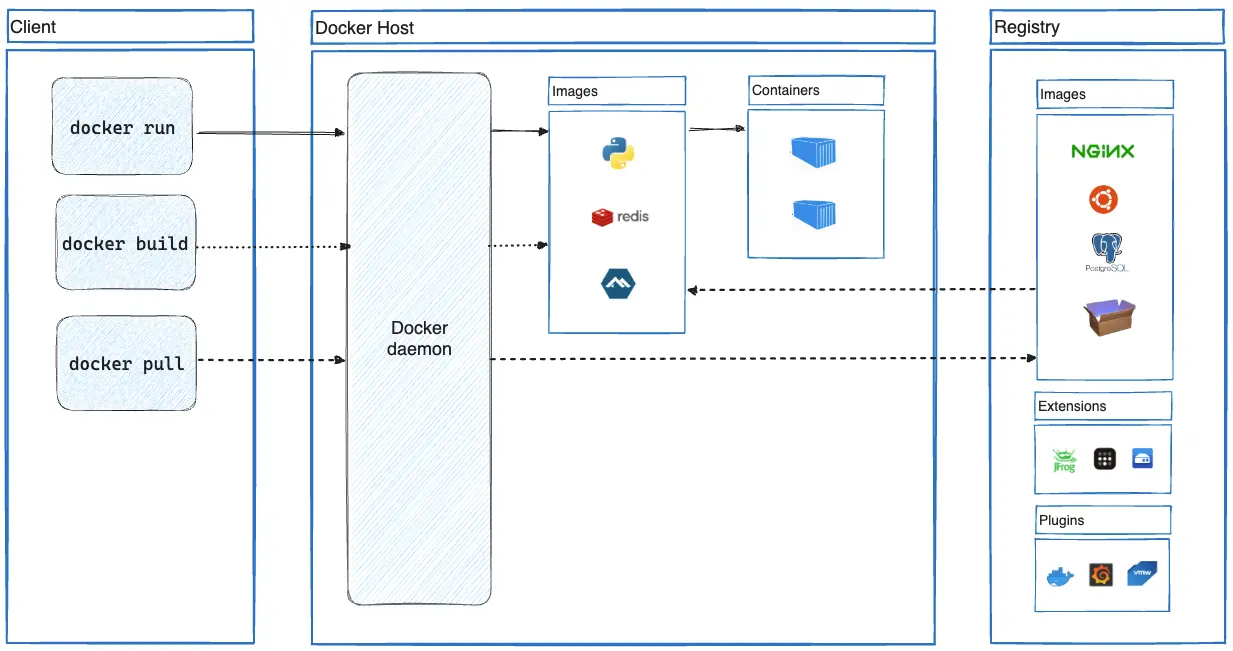
🤔 What is Docker?
Docker is an open-source platform designed to automate the deployment of applications. It packages your application and its dependencies into a neat, portable container 🛳️.
Key Features of Docker:
- Lightweight: Containers share the host OS kernel, making them smaller and faster compared to virtual machines.
- Portable: Develop locally, ship to production, and run anywhere! 🌍
- Isolation: Each container has its own isolated environment, ensuring no conflicts between dependencies.
- Scalable: Perfect for managing microservices and large-scale distributed systems.
🔥 How Does Docker Work?
At its core, Docker uses containers. Think of containers as lightweight, standalone packages that include:
- Code 📝
- Runtime ⏱️
- Libraries 📚
- Settings ⚙️
Docker uses a Docker Engine to build, run, and manage these containers. Here’s the lifecycle:
- Write a Dockerfile 🛠️ (more on this below).
- Build an Image 📦 from the Dockerfile.
- Run the Image to create a Container 🚀.
🌟 Why Use Docker?
1. Consistency Across Environments:
With Docker, “it works on my machine” becomes a thing of the past. Containers ensure the app behaves the same way in development, testing, and production.
2. Faster Deployment:
Containers start in seconds, making it easier to scale up or down depending on demand.
3. Cost-Effective:
Docker uses fewer resources compared to traditional virtual machines, saving infrastructure costs.
4. Simplified Dependencies Management:
No need to install dependencies on the host machine. Just package everything into a container!
🛠️ Setting Up a Simple Dockerfile
A Dockerfile is a text file with instructions to build a Docker image. Let’s set up a basic example for a Ruby on Rails application.
Step-by-Step Dockerfile
# Step 1: Use the official Ruby image
FROM ruby:3.1.4
# Step 2: Set a working directory inside the container
WORKDIR /app
# Step 3: Copy your application files into the container
COPY . /app
# Step 4: Install dependencies
RUN bundle install
# Step 5: Expose a port for the app
EXPOSE 3000
# Step 6: Define the command to run your app
CMD ["rails", "server", "-b", "0.0.0.0"]
How It Works:
- FROM ruby:3.1.4
This sets up the base image with Ruby pre-installed. 🛠️ - WORKDIR /app
Specifies the directory inside the container where commands will run. - COPY . /app
Copies the app files from your local machine to the container. 📂 - RUN bundle install
Installs all necessary Ruby gems. 💎 - EXPOSE 3000
Opens port 3000 for the Rails app. 🌐 - CMD [“rails”, “server”, “-b”, “0.0.0.0”]
Defines the command to start the server. 🚀
🏃♂️ Running Your Dockerized App
1️⃣ Build the Image:
docker build -t my-rails-app .2️⃣ Run the Container:
docker run -p 3000:3000 my-rails-app🎉 Your Rails app is now running at http://localhost:3000!
🌍 Real-World Use Cases of Docker
- Microservices Architecture: Simplify and isolate each service for easy scaling.
- Continuous Integration/Continuous Deployment (CI/CD): Automate testing and deployment pipelines.
- Development Environments: Share pre-configured environments with your team in seconds.
- Multi-Cloud Deployments: Run the same container on AWS, Azure, or GCP without changes.
🚀 Bonus Tips for Docker Mastery
- Use Docker Compose to manage multi-container applications.
- Optimize image size by using lightweight base images like
alpine. - Use volumes to persist data beyond container lifecycle.
🌟 Conclusion
Docker is more than a tool; it’s a revolution in software development and deployment. By learning Docker, you’re equipping yourself to build efficient, scalable, and reliable applications. 🐳
Ready to dive in? 🚤 Start Dockerizing your projects today and watch your productivity skyrocket!
Got questions or ideas to share? 💬 Drop them in the comments below! 👇 Let’s make Docker easier for everyone! 😊


Comments
Post a Comment