🔍✨ Unlocking Insights with Exploratory Data Analysis (EDA): Your Ultimate Guide ✨🔍
🔍✨ Unlocking Insights with Exploratory Data Analysis (EDA): Your Ultimate Guide ✨🔍
Data is the new oil, but raw data alone isn’t enough to drive decisions. To extract meaningful insights, you need to dive deep into the data, understand its patterns, and uncover hidden stories. That’s where Exploratory Data Analysis (EDA) comes in! 🚀
In this blog, we’ll break down what EDA is, the tools you can use, and some pro tips to make your analysis shine. Plus, we’ll show you how to track your analysis effectively. Let’s get started! 🎉
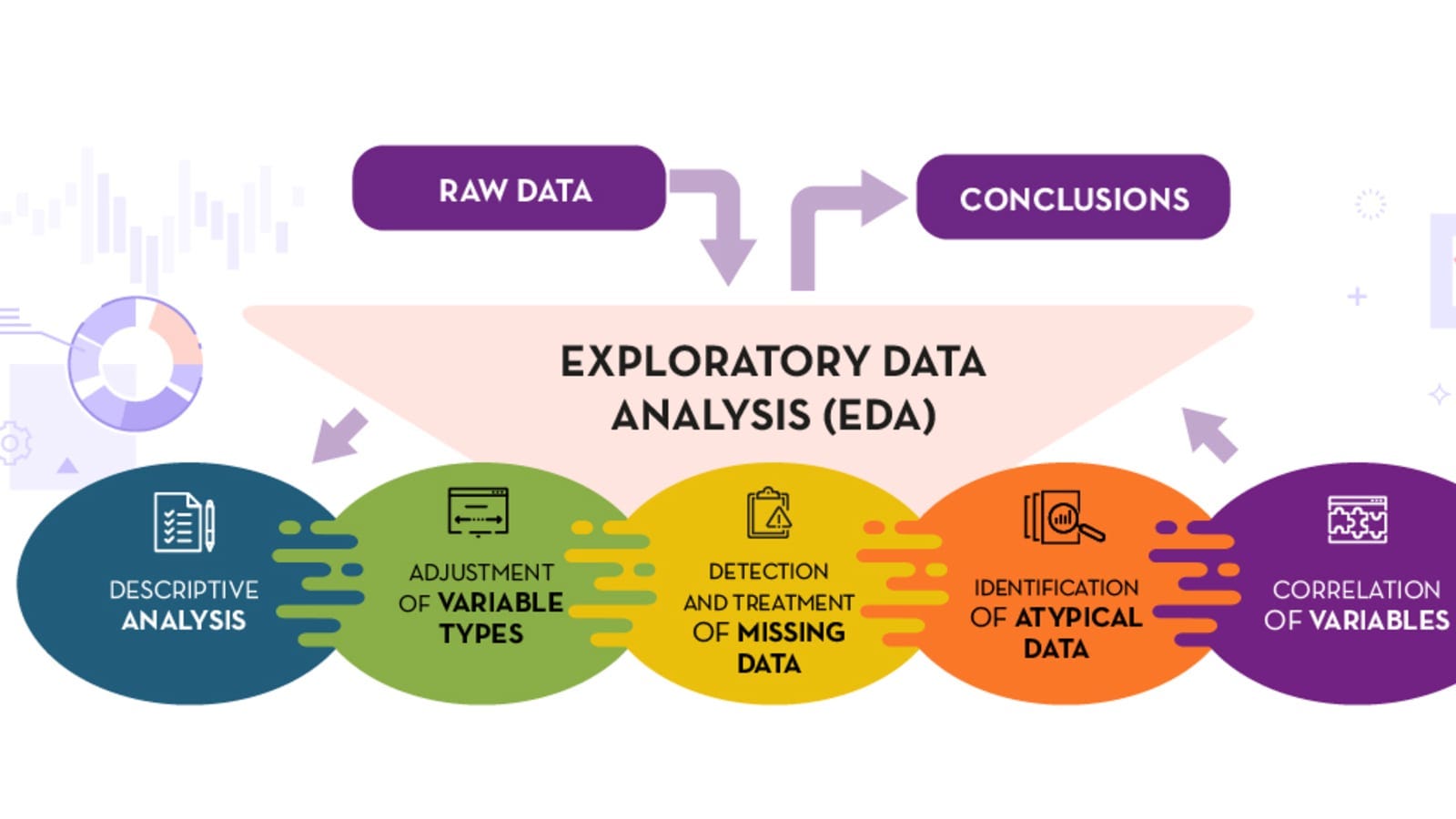
What is Exploratory Data Analysis (EDA)? 🤔
EDA is the process of analyzing datasets to summarize their main characteristics, often using visual methods. It’s like being a detective 🕵️♂️, where you explore the data to find patterns, spot anomalies, test hypotheses, and check assumptions.
The goal of EDA is to:
- Understand the data structure 📊
- Identify trends and relationships 🔗
- Detect outliers and missing values ❗
- Prepare the data for modeling 🛠️
Key Concepts in EDA 🧠
1. Data Cleaning: Handle missing values, remove duplicates, and correct inconsistencies. 🧹
- Example: Replace missing values with the mean or median.
2. Univariate Analysis: Analyze a single variable to understand its distribution. 📈
- Example: Plot a histogram for age distribution.
3. Bivariate Analysis: Explore the relationship between two variables. 🔗
- Example: Scatter plot of height vs. weight.
4. Multivariate Analysis: Examine interactions among multiple variables. 🌐
- Example: Heatmap to show correlations between variables.
5. Outlier Detection: Identify data points that deviate significantly from the rest. 🚩
- Example: Use boxplots to spot outliers.
6. Data Visualization: Use graphs and charts to make patterns clear. 📊
- Example: Bar charts, line graphs, and pie charts.
Tools for EDA 🛠️
Here are some popular tools to make your EDA journey smooth and efficient:
1. Python Libraries 🐍
- Pandas: For data manipulation and analysis.
- Matplotlib & Seaborn: For data visualization.
- NumPy: For numerical computations.
import pandas as pd
import seaborn as sns
import matplotlib.pyplot as plt

# Load
data data = pd.read_csv('data.csv')

# Basic
EDA print(data.head())
print(data.describe())
sns.histplot(data['age'])
plt.show()
2. R 📊
- ggplot2: For advanced visualizations.
- dplyr: For data manipulation.
3. Tableau 🖥️
- Great for interactive visualizations and dashboards.
4. Excel 📑
- Perfect for quick analysis and basic charts.
Pro Tips for Effective EDA 💡
1. Start with the Basics: Check the shape, size, and structure of your dataset.
- Example: Use
data.shapein Python to see rows and columns.
2. Visualize Everything: A picture is worth a thousand words. Use plots to understand distributions and relationships.
3. Ask Questions: Formulate hypotheses and test them during EDA.
- Example: Does higher education lead to higher income?
4. Handle Missing Data: Decide whether to impute or drop missing values based on the context.
5. Look for Patterns and Anomalies: Trends, seasonality, and outliers can reveal critical insights.
6. Document Your Findings: Keep track of your observations and decisions for future reference.
How to Track Your Analysis 📝
Tracking your EDA process is crucial for reproducibility and collaboration. Here’s how you can do it:
1. Use Jupyter Notebooks 📓
- Combine code, visualizations, and explanations in one place.
- Example: Write comments and markdown cells to explain each step.
2. Version Control with Git 🔄
- Track changes in your analysis using Git and platforms like GitHub.
3. Create a Summary Report 📄
- Summarize your findings, visualizations, and conclusions in a document or presentation.
4. Automate Repetitive Tasks 🤖
- Use scripts to automate data cleaning and visualization steps.
Example: EDA on a Sales Dataset 🛒
Let’s say you have a sales dataset with columns like Date, Product, Region, and Sales. Here’s how you can perform EDA:
1. Load the Data:
sales_data = pd.read_csv('sales.csv')2. Check for Missing Values:
print(sales_data.isnull().sum())3. Visualize Sales Trends:
sns.lineplot(x='Date', y='Sales', data=sales_data)
plt.title('Sales Over Time')
plt.show()
4. Analyze Sales by Region:
sns.barplot(x='Region', y='Sales', data=sales_data)
plt.title('Sales by Region')
plt.show()
5. Detect Outliers:
sns.boxplot(x='Sales', data=sales_data)
plt.title('Sales Distribution')
plt.show()
Conclusion 🎯
Exploratory Data Analysis is the foundation of any data-driven project. It helps you understand your data, uncover insights, and make informed decisions. With the right tools, techniques, and a curious mindset, you can turn raw data into actionable knowledge. 🌟
So, roll up your sleeves, grab your dataset, and start exploring! 🚀 And don’t forget to track your analysis for a seamless workflow. Happy analyzing! 🎉
Got questions or want to share your EDA experiences? Drop a comment below! 👇 Let’s learn together! 🌱


Comments
Post a Comment