🚀 Mastering Database Magic in Ruby on Rails: Connections, Performance & More! ✨
🚀 Mastering Database Magic in Ruby on Rails: Connections, Performance & More! ✨
Ruby on Rails isn’t just a framework — it’s a database whisperer! With its elegant ORM (Active Record) and convention-over-configuration philosophy, Rails transforms complex database operations into intuitive, clean code. Whether you’re handling 10 users or 10 million records, Rails scales gracefully. Let’s unravel how Rails manages databases like a pro!
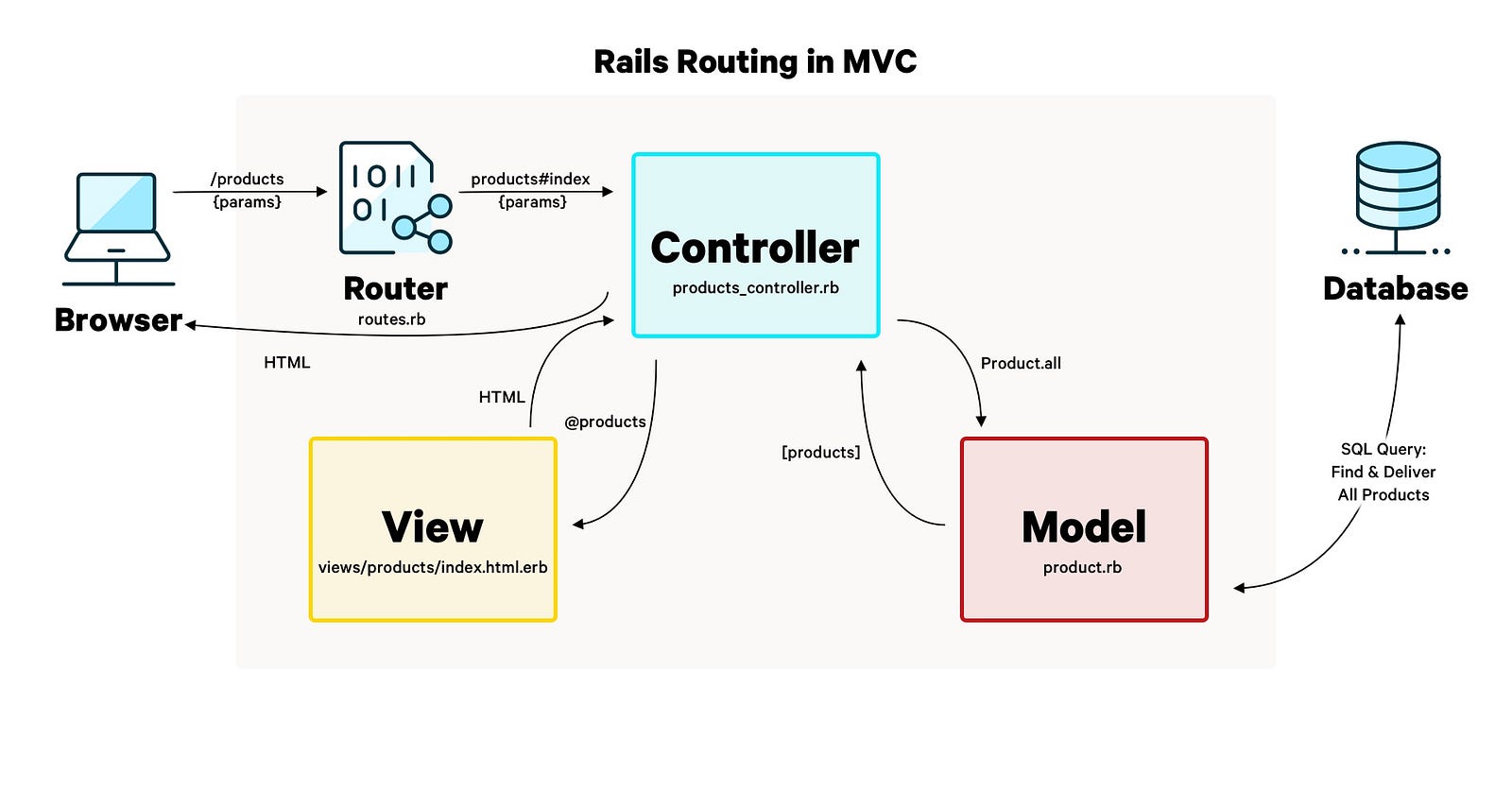
🔌 How Rails Connects to Databases
Rails uses the config/database.yml file to define connections. Here’s the workflow:
1. Configuration:
development:
  adapter: postgresql
  database: my_app_dev
  username: user
  password: pass
  host: localhost
Rails supports PostgreSQL, MySQL, SQLite, and more via adapters (pg, mysql2, sqlite3 gems).
2. Connection Pooling:
Rails creates a pool of database connections (managed by ActiveRecord::ConnectionAdapters). Each request grabs a connection, uses it, and releases it back—avoiding overload!
3. Active Record Abstraction:
When you run User.all, Rails:
- Converts Ruby to SQL:
SELECT * FROM users - Executes it via the adapter
- Returns results as Ruby objects 🪄
🎯 Handling Multiple Databases
Need to split reads/writes or shard data? Rails 6+ makes it easy:
1. Vertical Sharding (e.g., users DB + products DB):
# config/database.yml
 production:
  primary:
    database: main
  analytics:
    database: analytics_replica
2. Horizontal Sharding (e.g., geographic data splits):
Use connects_to in models:
class User < ApplicationRecord
  connects_to shards: {
    europe: { writing: :primary_eu },
      asia: { writing: :primary_asia }
  }
end
3. Automatic Read/Write Splitting:
Gems like makara or Rails’ built-in replica handling:
ActiveRecord::Base.connected_to(role: :reading) do
  User.last # Reads from replica
end
💾 SQL Dumps On-The-Fly
Need a backup? Rake tasks to the rescue!
# Dump PostgreSQL database
rake db:dump

# Custom task (in lib/tasks/db.rake)
task :backup do
  system("pg_dump my_app_prod > backup_#{Time.now.utc.iso8601}.sql")
end
Run rake backup anytime! Use whenever gem for automated cron backups.
🛡️ Backups with External Tools
Don’t rely on manual dumps! Integrate:
- AWS S3 +
aws-sdk-s3gem: Auto-upload SQL dumps to cloud storage. - Heroku PG Backups: Native automated daily snapshots.
- Bacula/Bareos: Enterprise-grade backup scheduling.
Pro Tip: Use the activerecord-sqlserver-adapter for MSSQL backups via Azure Blob Storage!
⚡ Optimizing for Heavy Data Loads
Scale Rails databases like a boss:
1. Index Smartly:
add_index :users, :email, unique: trueUse explain to analyze queries: User.where(email: "foo").explain.
2. Batch Processing:
Avoid User.all.each (loads everything!). Instead:
User.find_each(batch_size: 1000) do |user|
  # Processes 1000 records at a time
end
3. Caching:
- SQL Caching: Rails caches query results automatically per request.
- Fragment Caching: Cache views with
<% cache @user do %>. - Redis: Use
redis-railsgem for high-speed data storage.
4. Connection Tweaks:
Increase pool size in database.yml:
production: pool: 25 # Default is 5🌟 Active Record: Your Optimization Superpower
Active Record isn’t just an ORM — it’s a performance powerhouse:
- Lazy Loading: Queries execute ONLY when needed:
users = User.where(country: "DE") # No DB hit yet
users.each { |u| puts u.name } # Hits DB now!- Eager Loading: N+1 be gone!
# Bad: 1 query for users + N for posts
User.all.each { |u| u.posts.count }

# Good: 2 queries total
User.includes(:posts).each { |u| u.posts.count }- Pluck & Pick: Fetch only what you need:
User.pluck(:id, :name) # [[1, "Alice"], [2, "Bob"]]
User.where(active: true).pick(:email) # "alice@example.com"- Transactional Integrity:
User.transaction do
  user.update!(balance: 100)
  Payment.create!(user: user, amount: 10) # Rolls back both if fails!
end
💎 Must-Use Gems for Database Bliss
Level up with these gems:

# activerecord-import example
users = 1000.times.map { |i| User.new(name: "User #{i}") }
User.import(users) # 1 INSERT with 1000 rows!
🎬 Conclusion: Database Nirvana Achieved!
Rails + databases = ❤️. From smart connections to sharding, backups, and optimization — you’re equipped to build data-heavy apps without breaking a sweat. Remember:
“Rails doesn’t just run queries; it conducts symphonies.” 🎻
Next Step: Try the pghero gem to visualize query performance, or refactor a slow query using explain. Your database will thank you!
Keep coding, keep scaling! 🚀
🔗 Share this post: #RubyOnRails #Database #WebDev #Performance #ActiveRecord


Comments
Post a Comment