🚀 Supercharge Your Database: Master SQL Query Optimization with These Must-Know Functions! 🔍✨
🚀 Supercharge Your Database: Master SQL Query Optimization with These Must-Know Functions! 🔍✨
In the data-driven world 🌐, a slow SQL query can ruin performance and frustrate users. Luckily, SQL provides built-in functions and techniques to help you write optimized queries that run like a cheetah 🐆 instead of a tortoise 🐢.
Today, let’s break down essential SQL functions and tricks you should use to tune your queries to perfection. 📊
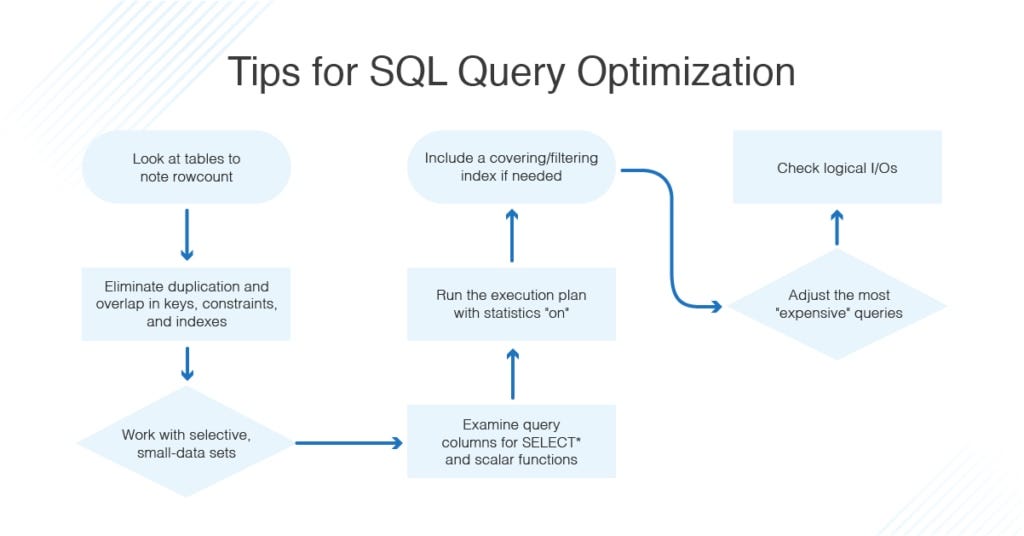
🎯 1️⃣ The EXPLAIN Function — Know What Happens!What it does:
EXPLAIN shows how your SQL engine plans to execute your query. It’s your crystal ball 🔮 for performance.
✅ Example:
EXPLAIN SELECT * FROM employees WHERE department = 'Sales';💡 How it helps:
- Reveals index usage
- Shows join methods
- Highlights full table scans
Tip: Always EXPLAIN complex queries to detect bottlenecks!
⚡ 2️⃣ The INDEX Magic — Speed Up Data AccessWhat it does:
Indexes act like a book’s table of contents 📚 — they let the database jump straight to relevant rows.
✅ Example:
CREATE INDEX idx_department ON employees(department);Then run:
SELECT * FROM employees WHERE department = 'Sales';Tip: Index columns used in WHERE, JOIN, ORDER BY.
🔄 3️⃣ LIMIT — Fetch Only What You NeedWhat it does:
Limits how many rows you pull — why load a truck when you need a cup? ☕️
✅ Example:
SELECT * FROM orders ORDER BY order_date DESC LIMIT 10;Tip: Always paginate results in apps instead of loading millions of rows.
🗃️ 4️⃣COUNT(*)vsCOUNT(column)— Know the Difference!
What it does:
COUNT(*) counts all rows; COUNT(column) skips NULLs.
✅ Example:
SELECT COUNT(*) FROM customers;
SELECT COUNT(email) FROM customers;
Tip: Use COUNT(1) or COUNT(*) for exact row counts; it's often faster.
🔑 5️⃣ DISTINCT — Use Wisely!What it does:
Removes duplicates from your results.
✅ Example:
SELECT DISTINCT city FROM customers;⚠️ Warning: DISTINCT can be slow on huge datasets. Use only when really needed!
🔗 6️⃣ JOIN Smartly — Use Proper ConditionsWhat it does:
Combines rows from multiple tables.
✅ Example:
SELECT e.name, d.department_name
FROM employees e
JOIN departments d ON e.department_id = d.id;
Tip: Always use ON properly to avoid cross joins and exploding result sets!
⚙️ 7️⃣ COALESCE — Handle NULLs Like a ProWhat it does:
Replaces NULLs with default values, which can speed up processing.
✅ Example:
SELECT name, COALESCE(phone, 'N/A') FROM customers;Tip: Cleaner results mean less post-processing.
🧮 8️⃣ CASE — Conditional Logic Inside QueriesWhat it does:
Run IF/ELSE inside SQL to avoid multiple queries.
✅ Example:
SELECT name,
  CASE
    WHEN salary > 5000 THEN 'High'
    ELSE 'Low'
  END AS salary_category
FROM employees;
Tip: Use CASE to filter or categorize in one shot
🎁 Bonus: Pro Tips to Optimize Your SQL Queries to the Max! 🚀✨
✅ 1. Use Proper Data Types:
Smaller, appropriate types = faster processing.
✅ 2. Avoid SELECT :
Always select only the columns you need.
✅ 3. Batch Updates:
Update/delete in batches for large data instead of all at once.
✅ 4. Archive Old Data:
Keep hot tables small; archive historical data.
✅ 5. Use Stored Procedures:
Precompiled logic saves parsing time.
✅ 6. Monitor and Tune Regularly:
Use database monitoring tools to catch slow queries.
📌 Final Words
Mastering these SQL functions and habits will turn you into a Database Ninja 🥷 — your apps will run faster, your users will stay happy, and your servers will thank you.
Try these out today and see the magic happen! 🚀
👉 Did you find this helpful?
🔥 Share it with your developer friends & drop your favorite SQL tip in the comments below!


Comments
Post a Comment