🌐 Protocols Every Experienced Tech Professional Must Know 🚀
🌐 Protocols Every Experienced Tech Professional Must Know 🚀
In today’s digital world, protocols are the silent heroes running behind the scenes. Whether you’re a developer, DevOps engineer, or system architect, understanding protocols isn’t just helpful — it’s essential. These standards govern how systems talk to each other, ensuring security, efficiency, and scalability.
Let’s dive deep into the most important protocols you must master as an experienced tech professional 👇
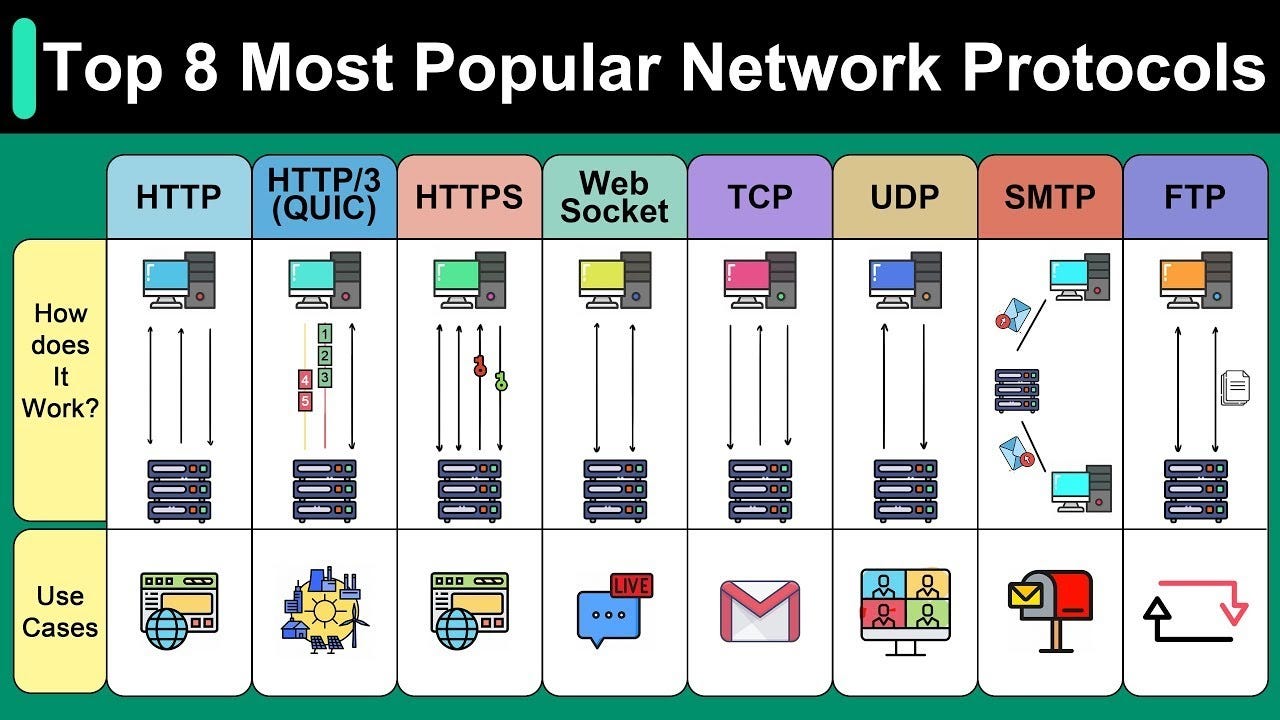
🔑 1. HTTP/HTTPS (Hypertext Transfer Protocol Secure)
👉 The backbone of the web.
What it is: HTTP defines communication between clients (browsers) and servers. HTTPS is the secure version with SSL/TLS encryption.
Features:
- Stateless but scalable.
- HTTPS ensures data encryption, integrity, and authentication.
- Widely used in REST APIs, websites, and microservices.
Tools:
- 🛠️ cURL, Postman for API testing.
- Wireshark for packet analysis.
- OpenSSL for certificate handling.
📩 2. SMTP, IMAP & POP3 (Email Protocols)
👉 Powering communication since the dawn of the internet.
- SMTP (Simple Mail Transfer Protocol) → Sending emails.
- IMAP (Internet Message Access Protocol) → Accessing mail on the server.
- POP3 (Post Office Protocol v3) → Downloading emails locally.
Features:
- Reliable and standardized.
- IMAP allows multiple device sync.
- SMTP supports authentication and encryption with TLS.
Tools:
- SendGrid, Postfix, Mailgun for handling emails.
- Telnet for testing email servers.
🔒 3. SSL/TLS (Secure Sockets Layer / Transport Layer Security)
👉 The reason you see 🔒 in your browser’s address bar.
What it is: Security protocols for encrypting communication.
Features:
- Provides confidentiality, integrity, and authentication.
- Supports certificates and key exchange (RSA, ECDHE).
- Essential for HTTPS, FTPS, VPNs, and APIs.
Tools:
- OpenSSL for cert generation and testing.
- Qualys SSL Labs for vulnerability scanning.
📡 4. DNS (Domain Name System)
👉 The “phonebook” of the internet.
What it is: Translates human-readable domain names (example.com) into IP addresses.
Features:
- Hierarchical system (Root → TLD → Authoritative).
- Supports caching for performance.
- Vulnerable to attacks like DNS spoofing & cache poisoning.
Tools:
- dig, nslookup for DNS queries.
- Cloudflare DNS, Google DNS for faster resolution.
📂 5. FTP/SFTP (File Transfer Protocols)
👉 Sharing files before cloud storage existed.
- FTP → Simple file transfer.
- SFTP (SSH File Transfer Protocol) → Secure transfer using SSH.
Features:
- FTP supports multiple file operations.
- SFTP adds encryption & authentication.
- Useful for DevOps pipelines, backups, and server transfers.
Tools:
- FileZilla, WinSCP for client use.
- scp/rsync in Linux for automation.
📶 6. TCP/IP (Transmission Control Protocol / Internet Protocol)
👉 The foundation of networking.
What it is: TCP ensures reliable communication, while IP ensures addressing and routing.
Features:
- TCP guarantees delivery, ordering, and error-checking.
- IP enables global addressing (IPv4/IPv6).
- Together, they power the internet 🌍.
Tools:
- ping, traceroute for connectivity tests.
- netstat, tcpdump for monitoring connections.
🛡️ 7. SSH (Secure Shell Protocol)
👉 The lifeline of system administrators.
What it is: Provides secure remote login and command execution.
Features:
- Encrypted communication.
- Key-based authentication.
- Supports tunneling and secure file transfer.
Tools:
- PuTTY, OpenSSH for connections.
- Ansible uses SSH for automation.
🏗️ 8. gRPC (Google Remote Procedure Call)
👉 The modern protocol for microservices.
What it is: A high-performance, open-source RPC framework built on HTTP/2.
Features:
- Binary data transfer via Protocol Buffers (Protobuf).
- Bi-directional streaming.
- Strongly typed contracts.
Tools:
- Protobuf compiler.
- Supported in multiple languages (Python, Go, Ruby, Java).
⚙️ 9. MQTT (Message Queuing Telemetry Transport)
👉 The heart of IoT communication.
What it is: Lightweight messaging protocol for constrained devices.
Features:
- Publisher-Subscriber model.
- Small bandwidth usage.
- Works well in unstable networks.
Tools:
- Mosquitto MQTT broker.
- HiveMQ, EMQX for enterprise IoT solutions.
🛠️ 10. SNMP (Simple Network Management Protocol)
👉 For monitoring and managing network devices.
What it is: Used by routers, switches, firewalls, and servers to share status and metrics.
Features:
- Collects performance data.
- Allows remote management.
- Uses community strings for security.
Tools:
- Nagios, Zabbix, SolarWinds for SNMP monitoring.
🎯 Conclusion
Being an experienced tech professional means more than just writing code — it’s about understanding the protocols that make the internet work. From HTTP/HTTPS securing web apps to MQTT enabling IoT devices, these protocols are the invisible pillars of modern systems.
💡 Mastering them will not only sharpen your technical edge but also give you the confidence to design scalable, secure, and reliable architectures.
🚀 Which protocol do you use daily in your work? Drop your thoughts below!


Comments
Post a Comment