AI Agents Unleashed: Design, Train, and Deploy Step-by-Step 🚀🤖
AI Agents Unleashed: Design, Train, and Deploy Step-by-Step 🚀🤖
TL;DR: AI agents are programs that perceive their environment, reason, and take actions to achieve goals. This blog walks you through the key concepts, a practical step-by-step creation and training pipeline, real-world usage patterns, and important tips to follow before you build. Perfect for devs, product folks, and curious readers. 🌟
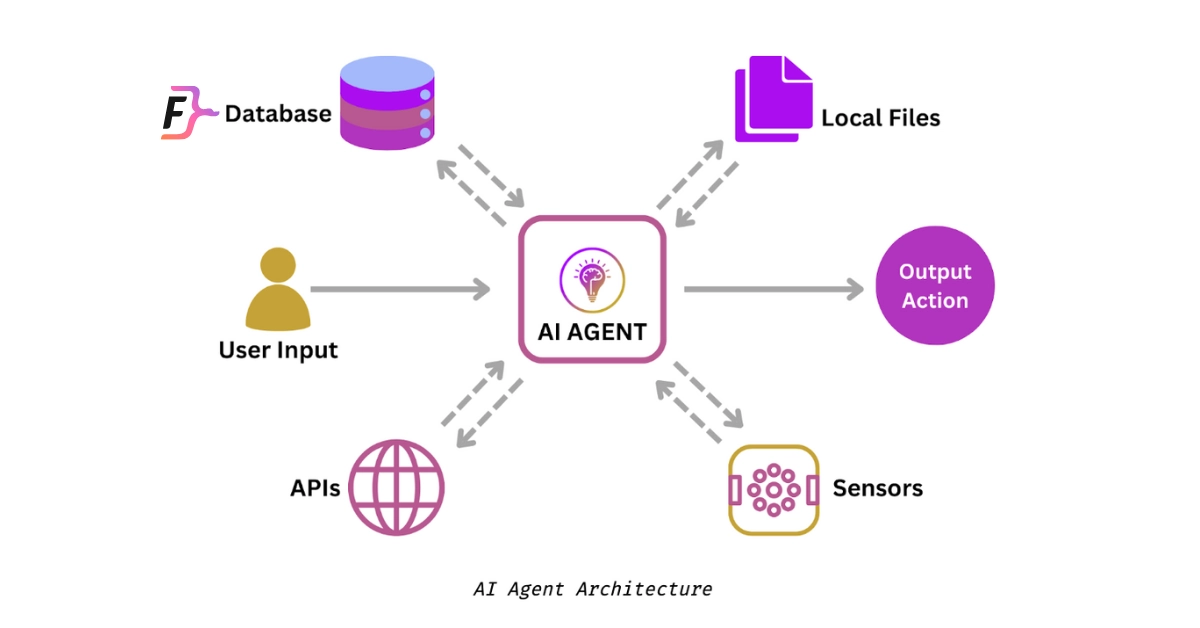
What is an AI Agent? — The big idea 🧠
An AI agent is a system that:
- Perceives inputs (text, images, sensors). 👀
- Decides what to do (planning, reasoning, model inference). 🧩
- Acts in the world (APIs, UI, robot actuators). 🛠️
It has a goal (task to accomplish) and tries to maximize success while operating under constraints.
Common examples: chat assistants, autonomous bots that run workflows, recommendation agents, and robotic controllers.
Core concepts you must know 🔑
- Environment: Where the agent operates (chat, web, robot workspace).
- State: The agent’s view of the environment (history, variables, sensors).
- Actions: The set of operations the agent can perform (API call, send message).
- Reward / Objective: How success is measured (task completion, accuracy, user satisfaction).
- Policy: The mapping from observed state → action (could be rules, ML model, or hybrid).
- Planner vs Executor: Planners decide what to do; executors perform how to do it.
- Safety & Constraints: Validation, guardrails, and fallback strategies to avoid harmful outputs.
Step-by-step: Build an AI Agent (practical) 🛠️
1. Define the goal & success metrics 📝
- What is the agent supposed to achieve? (e.g., “book a meeting”, “answer billing queries”, “automate server restarts”).
- Choose clear KPIs: task completion rate, user satisfaction score, time-to-complete, error rate.
2. Design the environment & scope 🎯
- Inputs: text, voice, sensors, webhooks.
- Outputs/actions: HTTP calls, database writes, messages, hardware commands.
- Scope boundaries: which actions are allowed/forbidden.
3. Select architecture & components 🧩
Common patterns:
- Rule-based + LLM — deterministic flows plus LLM for natural language. Good for high-reliability tasks.
- LLM-driven agent — LLM plans and generates actions, with tools/API helpers.
- RL agent (Reinforcement Learning) — if environment provides reward signals and you need sequential decision optimization.
- Hybrid — planner (LLM or search) + executor (specialized model or code).
Components to prepare:
- Perception layer (NLP/vision models).
- State manager (context memory, DB).
- Planner/policy (LLM or ML model).
- Action layer (tooling & adapters).
- Monitoring & logging.
4. Collect and prepare data 📚
- Gather examples of inputs, expected actions, and outcomes.
- Add edge cases and failure examples.
- Label where necessary (intent labels, step-by-step demonstrations).
- For RL: design simulators or offline logs for policy learning.
5. Build prototypes — start small ⚡
- Create a minimal agent that can handle 1–2 flows end-to-end.
- Integrate a single tool (e.g., calendar API) and a basic state store.
- Focus on deterministic success for those flows.
6. Train / Fine-tune models 🧪
Options:
- Supervised fine-tuning: Train model on labeled pairs (input → action). Good for predictable behaviors.
- Prompt engineering + few-shot: Use LLMs with carefully designed prompts and examples for behavior shaping.
- Reinforcement learning: Optimize a policy using rewards (requires simulator or real interactions). Best for long-horizon decision making.
- RAG (Retrieval-Augmented Generation): Combine a vector DB + LLM to ground responses on documents.
Practical tips:
- Start with fine-tuning or prompt engineering before RL — quicker to iterate.
- Use human demonstrations to bootstrap policies (behavioral cloning).
- If using LLMs, create a robust prompting strategy and test for hallucinations.
7. Testing & evaluation ✅
- Unit test actions and API calls.
- Simulate typical user interactions and edge cases.
- Evaluate metrics: success rate, latency, error modes.
- Run safety tests (e.g., adversarial prompts, forbidden-action tests).
8. Safety & guardrails 🛡️
- Action approval: require human confirmation for high-risk actions.
- Validators: check model outputs before executing (sanitization, regex checks).
- Rate limits and retries to avoid cascading failures.
- Logging + audit trail for every decision/action.
9. Deploy & monitor 🚀
- Deploy incrementally: shadow mode → limited users → full rollout.
- Monitor: task success, latency, exceptions, unexpected actions.
- Feedback loop: log failures, gather human corrections, retrain/update.
10. Iterate — continuous improvement 🔄
- Use logs and user feedback to retrain/fine-tune.
- A/B test different policies or prompts.
- Expand capabilities gradually (add tools, longer memory, etc.).
Training approaches explained (quick) 🎓
- Prompting — Provide examples & instructions at inference time. Fastest iteration, low cost.
- Fine-tuning — Train model weights on your labeled data. Higher fidelity, more control.
- Reinforcement Learning (RL) — Learn from rewards in an environment; useful for sequential tasks with delayed rewards.
- Imitation Learning / Behavioral Cloning — Learn from human demonstrations; good bootstrap for complex tasks.
- RAG + grounding — Use retrieval to ground LLM outputs in trusted content to reduce hallucinations.
How to use AI Agents — practical examples 🧰
1. Customer Support Agent
- Perceives: user message.
- Action: search knowledge base (RAG) → suggest answer → if uncertain, escalate to human.
2. Workflow Automation Agent
- Perceives: event webhook.
- Action: query internal API → update ticket → send confirmation.
3. Personal Assistant
- Perceives: user commands.
- Action: schedule meetings (calendar API), prep emails, summarize docs.
4. Robotics Agent (physical)
- Perceives: sensor inputs.
- Action: movement commands with safety checks and low-level controllers.
Tips & precautions before you start ⚠️✨
- Define success clearly — Vague goals lead to unpredictable agents. Use measurable KPIs. 🎯
- Start constrained — Narrow scope dramatically for first release. Ship small, reliable behavior. 🐣
- Plan for safety & reversibility — Never let an unvetted agent execute irreversible actions without human oversight. 🔒
- Prepare data & edge cases — Real-world usage diverges from lab examples. Collect failure cases early. 🧾
- Use auditable logs — Keep full decision traces for debugging, compliance, and retraining. 📜
- Control costs — LLM calls and RL training are expensive. Simulate where possible and cache results. 💸
- Guard against hallucination — Ground outputs with RAG, validators, or structured APIs. 🪄→📚
- Privacy & compliance — Know what user data you store and for how long; anonymize when required. 🔐
- Human in the loop — Design for escalation paths and human correction to improve long-term performance. 🤝
- Beta with limited users — Observe real interactions in a controlled environment before full launch. 🧪
Common pitfalls (and how to avoid them) 🧯
- Over-trusting te model: Always validate actions, especially those that change state. ✔️
- Unclear failure modes: Log clearly and design graceful fallbacks. ✔️
- No retraining plan: Build the feedback loop upfront. ✔️
- Neglecting latency: Make sure your agent meets real-time needs (or degrade features intentionally). ✔️
Quick checklist before you ship ✅
- Well-defined goal and metrics
- Narrow MVP scope
- Data collection & labeling plan
- Safety validators and human fallback
- Action approval for risky ops
- Logging & monitoring pipelines
- Cost & rate-limit controls
- Privacy and compliance checks
Closing thoughts — build with responsibility & curiosity 🌱
AI agents can automate huge chunks of work and create delightful user experiences — but they can also fail in surprising ways. Ship small, instrument everything, and iterate based on real user signals. Mix the power of modern LLMs with solid engineering: validation, monitoring, and human oversight. Build agents that are useful, safe, and trustable. ✨


Comments
Post a Comment