🚀 Deploying a Ruby on Rails Application Like a Pro (Step-by-Step Guide) 🌍🔥
🚀 Deploying a Ruby on Rails Application Like a Pro (Step-by-Step Guide) 🌍🔥
From Localhost to Live Server with Domains, Routing, Production Setup & Optimization
Deploying a Ruby on Rails application is one of the most powerful milestones for any developer.
It’s the moment your project goes from:
💻 “Works on my machine” → 🌍 Available to the whole world
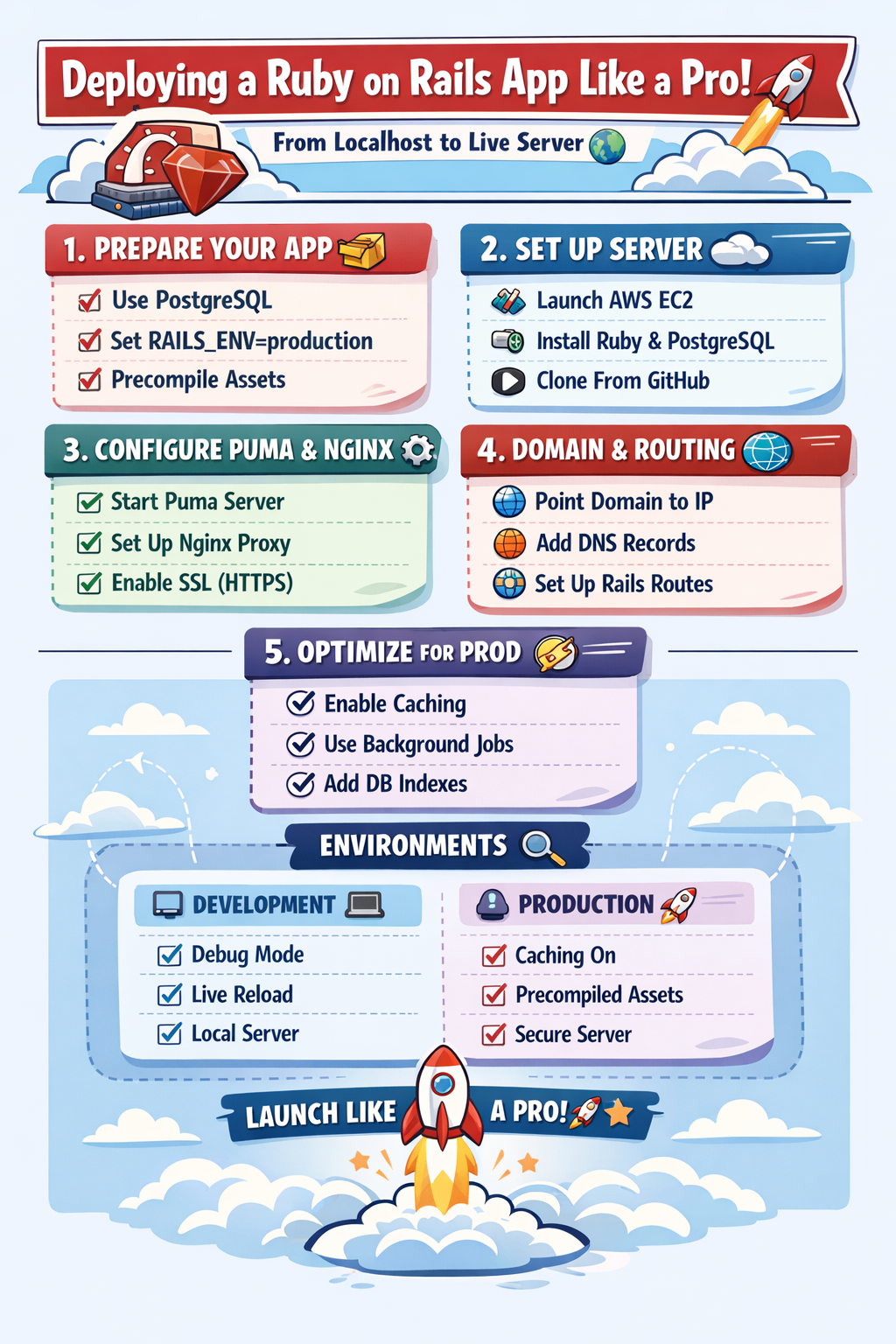
In this guide, you’ll learn:
✅ Every deployment step
✅ Production vs Development separation
✅ Domain + Routing basics
✅ Best optimization techniques
✅ Real examples + pro-level practices
Let’s begin! 🚀
🏗️ 1. What Does Deployment Mean in Rails?
Deployment means:
- Moving your Rails app from your laptop
- To a live server (AWS, DigitalOcean, Render, etc.)
- Configuring it for production users
A deployed Rails app includes:
🌐 Web Server (Nginx)
⚙️ App Server (Puma)
🗄️ Database (PostgreSQL/MySQL)
🔐 Environment Variables
📦 Assets + Optimization
🧑💻 2. Prepare Your Rails App for Production
Before deploying, your Rails app must be production-ready.
✅ Use PostgreSQL (Recommended)
Rails apps in production almost always use PostgreSQL.
Update Gemfile:
gem "pg"Run:
bundle installUpdate database config:
production:
  adapter: postgresql
  encoding: unicode
  database: myapp_production
✅ Set Rails Environment Correctly
Rails has environments:
- development (local)
- test
- production (live)
Rails automatically uses:
RAILS_ENV=productionin deployment.
🌍 3. Choose a Deployment Server
Popular options:

We’ll explain deployment using AWS EC2 + Nginx + Puma (most professional setup).
☁️ 4. Setup Server (AWS EC2)
✅ Launch an EC2 Instance
Steps:
- Go to AWS Console
- Launch Instance
- Select Ubuntu 22.04
- Enable port:
- 22 (SSH)
- 80 (HTTP)
- 443 (HTTPS)
Download .pem key.
🔐 Connect to Server via SSH
ssh -i mykey.pem ubuntu@your-server-ipNow you are inside your cloud server 🎉
⚙️ 5. Install Required Dependencies
Update server packages:
sudo apt update && sudo apt upgrade -yInstall essentials:
sudo apt install git curl build-essential -y✅ Install Ruby
Use rbenv:
sudo apt install rbenv -y
rbenv install 3.2.2
rbenv global 3.2.2
Check:
ruby -v✅ Install Rails
gem install rails
rails -v
✅ Install Node.js + Yarn (Assets)
Rails needs JS runtime:
sudo apt install nodejs yarn -y🗄️ 6. Setup Database (PostgreSQL)
Install PostgreSQL:
sudo apt install postgresql postgresql-contrib -yCreate DB user:
sudo -u postgres createuser myappuser -s
sudo -u postgres psql
Set password:
ALTER USER myappuser WITH PASSWORD 'password';Exit:
\q📦 7. Upload Rails Application Code
Clone from GitHub:
git clone https://github.com/yourusername/myapp.git
cd myapp
Install gems:
bundle install🔐 8. Configure Environment Variables (Secrets)
Never hardcode secrets like:
- API keys
- DB passwords
- Rails master key
Use:
EDITOR=nano rails credentials:editOr export variables:
export RAILS_MASTER_KEY=yourkey
export DATABASE_URL=postgres://...
⚙️ 9. Run Production Setup Commands
✅ Precompile Assets
Rails compiles CSS/JS for production:
RAILS_ENV=production rails assets:precompile✅ Migrate Database
RAILS_ENV=production rails db:migrate✅ Seed Data (Optional)
RAILS_ENV=production rails db:seed🚀 10. Setup Puma App Server
Rails uses Puma in production.
Start Puma:
bundle exec puma -e productionBut in real deployments, Puma runs as a service.
Create:
sudo nano /etc/systemd/system/puma.serviceExample:
[Unit]
Description=Puma Rails Server
After=network.target

[Service]
User=ubuntu
WorkingDirectory=/home/ubuntu/myapp
ExecStart=/home/ubuntu/.rbenv/shims/bundle exec puma -e production
Restart=always

[Install]
WantedBy=multi-user.target
Enable:
sudo systemctl start puma
sudo systemctl enable puma
🌐 11. Setup Nginx Reverse Proxy
Install Nginx:
sudo apt install nginx -yConfigure:
sudo nano /etc/nginx/sites-available/myappExample config:
server {
    listen 80;
    server_name example.com www.example.com;

    root /home/ubuntu/myapp/public;

    location / {
        proxy_pass http://localhost:3000;
        proxy_set_header Host $host;
    }
}
Enable site:
sudo ln -s /etc/nginx/sites-available/myapp /etc/nginx/sites-enabled
sudo systemctl restart nginx
Now your Rails app is live 🚀
🌍 12. Domain + Routing Explained
✅ How Domain Works
When a user visits:
www.example.comDNS maps domain → server IP.
Steps:
- Buy domain from GoDaddy/Namecheap
- Add DNS Record:

Within minutes, domain points to your Rails server.
✅ Routing in Rails
Rails routing decides:
URL → Controller Action
Example:
get "/about", to: "pages#about"User visits:
example.com/aboutRails runs:
PagesController#about⚡ 13. Optimization Techniques for Production
Deploying is not enough. Optimize it! 🚀
✅ Enable Caching
In production.rb:
config.action_controller.perform_caching = true✅ Use Background Jobs
Use Sidekiq for heavy tasks:
gem "sidekiq"Example:
EmailJob.perform_later(user.id)✅ Use CDN for Assets
Serve images & JS faster via Cloudflare/AWS CloudFront.
✅ Database Indexing
Add indexes:
add_index :users, :emailSpeeds up queries massively ⚡
✅ Use SSL (HTTPS)
Install Certbot:
sudo apt install certbot python3-certbot-nginx
sudo certbot --nginx
Now your app is secure 🔒
🧪 14. Separating Development vs Production Properly
Rails automatically separates environments:
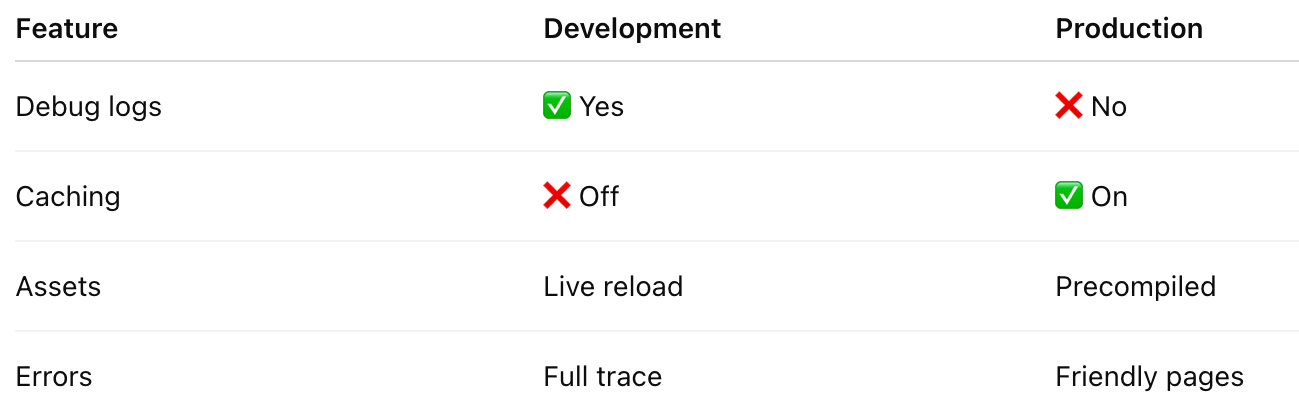
Use:
rails sfor dev
Use:
RAILS_ENV=production rails sfor prod
🎯 Final Deployment Checklist ✅
✔ App runs locally
✔ PostgreSQL configured
✔ Secrets stored safely
✔ Assets precompiled
✔ Puma service running
✔ Nginx routing works
✔ Domain connected
✔ HTTPS enabled
✔ Production optimized
🌟 Conclusion: Rails Deployment Mastery
Deploying Rails is a superpower 💎
Once you master it, you can launch:
🚀 SaaS Products
🌍 Startups
📦 APIs
🛒 E-commerce apps
📱 Mobile backends
Rails is built for production success!


Comments
Post a Comment