🚀 Handling Large Datasets in Python Like a Pro (Libraries + Principles You Must Know) 📊🐍
🚀 Handling Large Datasets in Python Like a Pro (Libraries + Principles You Must Know) 📊🐍
In today’s world, data is exploding.
From millions of customer records to terabytes of sensor logs, modern developers and analysts face one major challenge:
👉 How do you handle large datasets efficiently without crashing your system?
Python offers powerful libraries and principles to process huge datasets smartly — even on limited machines.
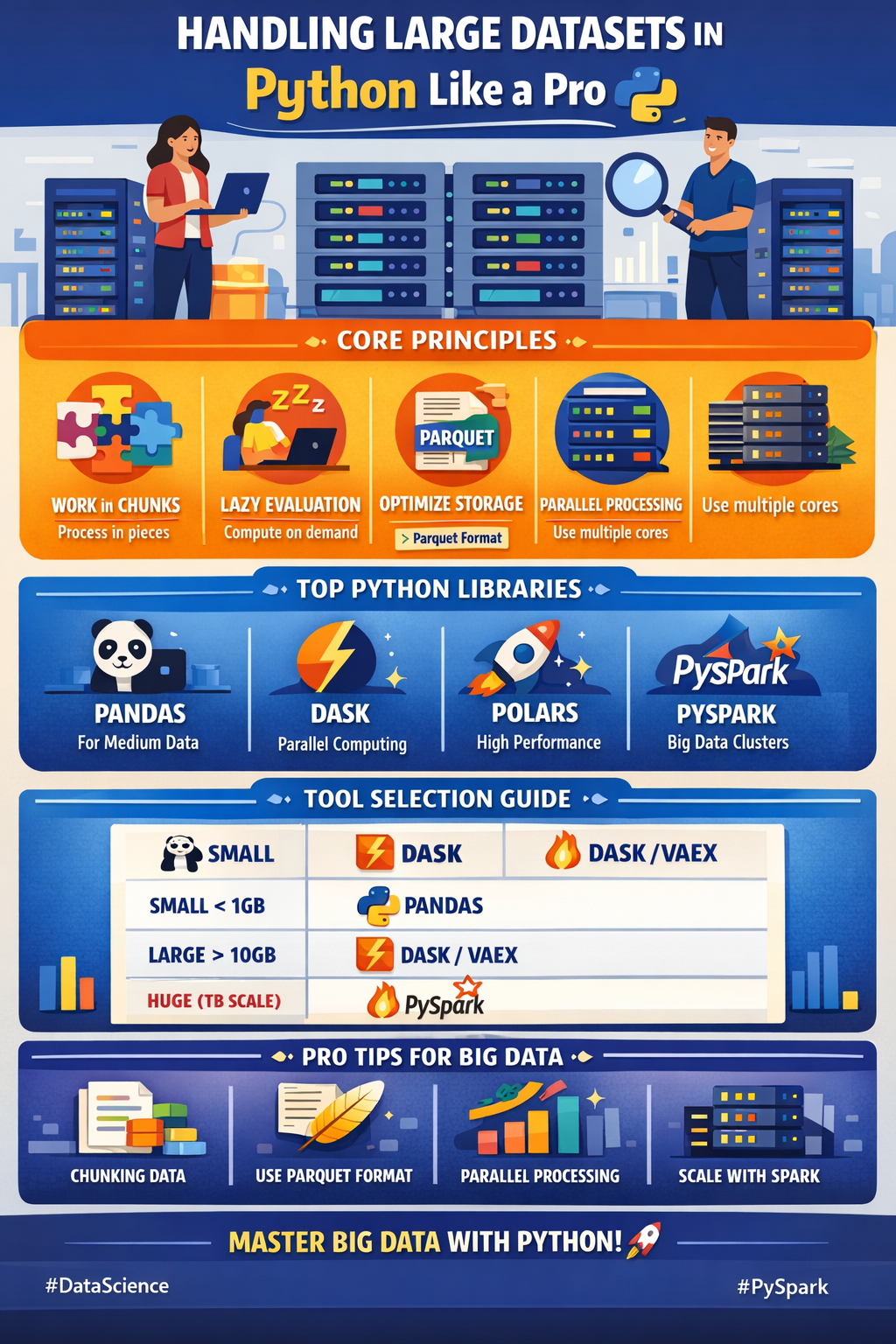
Let’s explore the best Python libraries + core principles to master big data handling 💡🔥
🌟 Why Large Datasets Are Challenging?
Large datasets create problems like:
⚠️ Memory overflow
⚠️ Slow computation
⚠️ Long processing time
⚠️ Inefficient storage
⚠️ Difficult scalability
So the key is:
✅ Optimize memory
✅ Use parallelism
✅ Process lazily
✅ Scale beyond one machine
🧠 Core Principles for Handling Large Data Efficiently
Before jumping into libraries, let’s understand the mindset.
1️⃣ Work in Chunks, Not All at Once 🧩
Loading a 10GB CSV fully into memory is dangerous.
Instead:
✅ Process data piece by piece.
Example (Chunking with Pandas)
import pandas as pd

chunks = pd.read_csv("bigfile.csv", chunksize=100000)

for chunk in chunks:
    print(chunk.mean())
✨ This allows processing huge files without memory crashes.
2️⃣ Use Lazy Evaluation 💤
Lazy evaluation means:
👉 Data is processed only when needed.
This avoids unnecessary computations.
Libraries like Dask and Polars use this principle heavily.
3️⃣ Choose the Right Storage Format 📂
CSV is slow.
Instead, prefer:
✅ Parquet
✅ Feather
✅ HDF5
These formats are optimized for speed and compression.
4️⃣ Parallel & Distributed Computing ⚡
Big datasets need:
🚀 Multi-core CPU usage
🚀 Cluster computing
Python libraries make this easy.
5️⃣ Optimize Data Types 🏗️
Wrong datatypes waste memory.
Example:
df["age"] = df["age"].astype("int8")Using smaller integer types can reduce memory drastically.
📚 Best Python Libraries for Large Dataset Handling
Now let’s dive into the most powerful tools.
1️⃣ Pandas (Efficient for Medium-Large Data) 🐼
Pandas is the most popular library for data analysis.
Key Features
✅ Fast tabular operations
✅ Chunking support
✅ Strong ecosystem
Best Use Case
👉 Up to a few GB datasets.
Example: Memory Optimization
import pandas as pd

df = pd.read_csv("data.csv")
print(df.memory_usage(deep=True))
Example: Chunk Processing
for chunk in pd.read_csv("big.csv", chunksize=50000):
    filtered = chunk[chunk["salary"] > 50000]
    print(filtered.shape)
2️⃣ Dask (Parallel Pandas for Big Data) ⚡
Dask is like Pandas but:
🔥 Works on datasets larger than memory
🔥 Uses parallel computing
🔥 Supports distributed clusters
Key Features
✅ Lazy execution
✅ Scales from laptop → cluster
✅ Parallel DataFrames
Example: Using Dask
import dask.dataframe as dd

df = dd.read_csv("bigfile.csv")
result = df[df["sales"] > 1000].mean()
print(result.compute())
✨ .compute() triggers execution.
3️⃣ Polars (Blazing Fast DataFrames) 🚀
Polars is a modern alternative to Pandas.
Key Features
🔥 Super fast (written in Rust)
🔥 Lazy + eager execution
🔥 Low memory usage
Example: Lazy Query
import polars as pl

df = pl.scan_csv("big.csv")

result = (
    df.filter(pl.col("age") > 30)
      .group_by("city")
      .mean()
)

print(result.collect())
Polars is perfect for performance lovers 💎
4️⃣ PySpark (Big Data + Distributed Clusters) 🌍
Apache Spark is the king of big data.
PySpark is its Python interface.
Key Features
✅ Handles terabytes of data
✅ Distributed computing
✅ Works with Hadoop + Cloud
Example: Spark DataFrame
from pyspark.sql import SparkSession

spark = SparkSession.builder.appName("BigData").getOrCreate()
df = spark.read.csv("huge.csv", header=True)
df.groupBy("department").count().show()
Use PySpark when data is too big for one machine.
5️⃣ NumPy (Efficient Numerical Computation) 🔢
NumPy is the foundation of scientific computing.
Key Features
✅ Fast arrays
✅ Low-level memory efficiency
✅ Vectorized operations
Example: Vectorization Instead of Loops
import numpy as np

arr = np.random.rand(10000000)
print(arr.mean())
NumPy avoids slow Python loops.
6️⃣ Vaex (Out-of-Core DataFrames) 🛰️
Vaex works with huge datasets without loading everything.
Key Features
✅ Memory mapping
✅ Billion-row datasets
✅ Lazy evaluation
Example: Vaex
import vaex

df = vaex.open("bigdata.hdf5")
print(df.mean(df.salary))
Perfect for massive datasets on laptops.
7️⃣ Datatable (Fast Data Processing Engine) 🏎️
Datatable is inspired by R’s data.table.
Key Features
🔥 Extremely fast joins & filtering
🔥 Handles big datasets efficiently
Example
import datatable as dt

df = dt.fread("large.csv")

print(df[:, dt.mean(dt.f.salary)])
8️⃣ SQL + DuckDB (Big Data Without Leaving Python) 🦆
DuckDB is an in-process analytics database.
Key Features
✅ Query Parquet directly
✅ Lightning-fast SQL analytics
✅ No server needed
Example: Query Large Parquet File
import duckdb

result = duckdb.query("""
    SELECT city, AVG(salary)
    FROM 'big.parquet'
    GROUP BY city
""")

print(result.df())
DuckDB is one of the most underrated big data tools 🔥
🛠️ Best Tools & Practices Summary
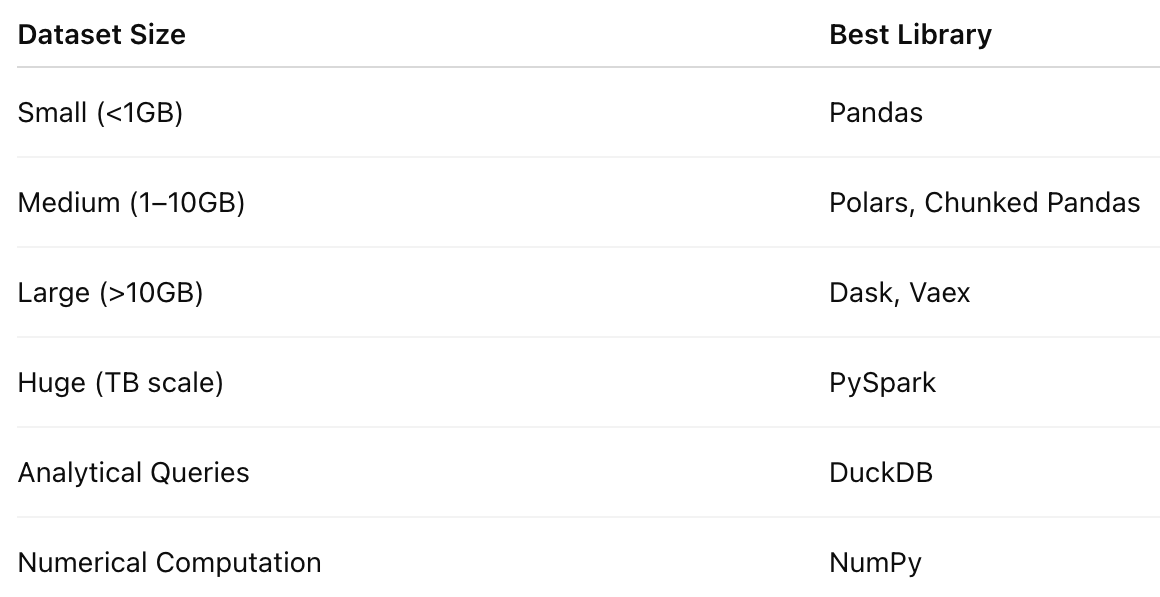
🎯 Final Big Data Handling Checklist ✅
Whenever you work with large datasets:
✅ Use chunking
✅ Prefer Parquet over CSV
✅ Optimize datatypes
✅ Use lazy execution
✅ Parallelize computations
✅ Scale with Spark when needed
🌈 Closing Thoughts
Handling large datasets is not about having the strongest laptop…
It’s about using the right principles + libraries 💡
Python provides everything you need:
🐼 Pandas for everyday work
⚡ Dask & Polars for scalability
🌍 Spark for true big data
🦆 DuckDB for fast analytics
Master these, and you’ll become unstoppable in data engineering 🚀🔥


Comments
Post a Comment