🤖✨ AI Agents: The Future of Intelligent Software (A Complete Developer’s Guide)
🤖✨ AI Agents: The Future of Intelligent Software (A Complete Developer’s Guide)
Artificial Intelligence is evolving fast…
We moved from:
✅ Simple automation →
✅ Machine Learning models →
✅ Chatbots →
🚀 And now… AI Agents
AI Agents are not just tools that answer questions.
They are digital workers that can:
- Think step-by-step
- Plan tasks
- Use tools
- Take actions
- Learn from feedback
- Work independently
Welcome to the era of Agentic AI 🧠⚡
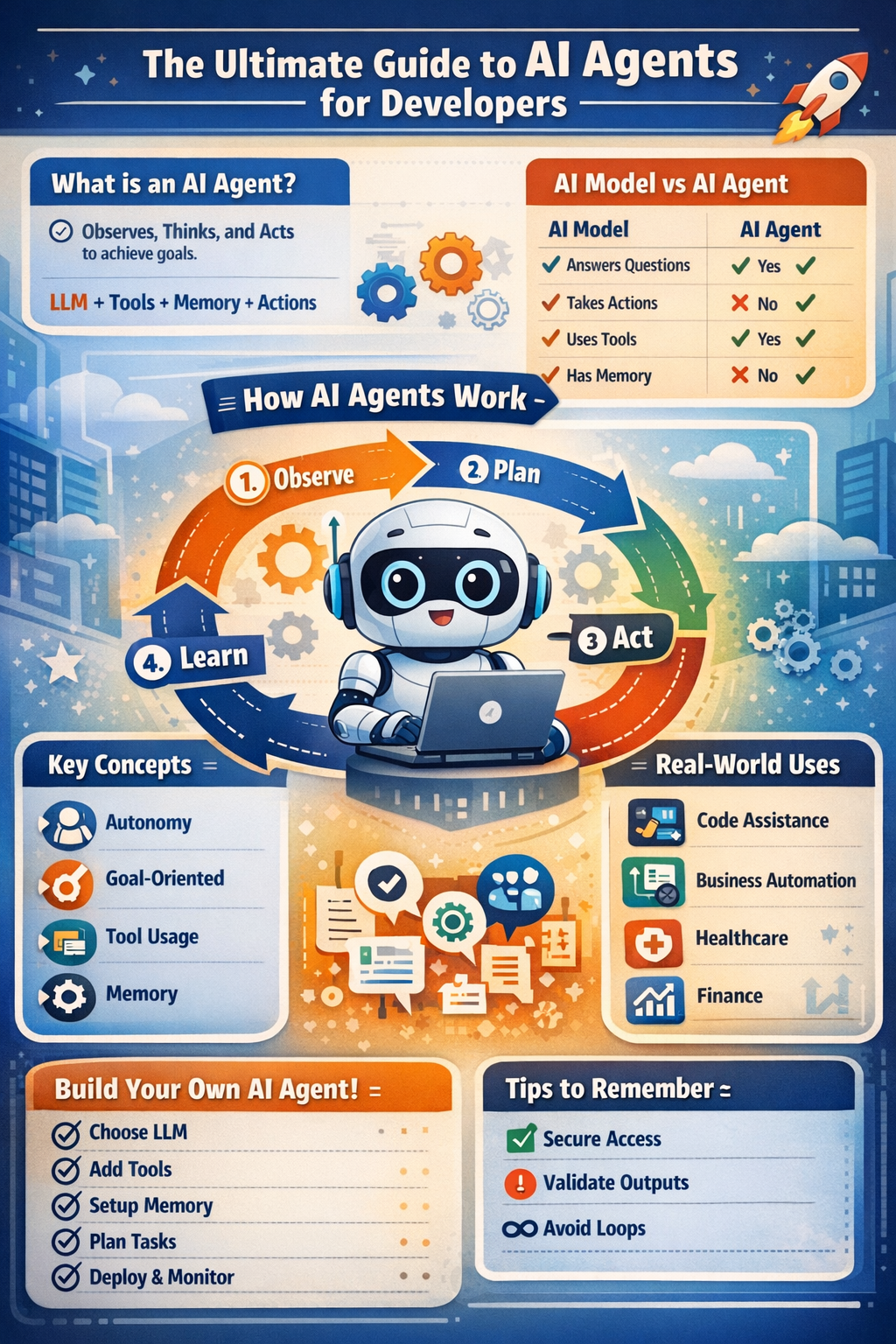
Let’s break it down deeply.
🌍 What Exactly is an AI Agent?
An AI Agent is an intelligent system that can:
Observe its environment, decide what to do, and act to achieve a goal.
Unlike traditional AI models that only generate text…
AI Agents can:
- Perform multi-step reasoning
- Execute tasks autonomously
- Interact with external systems
- Continuously improve actions
📌 Simple Definition:
AI Agent = Brain (LLM) + Tools + Memory + Planning + Actions
🤖 AI Model vs AI Agent (Big Difference)
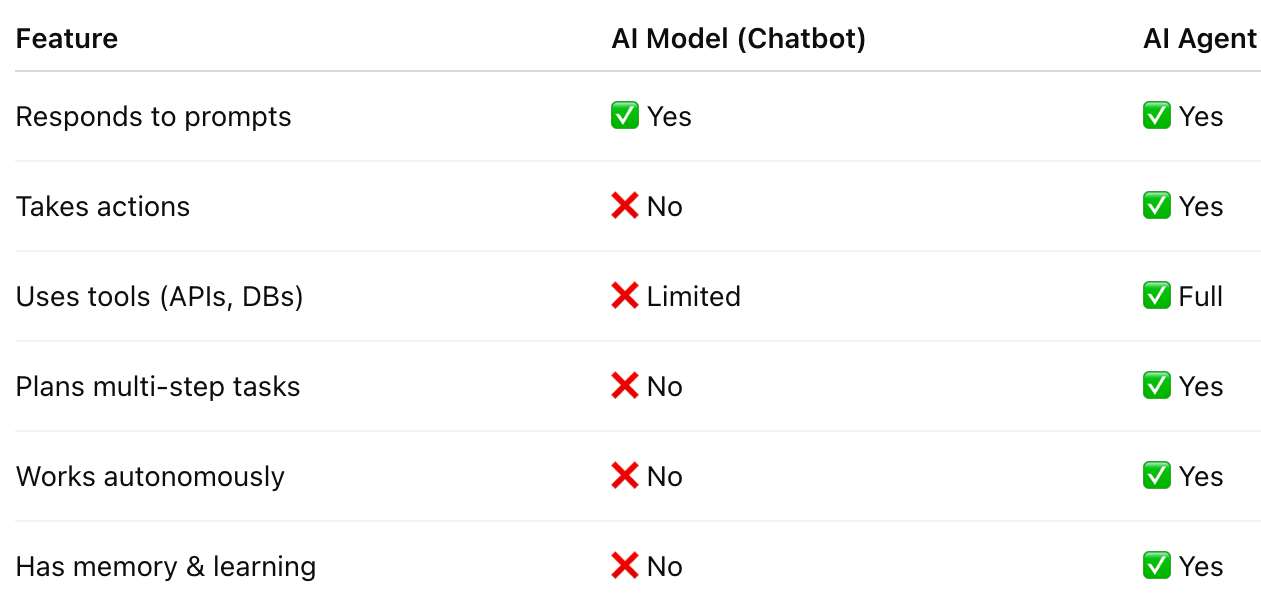
ChatGPT alone is a model…
ChatGPT + tools + workflow = AI Agent 🚀
🧠 How AI Agents Work Internally
AI Agents follow a loop called:
🔁 Observe → Think → Act → Learn
Let’s understand:
1️⃣ Perception (Observation) 👀
The agent first gathers context:
- User input
- System state
- Environment data
- Previous memory
Example:
“Book me a flight to Delhi tomorrow.”
Agent observes:
- Destination = Delhi
- Date = Tomorrow
- Task = Booking flight
2️⃣ Reasoning & Planning 🧩
Agent breaks the goal into steps:
- Search flights
- Compare prices
- Ask preferences
- Confirm booking
- Make payment
This is called:
📌 Task Decomposition
Agents don’t solve everything at once…
They plan like humans.
3️⃣ Tool Usage 🔧
AI Agents can call tools like:
- APIs
- Databases
- Browsers
- Code execution
- File systems
Example:
Agent calls:
- Flight Search API
- Payment Gateway API
This is what makes agents powerful.
4️⃣ Action Execution ⚡
Agent performs real actions:
- Sends emails
- Creates tickets
- Updates CRM
- Deploys code
- Generates reports
Example:
“Deploy my Rails app to AWS.”
Agent can:
- Run CI/CD pipeline
- Restart servers
- Monitor logs
5️⃣ Memory & Feedback 🧠📚
Agents improve using memory:
- Short-term memory → current conversation
- Long-term memory → user preferences
- External memory → vector databases
Example:
Agent remembers:
“User prefers Indigo flights.”
So next time it suggests better results.
⭐ Key Concepts of AI Agents
Let’s explore the most important building blocks.
🧠 1. Autonomy
Agents can operate without constant prompting.
Example:
Daily agent checks system logs and alerts DevOps.
🎯 2. Goal-Oriented Behavior
Agents are driven by objectives.
Example:
Reduce cloud cost by 20%.
Agent actions:
- Analyze usage
- Recommend downsizing
- Apply changes
🛠️ 3. Tool-Augmented Intelligence
LLMs alone are limited.
Agents become powerful when connected to tools.
Example Tools:
- Web Search
- GitHub APIs
- Jira
- Slack
- AWS SDK
🧩 4. Planning & Multi-Step Reasoning
Agents can create strategies:
“Write blog + create infographic + post on LinkedIn.”
Steps:
- Draft content
- Design image
- Generate caption
- Schedule post
🧠 5. Memory Systems
Agents store information for continuity.
Types:
- Conversation memory
- User profile memory
- Knowledge base memory
🤝 6. Multi-Agent Collaboration
Sometimes multiple agents work together:
- Research Agent
- Coding Agent
- Testing Agent
- Deployment Agent
Like an AI team 👥
🚀 Features of AI Agents
AI Agents bring major advantages:
✅ Task automation
✅ Intelligent decision-making
✅ Personalized assistance
✅ Tool integration
✅ Multi-step workflows
✅ Continuous learning
✅ Human-like planning
✅ Scalable productivity
💡 Real-World Examples of AI Agents
AI Agents are already being used in:
👨💻 Software Development
- Code generation
- Bug fixing
- PR reviews
- Test writing
- Deployment automation
Example:
Agent monitors CI failures and fixes them.
🏢 Business Operations
- Invoice processing
- Customer support
- Sales follow-ups
🩺 Healthcare
- Appointment scheduling
- Medical coding automation
- Report summarization
📈 Finance
- Portfolio monitoring
- Fraud detection
- Trading assistants
⚠️ Things to Remember While Building AI Agents
AI Agents are powerful…
But require responsibility.
1️⃣ Agents Can Make Mistakes
Always include:
- Validation
- Human approval for critical tasks
2️⃣ Tool Access Must Be Secure 🔐
Don’t allow unrestricted access to:
- Payment systems
- Production databases
- Admin controls
3️⃣ Avoid Infinite Loops ♾️
Agents can get stuck in cycles.
Add:
- Step limits
- Timeout rules
4️⃣ Observability Matters 📊
Track:
- Actions taken
- Tool calls
- Errors
- Decision logs
5️⃣ Ethics & Privacy Are Critical ⚖️
Agents must respect:
- User consent
- Data security
- Transparency
👨💻 Developer Guide: Build Your Own AI Agent (Step-by-Step)
As a Software Developer, here is your roadmap.
✅ Step 1: Choose the Agent Use Case
Start small:
- Automated code reviewer
- Jira ticket summarizer
- Deployment assistant
- Customer query responder
✅ Step 2: Select Your Core LLM Brain 🧠
Options:
- OpenAI GPT models
- Claude
- Gemini
- Llama (open-source)
✅ Step 3: Add Tool Integrations 🔧
Your agent needs tools:
- REST APIs
- Databases
- File access
- Cloud SDKs
Example:
agent.call_tool("get_weather")
agent.call_tool("search_flights")
✅ Step 4: Implement Memory 🧠
Use:
- Redis (short-term)
- Vector DBs (long-term)
- Postgres for structured memory
Example:
Store user preferences for personalization.
✅ Step 5: Add Planning Layer 📌
Frameworks help:
- LangChain Agents
- CrewAI
- AutoGen
- Semantic Kernel
Planning types:
- ReAct (Reason + Act)
- Tree of Thoughts
- Task decomposition
✅ Step 6: Add Safety & Guardrails 🔐
Include:
- Role-based access
- Output validation
- Human approval steps
✅ Step 7: Deploy as a Service 🌐
Deploy agent like an app:
- FastAPI backend
- Rails integration
- Docker container
- AWS Lambda or EC2
✅ Step 8: Monitor & Improve 📈
Track:
- Success rate
- Errors
- User satisfaction
- Tool performance
🔥 Best AI Agent Tech Stack (2026 Ready)
For Developers:
- LLM: GPT / Claude
- Framework: LangChain / CrewAI
- Memory: Pinecone / Weaviate / Redis
- Backend: FastAPI / Rails API
- Deployment: Docker + AWS
- Observability: LangSmith, OpenTelemetry
- Security: OAuth + Guardrails AI
🌟 Final Thought: AI Agents Are the New Software Revolution
“In the future, software won’t just run…
It will think, plan, and act.”
AI Agents are the bridge between:
💻 Code + 🧠 Intelligence + ⚡ Action
If you are a developer…
Now is the best time to learn agentic systems 🚀
📌 Quick Developer Checklist ✅
✔ Understand agent loop (Observe → Think → Act)
✔ Start with a narrow use case
✔ Add tools + memory
✔ Implement guardrails
✔ Monitor actions
✔ Scale with multi-agent


Comments
Post a Comment