🌐 Protocols of the Internet: The Invisible Rules That Power the Digital World 🚀
🌐 Protocols of the Internet: The Invisible Rules That Power the Digital World 🚀
Have you ever wondered how a message sent from your laptop in India reaches a server in the US within milliseconds? 🤯
How does YouTube stream videos smoothly?
How does Gmail deliver emails securely?
The answer lies in Internet Protocols — the standardized rules that allow devices to communicate over networks.
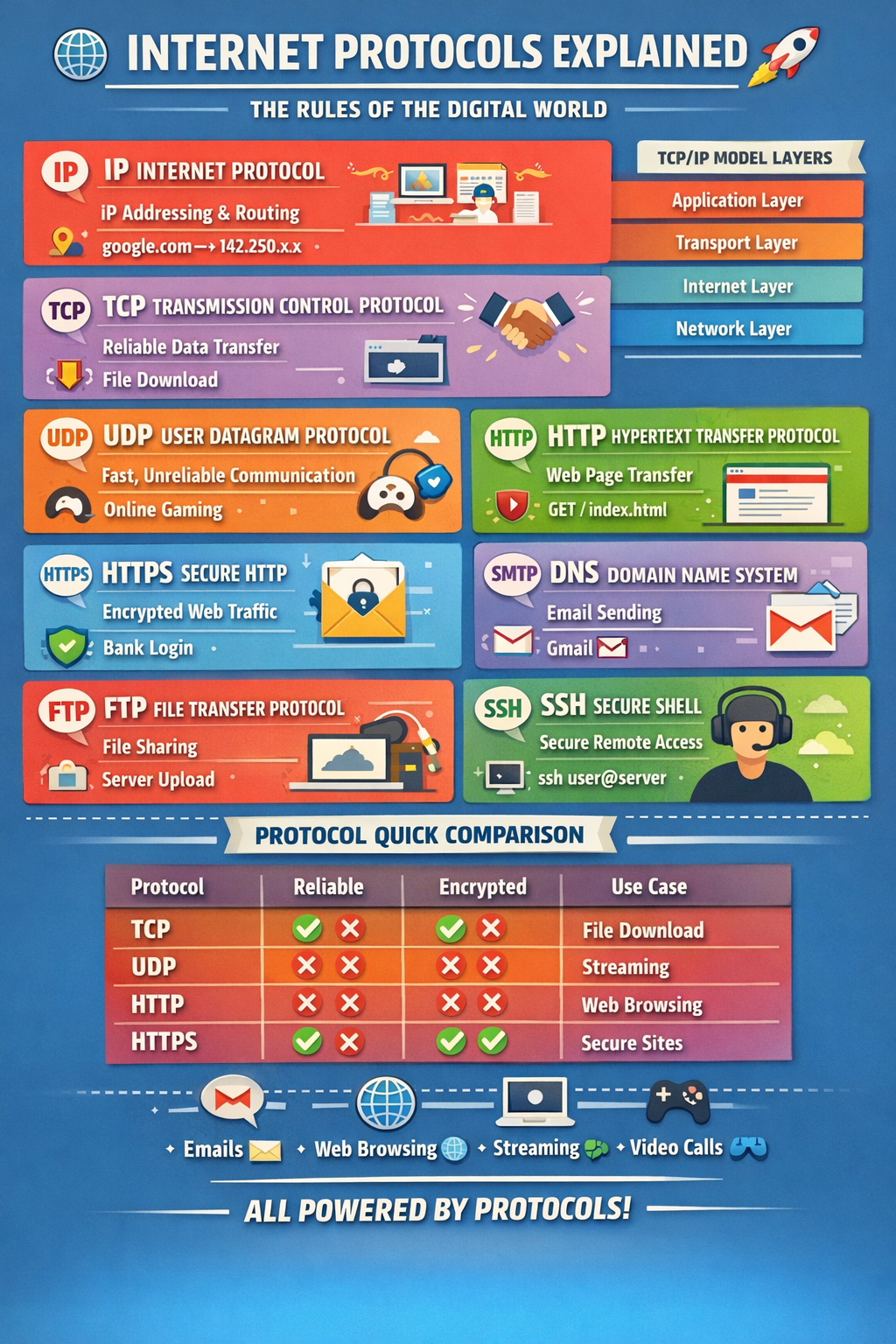
Let’s dive deep into the most important Internet protocols, understand their working, features, and real-world examples — in a simple yet powerful way 💡
🧠 What is an Internet Protocol?
An Internet Protocol is a set of rules that define how data is:
- 📦 Packaged
- 📍 Addressed
- 🚚 Transmitted
- 📬 Received
Without protocols, the internet would be chaos.
Think of them as traffic rules of the digital highway 🛣️
🏗️ The TCP/IP Model (Foundation of Internet)
The Internet mainly works on the TCP/IP Model, which includes:
- Application Layer
- Transport Layer
- Internet Layer
- Network Access Layer
Now let’s explore the key protocols layer by layer.
🌍 1️⃣ IP — Internet Protocol
📌 What It Does:
Responsible for addressing and routing packets from source to destination.
🔧 Features:
- Logical addressing (IP address)
- Packet switching
- Stateless communication
- Works with IPv4 & IPv6
⚙️ How It Works:
- Data is broken into packets
- Each packet gets:
- Source IP
- Destination IP
3. Routers forward packets based on IP address
💡 Example:
When you open google.com, your device sends packets to Google's server IP (e.g., 142.250.x.x)
🔢 IPv4 vs IPv6
- IPv4: 32-bit address (e.g., 192.168.1.1)
- IPv6: 128-bit address (e.g., 2001:db8::1)
🔄 2️⃣ TCP — Transmission Control Protocol
📌 What It Does:
Ensures reliable, ordered, and error-checked delivery of data.
🔧 Features:
- Reliable communication
- Error detection
- Retransmission
- Flow control
- 3-way handshake
🤝 TCP 3-Way Handshake
- SYN
- SYN-ACK
- ACK
Connection established 🔐
⚙️ How It Works:
- Splits data into segments
- Numbers them
- Waits for acknowledgment
- Resends if lost
💡 Example:
When downloading a file, TCP ensures the file arrives completely and correctly.
⚡ 3️⃣ UDP — User Datagram Protocol
📌 What It Does:
Provides fast but unreliable communication.
🔧 Features:
- No handshake
- No acknowledgment
- Faster than TCP
- Low latency
⚙️ How It Works:
Sends packets without checking delivery.
💡 Example:
- Online gaming 🎮
- Live streaming 📺
- Video calls 📞
Speed matters more than perfection here.
🌐 4️⃣ HTTP — HyperText Transfer Protocol
📌 What It Does:
Transfers web pages between browser and server.
🔧 Features:
- Stateless
- Request-Response model
- Methods: GET, POST, PUT, DELETE
⚙️ How It Works:
- Browser sends HTTP request
- Server responds with HTML, JSON, etc.
💡 Example:
When you visit a blog, your browser sends:
GET /index.html HTTP/1.1Server responds with page content.
🔐 5️⃣ HTTPS — Secure HTTP
📌 What It Does:
Encrypted version of HTTP.
🔧 Features:
- SSL/TLS encryption
- Data integrity
- Authentication
- Secure communication
⚙️ How It Works:
- TLS handshake
- Exchange of encryption keys
- Secure data transmission
💡 Example:
When you log in to your bank website 🏦
📧 6️⃣ SMTP — Simple Mail Transfer Protocol
📌 What It Does:
Sends emails between mail servers.
🔧 Features:
- Push protocol
- Works with TCP
- Uses port 25, 587
⚙️ How It Works:
- Email client sends mail to SMTP server
- Server forwards to recipient server
💡 Example:
Sending email via Gmail 📬
📥 7️⃣ POP3 & IMAP — Email Retrieval Protocols
📌 POP3 (Post Office Protocol v3)
- Downloads email
- Usually deletes from server
- Offline access
📌 IMAP (Internet Message Access Protocol)
- Syncs email
- Keeps mail on server
- Access from multiple devices
💡 Example:
Accessing Gmail from phone & laptop simultaneously → IMAP
📂 8️⃣ FTP — File Transfer Protocol
📌 What It Does:
Transfers files between systems.
🔧 Features:
- Uses TCP
- Separate control & data channel
- Authentication supported
⚙️ Example:
Uploading files to a hosting server.
⚠️ Not encrypted → Use SFTP instead.
🔍 9️⃣ DNS — Domain Name System
📌 What It Does:
Translates domain names into IP addresses.
🔧 Features:
- Distributed system
- Hierarchical structure
- Caching mechanism
⚙️ How It Works:
- User enters domain
- DNS resolver queries root → TLD → authoritative server
- Returns IP address
💡 Example:
google.com → 142.250.x.x
DNS is the phonebook of the internet 📖
🖧 1️⃣0️⃣ ARP — Address Resolution Protocol
📌 What It Does:
Maps IP address to MAC address inside local network.
💡 Example:
Your router finding your laptop’s physical address.
🔐 1️⃣1️⃣ SSH — Secure Shell
📌 What It Does:
Secure remote login.
🔧 Features:
- Encryption
- Authentication
- Secure command execution
💡 Example:
Connecting to AWS EC2 server from terminal:
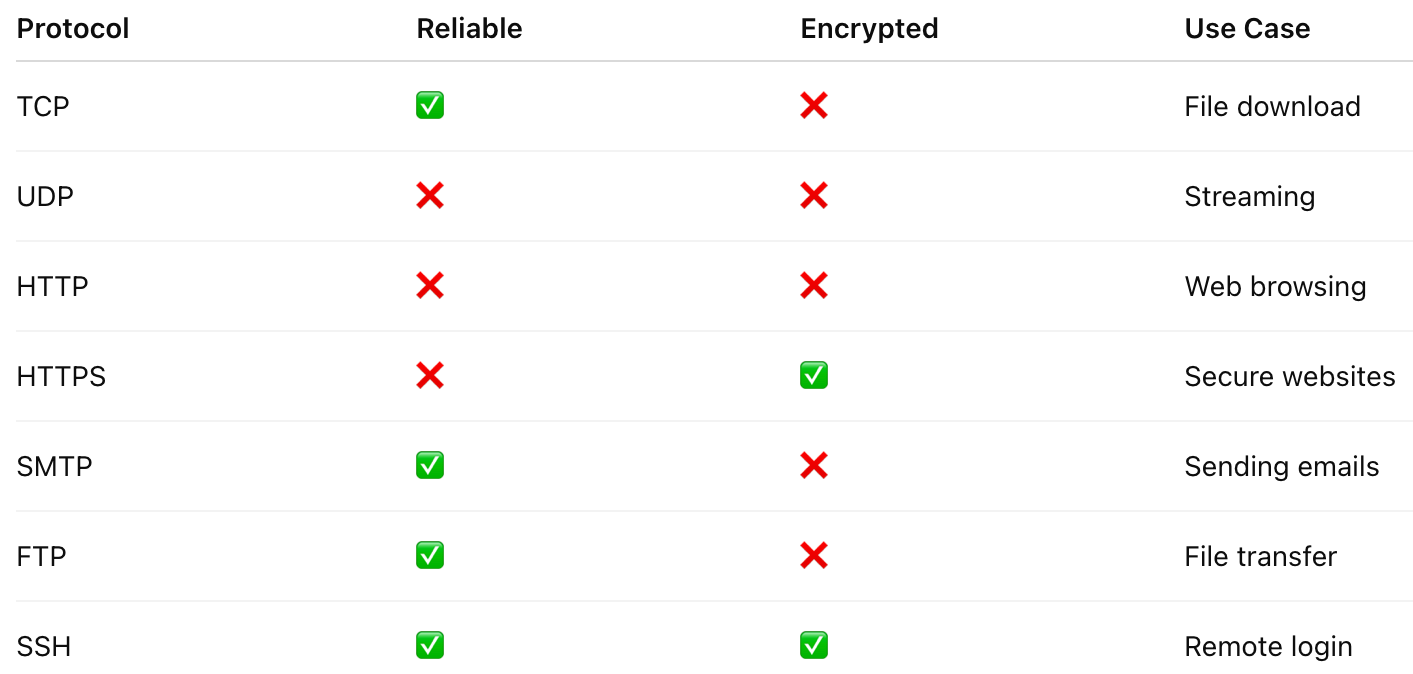
ssh user@server_ip📊 Quick Protocol Comparison
🔥 Real-World Flow Example
When you open https://example.com:
- DNS resolves domain 🌍
- IP routes packets 📦
- TCP handshake 🤝
- TLS encryption 🔐
- HTTP request-response 🌐
- Page loads 🎉
Multiple protocols working together seamlessly!
🎯 Why Understanding Protocols Matters
- 💻 Better backend development
- 🔐 Improved cybersecurity awareness
- 🚀 Faster debugging
- 🌍 Strong networking knowledge
As a developer, mastering protocols makes you 10x powerful.
🏁 Final Thoughts
Internet protocols are invisible superheroes 🦸
They silently coordinate billions of devices daily.
From sending WhatsApp messages 📱
To deploying apps on cloud ☁️
To streaming Netflix 🎬
Everything works because of these protocols.
If you’re building web apps, working with DevOps, or learning system design —
Understanding protocols is non-negotiable 💡🔥


Comments
Post a Comment