🌐 Servers in Depth — The Invisible Engines Powering the Internet 🚀
🌐 Servers in Depth — The Invisible Engines Powering the Internet 🚀
Every time you open a website, send a message, stream a video, or make an online payment…
👉 A server is working behind the scenes.
Servers are the silent warriors of the digital world 💻⚡
In this blog, we’ll explore:
- What is a Server?
- How Servers Work
- Types of Servers
- Core Principles
- Important Protocols
- Real-world Examples
- Best Practices & Optimization Tips
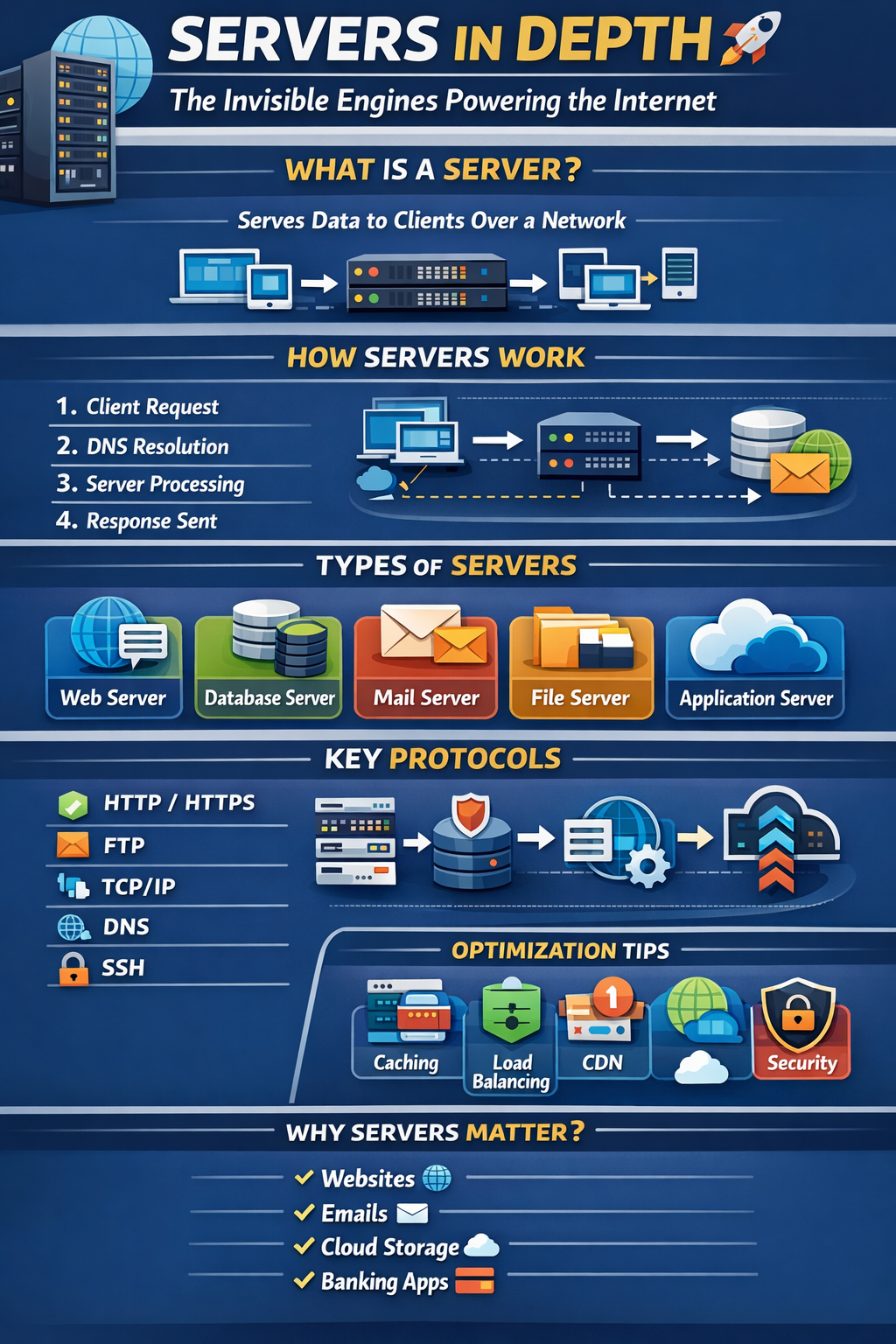
Let’s dive deep 🔥
🖥️ What is a Server?
A server is a computer system (hardware + software) that provides resources, services, or data to other computers called clients over a network.
📌 Simple Definition:
A server listens for requests and responds with the requested data.
Example:
- You open
google.com - Your browser sends a request
- Google’s server responds with a webpage
⚙️ How Servers Work (Step-by-Step)
Let’s understand with a website example 🌍
1️⃣ Client Sends Request
You type https://example.com
2️⃣ DNS Resolution
Domain converts into an IP address.
3️⃣ Request Reaches Server
Server receives HTTP request.
4️⃣ Processing
Server:
- Checks route
- Connects to database
- Processes logic
5️⃣ Response Sent
Server returns:
- HTML
- JSON
- File
- Error message
📦 Client displays result.
🧠 Core Working Principles of Servers
🔹 1. Request–Response Model
Servers operate on this fundamental model:
- Client requests
- Server responds
🔹 2. Statelessness (Mostly)
Each request is independent (HTTP).
Sessions/cookies maintain state.
🔹 3. Concurrency
Servers handle multiple requests simultaneously using:
- Multi-threading
- Event-driven models
- Async I/O
🔹 4. Scalability
Servers must handle growth:
- Vertical scaling (increase power)
- Horizontal scaling (add more servers)
🔹 5. Reliability
Servers must ensure:
- High uptime
- Fault tolerance
- Load balancing
🏗️ Types of Servers (With Examples)
🌍 1. Web Server
📌 Purpose: Serve websites via HTTP/HTTPS
Examples:
- Apache
- Nginx
🔹 Handles:
- Static files (HTML, CSS)
- API responses
- Reverse proxy
🗄️ 2. Database Server
📌 Purpose: Store and manage data
Examples:
- MySQL
- PostgreSQL
🔹 Handles:
- Queries
- Transactions
- Data consistency
📧 3. Mail Server
📌 Purpose: Send and receive emails
Protocols used:
- SMTP (Sending)
- IMAP (Receiving)
- POP3
📁 4. File Server
📌 Purpose: Centralized file storage
Used in:
- Offices
- Enterprises
- Cloud storage systems
🎮 5. Application Server
📌 Purpose: Executes business logic
Used in:
- Banking apps
- SaaS platforms
- APIs
🌩️ 6. Cloud Servers
📌 Virtual servers hosted in cloud environments.
Examples:
- AWS EC2
- Google Cloud
- Azure VM
Benefits:
- Auto scaling
- Pay-as-you-go
- High availability
🌐 Important Server Protocols (With Examples)
🔹 1. HTTP / HTTPS
Used for websites.
- HTTP → Not secure
- HTTPS → Encrypted via SSL/TLS 🔒
Example:
Browser ↔ Web Server
🔹 2. FTP
File Transfer Protocol
Used for uploading files to servers.
🔹 3. TCP/IP
Foundation of internet communication.
TCP ensures:
- Reliable delivery
- Ordered packets
IP handles:
- Addressing & routing
🔹 4. DNS
Converts domain name to IP address.
Example:google.com → 142.250.190.14
🔹 5. SSH
Secure remote access to servers.
Example:
ssh user@server_ipUsed for:
- Deployment
- Configuration
- Troubleshooting
🏢 Server Deployment Models
🖥️ On-Premise
- Physical servers in office
- Full control
- High maintenance
☁️ Cloud-Based
- Hosted by provider
- Flexible
- Cost-effective
🔄 Hybrid
- Combination of both
⚡ Real-World Example
Let’s say you build a Ruby on Rails application.
Server stack might look like:
User Browser
⬇
Nginx (Web Server)
⬇
Puma (Application Server)
⬇
PostgreSQL (Database Server)
Each server has a specific role.
🚀 Optimization Techniques
🔥 1. Caching
- Redis
- Memcached
- Browser cache
Reduces load on server.
🔥 2. Load Balancing
Distribute traffic across multiple servers.
🔥 3. CDN
Content Delivery Networks reduce latency.
🔥 4. Compression
Enable Gzip/Brotli.
🔥 5. Database Indexing
Speeds up queries.
⚠️ Common Mistakes to Avoid
❌ No monitoring
❌ Ignoring backups
❌ Poor security configuration
❌ No SSL
❌ Overloading single server
🎯 Why Servers Matter
Without servers:
- No websites
- No banking apps
- No cloud storage
- No social media
Servers are the foundation of the digital economy 💰🌍
🏁 Final Thoughts
Servers are not just machines.
They are:
⚡ The backbone of the internet
🧠 The processors of logic
📦 The keepers of data
🔐 The guardians of security
Understanding servers deeply makes you:
- Better developer 👨💻
- Better DevOps engineer ⚙️
- Better system architect 🏗️


Comments
Post a Comment