🚀 The Ultimate JavaScript Framework Battle: React vs Angular vs Vue vs Svelte vs Solid vs Qwik vs Alpine 🏆
🚀 The Ultimate JavaScript Framework Battle: React vs Angular vs Vue vs Svelte vs Solid vs Qwik vs Alpine 🏆
Choosing the right JavaScript framework can make or break your project! With new players entering the field, the competition is fiercer than ever. Let’s explore 7 top frameworks, their features, syntax, extensions, and ideal use cases — so you can pick the best one for your needs!
🔍 Why Use a JavaScript Framework?
Modern web apps demand:
✅ Blazing-fast performance ⚡
✅ Reusable components ♻️
✅ Strong developer experience (DX) 💻
✅ Scalability & maintainability 🏗️
Now, let’s break them down one by one!
1. ⚛️ React (Meta/Facebook) — The King of UI 👑
Type: Library (Not a full framework)
Best For: Dynamic SPAs, interactive UIs
✨ Key Features:
- Virtual DOM for optimized rendering
- Hooks API (simplifies state & side effects)
- JSX (write HTML inside JavaScript)
- Massive ecosystem (Next.js, Redux, React Router)
📜 Basic Syntax (Functional Component):
import { useState } from 'react';

function Counter() {
  const [count, setCount] = useState(0);
  return (
    <div>
      <p>Count: {count}</p>
      <button onClick={() => setCount(count + 1)}>
        Increment
      </button>
    </div>
  );
}
🔧 Popular Extensions:
- Next.js (SSR/SSG)
- Redux / Zustand (State Management)
- React Query (Data Fetching)
2. 🅰️ Angular (Google) — The Enterprise Powerhouse �
Type: Full MVC Framework
Best For: Large-scale, structured applications
✨ Key Features:
- Two-way data binding
- Dependency Injection (DI)
- TypeScript-first
- Built-in RxJS for reactive programming
📜 Basic Syntax (Component):
import { Component } from '@angular/core';

@Component({
  selector: 'app-counter',
  template: `
    <p>Count: {{ count }}</p>
    <button (click)="increment()">Increment</button>
  `,
})
export class CounterComponent {
  count = 0;
  increment() {
    this.count++;
  }
}
🔧 Popular Extensions:
- NgRx (State Management)
- Angular Universal (SSR)
- Ionic (Mobile Apps)
3. 🌟 Vue (Evan You) — The Progressive Framework 🎯
Type: Progressive Framework
Best For: Flexible & lightweight apps
✨ Key Features:
- Reactive data binding
- Single-File Components (.vue files)
- Composition API (Vue 3)
- Easy to learn
📜 Basic Syntax (Composition API):
<script setup>
  import { ref } from 'vue';

  const count = ref(0);
  function increment() {
    count.value++;
  }
</script>

<template>
  <p>Count: {{ count }}</p>
  <button @click="increment">Increment</button>
</template>
🔧 Popular Extensions:
- Pinia / Vuex (State Management)
- Nuxt.js (SSR/SSG)
- Vuetify (UI Components)
4. 🎯 Svelte (Rich Harris) — The No-VDOM Wonder ✨
Type: Compiler-based
Best For: Ultra-fast, lightweight apps
✨ Key Features:
- Compiles to vanilla JS (No Virtual DOM!)
- Reactive assignments (no useState!)
- Scoped CSS by default
- Minimal boilerplate
📜 Basic Syntax:
<script>
  let count = 0;

  function increment() {
    count += 1;
  }
</script>
<p>Count: {count}</p>
<button on:click={increment}>Increment</button>
🔧 Popular Extensions:
- SvelteKit (Full-stack framework)
- Svelte Stores (State Management)
5. 💎 SolidJS — React-like, but Faster ⚡
Type: Reactive Library
Best For: High-performance apps
✨ Key Features:
- No Virtual DOM (like Svelte)
- React-like syntax (but simpler)
- Fine-grained reactivity
- Small bundle size
📜 Basic Syntax:
import { createSignal } from 'solid-js';

function Counter() {
  const [count, setCount] = createSignal(0);
  return (
    <div>
      <p>Count: {count()}</p>
      <button onClick={() => setCount(count() + 1)}>
        Increment
      </button>
    </div>
  );
}
🔧 Popular Extensions:
- SolidStart (Meta-framework)
6. 🚀 Qwik — The Resumable Framework 🔄
Type: HTML-first Framework
Best For: Instant-loading websites
✨ Key Features:
- Resumability (No hydration!)
- Lazy-loading by default
- Near-instant page loads
- Works with React components
📜 Basic Syntax:
import { component$, useSignal } from '@builder.io/qwik';

export default component$(() => {
  const count = useSignal(0);
  return (
    <div>
      <p>Count: {count.value}</p>
      <button onClick$={() => count.value++}>
        Increment
      </button>
    </div>
  );
});
🔧 Popular Extensions:
- Qwik City (Full-stack framework)
7. 🏔️ Alpine.js — The Minimalist JS for HTML 🏕️
Type: Lightweight Utility
Best For: Adding interactivity to static sites
✨ Key Features:
- No build step needed
- Declarative, like Vue
- Tiny (~7KB)
- Perfect for PHP/Laravel apps
📜 Basic Syntax:
<div x-data="{ count: 0 }">
  <p x-text="`Count: ${count}`"></p>
  <button @click="count++">Increment</button>
</div>
🔧 Popular Extensions:
- Alpine Magic Helpers
🏆 Comparison Table
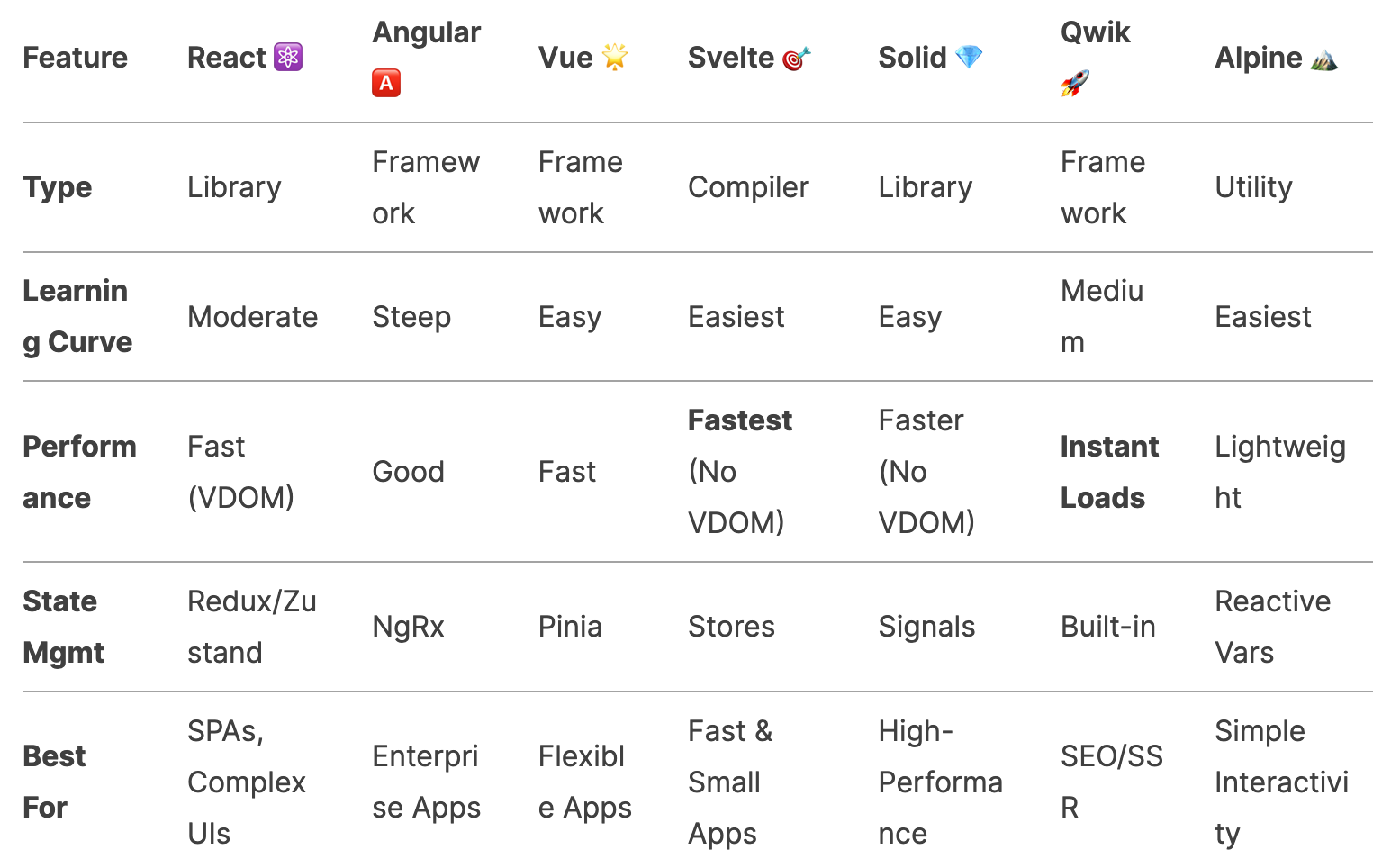
🎯 Which One Should You Choose?
- Building a large-scale app? → Angular 🅰️
- Need flexibility & ease? → Vue 🌟
- Want top performance? → Svelte / Solid 🎯💎
- Instant-loading websites? → Qwik 🚀
- Just need lightweight interactivity? → Alpine 🏔️
- Sticking with the ecosystem leader? → React ⚛️
💡 Final Thoughts
The best framework depends on your project needs!
- React dominates the market.
- Angular is great for structured teams.
- Vue is the easiest to learn.
- Svelte/Solid/Qwik are the future of performance.
- Alpine is perfect for sprinkling JS on static sites.
Which one is your favorite? Let’s discuss in the comments! 👇
#JavaScript #WebDev #React #Angular #Vue #Svelte #SolidJS #Qwik #AlpineJS #Frontend #Programming


Comments
Post a Comment