⚛️ ReactJS Models & Schema Setup
⚛️ ReactJS Models & Schema Setup
🏗️ Building Scalable, Maintainable Frontend Architecture (Like a Pro!)
React is not just about components — real-world React apps need structured data models, schemas, and predictable architecture to scale smoothly 🚀
In this blog, you’ll learn how to design Models & Schemas in React, which libraries to use, and best architectural practices with practical examples.
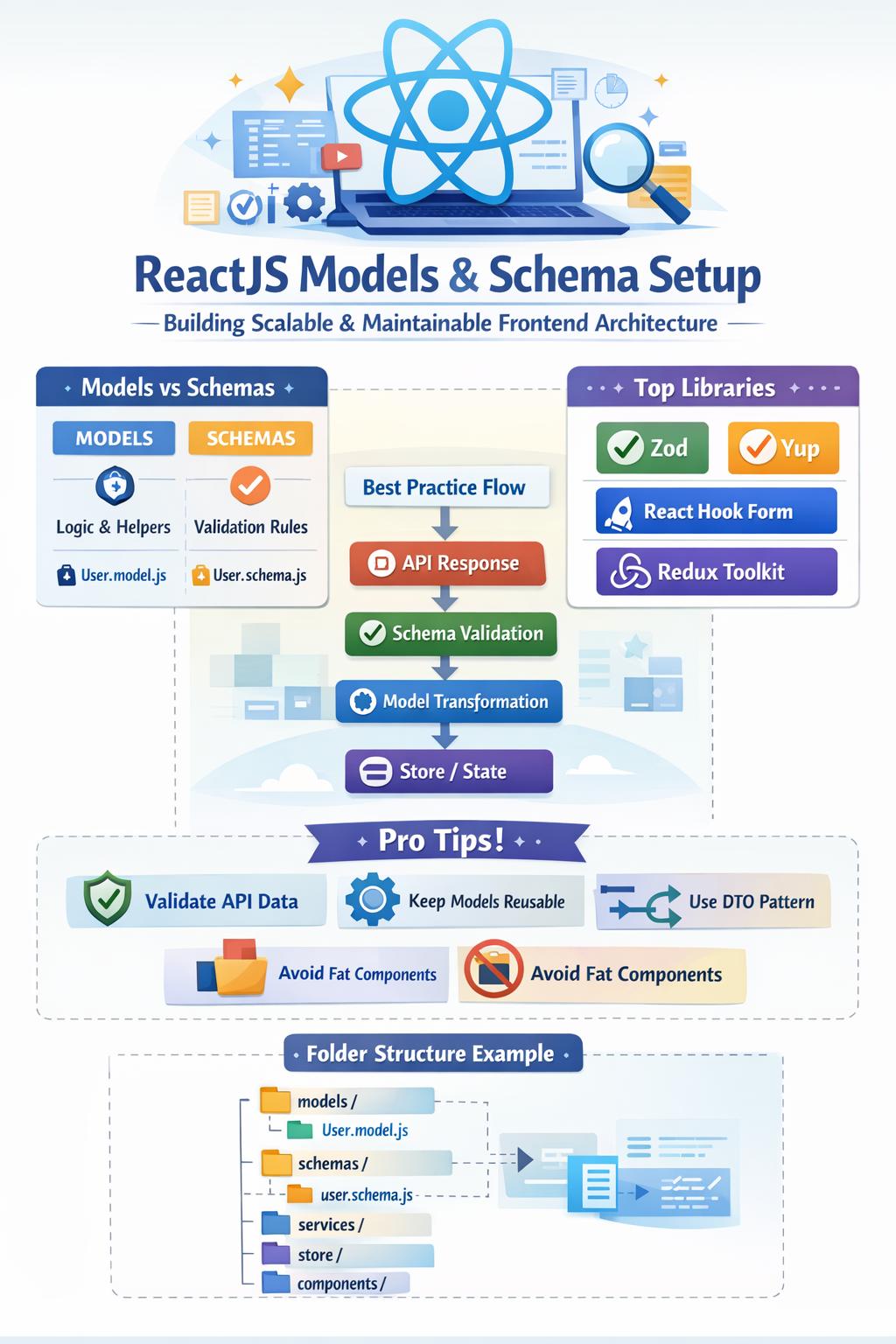
🔥 Why Models & Schema Matter in React?
Without proper models:
❌ Props become messy
❌ API data handling gets fragile
❌ Bugs increase with scale
❌ Refactoring becomes painful
With models & schemas:
✅ Predictable data flow
✅ Type safety & validation
✅ Easy API integration
✅ Scalable frontend architecture
🧠 Core Principles of React Data Modeling
1️⃣ Single Source of Truth
Keep your data in one place (state/store).
// Good
const user = { id: 1, name: "Raj", email: "raj@gmail.com" };
❌ Avoid duplicating state across components.
2️⃣ Shape Your Data Before Using It
Raw API responses are messy — normalize them.
const normalizeUser = (apiUser) => ({
  id: apiUser.id,
  name: apiUser.full_name,
  email: apiUser.email_address
});
3️⃣ UI ≠ Data Logic
React components should render, not transform data.
👉 Data transformation belongs to models, services, or schemas.
📐 What Is a Model in React?
A Model defines:
- Data structure
- Default values
- Business rules
- Helpers & transformers
🧩 Example: User Model
export class User {
  constructor({ id, name, email }) {
    this.id = id;
    this.name = name;
    this.email = email;
  }

  isAdmin() {
    return this.email.endsWith("@admin.com");
  }
}
📌 Models make your data self-explanatory and reusable.
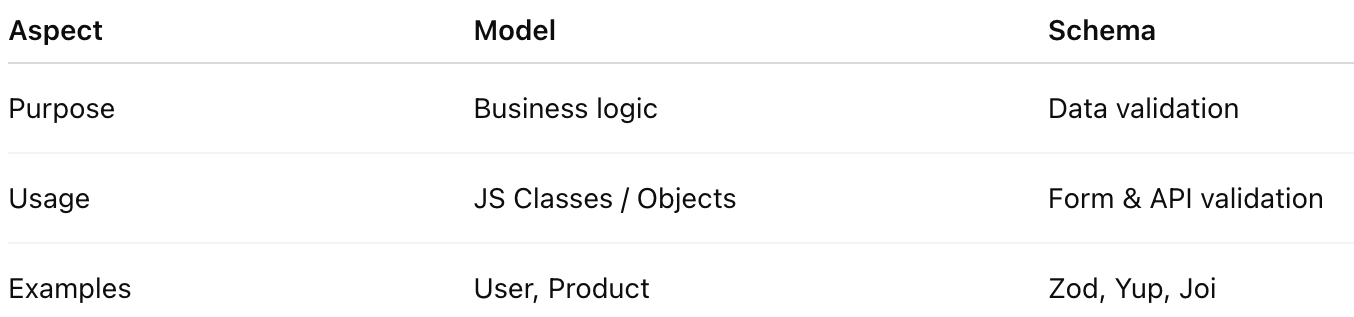
🧬 Schema vs Model (Important Difference!)
🧰 Popular Libraries for Models & Schemas
🟢 1. Zod — Schema Validation King 👑
✔ Type-safe
✔ Runtime validation
✔ Works perfectly with TypeScript
Example: User Schema with Zod
import { z } from "zod";

export const UserSchema = z.object({
  id: z.number(),
  name: z.string(),
  email: z.string().email(),
});
Validate API data:
UserSchema.parse(apiResponse);🔥 Prevents invalid data before it breaks UI
🟡 2. Yup — Form Validation Favorite ✍️
Best with:
- Formik
- React Hook Form
import * as Yup from "yup";

export const UserSchema = Yup.object({
  name: Yup.string().required(),
  email: Yup.string().email().required(),
});
🔵 3. React Hook Form — Schema Friendly Forms 🚀
useForm({
  resolver: zodResolver(UserSchema),
});
✔ Fast
✔ Minimal re-renders
✔ Schema-based validation
🟣 4. Redux Toolkit — Store + Models 🏪
const userSlice = createSlice({
  name: "user",
  initialState: {},
  reducers: {
    setUser: (state, action) => action.payload,
  },
});
📌 Combine with models for clean state management
🏗️ Recommended React Architecture for Models
src/
 ├── models/
 │   ├── User.model.js
 │   ├── Product.model.js
 ├── schemas/
 │   ├── user.schema.js
 │   ├── product.schema.js
 ├── services/
 │   ├── user.service.js
 ├── store/
 ├── components/
🔥 Separation = Maintainability
🔄 Real-World Flow (Best Practice)
API Response
   ↓
Schema Validation (Zod/Yup)
   ↓
Model Transformation
   ↓
Store / State
   ↓
React Component
This flow avoids runtime crashes and data chaos 😎
🧠 Advanced Tips for Scalable Architecture
✅ 1. Never Trust Backend Data
Always validate API responses.
✅ 2. Keep Models Framework-Agnostic
Your models should not depend on React.
✅ 3. Avoid Fat Components
If a component has:
- data parsing
- condition checks
- business logic
➡ Move it to models or services
✅ 4. Use DTO Pattern
Transform API → UI format.
const UserDTO = (apiUser) => ({
  id: apiUser.id,
  name: apiUser.full_name,
});
✅ 5. Prefer Composition Over Inheritance
Small reusable models > Big rigid models
🚫 Common Mistakes to Avoid
❌ Using raw API data directly
❌ Mixing validation logic inside components
❌ Storing unvalidated data in Redux
❌ No schema for forms
❌ Overusing Redux for local UI state
🚀 Final Thoughts
React apps fail or scale based on how well data is handled.
📌 Models give structure
📌 Schemas give safety
📌 Architecture gives longevity
If you master this combo, your React apps will feel enterprise-ready 💎


Comments
Post a Comment