⚖️ Load Balancing Demystified: The Secret Weapon Behind High-Performance Systems 🚀
⚖️ Load Balancing Demystified: The Secret Weapon Behind High-Performance Systems 🚀
Imagine your Rails app suddenly goes viral 🔥
Thousands of users hit your server at the same time…
👉 Without Load Balancing, your server crashes.
👉 With Load Balancing, traffic is smoothly distributed, performance stays stable, and users stay happy 😎
In this blog, we’ll explore:
- ✅ What Load Balancing is
- ✅ How it works
- ✅ Important terminologies
- ✅ Algorithms & techniques
- ✅ Optimization strategies
- ✅ Why it’s critical in modern architecture

📌 What is Load Balancing?
Load Balancing is the process of distributing incoming network traffic across multiple servers to ensure:
- High availability
- Reliability
- Scalability
- Performance optimization
Instead of sending all requests to one server, traffic is distributed intelligently across many.
🧠 How Load Balancing Works (Step-by-Step)
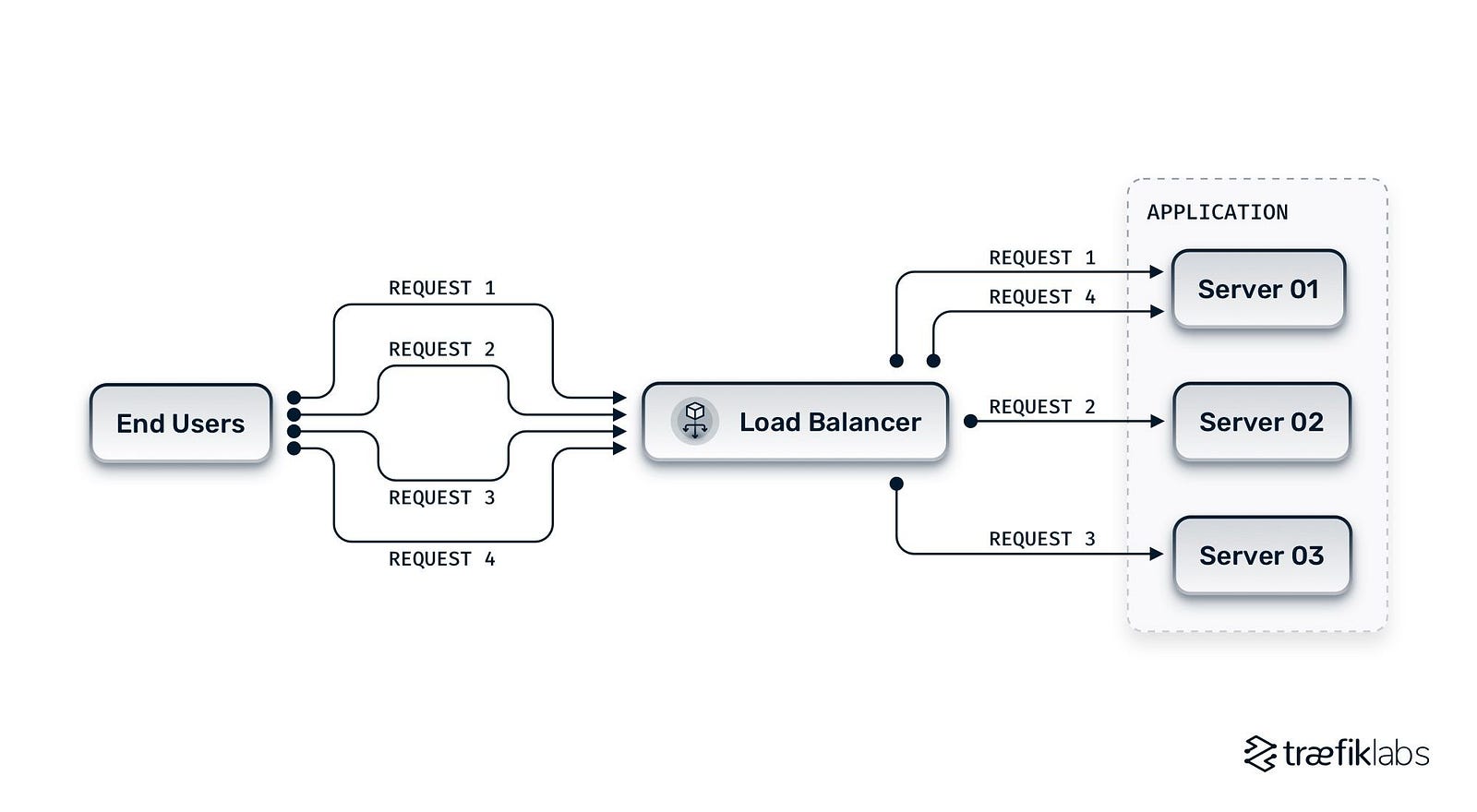
Step 1: Client Sends Request
A user sends a request to your application (e.g., www.example.com).
Step 2: Request Hits Load Balancer
Instead of going directly to a server, it first reaches the Load Balancer.
Step 3: Load Balancer Chooses Server
Based on an algorithm (Round Robin, Least Connections, etc.), it selects the best backend server.
Step 4: Response Returned
The selected server processes the request and sends the response back through the load balancer to the client.
Simple. Powerful. Scalable. 💪
🏗 Types of Load Balancers
1️⃣ Hardware Load Balancer
- Dedicated physical device
- Expensive but powerful
- Used in enterprise data centers
2️⃣ Software Load Balancer
Runs on servers or cloud environments.
Examples:
- Nginx
- HAProxy
- Apache HTTP Server
3️⃣ Cloud Load Balancer
Managed by cloud providers.
Examples:
- AWS Elastic Load Balancer
- Google Cloud Load Balancing
- Azure Load Balancer
⚙️ Core Load Balancing Algorithms
🔄 1. Round Robin
Requests are distributed sequentially:
Server1 → Server2 → Server3 → repeat
✔ Simple
❌ Doesn’t consider server load
🧮 2. Least Connections
Traffic goes to the server with the least active connections.
✔ Smart distribution
✔ Better for dynamic traffic
⚡ 3. IP Hash
Client IP determines which server handles the request.
✔ Maintains session consistency
✔ Good for session-based apps
🧠 4. Weighted Round Robin
Servers with higher capacity get more traffic.
Example:
- Server A (weight 3)
- Server B (weight 1)
Server A receives 3x more traffic.
📚 Important Terminologies
🧱 Backend Server
Actual servers processing application logic.
🌐 Frontend (Load Balancer)
Entry point that distributes traffic.
💓 Health Check
Load balancer periodically checks if servers are alive.
If unhealthy → removed from rotation.
🔁 Failover
If one server fails, traffic shifts automatically to others.
📦 Sticky Sessions (Session Persistence)
Ensures a user continues interacting with the same server.
🔐 SSL Termination
Load balancer handles HTTPS encryption instead of backend servers.
Improves backend performance significantly.
🧩 Layer 4 vs Layer 7 Load Balancing
🔵 Layer 4 (Transport Layer)
- Works at TCP/UDP level
- Faster
- Based on IP + Port
🟢 Layer 7 (Application Layer)
- Works at HTTP/HTTPS level
- Can route based on:
URL path
Headers
Cookies
Hostnames
Example:
/api/*→ API servers/images/*→ Static servers
More intelligent routing 🎯
🚀 Why Load Balancing is Important
1️⃣ High Availability
No single point of failure.
2️⃣ Scalability
Easily add more servers during traffic spikes.
3️⃣ Better Performance
Traffic evenly distributed = faster responses.
4️⃣ Fault Tolerance
Failed servers automatically removed.
5️⃣ Zero Downtime Deployments
Deploy on one server while others handle traffic.
🛠 Optimization Strategies for Load Balancing
Now let’s talk like pros 🔥
🧠 1. Use Health Checks Smartly
- Short intervals for critical apps
- Avoid too frequent checks (extra overhead)
📊 2. Enable Auto Scaling
Combine Load Balancer with Auto Scaling Groups (Cloud).
Example:
- Traffic spike detected
- New servers automatically launched
- Load balancer registers them
🗄 3. Avoid Sticky Sessions (When Possible)
Instead:
- Use Redis or centralized session storage
- Keep servers stateless
This improves scalability massively.
🔐 4. Use SSL Offloading
Let load balancer handle encryption.
Backend servers focus on business logic.
⚡ 5. Enable Caching
Integrate with:
- CDN
- Reverse proxy caching (like Nginx)
Less backend load = better performance.
🧪 6. Monitor & Observe
Track:
- Request latency
- Error rate
- CPU usage
- Memory usage
- Throughput
Use observability tools to optimize distribution.
🏗 Example: Load Balancing in a Rails App
Suppose you deploy:
- 3 Rails servers
- 1 Nginx load balancer
- 1 Redis instance
Flow:
User → Nginx → Rails Server (balanced) → Redis (session/cache)
Now:
- Add 2 more servers?
- No problem.
- Load balancer auto-distributes traffic.
Scalable architecture 💎
🧠 Advanced Concepts
🔁 Blue-Green Deployment
Two identical environments.
Switch traffic instantly via load balancer.
🌊 Canary Deployment
Route small % of traffic to new version.
Monitor → Gradually increase.
🏁 Final Thoughts
Load Balancing is not just about distributing traffic…
It is about:
- 💡 System design intelligence
- ⚡ Performance engineering
- 🛡 Reliability
- 📈 Scalability
If you’re building:
- SaaS
- Microservices
- APIs
- E-commerce platforms
Load balancing is non-negotiable.
💬 Powerful Quote
“Design systems for failure, not perfection.”
Load balancing is how we embrace that philosophy.


Comments
Post a Comment