🚀 AWS EC2 Mastery: The Ultimate Guide to Cloud Computing Power 💻⚡
🚀 AWS EC2 Mastery: The Ultimate Guide to Cloud Computing Power 💻⚡
Want to run your applications on powerful servers without buying hardware? 🤔
Welcome to AWS EC2 (Elastic Compute Cloud) — your gateway to scalable, flexible, and cost-efficient cloud computing! ☁️🔥
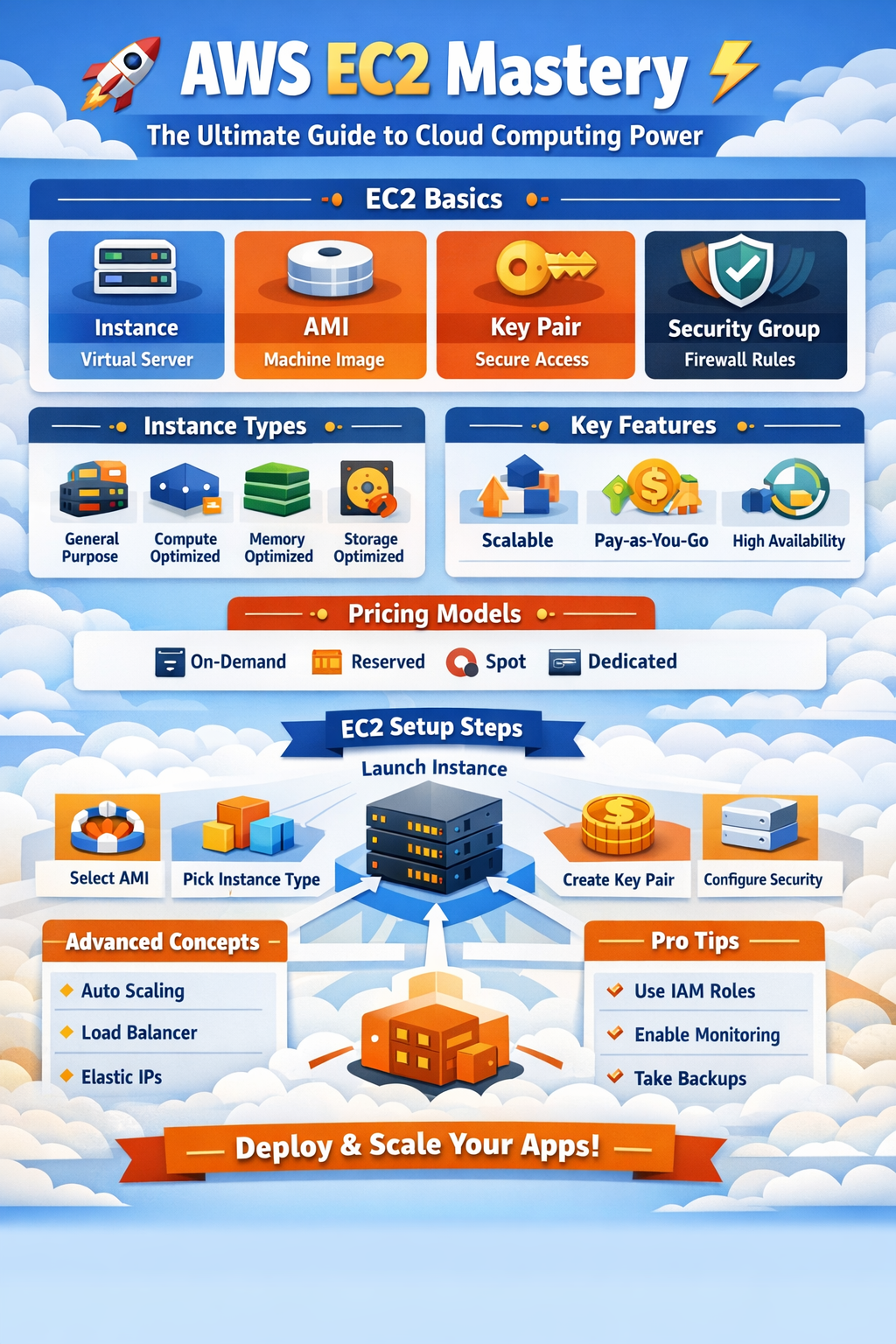
In this deep-dive guide, we’ll cover everything — from basics to advanced concepts, real-world usage, and step-by-step setup. Let’s go! 🚀
🌟 What is AWS EC2?
Amazon EC2 (Elastic Compute Cloud) is a web service that provides resizable virtual servers (instances) in the cloud.
👉 In simple terms:
EC2 = Rent a computer in the cloud and control it like your own machine 💻
🧠 Core Concepts & Terminologies
1️⃣ Instance 🖥️
A virtual server running in AWS.
- Like your personal computer on the internet 🌐
- Can run Linux, Windows, or custom OS
2️⃣ AMI (Amazon Machine Image) 📀
A template used to launch instances.
Includes:
- OS (Ubuntu, Amazon Linux, Windows)
- Pre-installed software
- Configuration
👉 Example:
- Ubuntu + Nginx + Node.js = Custom AMI
3️⃣ Instance Types ⚙️
Different types based on workload:
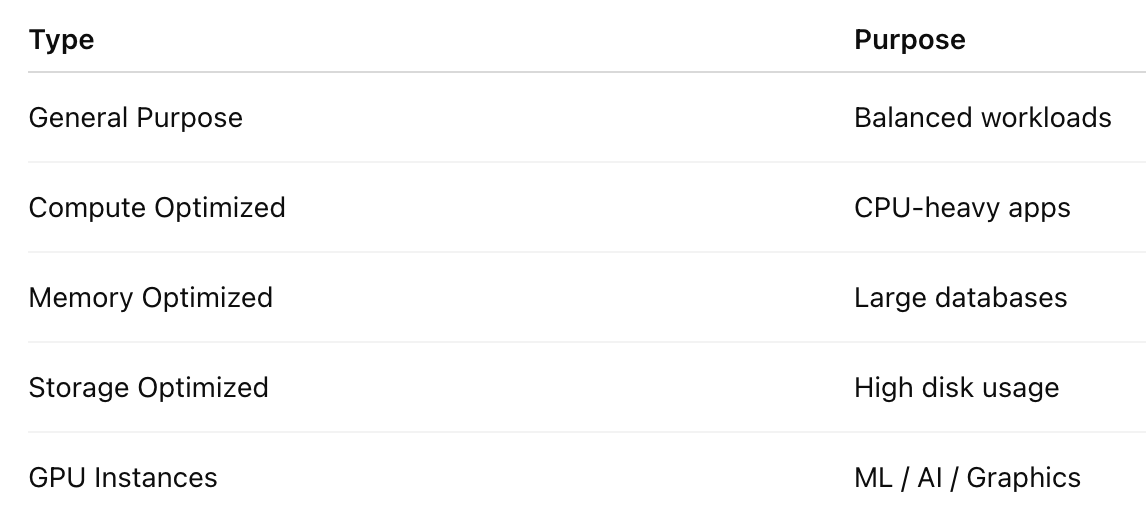
👉 Example:t2.micro = Free tier, lightweight apps 🆓
4️⃣ Key Pair 🔐
Used for secure login into EC2.
- Public key → stored in AWS
- Private key → downloaded by you
👉 Used with SSH:
ssh -i key.pem ubuntu@your-ip5️⃣ Security Groups 🛡️
Acts like a firewall for your instance.
Controls:
- Incoming traffic (inbound rules)
- Outgoing traffic (outbound rules)
👉 Example:
- Allow port 22 → SSH
- Allow port 80 → HTTP
6️⃣ Elastic IP 🌍
A static public IP address
- Doesn’t change even if instance restarts
- Useful for production apps
7️⃣ EBS (Elastic Block Store) 💾
Persistent storage attached to EC2.
- Like a hard disk
- Data remains even if instance stops
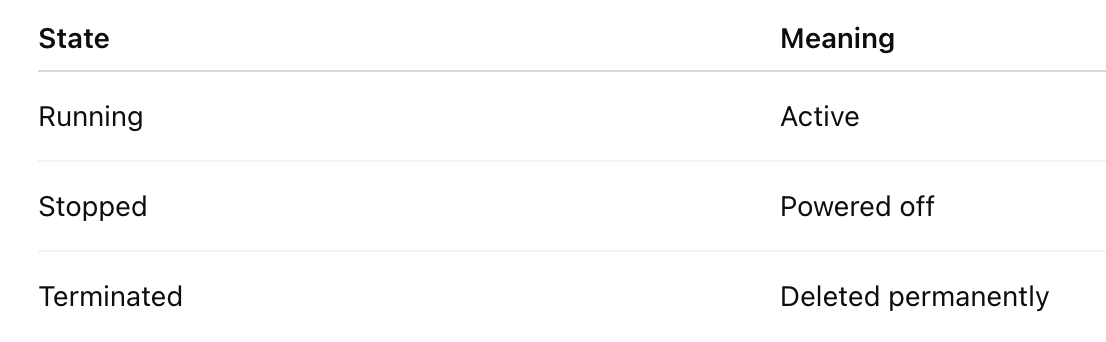
8️⃣ Instance States 🔄
⚡ Key Features of EC2
🔹 Scalability
Scale up/down anytime:
- Vertical scaling (bigger instance)
- Horizontal scaling (more instances)
🔹 Pay-as-you-go 💰
- No upfront cost
- Pay only for usage
🔹 High Availability 🌐
- Deploy across multiple AZs (Availability Zones)
🔹 Elasticity
Auto scale based on demand 📈
🔹 Customizable
Choose:
- OS
- CPU
- RAM
- Storage
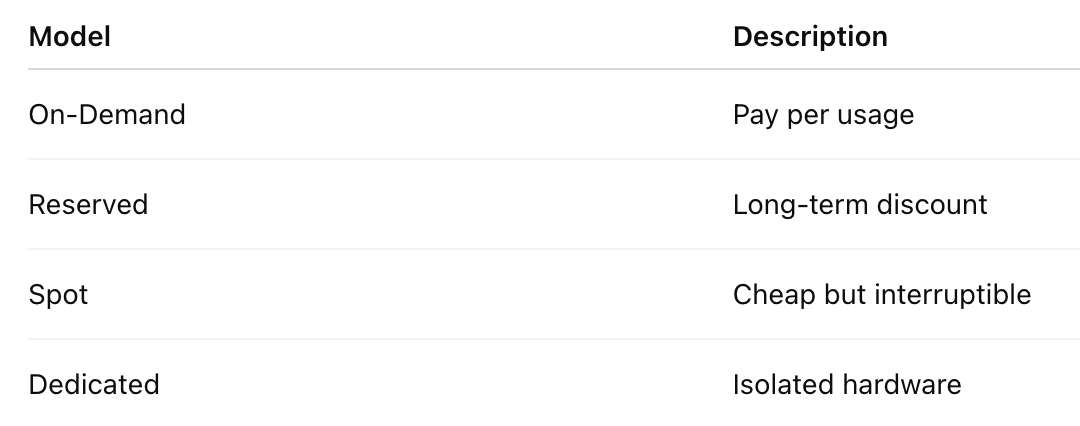
🔥 EC2 Pricing Models
🛠️ Step-by-Step EC2 Setup Guide
🚀 Step 1: Login to AWS Console
👉 Go to AWS → EC2 Dashboard
🧩 Step 2: Launch Instance
- Click Launch Instance
- Choose AMI (e.g., Ubuntu)
⚙️ Step 3: Choose Instance Type
👉 Example:
t2.micro(Free tier)
🔐 Step 4: Create Key Pair
- Download
.pemfile - Keep it safe!
🛡️ Step 5: Configure Security Group
Add rules:
- SSH (22)
- HTTP (80)
- HTTPS (443)
💾 Step 6: Add Storage
- Default: 8GB (can increase)
🚀 Step 7: Launch Instance
🎉 Your EC2 is live!
🔗 Connect to EC2 (SSH)
chmod 400 key.pem
ssh -i key.pem ubuntu@<public-ip>
🌐 Deploy a Sample App (Example)
Let’s deploy a Node.js app 👇
Step 1: Install Node
sudo apt update
sudo apt install nodejs npm -y
Step 2: Create App
nano app.jsconst http = require('http');
http.createServer((req, res) => {
res.end("Hello from EC2 🚀");
}).listen(3000);Step 3: Run App
node app.jsStep 4: Open Port 3000 in Security Group
👉 Visit:
http://your-ip:3000🎉 Boom! Your app is live!
🔥 Advanced EC2 Concepts
⚡ Auto Scaling Group (ASG)
Automatically:
- Adds instances during high traffic 📈
- Removes during low usage 📉
⚖️ Load Balancer (ELB)
Distributes traffic across instances:
👉 Benefits:
- No downtime
- Better performance
📦 Launch Templates
Reusable configs for launching instances
🧠 Placement Groups
Control how instances are placed:
- Cluster → low latency
- Spread → fault tolerance
🚨 Best Practices
✔️ Use IAM roles instead of storing credentials
✔️ Enable monitoring (CloudWatch) 📊
✔️ Regularly take snapshots (backup)
✔️ Use Auto Scaling + Load Balancer
✔️ Restrict security group rules 🔐
❌ Common Mistakes to Avoid
❌ Leaving ports open to public
❌ Not using key pair securely
❌ Forgetting to stop unused instances 💸
❌ Not setting alarms for billing
🧠 Real-Life Use Cases
- 🌐 Hosting websites/apps
- 🤖 Machine Learning workloads
- 📊 Data processing
- 🎮 Game servers
- 🔁 CI/CD pipelines
🏁 Final Thoughts
AWS EC2 is like having infinite servers in your pocket 💼⚡
Mastering EC2 means:
✅ You can deploy anything
✅ Scale globally
✅ Build production-grade systems
💡 Pro Tip
👉 Combine EC2 with:
- S3 (storage)
- RDS (database)
- CloudFront (CDN)
💥 That’s how real-world scalable apps are built!
🚀 Ready to Launch?
Start with a small EC2 instance today and build your first cloud app 🌐🔥
Because in tech…
“The best way to learn cloud is to deploy in cloud.” ☁️💡


Comments
Post a Comment