🚀 Mastering JSON: The Universal Language of Data 🌐 (Complete Deep Dive Guide)
🚀 Mastering JSON: The Universal Language of Data 🌐 (Complete Deep Dive Guide)
In today’s digital world, data is everything — and how we structure, store, and exchange that data defines how powerful our systems can be.
Enter JSON (JavaScript Object Notation) — a lightweight, flexible, and human-readable format that has become the backbone of modern applications.
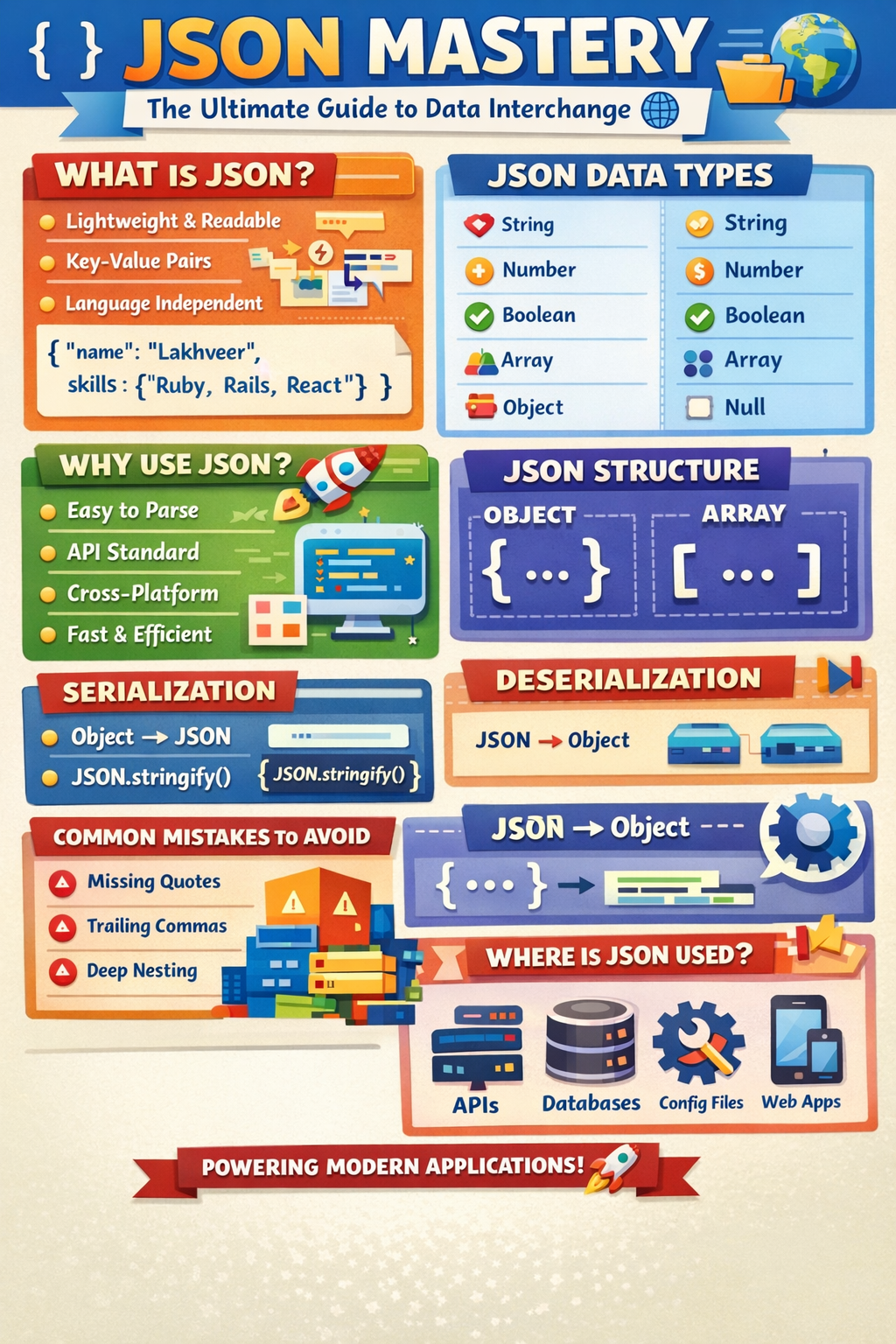
Whether you’re a developer, data analyst, or tech enthusiast — this guide will take you from zero to JSON mastery 💡
📌 What is JSON?
JSON (JavaScript Object Notation) is a text-based data interchange format used to store and transmit structured data.
👉 It is:
- Lightweight 🪶
- Easy to read 👀
- Easy to write ✍️
- Language-independent 🌍
📦 Example:
{
  "name": "Lakhveer",
  "role": "Developer",
  "skills": ["Ruby", "Rails", "React"]
}
🧠 Why JSON Was Created?
Before JSON, developers used:
- XML ❌ (too verbose)
- Custom formats ❌ (hard to standardize)
JSON solved these problems by being:
- Simple
- Readable
- Efficient
🔥 Core Concepts of JSON
1. 🧱 JSON Structure
JSON is built using:
- Objects →
{ } - Arrays →
[ ]
2. 🔑 Key-Value Pairs
Data in JSON is stored as:
"key": "value"Example:
{
  "city": "Indore"
}
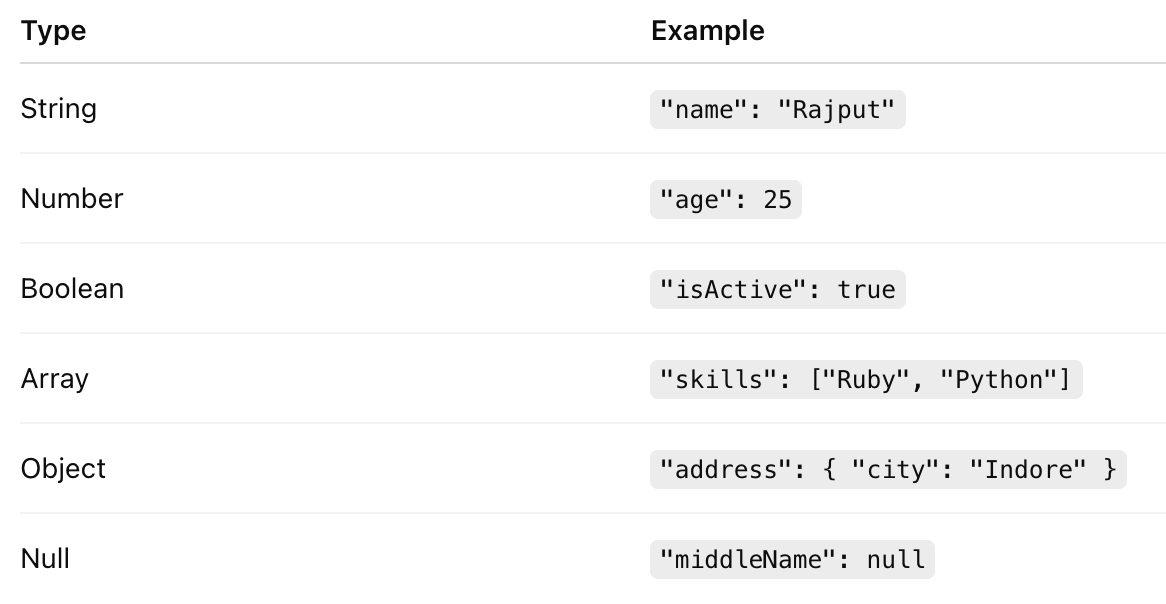
3. 📚 Data Types in JSON
JSON supports the following data types:
4. 🧩 Nested JSON
JSON allows nesting (object inside object or array):
{
  "user": {
    "name": "Lakhveer",
    "skills": [
      { "name": "Ruby", "level": "Advanced" },
      { "name": "React", "level": "Intermediate" }
    ]
  }
}
✍️ JSON Formatting Rules (VERY IMPORTANT ⚠️)
Follow these strictly:
✅ 1. Keys must be strings
"key": "value"❌ Invalid:
key: "value"✅ 2. Double quotes only
"name": "Lakhveer"❌ Invalid:
'name': 'Lakhveer'✅ 3. No trailing commas
{
  "name": "Lakhveer"
}
✅ 4. Proper nesting
{}for objects[]for arrays
✅ 5. Case-sensitive keys
"name" ≠ "Name"⚙️ JSON vs JavaScript Object

🔄 Serialization & Deserialization
📤 Serialization (Object → JSON)
Convert data into JSON format
const user = { name: "Lakhveer" };
JSON.stringify(user);
📥 Deserialization (JSON → Object)
Convert JSON into usable object
const json = '{"name":"Lakhveer"}';
JSON.parse(json);
🌐 Where JSON is Used?
1. 🔗 APIs (Most Important)
Every modern API uses JSON
Example response:
{
  "status": 200,
  "data": {
    "user": "Lakhveer"
  }
}
2. 🗄️ Databases
- NoSQL DBs like MongoDB use JSON-like format (BSON)
3. ⚙️ Configuration Files
Example:
{
  "port": 3000,
  "env": "production"
}
4. 📱 Mobile & Web Apps
Frontend ↔ Backend communication
5. ☁️ Cloud & DevOps
- Kubernetes configs
- AWS responses
🚀 Why Should You Use JSON?
1. ⚡ Lightweight & Fast
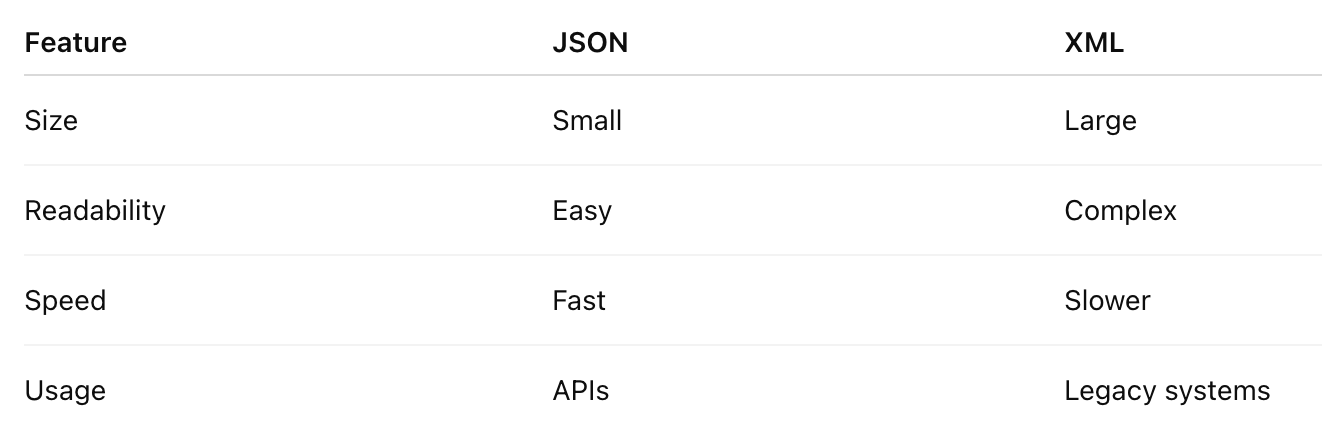
Compared to XML, JSON is much smaller → faster transmission
2. 👨💻 Developer Friendly
Easy to read & write → improves productivity
3. 🌍 Language Independent
Works with:
- Ruby 🟥
- Python 🐍
- JavaScript ⚡
- Java ☕
- Go 🐹
4. 🔌 Perfect for APIs
Standard format for REST APIs
5. 📦 Easy Parsing
Built-in support in almost all languages
⚠️ Common Mistakes to Avoid
❌ Missing quotes
❌ Trailing commas
❌ Mixing data types incorrectly
❌ Using comments (not allowed)
❌ Deep nesting (hard to maintain)
🧠 Advanced JSON Concepts
1. JSON Schema 🧾
Defines structure of JSON
{
  "type": "object",
  "properties": {
    "name": { "type": "string" }
  }
}
2. JSON Web Token (JWT) 🔐
Used for authentication
Structure:
Header.Payload.Signature3. JSON vs XML ⚔️
💡 Real-World Example (API Flow)
Request:
GET /users/1Response:
{
  "id": 1,
  "name": "Lakhveer",
  "email": "example@gmail.com"
}
👉 Backend sends JSON → Frontend displays UI
🏆 Best Practices
✔ Keep JSON simple
✔ Avoid deep nesting
✔ Use meaningful keys
✔ Validate with JSON schema
✔ Minify for production
🎯 Final Thoughts
JSON is not just a format — it’s the language of modern applications 💬
From APIs to cloud, from mobile apps to databases — JSON is everywhere.
👉 If you master JSON:
- You understand APIs better
- You build scalable systems
- You debug faster
- You communicate data efficiently
🔥 Quick Recap
✅ Lightweight data format
✅ Easy to read/write
✅ Used in APIs, DBs, configs
✅ Supports multiple data types
✅ Backbone of modern web
💬 Pro Tip
If you’re working with Ruby on Rails (your expertise 💎):
👉 Use:
render json: { message: "Success" }👉 Rails + JSON = 🔥 Powerful APIs


Comments
Post a Comment