⚛️ ReactJS Latest Version (React 19.2) — The Future of Frontend Development is Here 🚀
⚛️ ReactJS Latest Version (React 19.2) — The Future of Frontend Development is Here 🚀
React has once again changed the game! 🎯
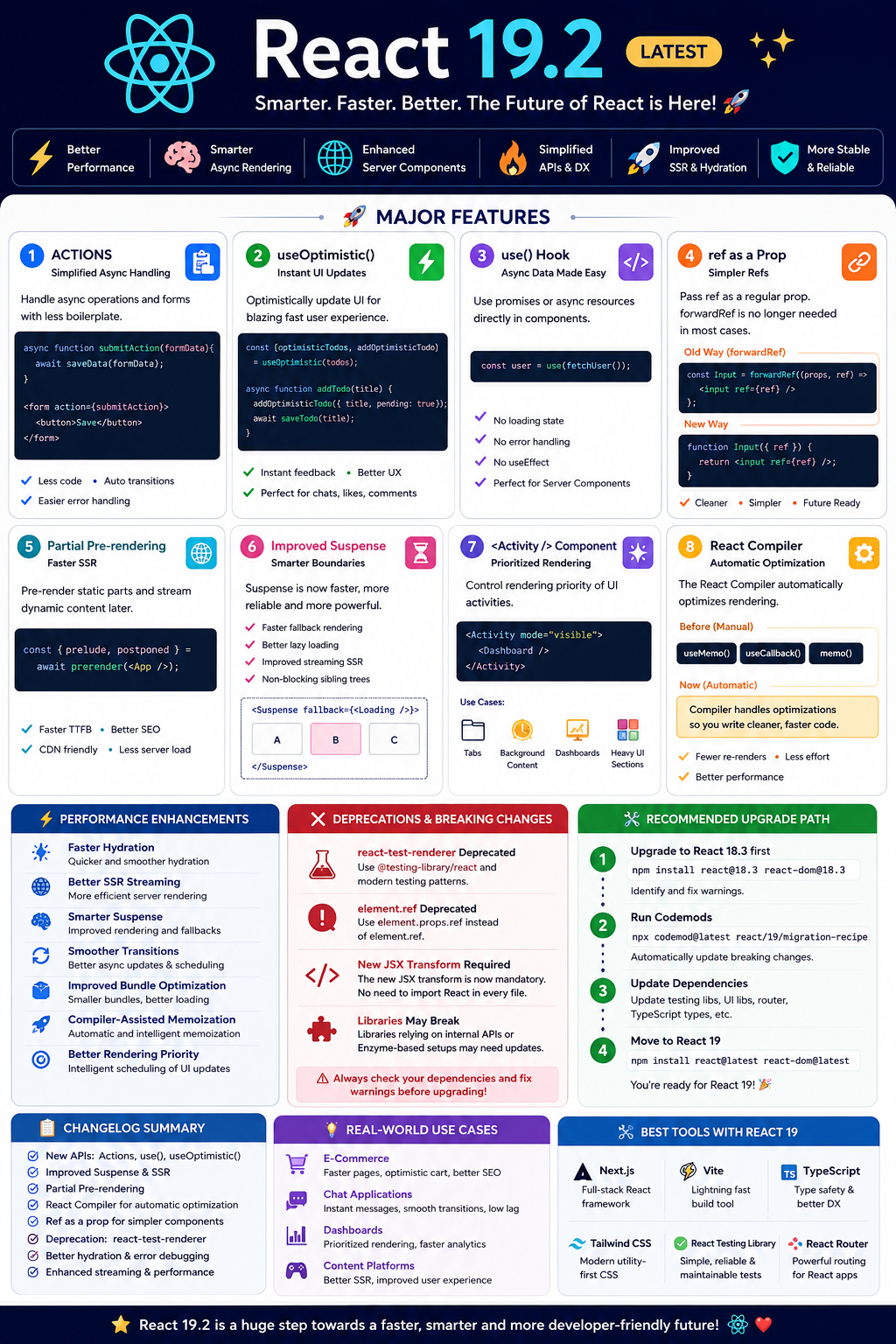
The latest stable release — React 19.2 — introduces smarter rendering, improved async handling, better developer experience, server-side optimizations, and modern APIs that reduce boilerplate drastically.
Whether you’re a beginner or a senior developer, this version brings huge productivity and performance improvements. 💡
🌟 What’s New in React 19.2?
The latest React ecosystem focuses on:
- ⚡ Better performance
- 🧠 Smarter async rendering
- 🌐 Enhanced Server Components support
- 🔥 Simplified forms & actions
- 🚀 Reduced manual optimization
- 🛠️ Cleaner APIs
- 📦 Improved SSR & hydration
According to the official React release notes, React 19.2 introduces features like <Activity />, useEffectEvent, Partial Pre-rendering, improved Suspense behavior, and better SSR support.
🚀 Major Features in React 19
1️⃣ Actions — Simplified Async Handling ⚡
Handling async operations is now much cleaner.
❌ Earlier Approach
const [loading, setLoading] = useState(false);

async function handleSubmit() {
  setLoading(true);
  await saveData();
  setLoading(false);
}
✅ React 19 Actions
async function submitAction(formData) {
  await saveData(formData);
}

<form action={submitAction}>
  <button>Save</button>
</form>
🎯 Benefits
- Less boilerplate
- Cleaner forms
- Automatic transitions
- Easier error handling
React now treats async updates more intelligently.
2️⃣ useOptimistic() — Instant UI Updates 🚀
This hook makes applications feel lightning-fast.
Example
const [optimisticTodos, addOptimisticTodo] =
  useOptimistic(todos);

async function addTodo(title) {
  addOptimisticTodo({
    title,
    pending: true
  });
  await saveTodo(title);
}
💡 Why It’s Amazing
- Instant feedback to users
- Better UX
- Great for chats, comments, likes, etc.
3️⃣ use() Hook — Async Data Made Easy 🔥
One of the most revolutionary additions.
Example
const user = use(fetchUser());Instead of manually managing:
- loading
- error
- state
- effects
React handles async resources directly inside components.
🎯 Benefits
- Cleaner code
- Less state management
- Easier data fetching
- Perfect for Server Components
4️⃣ ref as a Prop ✨
You no longer need forwardRef() in many cases.
Old Way
const Input = forwardRef((props, ref) => {
  return <input ref={ref} />;
});
New Way
function Input({ ref }) {
  return <input ref={ref} />;
}
🎯 Advantages
- Cleaner components
- Less wrapper complexity
- Simpler reusable UI components
React plans to eventually deprecate forwardRef.
5️⃣ Partial Pre-rendering 🌐
Massive improvement for SSR applications.
React can now:
- Pre-render static content
- Stream dynamic content later
- Improve TTFB (Time To First Byte)
Example Concept
const { prelude, postponed } =
  await prerender(<App />);
🚀 Benefits
- Faster page loads
- Better SEO
- Reduced server pressure
- CDN-friendly rendering
6️⃣ Improved Suspense 🚦
Suspense boundaries are smarter now.
Enhancements
- Faster fallback rendering
- Better lazy loading
- Improved streaming SSR
- More responsive UI transitions
React immediately renders fallbacks without blocking sibling trees.
7️⃣ <Activity /> Component 🧠
New experimental-style architecture control.
<Activity mode="visible">
  <Dashboard />
</Activity>
🎯 Purpose
Allows React to prioritize rendering activities intelligently.
Useful for:
- Tabs
- Background content
- Dashboards
- Heavy UI sections
8️⃣ React Compiler 🤖
The React Compiler automatically optimizes rendering.
Before
Developers manually used:
useMemo()
useCallback()
memo()
Now
React Compiler handles many optimizations automatically.
🚀 Benefits
- Cleaner code
- Fewer performance bugs
- Reduced re-renders
- Less optimization fatigue
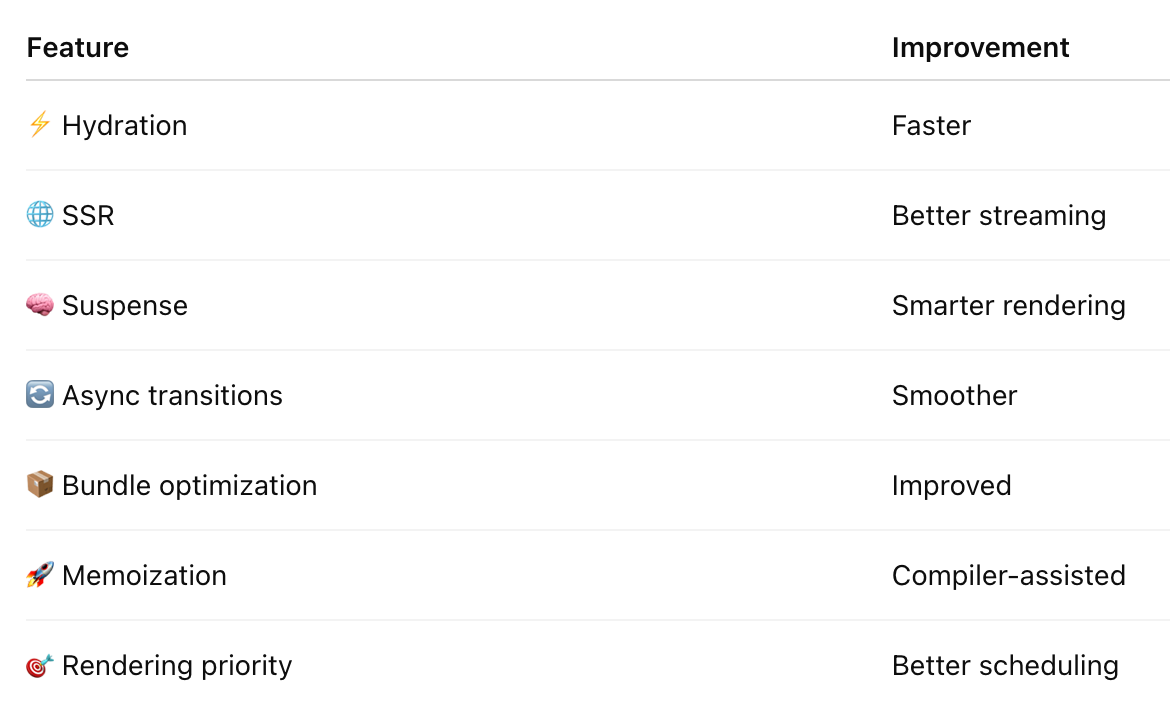
🔥 Performance Enhancements
React 19 dramatically improves performance in:
❌ Deprecated Features & Breaking Changes
⚠️ react-test-renderer Deprecated
React recommends:
@testing-library/react- Modern testing patterns
instead of:
react-test-renderer⚠️ element.ref Deprecated
Use:
element.props.refinstead of:
element.ref⚠️ New JSX Transform Required
Modern JSX transform is now mandatory.
You no longer need:
import React from 'react';in every file.
⚠️ Libraries Depending on Internal APIs May Break
Some older libraries relying on deprecated internals may fail during upgrades.
Compatibility issues may occur with certain legacy packages and Enzyme-based testing setups.
🛠️ Recommended Upgrade Path
✅ Step 1
Upgrade to:
react@18.3first.
This helps identify warnings safely before moving to React 19.
✅ Step 2
Run codemods.
npx codemod@latest react/19/migration-recipe✅ Step 3
Update dependencies.
Especially:
- Testing libraries
- UI frameworks
- Routing packages
- TypeScript types
✅ Step 4
Move to React 19.
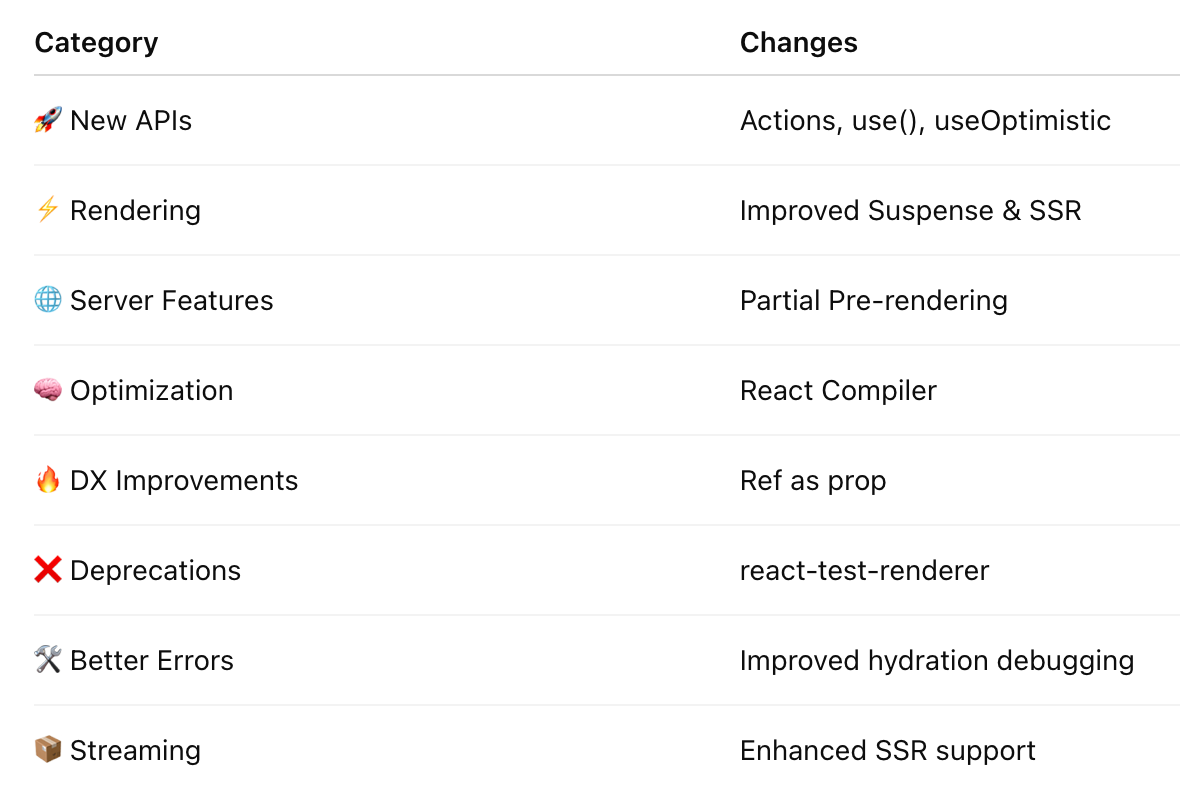
npm install react@latest react-dom@latest📋 React 19 Changelog Summary
💡 Real-World Use Cases
🛒 E-Commerce Apps
- Faster product pages
- Optimistic cart updates
- Better SEO
💬 Chat Applications
- Instant messaging UI
- Better transitions
- Reduced lag
📊 Dashboards
- Activity prioritization
- Improved rendering scheduling
- Faster analytics loading
🎯 Why React 19 is a Game-Changer
React is moving toward:
- 🌐 Server-first architecture
- ⚡ Automatic optimization
- 🧠 Async-native UI
- 🚀 Better developer productivity
This release reduces the need for:
- manual optimization
- excessive hooks
- repetitive loading logic
- complex async handling
🧠 Pro Tips for Developers
✅ Learn Server Components
✅ Use Suspense aggressively
✅ Migrate from Enzyme
✅ Prefer modern testing libraries
✅ Adopt React Compiler gradually
✅ Use Actions for forms
✅ Use useOptimistic() for better UX
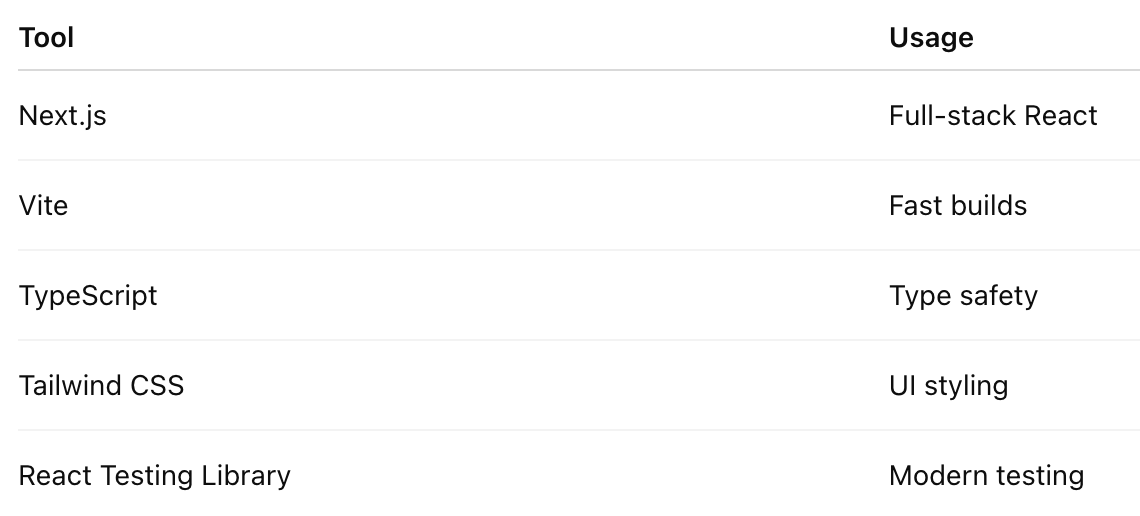
📚 Best Tools with React 19
🎉 Final Thoughts
React 19.2 is one of the most important React releases ever. 🚀
It modernizes frontend development with:
- smarter rendering
- async-first APIs
- better SSR
- simplified developer experience
- automatic optimization
If Hooks changed React in 2019…
React 19 is redefining React again for the AI + Server Components era. ⚡🔥


Comments
Post a Comment