🚀 Redux Toolkit Mastery: The Ultimate Guide to Modern State Management in React ⚡
🚀 Redux Toolkit Mastery: The Ultimate Guide to Modern State Management in React ⚡
“Good state management doesn’t make your application bigger — it makes complexity smaller.”
React applications become increasingly difficult to manage as they grow. Passing data through multiple components, handling API responses, managing loading states, and synchronizing UI updates can quickly become chaotic.
This is where Redux Toolkit (RTK) comes in.
Redux Toolkit is the official, recommended way to write Redux logic. It removes boilerplate code, improves performance, and makes state management elegant and scalable.
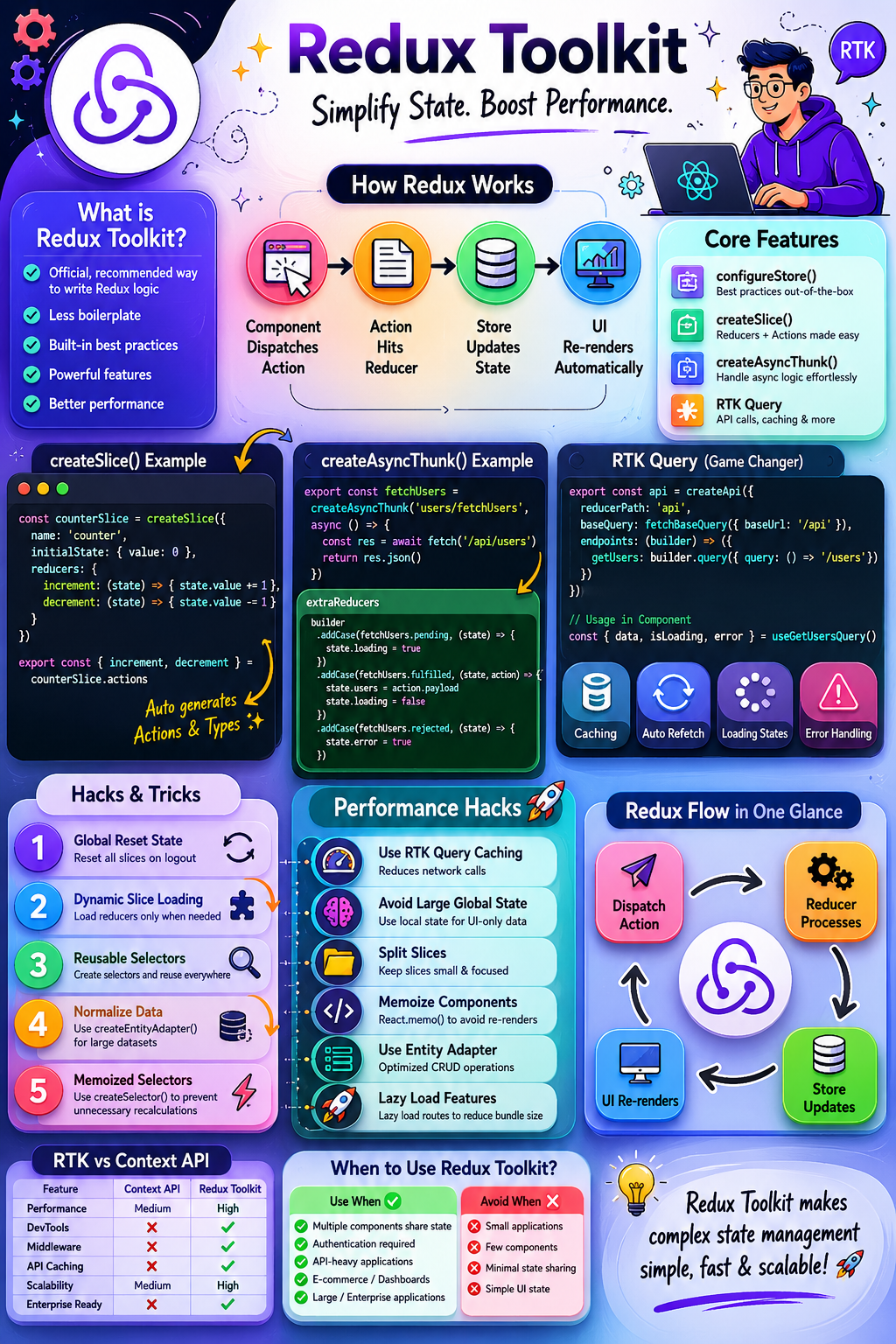
Let’s master Redux Toolkit from beginner to advanced level! 🔥
🤔 What is Redux Toolkit?
Redux Toolkit (RTK) is the official package developed by the Redux team to simplify Redux development.
Before RTK:
❌ Too much boilerplate
❌ Multiple files for actions, reducers, constants
❌ Complex configuration
❌ Difficult learning curve
With RTK:
✅ Less code
✅ Better performance
✅ Built-in best practices
✅ Simplified API handling
✅ Easier debugging
🏗️ How Redux Works Behind The Scenes
Redux follows a predictable flow:
Component
    ↓
Dispatch Action
    ↓
Reducer
    ↓
Store Updates
    ↓
UI Re-renders
Example:
User clicks “Add Product”
dispatch(addProduct(product))Reducer updates state:
state.products.push(product)Store updates:
{
  products: [...]
}
React UI re-renders automatically.
⚡ Why Redux Toolkit Was Created
Traditional Redux looked like this:
// Action
const ADD_USER = "ADD_USER";

const addUser = (user) => ({
  type: ADD_USER,
  payload: user
});
// Reducer
const reducer = (state, action) => {
  switch(action.type){
    case ADD_USER:
      return {
        ...state,
        users:[...state.users, action.payload]
      }
  }
}
Huge boilerplate 😴
Redux Toolkit simplifies everything:
const userSlice = createSlice({
  name: "users",
  initialState: [],
  reducers: {
    addUser(state, action) {
      state.push(action.payload)
    }
  }
})
Clean and beautiful ✨
🎯 Core Features of Redux Toolkit
1️⃣ configureStore()
Creates Redux Store with best practices built-in.
import { configureStore } from '@reduxjs/toolkit'

const store = configureStore({
  reducer: {
    users: userReducer
  }
})
Benefits:
✅ Redux DevTools Enabled
✅ Middleware Included
✅ Better Performance
✅ Cleaner Setup
2️⃣ createSlice()
Most important RTK feature.
It automatically creates:
- Reducers
- Actions
- Action Types
const counterSlice = createSlice({
  name: 'counter',
  initialState: {
    value: 0
  },
  reducers: {
    increment: (state) => {
      state.value += 1
    },

    decrement: (state) => {
      state.value -= 1
    }
  }
})
Generated automatically:
counterSlice.actions.increment()
counterSlice.actions.decrement()
Magic ✨
3️⃣ createAsyncThunk()
Handles API calls elegantly.
Without RTK:
loading
success
error
must be managed manually.
With RTK:
export const fetchUsers =
createAsyncThunk(
  'users/fetchUsers',
  async () => {
    const response =
    await fetch('/users')

    return response.json()
  }
)
Reducer:
extraReducers: (builder) => {
  builder
    .addCase(fetchUsers.pending,
      (state)=>{
        state.loading=true
    })

    .addCase(fetchUsers.fulfilled,
      (state,action)=>{
        state.users=action.payload
    })
    .addCase(fetchUsers.rejected,
      (state)=>{
        state.error=true
    })
}
Perfect for API integrations 🌐
🚀 Complete Project Example
Store
import { configureStore }
from '@reduxjs/toolkit'

import userReducer
from './userSlice'
export const store =
configureStore({
  reducer: {
    users: userReducer
  }
})
Slice
import {
 createSlice
} from '@reduxjs/toolkit'

const initialState = {
 users:[]
}

const userSlice =
createSlice({
 name:'users',
 initialState,
 reducers:{
  addUser:(state,action)=>{
   state.users.push(
    action.payload
   )
  }
 }
})

export const {
 addUser
}=userSlice.actions
export default userSlice.reducer
Component
const dispatch = useDispatch()

dispatch(addUser({
 id:1,
 name:"John"
}))
Read data:
const users = useSelector(
 state => state.users.users
)
Done 🎉
🔥 Immer.js Magic
Redux Toolkit uses Immer internally.
Normally:
return {
 ...state,
 count: state.count + 1
}
RTK allows:
state.count += 1Looks mutable.
Actually immutable.
Immer converts it safely behind the scenes.
Huge productivity boost ⚡
🎯 RTK Query (Game Changer)
Redux Toolkit includes RTK Query.
Think of it as:
Axios + Redux + Caching + Loading States + Error Handling
All in one.
API Setup
export const api =
createApi({
 reducerPath:'api',
 baseQuery:
 fetchBaseQuery({
  baseUrl:'/api'
 }),
 endpoints:(builder)=>({
  getUsers:
  builder.query({
   query:()=>'/users'
  })
 })
})
Usage:
const {
 data,
 error,
 isLoading
}
=
useGetUsersQuery()
No extra reducer.
No thunk.
No loading state.
No cache logic.
Everything automatic 🚀
💡 Advanced Redux Toolkit Hacks
Hack #1: Global Reset State
Logout users instantly.
const appReducer =
combineReducers({
 auth,
 users
})

const rootReducer =
(state, action) => {
 if(action.type === "LOGOUT") {
   state = undefined
 }
 return appReducer(
   state,
   action
 )
}
Perfect for authentication systems.
Hack #2: Dynamic Slice Loading
Load reducers only when needed.
Useful for:
- Large applications
- SaaS Platforms
- Admin Panels
Result:
⚡ Faster Initial Load
⚡ Reduced Bundle Size
Hack #3: Create Reusable Selectors
Bad:
const users =
state.users.users
Better:
export const
selectUsers =
(state)=>state.users.users
Usage:
const users =
useSelector(selectUsers)
Reusable everywhere.
Hack #4: Normalize Large Data
Bad:
[
 {id:1},
 {id:2},
 {id:3}
]
Better:
{
 ids:[1,2,3],

 entities:{
   1:{id:1},
   2:{id:2},
   3:{id:3}
 }
}
Use:
createEntityAdapter()Benefits:
✅ Faster Lookup
✅ Faster Updates
✅ Better Performance
Hack #5: Memoized Selectors
Use:
createSelector()Example:
const selectActiveUsers =
createSelector(
 [selectUsers],
 (users)=>
 users.filter(
  user => user.active
 )
)
Prevents unnecessary recalculations.
Huge performance boost 🔥
⚡ Redux Toolkit Performance Hacks
🚀 Use RTK Query Caching
RTK Query automatically caches requests.
useGetUsersQuery()Same API call won’t execute repeatedly.
Less network traffic.
Better speed.
🚀 Avoid Large Global State
Bad:
store = {
 modalOpen,
 searchInput,
 dropdownValue
}
Use local state:
useState()for UI-only data.
Keep Redux for shared data.
🚀 Split Slices
Bad:
appSliceHuge slice.
Better:
authSlice
userSlice
productSlice
cartSlice
Better maintainability.
🚀 Memoize Components
React.memo(Component)Avoids unnecessary re-renders.
🚀 Use Entity Adapter
createEntityAdapter()Optimized CRUD operations.
Ideal for:
- Products
- Users
- Posts
- Comments
🚀 Lazy Load Features
const AdminPage =
lazy(() =>
 import('./AdminPage')
)
Smaller bundle.
Faster application.
🎨 Folder Structure Best Practice
src
│
├── app
│   └── store.js
│
├── features
│
│   ├── auth
│   │    ├── authSlice.js
│   │    └── authAPI.js
│
│   ├── users
│   │    ├── userSlice.js
│   │    └── userAPI.js
│
│   └── products
│        ├── productSlice.js
│        └── productAPI.js
│
├── hooks
│
├── services
│
└── components
Scalable for enterprise applications 🏢
🆚 Redux Toolkit vs Context API
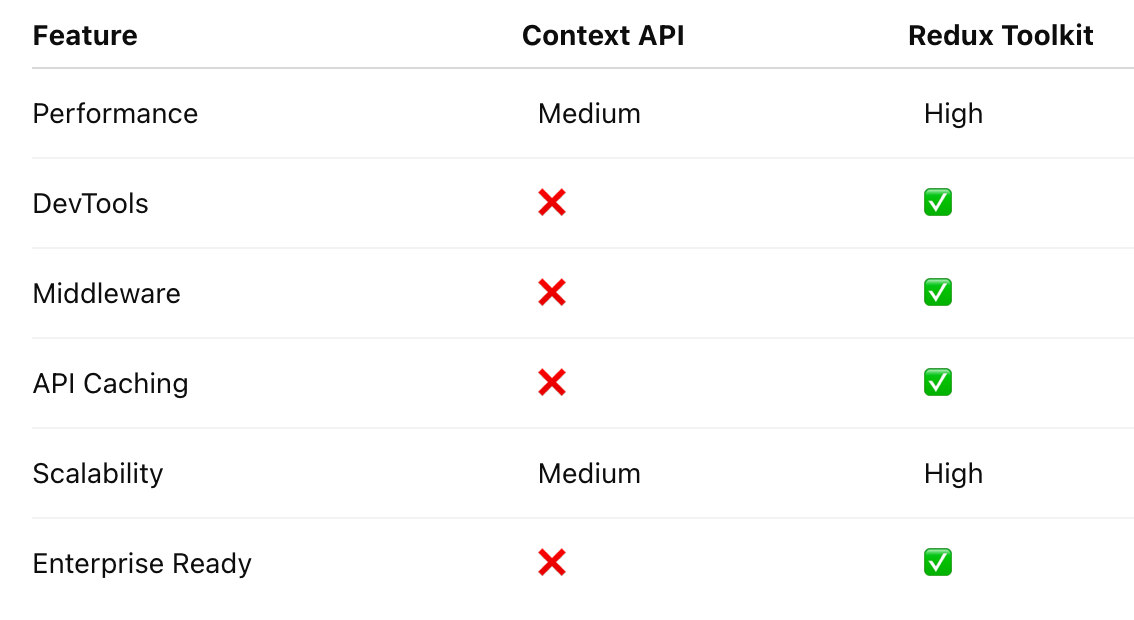
Rule:
Small Apps ➜ Context API
Large Apps ➜ Redux Toolkit
🎯 When Should You Use Redux Toolkit?
Use Redux Toolkit when:
✅ Multiple components share state
✅ Authentication required
✅ API-heavy applications
✅ E-commerce platforms
✅ SaaS products
✅ Dashboards
✅ Enterprise applications
Avoid Redux when:
❌ Small applications
❌ Few components
❌ Minimal state sharing
🏆 Final Thoughts
Redux Toolkit transformed Redux from a complex state management library into a developer-friendly powerhouse.
By mastering:
✔️ createSlice()
✔️ configureStore()
✔️ createAsyncThunk()
✔️ RTK Query
✔️ Entity Adapter
✔️ Memoized Selectors
✔️ Performance Optimization
you can build scalable React applications that remain fast, maintainable, and production-ready.
The modern React ecosystem increasingly treats Redux Toolkit as the gold standard for enterprise-grade state management — and for good reason.
🚀 Learn it once, and you’ll use it in almost every serious React project.


Comments
Post a Comment