🚀 The Ruby on Rails Rule Book for Third-Party Integrations
🚀 The Ruby on Rails Rule Book for Third-Party Integrations
Master APIs, Gems, AI Integrations, Design Patterns & Mistakes to Avoid Like a Pro 🔥
Third-party integrations are the lifeline of modern Ruby on Rails applications. From payment gateways 💳 and authentication 🔐 to AI assistants 🤖 and cloud services ☁️ — integrations help you build powerful applications faster.
But here’s the truth 👇
“Most Rails applications don’t fail because of coding issues… they fail because of poorly managed integrations.”
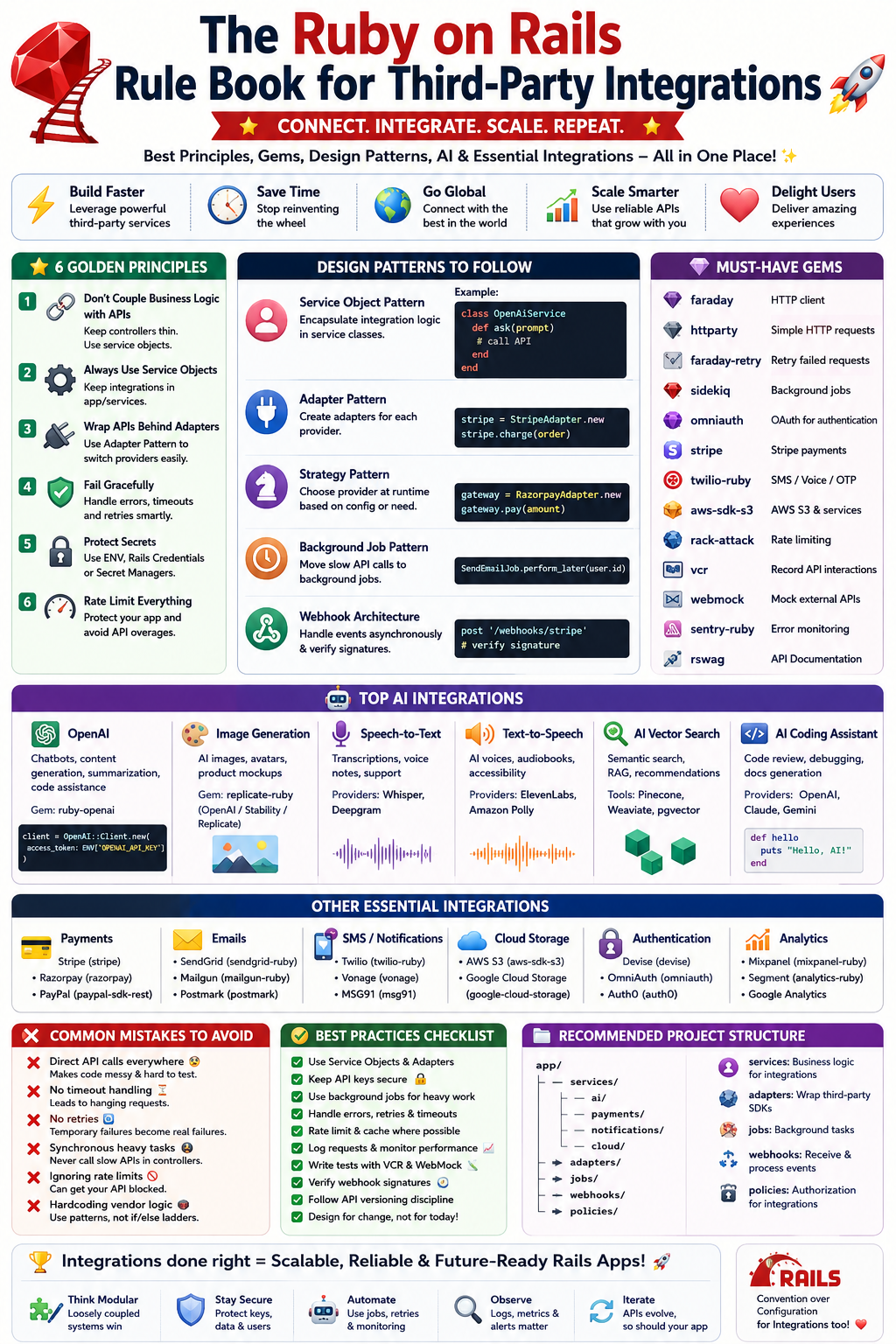
In this complete Ruby on Rails Rule Book 📘, you’ll learn:
✅ Principles of clean integrations
✅ Best Gems & APIs
✅ Architecture & Design Patterns
✅ AI integrations every developer should know
✅ Security & scalability practices
✅ Common mistakes to avoid
✅ Real-world examples with code snippets
Let’s dive deep ⚡
🌍 Why Third-Party Integrations Matter
Modern applications rarely work alone.
Your Rails app may need to connect with:
- 💳 Payment Systems
- 📧 Email Providers
- ☁️ Cloud Storage
- 🤖 AI Models
- 📊 Analytics
- 📱 Social Logins
- 📡 Webhooks
- 🛒 E-commerce APIs
- 📞 SMS/Voice APIs
- 📈 Monitoring Tools
Without integrations, your application becomes isolated.
🧠 Golden Principles of Third-Party Integrations
1️⃣ Never Couple Your Business Logic with APIs ❌
Bad Example 👎
class OrdersController < ApplicationController
  def create
    Stripe::Charge.create(
      amount: 5000,
      currency: 'usd'
    )
  end
end
Problem 🚨
- Hard to test
- Difficult to replace provider
- Controller becomes messy
Better Approach ✅
class PaymentService
  def self.charge(order)
    Stripe::Charge.create(
      amount: order.total_cents,
      currency: 'usd'
    )
  end
end
Controller:
PaymentService.charge(order)✔ Cleaner
✔ Testable
✔ Replaceable
2️⃣ Always Use Service Objects 🛠️
External integrations should live in:
app/servicesStructure Example:
app/services/
  ai/
  payments/
  notifications/
  cloud/
Example:
app/services/openai/chat_service.rbThis keeps your app scalable 📈
3️⃣ Wrap APIs Behind Adapters 🔌
Never expose third-party APIs directly to your application.
Use the Adapter Pattern 🧩
Example:
class SmsAdapter
  def send_message(phone, text)
    TwilioClient.send(phone, text)
  end
end
If tomorrow you switch from Twilio to another provider:
✔ Only adapter changes
✔ Entire app remains untouched
4️⃣ Fail Gracefully 💥
APIs fail.
Servers go down.
Rate limits happen.
Timeouts occur.
Always rescue errors:
begin
  client.generate_response(prompt)
rescue StandardError => e
  Rails.logger.error(e.message)
end
Better with retries 🔁
Use:
gem 'faraday-retry'5️⃣ Never Store Secrets in Code 🔐
BAD ❌
API_KEY = "abc123"GOOD ✅
ENV['OPENAI_API_KEY']Use:
- Rails Credentials
- Dotenv
- AWS Secrets Manager
Gem:
gem 'dotenv-rails'6️⃣ Rate Limit Everything 🚦
Many APIs charge money 💸
Protect your app.
Use:
gem 'rack-attack'Prevent abuse:
Rack::Attack.throttle('req/ip', limit: 100, period: 1.minute)🧩 Best Design Patterns for Integrations
🏗️ 1. Service Object Pattern
Perfect for external APIs.
class OpenAiService
  def ask(prompt)
  end
end
🧱 2. Adapter Pattern
Used for switching providers easily.
Example:
StripeAdapter
PaypalAdapter
RazorpayAdapter
🧠 3. Strategy Pattern
Choose provider dynamically.
payment_gateway = RazorpayAdapter.new
payment_gateway.pay
🧵 4. Background Job Pattern
Never make slow API calls inside requests.
Use:
ActiveJob
Sidekiq
Resque
Example:
SendEmailJob.perform_later(user.id)🛰️ 5. Webhook Architecture
Used by:
- Stripe
- GitHub
- Slack
- Razorpay
Example:
post '/webhooks/stripe'Always verify webhook signatures 🔐
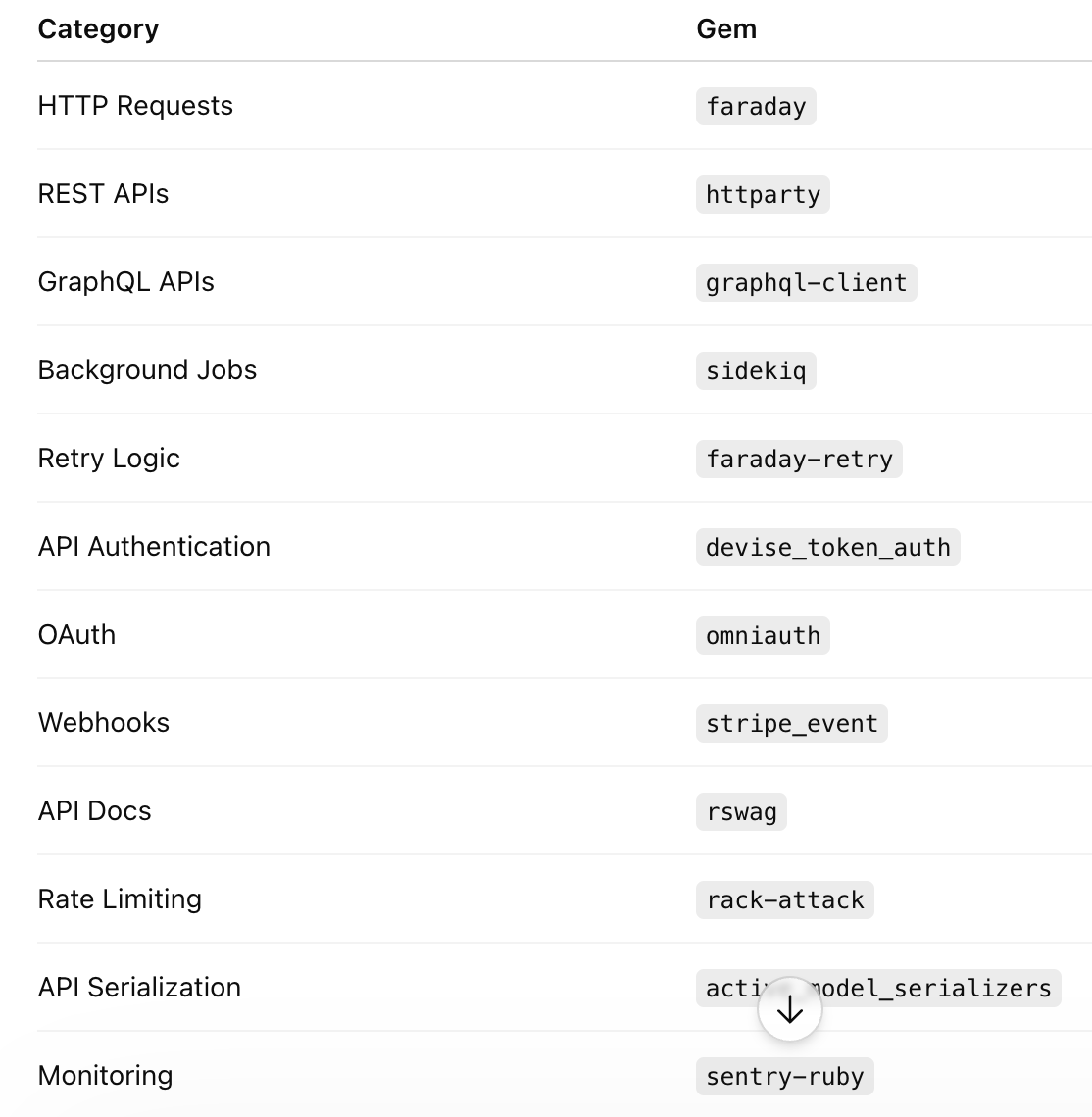
🔥 Essential Ruby Gems for Integrations
🤖 Best AI Integrations for Ruby on Rails
AI is changing everything 🔥
Here are the most powerful AI integrations every Rails developer should know.
🧠 1. OpenAI Integration
Use Cases:
✅ Chatbots
✅ AI Agents
✅ Content Generation
✅ Code Assistance
✅ Summarization
✅ Search
Gem:
gem 'ruby-openai'Setup:
client = OpenAI::Client.new(
  access_token: ENV['OPENAI_API_KEY']
)
Chat Example:
response = client.chat(
  parameters: {
    model: "gpt-4.1-mini",
    messages: [{ role: "user", content: "Hello" }]
  }
)
🎨 2. Image Generation AI
Use:
- AI avatars
- Infographics
- Product mockups
Options:
- OpenAI Images API
- Stability AI
- Replicate
Gem:
gem 'replicate-ruby'🎙️ 3. Speech-to-Text AI
Providers:
- Whisper
- Deepgram
Use Cases:
✅ Meeting transcription
✅ Voice notes
✅ Customer support
🗣️ 4. Text-to-Speech AI
Providers:
- ElevenLabs
- Amazon Polly
Use Cases:
✅ AI voice assistant
✅ Audiobooks
✅ Accessibility apps
🔎 5. AI Vector Search
Best for AI search systems.
Use:
- Pinecone
- Weaviate
- pgvector
Gem:
gem 'neighbor'Example:
has_neighbors :embedding🧑💻 6. AI Coding Assistant APIs
Use:
- OpenAI
- Claude
- Gemini
Applications:
✅ Code review
✅ Auto debugging
✅ Documentation generation
☁️ Most Important Non-AI Integrations
💳 Payment Integrations
Stripe
Best Overall 🔥
Gem:
gem 'stripe'Features:
✅ Subscription Billing
✅ Webhooks
✅ Marketplace Payments
✅ Invoices
Razorpay
Best for India 🇮🇳
Gem:
gem 'razorpay'PayPal
Global support 🌍
Gem:
gem 'paypal-sdk-rest'📧 Email Integrations
SendGrid
Gem:
gem 'sendgrid-ruby'Mailgun
Gem:
gem 'mailgun-ruby'Postmark
Fast transactional emails ⚡
📱 SMS & Notification Integrations
Twilio
Gem:
gem 'twilio-ruby'Use Cases:
✅ OTP
✅ Alerts
✅ Voice calls
☁️ Cloud Storage Integrations
AWS S3
Gem:
gem 'aws-sdk-s3'Use with:
ActiveStorage🔐 Authentication Integrations
Devise
Gem:
gem 'devise'OmniAuth
Social Login 🔥
gem 'omniauth-google-oauth2'📊 Analytics Integrations
Tools:
- Mixpanel
- Segment
- Google Analytics
Track:
✅ User behavior
✅ Retention
✅ Conversions
🧪 API Testing Best Practices
Use VCR Gem 📼
Avoid real API calls during tests.
gem 'vcr'Example:
VCR.use_cassette("openai_response") do
end
Use WebMock 🌐
Mock external APIs.
gem 'webmock'🚨 Biggest Mistakes Developers Make
❌ 1. Direct API Calls Everywhere
Creates chaos.
Solution ✅
Use Service Objects.
❌ 2. No Timeout Handling
Your app hangs forever 😵
Fix:
Faraday.new(request: { timeout: 5 })❌ 3. No Retry Mechanism
Temporary failures become permanent failures.
Use retries 🔁
❌ 4. Synchronous Heavy Tasks
Never process:
- AI generation
- File uploads
- Emails
inside controllers.
Use Sidekiq 🚀
❌ 5. Ignoring API Rate Limits
Can get your API blocked 🚫
Always throttle.
❌ 6. Hardcoding Vendor Logic
Bad:
if provider == 'stripe'Use Strategy Pattern instead 🧠
📦 Recommended Integration Folder Structure
app/
 ├── services/
 │    ├── ai/
 │    ├── payments/
 │    ├── notifications/
 │    └── cloud/
 │
 ├── adapters/
 │
 ├── jobs/
 │
 ├── webhooks/
 │
 └── policies/
Professional architecture 🔥
⚡ Real-World AI SaaS Architecture Example
Imagine building:
“AI Customer Support SaaS”
Integrations Used:
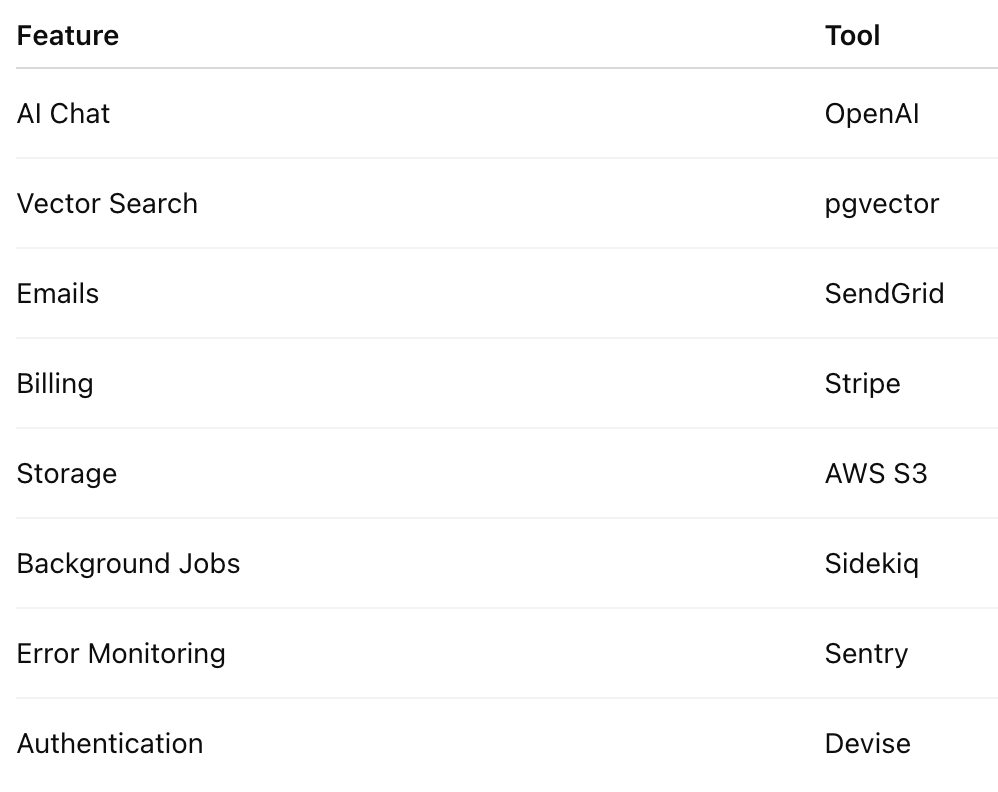
This is how real startups scale 🚀
🧠 Advanced Pro Tips
✅ Use Circuit Breakers
Prevent repeated failures.
Gem:
gem 'stoplight'✅ Use API Versioning
Never trust third-party APIs to stay unchanged.
✅ Log Everything
Use:
Rails.logger.infoOr:
- Datadog
- NewRelic
- Sentry
✅ Build Internal SDKs
Large apps create wrappers around APIs.
Example:
MyCompany::Payments::StripeVery scalable 🏗️
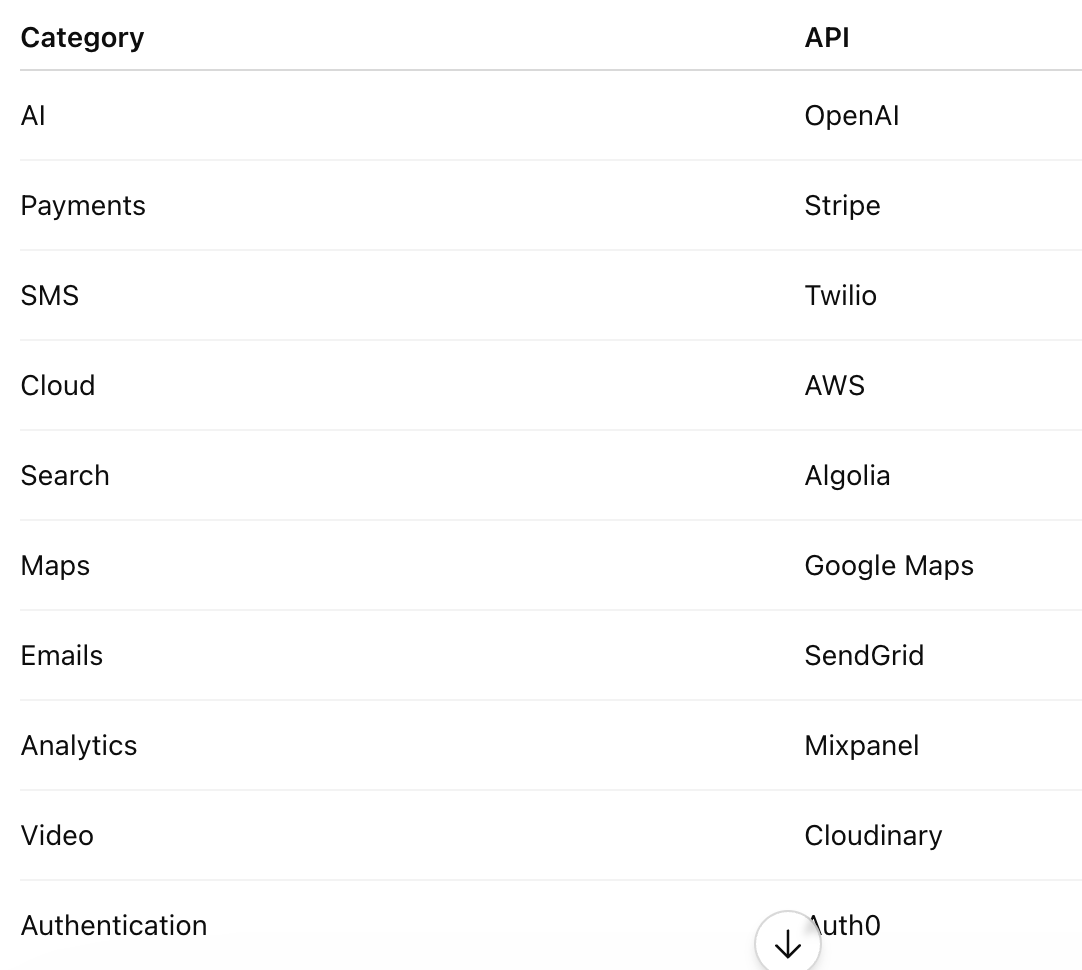
📚 Recommended APIs Every Rails Developer Should Explore
🎯 Final Rule Book Summary
Golden Rules ✅
✔ Use Service Objects
✔ Use Adapter Pattern
✔ Never hardcode secrets
✔ Background heavy tasks
✔ Handle retries & failures
✔ Rate limit APIs
✔ Log everything
✔ Test integrations properly
✔ Keep integrations isolated
🚀 Conclusion
Third-party integrations are not just “extra features” anymore…
They are the core infrastructure of modern applications 🌍
A great Rails developer knows:
“How to connect systems cleanly, securely, and scalably.”
Mastering integrations means mastering:
✅ Scalability
✅ Maintainability
✅ AI-powered systems
✅ Cloud-native architecture
✅ Modern SaaS development
And with Ruby on Rails ❤️, integrations become incredibly elegant when done correctly.
💬 Which Integration Do You Use the Most?
- 🤖 OpenAI
- 💳 Stripe
- ☁️ AWS
- 📧 SendGrid
- 📱 Twilio
- 🔐 Devise
Share your favorite Rails integration stack 🚀


Comments
Post a Comment