☁️ AWS S3 Mastery: The Ultimate Guide to Amazon Simple Storage Service (S3) 🚀
☁️ AWS S3 Mastery: The Ultimate Guide to Amazon Simple Storage Service (S3) 🚀
“Data is the new oil, and Amazon S3 is one of the world’s largest reservoirs for storing it.” 🌍
In the cloud era, almost every application stores files, images, videos, logs, backups, and analytics data. Whether you’re building a Ruby on Rails application, a ReactJS frontend, a machine learning platform, or a global streaming service, AWS S3 (Simple Storage Service) is often the first choice for storage.
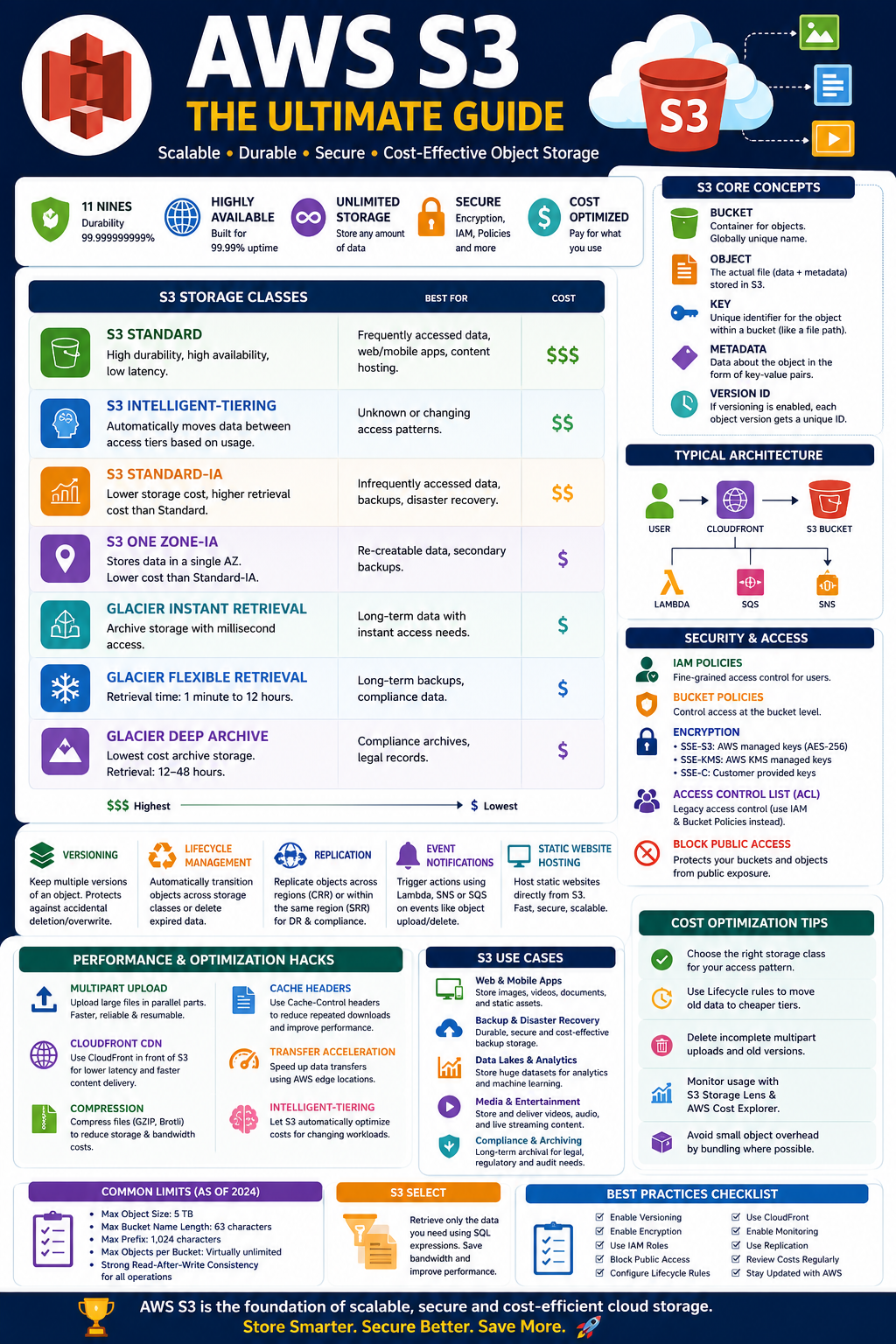
In this comprehensive guide, we’ll explore AWS S3 in-depth, covering:
✅ Core Concepts
✅ Storage Classes
✅ Security Features
✅ Versioning
✅ Lifecycle Management
✅ Replication
✅ Performance Optimization
✅ Cost Optimization Hacks
✅ Real-World Use Cases
✅ Best Practices
Let’s dive in! 🎯
🌟 What is AWS S3?
Amazon Simple Storage Service (Amazon S3) is a highly scalable object storage service designed to store and retrieve any amount of data from anywhere.
Key Characteristics
- Unlimited Storage ♾️
- 99.999999999% (11 Nines) Durability 🛡️
- High Availability 🌍
- Strong Consistency ⚡
- Secure and Encrypted 🔒
- Cost Effective 💰
🏗️ S3 Architecture
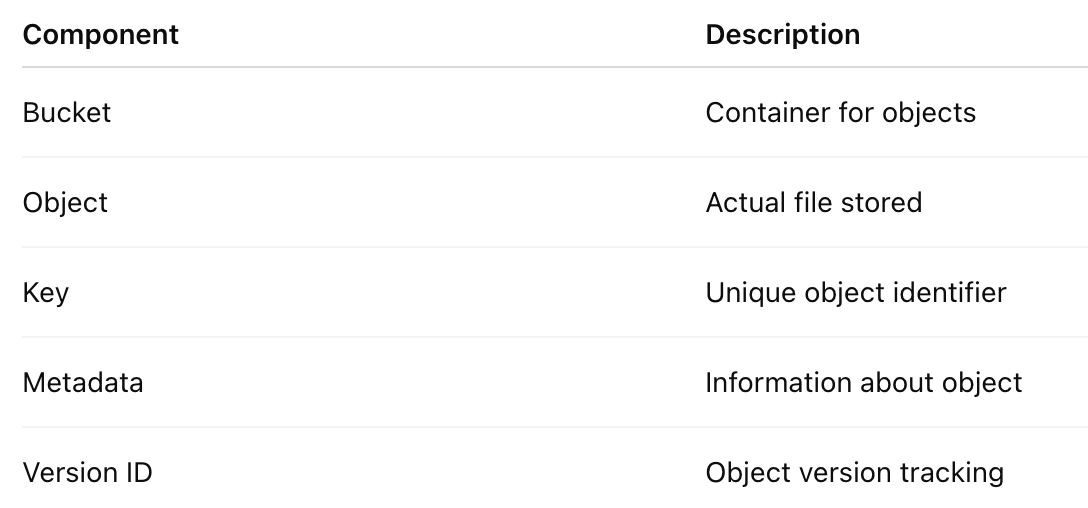
S3 stores data as Objects inside Buckets.
Bucket
 ├── image1.jpg
 ├── profile.png
 ├── video.mp4
 └── documents/
      └── resume.pdf
Components
📦 Buckets Explained
A Bucket is similar to a folder but exists globally within AWS.
Example:
my-company-imagesBucket Naming Rules
✅ Unique globally
my-company-images❌ Invalid
My_Images🎯 Objects in S3
An Object contains:
{
  "File": "profile.jpg",
  "Metadata": {},
  "Version": "1234",
  "StorageClass": "STANDARD"
}
Maximum object size:
5 TB🚀 Uploading Files
AWS CLI
aws s3 cp image.jpg s3://mybucket/Ruby Example
require 'aws-sdk-s3'

s3 = Aws::S3::Client.new
s3.put_object(
  bucket: 'mybucket',
  key: 'image.jpg',
  body: File.read('image.jpg')
)
🎯 Storage Classes
One of the most powerful S3 features.
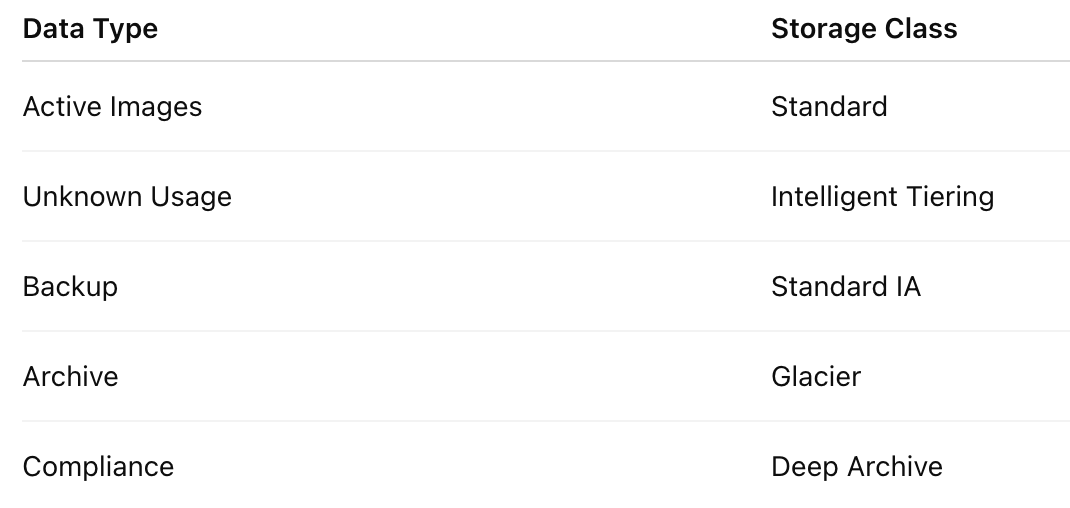
Different storage classes optimize cost based on access patterns.
1️⃣ S3 Standard
Most commonly used.
Features
✅ Millisecond access
✅ High throughput
✅ Multi-AZ storage
Use Cases
- Web Applications
- Images
- Videos
- Mobile Apps
Example:
User profile pictures2️⃣ S3 Intelligent-Tiering 🧠
Automatically moves data between tiers.
Benefits
- Saves cost automatically
- No performance impact
Use Cases
- Unknown access patterns
- Enterprise applications
Example:
Corporate documents3️⃣ S3 Standard-IA
(IA = Infrequent Access)
Characteristics
Lower storage cost
Higher retrieval cost
Use Cases
- Backups
- Disaster recovery
4️⃣ One Zone-IA
Stored in one availability zone.
Advantages
Cheaper than Standard-IA
Use Cases
- Secondary backups
- Re-creatable files
5️⃣ Glacier Instant Retrieval
Archive storage with instant access.
Use Cases
- Medical Records
- Historical Documents
6️⃣ Glacier Flexible Retrieval
Retrieval Time:
1 Minute to 12 HoursUse Cases
- Long-term backup
7️⃣ Glacier Deep Archive 🧊
Cheapest storage.
Retrieval:
12–48 HoursUse Cases
- Legal Records
- Compliance Data
🔐 Security Features
Security is where S3 shines.
1️⃣ IAM Policies
Control access to buckets.
Example:
{
  "Effect": "Allow",
  "Action": "s3:GetObject",
  "Resource": "*"
}
2️⃣ Bucket Policies
Bucket-level permissions.
Example:
{
  "Effect": "Allow",
  "Principal": "*",
  "Action": "s3:GetObject"
}
3️⃣ Access Control Lists (ACLs)
Legacy access control.
AWS now recommends:
✅ IAM
✅ Bucket Policies
Instead of ACLs.
🔒 Encryption Options
SSE-S3
AWS manages keys.
AES-256Best for:
General workloads.
SSE-KMS
Uses AWS KMS.
Benefits:
✅ Audit Trails
✅ Key Rotation
✅ Fine-Grained Access
Best for:
Sensitive applications.
SSE-C
Customer-managed keys.
Best for:
Organizations with strict compliance requirements.
🌍 Versioning
Versioning keeps every object version.
Example:
profile.jpgVersion 1:
profile.jpgVersion 2:
profile.jpgPrevious versions remain available.
Benefits
✅ Recovery from accidental deletion
✅ Protection against overwrites
♻️ Lifecycle Management
Automatically moves data across storage classes.
Example Rule:
After 30 Days → Standard IA
After 90 Days → Glacier
After 365 Days → Delete
Benefits
💰 Massive Cost Savings
🔄 Cross Region Replication (CRR)
Replicates data to another AWS region.
Example:
Mumbai → SingaporeBenefits:
✅ Disaster Recovery
✅ Compliance
✅ Global Applications
🌎 Same Region Replication (SRR)
Replication within same region.
Useful for:
- Data segregation
- Testing environments
⚡ Event Notifications
S3 can trigger:
- Lambda
- SNS
- SQS
Example Workflow
Image Uploaded
       ↓
S3 Event
       ↓
Lambda
       ↓
Thumbnail Generated
Perfect for media platforms.
🌐 Static Website Hosting
S3 can host websites directly.
Example:
HTML
CSS
JavaScript
Use Cases
- Portfolio websites
- Landing pages
- Documentation
🚀 S3 Transfer Acceleration
Uses AWS Edge Locations.
Normal Upload:
User → RegionAccelerated Upload:
User → Edge Location → S3Benefits:
⚡ Faster global uploads
📊 S3 Analytics
Provides:
- Access Patterns
- Usage Trends
- Storage Optimization Suggestions
Useful for:
Cost reduction strategies.
🔥 S3 Select
Retrieve only required data.
Instead of:
Download 10GB FileDownload:
SELECT * FROM file
WHERE country='India'
Benefits
⚡ Faster processing
💰 Lower costs
🚀 Multipart Upload
Required for large files.
Instead of:
5GB UploadUpload:
Part1
Part2
Part3
Part4
Advantages:
✅ Faster
✅ Resumable
✅ Reliable
📈 Performance Optimization Hacks
Hack #1: Multipart Upload
For files >100 MB.
Upload in parallel chunksHuge performance improvement.
Hack #2: Use CloudFront
Bad:
User → S3Good:
User → CloudFront → S3Benefits:
⚡ Lower latency
⚡ Better performance
Hack #3: Compress Files
Use:
GZIP
Brotli
Reduces:
- Storage Cost
- Bandwidth Cost
Hack #4: Cache Headers
Cache-Control:max-age=31536000Perfect for:
Images
CSS
JavaScript
Hack #5: Intelligent-Tiering
For unpredictable workloads.
Can save thousands of dollars yearly.
Hack #6: Lifecycle Rules
Move old files automatically.
30 Days → IA
90 Days → Glacier
💰 Cost Optimization Strategies
Use Storage Classes Wisely
Delete Unused Versions
Versioning can silently increase costs.
Schedule cleanup.
Enable Lifecycle Policies
Automatic cost optimization.
Avoid Small Object Overhead
Instead of:
10 Million Tiny FilesBundle data where possible.
🎯 Real-World Use Cases
📸 Instagram-like App
Store:
- Profile Pictures
- Videos
- Stories
Recommended:
S3 Standard + CloudFront🏥 Healthcare Platform
Store:
- Patient Reports
- X-rays
Recommended:
SSE-KMS
Versioning
CRR
🎥 Video Streaming Platform
Store:
- Movies
- Videos
Recommended:
Multipart Upload
Transfer Acceleration
CloudFront
🤖 Machine Learning
Store:
- Datasets
- Models
Recommended:
Intelligent Tiering
Lifecycle Policies
🏆 AWS S3 Best Practices Checklist
✅ Enable Versioning
✅ Enable Encryption
✅ Use IAM Roles
✅ Avoid Public Buckets
✅ Configure Lifecycle Rules
✅ Use Multipart Upload
✅ Enable Monitoring
✅ Use CloudFront
✅ Use Intelligent Tiering
✅ Enable Replication for Critical Data
✅ Regularly Review Storage Costs
🎯 Final Thoughts
AWS S3 is much more than a simple storage service. It is a highly scalable, secure, and cost-efficient data platform powering millions of applications worldwide. Whether you’re building a Ruby on Rails application, hosting static websites, creating machine learning pipelines, or designing enterprise backup solutions, mastering S3 can dramatically improve your application’s scalability and reliability.
💡 “The best cloud architecture isn’t just about storing data — it’s about storing it securely, efficiently, and cost-effectively.”
By leveraging Versioning, Lifecycle Policies, Replication, Intelligent Tiering, CloudFront, and Encryption, you can build enterprise-grade storage systems that are both high-performing and economical.
☁️ Master AWS S3, and you’ll master one of the most fundamental building blocks of modern cloud computing! 🚀


Comments
Post a Comment