🚀 CI/CD Mastery: The Complete Guide to Continuous Integration & Continuous Delivery/Deployment 🌟
🚀 CI/CD Mastery: The Complete Guide to Continuous Integration & Continuous Delivery/Deployment 🌟
“Great software isn’t built by writing code alone; it’s built by delivering value continuously.”
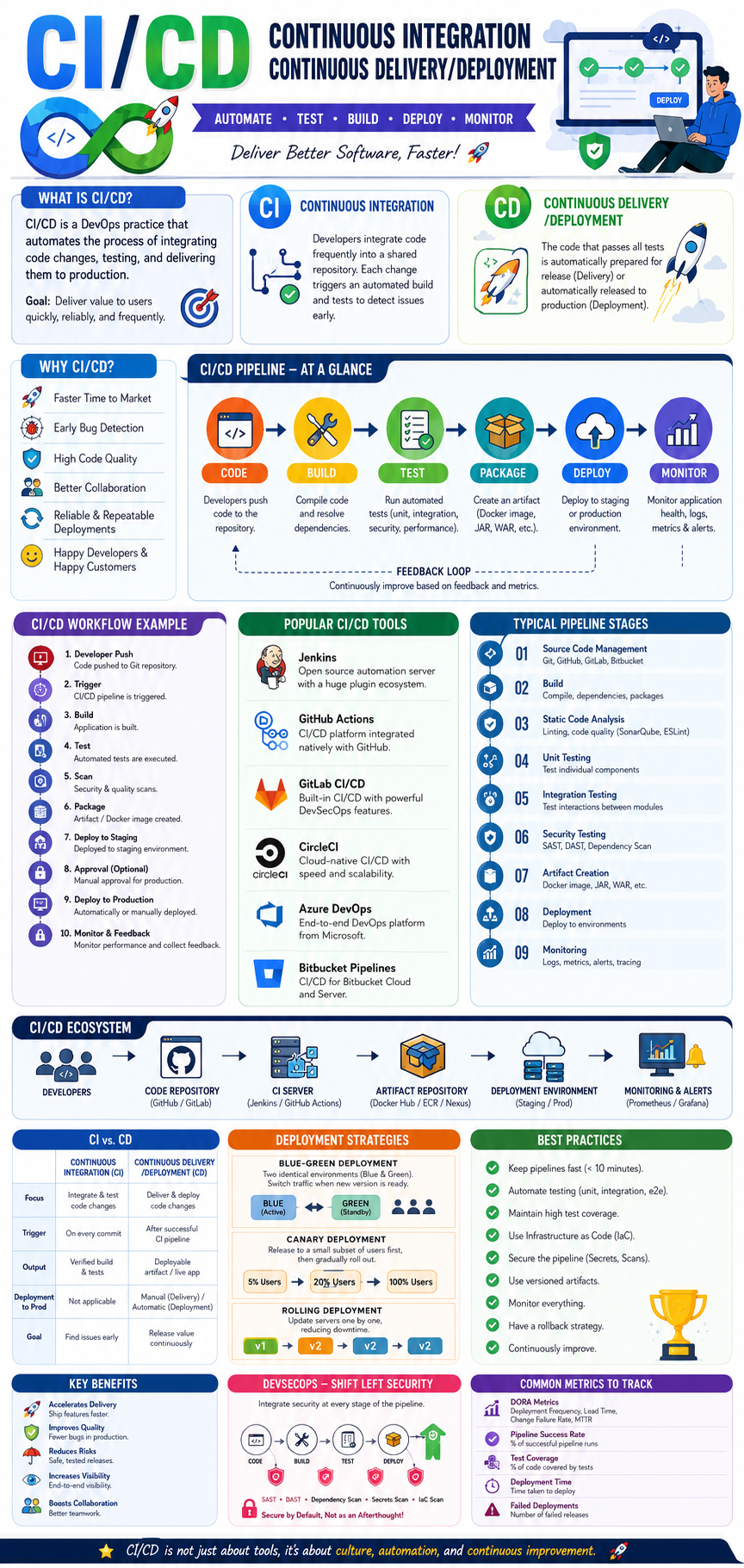
In modern software development, organizations deploy code hundreds or even thousands of times per day. Companies like Netflix, Amazon, and Google rely heavily on CI/CD pipelines to release software rapidly, reliably, and safely.
This guide covers everything about CI/CD — from fundamental concepts to advanced practices, tools, architectures, and real-world examples.
📚 Table of Contents
- What is CI/CD?
- Why CI/CD Matters
- CI vs CD
- CI/CD Lifecycle
- Key Terminologies
- CI/CD Architecture
- Continuous Integration Deep Dive
- Continuous Delivery Deep Dive
- Continuous Deployment Deep Dive
- Pipeline Stages Explained
- Popular CI/CD Tools
- CI/CD with Docker & Kubernetes
- GitOps & Modern CI/CD
- Security in CI/CD (DevSecOps)
- Monitoring & Observability
- CI/CD Best Practices
- Common Mistakes
- Real-World Example
- CI/CD Interview Questions
- Future of CI/CD
🎯 What is CI/CD?
CI/CD is a software engineering practice that automates:
✅ Building
✅ Testing
✅ Integration
✅ Deployment
✅ Monitoring
of applications.
Full Form
CI → Continuous Integration
CD → Continuous Delivery or Continuous Deployment
The goal is:
🚀 Deliver software faster, safer, and more frequently.
😫 Problems Before CI/CD
Traditional development looked like:
Developer A
Developer B
Developer C
     ↓
Merge after 2 months
     ↓
Huge conflicts
     ↓
Manual Testing
     ↓
Production Deployment
     ↓
Failures 😭
Common issues:
❌ Merge conflicts
❌ Deployment failures
❌ Long release cycles
❌ Manual errors
❌ Slow feedback
CI/CD solves these problems.
🔄 CI/CD Workflow
Developer
    ↓
Git Push
    ↓
CI Pipeline
    ↓
Build
    ↓
Test
    ↓
Security Scan
    ↓
Artifact Creation
    ↓
CD Pipeline
    ↓
Staging
    ↓
Production
🏗️ Continuous Integration (CI)
Continuous Integration means:
Frequently merging code into a shared repository and validating it automatically.
Every code change triggers:
1️⃣ Build
2️⃣ Test
3️⃣ Validation
Example
Developer pushes code:
git push origin feature-loginPipeline automatically:
Build Application
Run Unit Tests
Run Linter
Run Security Scan
Generate Artifact
If everything passes:
✅ Code accepted
Otherwise:
❌ Build fails
Benefits of CI
🚀 Faster Development
Issues detected immediately.
🐛 Early Bug Detection
Bugs found before production.
🤝 Better Collaboration
Developers integrate frequently.
🔒 Higher Code Quality
Automated quality checks.
🚚 Continuous Delivery (CD)
Continuous Delivery means:
Every successful build is deployable at any time.
Pipeline deploys automatically to staging.
Production deployment requires approval.
Build
 ↓
Test
 ↓
Staging
 ↓
Manual Approval
 ↓
Production
Benefits
✅ Faster releases
✅ Reduced deployment risk
✅ Predictable deployments
✅ Better customer satisfaction
⚡ Continuous Deployment
Continuous Deployment goes one step further.
No manual approval.
Build
 ↓
Test
 ↓
Deploy
Everything that passes tests automatically reaches production.
Example
When developers push:
git pushPipeline:
Build
Test
Deploy
Users instantly receive updates.
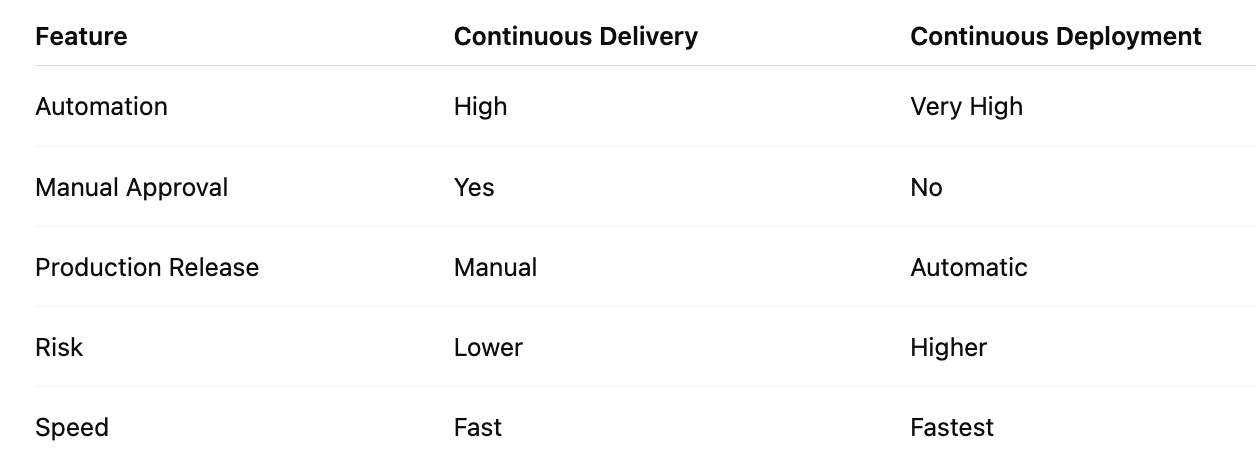
🔥 Continuous Delivery vs Continuous Deployment
🧩 Important CI/CD Terminologies
Pipeline
Automated workflow.
Example:
Build → Test → DeployBuild
Converting source code into executable software.
Example:
bundle install
rails assets:precompile
Artifact
Deployable package.
Examples:
📦 Docker Image
📦 WAR File
📦 JAR File
📦 ZIP Package
Trigger
Event that starts pipeline.
Examples:
Git Push
Pull Request
Schedule
Manual Trigger
Runner / Agent
Machine executing pipeline jobs.
Examples:
- Jenkins Agent
- GitHub Runner
- GitLab Runner
Stage
Logical grouping of jobs.
Build
Test
Deploy
Job
Single task inside stage.
Example:
test:
  script:
    - bundle exec rspec
🏛️ CI/CD Architecture
Git Repository
       ↓
CI Server
       ↓
Build
       ↓
Test
       ↓
Artifact Repository
       ↓
Deployment
       ↓
Production
🔧 CI Pipeline Stages
Stage 1: Source Control
Developers push code.
Popular tools:
- GitHub
- GitLab
- Bitbucket
Stage 2: Build
Compile application.
Example:
bundle install
npm install
Stage 3: Static Code Analysis
Code quality checks.
Tools:
- RuboCop
- SonarQube
- ESLint
Stage 4: Unit Testing
Test individual components.
bundle exec rspecStage 5: Integration Testing
Verify interactions between services.
Example:
Rails API
↔
PostgreSQL
↔
Redis
Stage 6: Security Testing
Identify vulnerabilities.
Tools:
- Snyk
- Trivy
- OWASP ZAP
Stage 7: Artifact Creation
Example Docker Image:
docker build -t app:v1 .Stage 8: Deployment
Deploy application.
kubectl apply -f deployment.yaml🛠️ Popular CI/CD Tools
1️⃣ Jenkins
Features
✅ Open Source
✅ Huge Plugin Ecosystem
✅ Pipeline as Code
✅ Distributed Builds
Example:
pipeline {
  stages {
    stage('Build') {
      steps {
        sh 'bundle install'
      }
    }
  }
}
2️⃣ GitHub Actions
Features
✅ Native GitHub Integration
✅ YAML Pipelines
✅ Marketplace Actions
Example:
name: CI

on: push
jobs:
  build:
    runs-on: ubuntu-latest
3️⃣ GitLab CI/CD
Features
✅ Built-in CI/CD
✅ Auto DevOps
✅ Security Scanning
Example:
stages:
  - build
  - deploy
4️⃣ CircleCI
Features:
- Fast execution
- Docker support
- Parallel jobs
5️⃣ Azure DevOps
Features:
- Enterprise-ready
- Multi-cloud deployment
- Advanced reporting
🐳 CI/CD with Docker
Docker ensures:
Works on my machine = Works everywhere
Build image:
docker build -t rails-app .Push image:
docker push rails-appDeploy:
docker run rails-app☸️ CI/CD with Kubernetes
Kubernetes automates deployment.
Benefits:
✅ Auto-scaling
✅ Self-healing
✅ Rolling updates
Deployment Example
kubectl apply -f deployment.yamlPipeline:
Build
 ↓
Docker Image
 ↓
Container Registry
 ↓
Kubernetes
🔄 GitOps: The Future of Deployment
GitOps means:
Git becomes the single source of truth.
Popular Tools:
- Argo CD
- Flux CD
Workflow:
Git Commit
 ↓
Git Repository
 ↓
ArgoCD
 ↓
Kubernetes
Benefits:
✅ Auditable
✅ Reproducible
✅ Secure
🔐 DevSecOps in CI/CD
Security should be integrated into every stage.
Code
 ↓
Scan
 ↓
Build
 ↓
Deploy
Security Checks
Dependency Scanning
bundle auditContainer Scanning
trivy image app:v1Secret Detection
Detect:
AWS Keys
Passwords
Tokens
📊 Monitoring & Observability
Deployment doesn’t end after release.
Monitor:
✅ CPU
✅ Memory
✅ Errors
✅ Latency
✅ Traffic
Popular Tools
- Prometheus
- Grafana
- Datadog
- New Relic
🚀 Advanced Deployment Strategies
Blue-Green Deployment
Blue → Live
Green → New Version
Switch traffic instantly.
Benefits:
✅ Zero downtime
Canary Deployment
5% Users
 ↓
20% Users
 ↓
100% Users
Benefits:
✅ Reduced risk
Rolling Deployment
Server 1 Updated
Server 2 Updated
Server 3 Updated
Benefits:
✅ Continuous availability
💡 CI/CD Best Practices
✅ Keep Pipelines Fast
Target:
< 10 Minutes✅ Automate Testing
Never skip tests.
✅ Infrastructure as Code
Use:
- Terraform
- CloudFormation
✅ Small Commits
Commit frequently.
✅ Monitor Everything
Measure:
- Deployment Frequency
- Lead Time
- MTTR
❌ Common CI/CD Mistakes
Overly Long Pipelines
Slow feedback.
Poor Test Coverage
Hidden bugs.
Manual Deployments
Human errors.
No Rollback Strategy
Dangerous releases.
Ignoring Security
Creates vulnerabilities.
🌍 Real-World CI/CD Example (Ruby on Rails)
Imagine a Rails e-commerce application.
Pipeline:
Developer Push
        ↓
GitHub
        ↓
GitHub Actions
        ↓
Bundle Install
        ↓
RuboCop
        ↓
RSpec
        ↓
Docker Build
        ↓
Push Image
        ↓
AWS ECR
        ↓
Kubernetes
        ↓
Production
Workflow file:
name: Rails CI

on: [push]
jobs:
  test:
    runs-on: ubuntu-latest
    steps:
      - uses: actions/checkout@v4
      - run: bundle install
      - run: bundle exec rubocop
      - run: bundle exec rspec
🎤 Common CI/CD Interview Questions
What is CI/CD?
Automated software integration, testing, and deployment process.
Difference between CI and CD?
CI focuses on integration and validation.
CD focuses on delivery and deployment.
What is GitOps?
Using Git as the source of truth for deployments.
What is Canary Deployment?
Gradually releasing software to a subset of users.
What is Blue-Green Deployment?
Maintaining two environments and switching traffic.
🔮 Future of CI/CD
Emerging trends:
🤖 AI-Assisted Testing
🤖 Self-Healing Pipelines
☁️ Cloud-Native Deployments
🔒 Shift-Left Security
🚀 GitOps Everywhere
⚡ Serverless CI/CD
🎯 Final Thoughts
CI/CD is no longer optional — it’s the backbone of modern software delivery. A well-designed CI/CD pipeline enables teams to:
✅ Release faster
✅ Improve quality
✅ Reduce risks
✅ Enhance security
✅ Scale efficiently
Whether you’re a Ruby on Rails developer, DevOps engineer, cloud architect, or software engineer, mastering CI/CD can dramatically improve both your productivity and the reliability of your applications.
“Automate everything that can be automated, and spend your time building value instead of repeating processes.” 🚀
🏆 CI/CD Learning Roadmap
Git
 ↓
Linux
 ↓
Docker
 ↓
CI/CD Tools
 ↓
Cloud (AWS/Azure/GCP)
 ↓
Kubernetes
 ↓
GitOps
 ↓
DevSecOps
 ↓
Observability
 ↓
Platform Engineering
Master these areas, and you’ll be capable of building enterprise-grade deployment pipelines used by the world’s most successful technology companies. 🚀🔥


Comments
Post a Comment