🚀 GitOps Mastery: The Ultimate Guide to Automated Infrastructure & Deployment Excellence ⚡
🚀 GitOps Mastery: The Ultimate Guide to Automated Infrastructure & Deployment Excellence ⚡
“If Infrastructure as Code changed the way we build systems, GitOps changed the way we operate them.”
Modern software development demands speed, reliability, security, and consistency. Managing infrastructure manually is error-prone and difficult at scale. That’s where GitOps comes in! 🎯
In this guide, you’ll learn:
✅ What GitOps is
✅ Core principles of GitOps
✅ Popular GitOps tools and their features
✅ GitOps architecture
✅ Advanced optimization techniques
✅ Production-ready hacks and tricks
✅ Common mistakes to avoid
✅ Mind-blowing Git commands every engineer should know
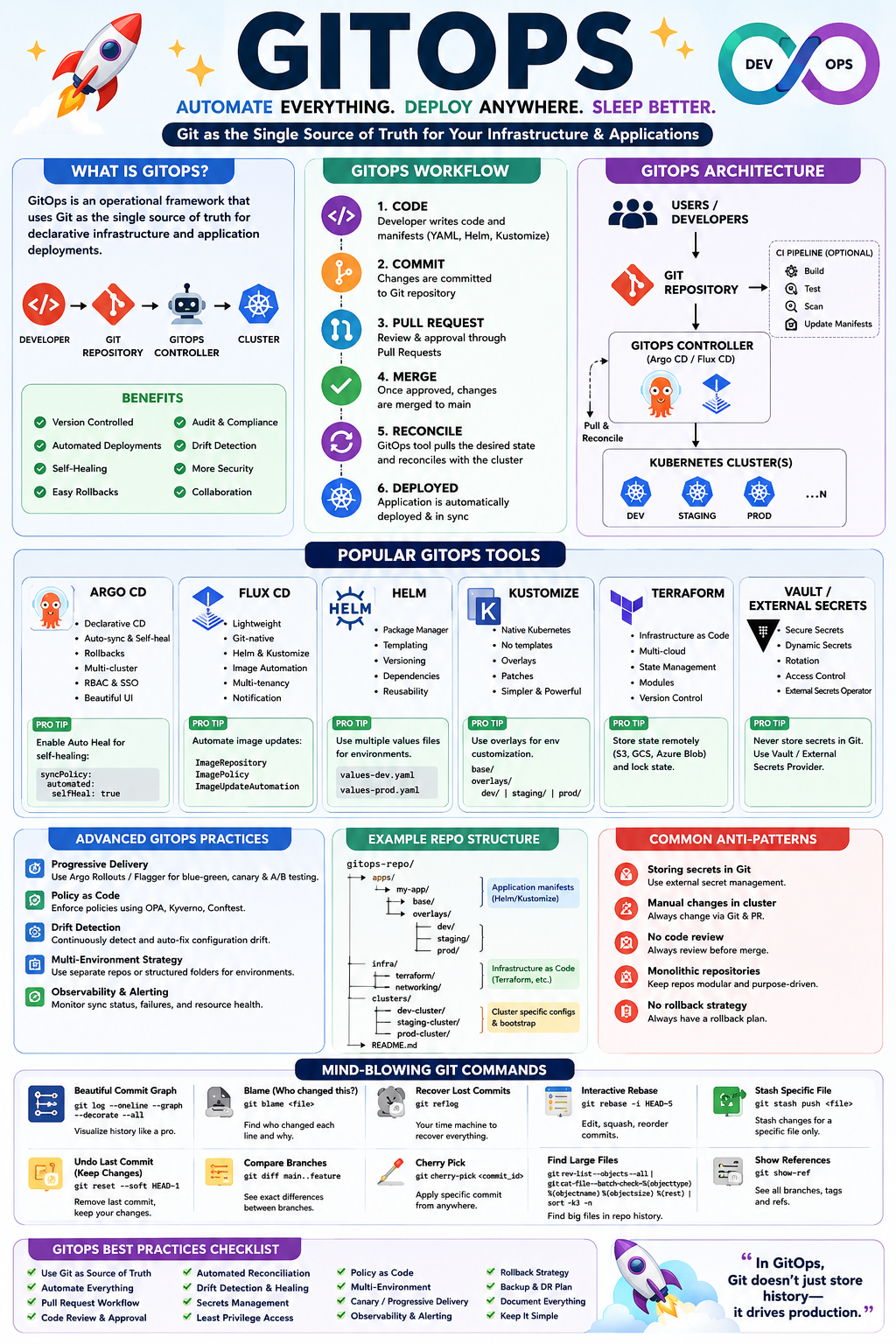
🌟 What is GitOps?
GitOps is an operational framework that uses Git as the single source of truth for both:
- Application deployment
- Infrastructure management
- Kubernetes configurations
Instead of manually changing servers or clusters:
Developer
    ↓
Git Repository
    ↓
GitOps Tool
    ↓
Production Environment
Everything is managed through:
- Pull Requests
- Code Reviews
- Git History
- Automated Reconciliation
🎯 Why GitOps?
Traditional Deployment
Developer
    ↓
SSH into Server
    ↓
Manual Changes
    ↓
Production
Problems:
❌ No audit trail
❌ Human mistakes
❌ Configuration drift
❌ Hard rollback
❌ Poor collaboration
GitOps Deployment
Developer
    ↓
Git Commit
    ↓
Pull Request
    ↓
Approval
    ↓
Automatic Deployment
Benefits:
✅ Version controlled
✅ Easy rollback
✅ Self-healing
✅ Auditable
✅ Automated
✅ Secure
🏗️ Core GitOps Principles
1️⃣ Git as Single Source of Truth
Everything lives in Git:
- Kubernetes manifests
- Helm charts
- Infrastructure code
- Secrets configuration
Example:
deployment.yaml
service.yaml
ingress.yaml
Git becomes your operational database.
2️⃣ Declarative Configuration
Instead of saying:
kubectl scale deployment app --replicas=5You define:
replicas: 5GitOps ensures reality matches desired state.
3️⃣ Automatic Reconciliation
GitOps continuously checks:
Git State
      =
Cluster State ?
If not:
Cluster Drift Detected
         ↓
Auto Fix
This is called reconciliation.
4️⃣ Pull-Based Deployments
GitOps tools pull changes from Git.
Not:
CI → ClusterInstead:
Cluster ← GitMuch safer 🔒
🔥 GitOps Architecture
Developer
    ↓
Git Repository
    ↓
CI Pipeline
(Build & Test)
    ↓
Update Manifest
    ↓
GitOps Controller
(ArgoCD/Flux)
    ↓
Kubernetes Cluster
🛠️ Major GitOps Tools
🚀 Argo CD
One of the most popular GitOps tools.
Features
✅ Continuous deployment
✅ Auto-sync
✅ Rollback
✅ RBAC
✅ Multi-cluster support
✅ Web UI
✅ Health monitoring
Why Engineers Love It
Beautiful dashboard.
Green = Healthy
Red = Broken
Easy troubleshooting.
Pro Tips
Enable Auto Heal
syncPolicy:
  automated:
    selfHeal: true
Automatically fixes configuration drift.
Use Application Sets
Manage hundreds of applications.
ApplicationSetGenerate applications dynamically.
Huge productivity boost 🚀
⚡ Flux CD
Lightweight GitOps controller.
Created for Kubernetes-native workflows.
Features
✅ Lightweight
✅ Git synchronization
✅ Helm support
✅ Kustomize support
✅ Image automation
Best Use Case
Large Kubernetes ecosystems.
Flux Hack
Automatic image upgrades:
ImagePolicy
ImageRepository
ImageUpdateAutomation
Flux updates image tags automatically.
Example:
v1.2.0
    ↓
v1.3.0
Without manual intervention.
🎨 Helm
Helm is Kubernetes package management.
Think:
apt installfor Kubernetes.
Features
✅ Templates
✅ Reusability
✅ Versioning
✅ Dependency management
Helm Hack
Use values files:
values-dev.yaml

values-staging.yaml

values-prod.yaml
Single chart.
Multiple environments.
⚙️ Kustomize
Native Kubernetes customization tool.
No templates.
Pure YAML transformations.
Features
✅ Overlay support
✅ Native Kubernetes
✅ Easy maintenance
Example:
Base
 ├── Dev Overlay
 ├── QA Overlay
 └── Prod Overlay
Clean architecture.
☁️ Terraform + GitOps
Terraform manages infrastructure.
Examples:
- AWS
- Azure
- GCP
- Networking
- Databases
GitOps manages Terraform execution.
Workflow
Terraform Code
      ↓
Git Commit
      ↓
Pull Request
      ↓
Approval
      ↓
Terraform Apply
Infrastructure becomes auditable.
🔐 Secrets Management Tools
HashiCorp Vault
Features:
✅ Dynamic secrets
✅ Secret rotation
✅ Encryption
✅ Access control
External Secrets Operator
Pulls secrets directly from:
- AWS Secrets Manager
- Vault
- Azure Key Vault
Never store secrets in Git.
Huge security win 🔥
🧠 Advanced GitOps Optimization Tricks
1️⃣ Separate Repositories
Bad:
One Repo
 ├── App Code
 └── Infrastructure
Good:
Application Repo

Infrastructure Repo

GitOps Repo
Cleaner governance.
2️⃣ Use Progressive Delivery
Deploy gradually.
Tools:
- Argo Rollouts
- Flagger
Example:
10%
30%
50%
100%
Reduce deployment risk.
3️⃣ Implement Canary Deployments
Instead of:
Old → NewUse:
90% Old
10% New
Monitor first.
Then continue.
4️⃣ Policy as Code
Use:
- OPA
- Kyverno
Example:
No latest tag allowedEnforced automatically.
5️⃣ Enable Drift Detection
Most outages happen because of:
kubectl edit deploymentSomeone changes production manually.
GitOps tools should immediately detect and fix drift.
⚡ Performance Hacks
ArgoCD Scaling
Increase controller workers.
controller.processors:
  status: 50
  operation: 25
Faster synchronization.
Use Shallow Clones
git clone --depth=1Faster Git operations.
Repository Structure
Bad:
1000 manifestsGood:
apps/
infra/
monitoring/
security/
Better reconciliation performance.
Reduce Kubernetes API Calls
Bundle resources logically.
Avoid thousands of tiny applications.
🚨 Common GitOps Mistakes
❌ Storing Secrets in Git
Never:
password: admin123Use Vault or External Secrets.
❌ Direct Cluster Changes
Never:
kubectl editAlways modify Git.
❌ Giant Monolithic Repositories
Hard to manage.
Split logically.
❌ No Pull Request Review
Require:
Code Review
+
Approval
Before deployment.
❌ Ignoring Rollback Strategy
Every deployment must have:
Rollback Plan💥 Mind-Blowing Git Commands Every Engineer Should Know
🔥 View Beautiful Commit Tree
git log --oneline --graph --decorate --allShows branch visualization.
🔥 Search Who Changed a Line
git blame filename.rbFind the author instantly.
🔥 Recover Deleted Commit
git reflogGit’s secret time machine.
Many developers don’t know this.
🔥 Interactive Rebase
git rebase -i HEAD~5Clean commit history like a pro.
🔥 Stash Specific Files
git stash push file.rbSave only one file.
🔥 Find Large Files
git rev-list --objects --all |
git cat-file --batch-check='%(objecttype) %(objectname) %(objectsize) %(rest)' |
sort -k3 -n
Repository cleanup magic.
🔥 Undo Last Commit Keep Changes
git reset --soft HEAD~1Commit removed.
Code preserved.
🔥 See Hidden References
git show-refUseful for debugging.
🔥 Compare Branches
git diff main..featureSee exact differences.
🔥 Cherry Pick Specific Commit
git cherry-pick COMMIT_IDMove individual fixes across branches.
🏆 GitOps Best Practices Checklist
✅ Infrastructure as Code
✅ Git as source of truth
✅ Pull request workflow
✅ Automated reconciliation
✅ Secrets management
✅ Multi-environment strategy
✅ Canary deployment
✅ Policy as Code
✅ Drift detection
✅ Automated rollback
✅ Monitoring & alerting
✅ Disaster recovery planning
🎯 Final Thoughts
GitOps is much more than a deployment technique — it’s a cultural and operational shift that brings version control, automation, security, reliability, and observability into infrastructure management.
Organizations adopting GitOps often experience:
📈 Faster deployments
🛡️ Better security
⚡ Reduced downtime
🔄 Easier rollbacks
👥 Improved collaboration
💰 Lower operational costs
Master tools like Argo CD, Flux CD, Helm, Kustomize, Terraform, and Vault, and you’ll be operating infrastructure the same way elite engineering teams manage systems at scale.
🚀 “In GitOps, Git doesn’t just store history — it drives production.”


Comments
Post a Comment