🚀 Jenkins Mastery Guide: The Complete Jenkins Handbook for CI/CD, Automation & DevOps Success
🚀 Jenkins Mastery Guide: The Complete Jenkins Handbook for CI/CD, Automation & DevOps Success
“Automation applied to an efficient operation will magnify the efficiency.” — Bill Gates
In today’s software development world, manually building, testing, and deploying applications is no longer practical. Modern teams rely on Continuous Integration (CI) and Continuous Deployment (CD) tools to automate everything.
Among all automation tools, Jenkins remains one of the most powerful and widely used open-source automation servers.
Whether you’re a Ruby on Rails Developer, React Developer, Python Engineer, or DevOps Professional, learning Jenkins can significantly improve your development workflow.
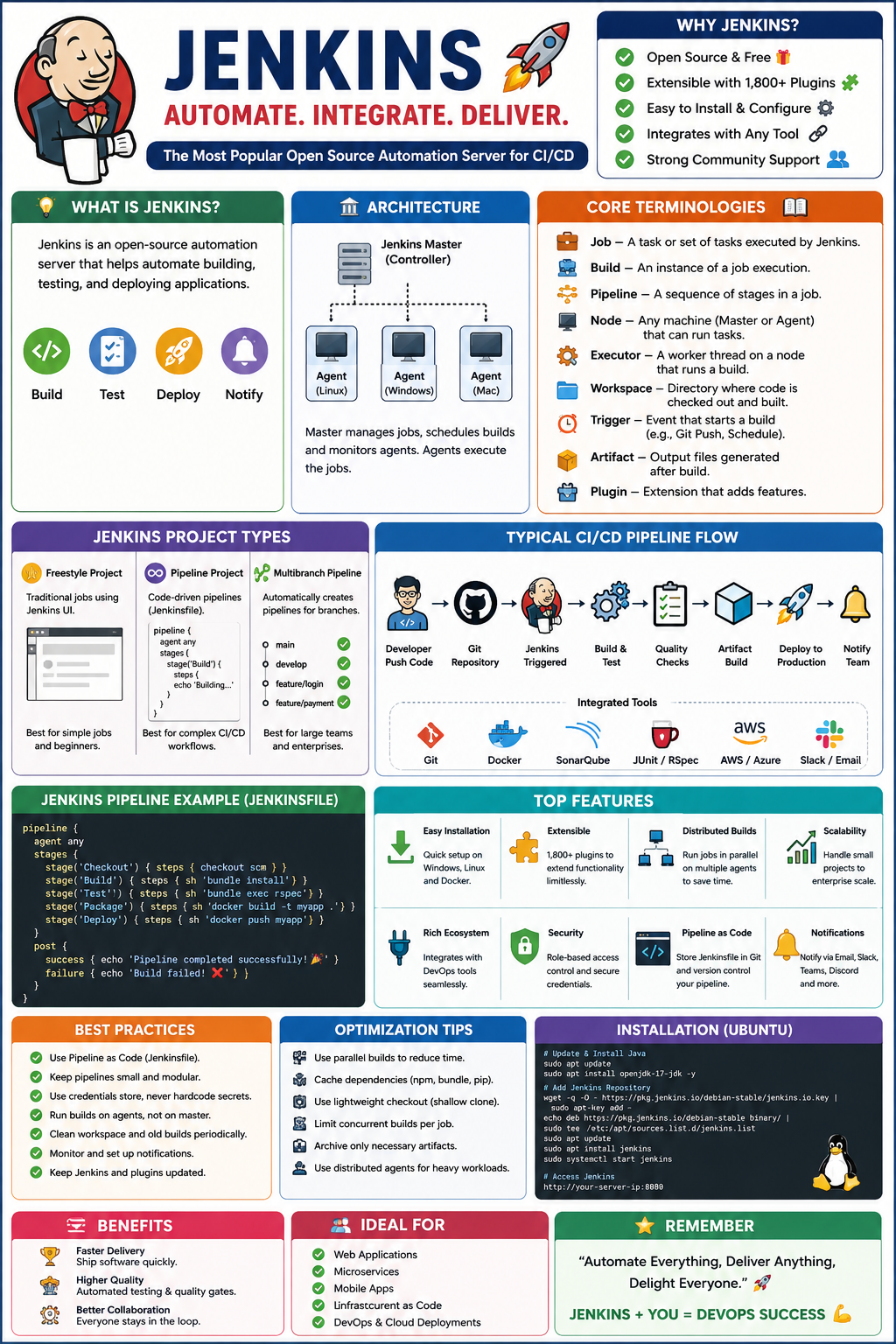
Let’s dive deep into Jenkins! 🚀
📖 What is Jenkins?
Jenkins is an open-source automation server that helps automate:
✅ Building Applications
✅ Running Tests
✅ Deploying Applications
✅ Monitoring Pipelines
✅ Continuous Integration
✅ Continuous Delivery
Instead of manually deploying code every time, Jenkins automatically performs tasks whenever code changes occur.
🎯 Why Jenkins?
Imagine a team of 20 developers.
Without Jenkins:
Developer → Push Code
↓
Manual Build
↓
Manual Testing
↓
Manual Deployment
↓
Production
Problems:
❌ Human errors
❌ Slow releases
❌ Inconsistent deployments
❌ Difficult debugging
With Jenkins:
Developer Pushes Code
↓
Jenkins Triggered
↓
Build
↓
Test
↓
Quality Check
↓
Deploy
↓
Notify Team
Everything becomes automated! 🎉
🏗 Jenkins Architecture
+----------------+
| Jenkins Master |
+----------------+
      |
      |
+-----+-----+
|           |
Agent 1   Agent 2
(Build)   (Test)
Components
1️⃣ Controller (Master)
Responsible for:
- Managing Jobs
- Scheduling Builds
- User Authentication
- Monitoring Agents
2️⃣ Agent (Slave)
Responsible for:
- Running Builds
- Executing Tests
- Deploying Applications
Agents allow distributed execution.
Example:
Linux Agent
Windows Agent
Mac Agent
Each can execute different workloads.
🔥 Core Jenkins Terminologies
Understanding these terms is essential.
1️⃣ Job
A task Jenkins executes.
Example:
Build Rails Applicationor
Run React Tests2️⃣ Build
Execution instance of a Job.
Example:
Build #101
Build #102
Build #103
Each build generates logs and results.
3️⃣ Pipeline
A sequence of automated stages.
Example:
Build
↓
Test
↓
Deploy
4️⃣ Node
Any machine capable of executing Jenkins tasks.
Master Node
Agent Node
5️⃣ Executor
A worker thread inside Jenkins.
Example:
Agent
 ├─ Executor 1
 ├─ Executor 2
 └─ Executor 3
More executors = more parallel jobs.
6️⃣ Workspace
Directory where code is downloaded.
Example:
/var/lib/jenkins/workspace/my-app7️⃣ Trigger
Starts a Jenkins job.
Examples:
SCM Trigger
Git PushSchedule Trigger
0 9 * * *Runs daily at 9 AM.
8️⃣ Artifact
Files generated after builds.
Examples:
WAR Files
Docker Images
Reports
ZIP Files
9️⃣ Plugin
Extension that adds functionality.
Examples:
- Git Plugin
- Docker Plugin
- Slack Plugin
- AWS Plugin
⚙ Jenkins Installation Overview
Ubuntu
sudo apt update
sudo apt install openjdk-17-jdk
Install Jenkins:
wget -q -O - https://pkg.jenkins.io/debian-stable/jenkins.io.key | sudo apt-key add -sudo apt install jenkinsStart Jenkins:
sudo systemctl start jenkinsAccess:
http://server-ip:8080📂 Jenkins Project Types
Freestyle Project
Simple UI-based jobs.
Suitable for:
- Beginners
- Small projects
Pipeline Project
Code-based CI/CD.
Example:
pipeline {
    agent any
        stages {
        stage('Build') {
            steps {
                echo 'Building...'
            }
        }
    }
}
Most recommended.
Multibranch Pipeline
Automatically creates pipelines for:
main
develop
feature/*
branches.
Perfect for enterprise projects.
🎯 Jenkins Pipeline Concepts
A Pipeline consists of stages.
Checkout
↓
Build
↓
Test
↓
Package
↓
Deploy
Declarative Pipeline
Most popular.
pipeline {
 agent any
  stages {
  stage('Build') {
   steps {
    sh 'bundle install'
   }
  }
 }
}
Scripted Pipeline
Advanced customization.
node {
 stage('Build') {
   sh 'bundle install'
 }
}
🚀 Complete CI/CD Flow Using Jenkins
Let’s consider a Ruby on Rails application.
Developer
↓
GitHub Push
↓
Jenkins
↓
Checkout Code
↓
Bundle Install
↓
Run Tests
↓
Code Quality Scan
↓
Build Docker Image
↓
Push Docker Image
↓
Deploy To AWS
↓
Slack Notification
This is the industry-standard flow.
🐳 Jenkins + Docker
Build Docker Image:
docker build -t myapp .Push Image:
docker push myappPipeline:
stage('Docker Build') {
 steps {
   sh 'docker build -t myapp .'
 }
}
Benefits:
✅ Consistent Deployments
✅ Faster Releases
✅ Portable Applications
☁ Jenkins + AWS Deployment
Common Services:
- EC2
- ECS
- EKS
- S3
- CodeDeploy
Pipeline:
stage('Deploy') {
 steps {
   sh 'aws s3 sync build/ s3://mybucket'
 }
}
🔍 Jenkins Testing Integration
Unit Testing
Rails:
bundle exec rspecPython:
pytestReact:
npm testIntegration Testing
Validates component communication.
Example:
Rails API ↔ PostgreSQLEnd-to-End Testing
Tools:
- Selenium
- Cypress
- Playwright
📊 Jenkins Quality Gates
Quality checks before deployment.
Tools:
SonarQube
Checks:
✅ Bugs
✅ Security Issues
✅ Code Smells
Pipeline Example:
stage('Sonar Scan') {
 steps {
  sh 'sonar-scanner'
 }
}
🔐 Jenkins Security Best Practices
Use RBAC
Role-Based Access Control
Admin
Developer
Viewer
Secure Credentials
Never hardcode:
❌
password = "123456"Use Jenkins Credentials Store.
✅
withCredentials(...)Enable HTTPS
Use SSL certificates.
Update Plugins
Regular updates reduce vulnerabilities.
⚡ Jenkins Performance Optimization
1️⃣ Use Distributed Agents
Bad:
All Jobs On MasterGood:
Master
↓
10 Build Agents
2️⃣ Parallel Builds
parallel {
 stage('Unit Test') {}
 stage('Integration Test') {}
}
Can reduce build time dramatically.
3️⃣ Workspace Cleanup
cleanWs()Prevents disk exhaustion.
4️⃣ Artifact Retention
Delete old builds.
Keep Last 20 Builds5️⃣ Cache Dependencies
Ruby:
bundle installNode:
npm installCache them to speed up builds.
6️⃣ Use Lightweight Checkout
Avoid cloning unnecessary Git history.
checkout scmwith shallow clone.
📈 Jenkins Monitoring
Useful Tools:
Prometheus
Collect metrics.
Grafana
Visual dashboards.
Metrics:
- Build Time
- Queue Length
- CPU Usage
- Memory Usage
- Failure Rate
🎯 Best Jenkins Folder Structure
Production
│
├── Frontend
│   ├── React
│
├── Backend
│   ├── Rails
│
├── Infrastructure
│   ├── Terraform
│
└── Shared Libraries
Keeps large organizations organized.
🏆 Industry Best Jenkins Workflow
Developer
↓
Git Push
↓
Pull Request
↓
Jenkins Build
↓
Unit Test
↓
Integration Test
↓
Security Scan
↓
Code Quality Scan
↓
Docker Build
↓
Deploy To Staging
↓
Manual Approval
↓
Deploy To Production
↓
Monitoring
↓
Feedback
This workflow is followed by many enterprise teams because it balances speed and safety.
💡 Common Jenkins Interview Questions
Q1. Difference between CI and CD?
CI: Continuous Integration
CD: Continuous Delivery/Deployment
Q2. What is Jenkinsfile?
Pipeline configuration file stored in Git.
Q3. Why use Agents?
To distribute workloads.
Q4. What are Artifacts?
Generated build outputs.
Q5. Difference Between Declarative and Scripted Pipelines?
Declarative → Simple and structured
Scripted → Flexible and powerful
🎉 Final Thoughts
Jenkins is much more than a build tool — it’s the heart of modern DevOps automation. By mastering Pipelines, Agents, Docker Integration, AWS Deployments, Testing, Security, and Performance Optimization, you can create a fully automated software delivery pipeline that releases code faster, safer, and more reliably.
🚀 Jenkins Success Formula
Git
+
Jenkins
+
Docker
+
Testing
+
SonarQube
+
AWS/Kubernetes
=
World-Class CI/CD Pipeline
“First automate the process, then optimize the automation.” 🔥
Master Jenkins, and you’ll unlock one of the most valuable skills in modern software engineering and DevOps. 🚀👨💻👩💻


Comments
Post a Comment