🚀 Mastering Large Datasets: The Complete Guide to Designing, Managing & Querying Massive Data Like a Pro 💾⚡
🚀 Mastering Large Datasets: The Complete Guide to Designing, Managing & Querying Massive Data Like a Pro 💾⚡
“Data is the new oil, but only if you know how to refine it.”
Modern applications don’t fail because of features — they fail because they can’t efficiently handle millions or billions of records.
Whether you’re building:
- 🛒 E-commerce Applications
- 💳 Banking Systems
- 📱 Social Media Platforms
- 🏥 Healthcare Systems
- 📦 Logistics Platforms
- 🤖 AI Applications
- 📈 Analytics Dashboards
Sooner or later, you’ll face one challenge:
How do we efficiently store, maintain, search, and query massive datasets?
This guide explains everything — from database design to indexing, partitioning, caching, distributed databases, and production-ready architecture.

📖 Table of Contents
- Understanding Large Datasets
- Common Challenges
- Database Design Principles
- Data Modeling
- Normalization vs Denormalization
- Indexing Deep Dive
- Query Optimization
- Execution Plans
- Partitioning
- Sharding
- Replication
- Materialized Views
- Caching Strategies
- Pagination
- Batch Processing
- Data Archiving
- Compression
- Search Engines
- Distributed Databases
- Monitoring
- Performance Hacks
- Perfect Architecture
- Ruby on Rails Examples
- Common Mistakes
- Best Practices
🌍 What is a Large Dataset?
A dataset becomes “large” when:
- Millions of records
- Billions of rows
- Hundreds of GB
- Multiple TB
- PB-scale systems
Example:
Users
20 Million

Orders
600 Million

Payments
850 Million

Products
8 Million

Reviews
1.5 Billion

Logs
80 Billion
At this stage…
Simple SQL queries become slow.
🚨 Problems with Large Datasets
Without proper design you’ll experience:
❌ Slow Queries
❌ Timeouts
❌ Deadlocks
❌ Locking
❌ High Memory Usage
❌ CPU Spikes
❌ Expensive Cloud Bills
❌ Database Crashes
🏗️ Golden Principles
Always design databases around:
✅ Read Performance
✅ Write Performance
✅ Scalability
✅ Fault Tolerance
✅ Data Integrity
✅ Maintainability
🧱 Step 1 — Proper Data Modeling
Bad schema = Slow system forever.
Good schema = Fast system for years.
Example
Instead of
Orders
id
customer_name
customer_email
customer_phone
customer_city
customer_country
Use
Customers
id
name
email

Orders
id
customer_id
Smaller rows mean:
✅ Faster reads
✅ Smaller indexes
✅ Less memory
📚 Normalization
Normalization removes duplication.
Example
Products
Laptop
Laptop
Laptop
Laptop
Laptop
Instead
Products
1 Laptop

Orders
product_id = 1
Advantages
✅ Less storage
✅ Easy updates
📦 Denormalization
Sometimes joins become expensive.
Instead of
Orders
customer_id
You may also store
customer_name
customer_city
Advantages
✅ Faster reads
Disadvantages
❌ Duplicate data
⚡ Indexing
Imagine searching a dictionary.
Without index:
Page 1…
Page 2…
Page 500…
With index:
Jump directly.
Databases work exactly the same way.
Example
Without index
SELECT *
FROM users
WHERE email='abc@gmail.com';
Database scans:
1
2
3
4
...
20 Million
With index
CREATE INDEX idx_users_email
ON users(email);
Search becomes almost instantaneous.
📌 Types of Indexes
Primary Index
PRIMARY KEY(id)Unique Index
emailPrevents duplicates.
Composite Index
(user_id, status)Useful when filtering by both columns.
Partial Index
Only Active UsersSmaller
Faster
Full Text Index
Useful for searching articles.
Spatial Index
Useful for maps.
📊 Query Optimization
Bad Query
SELECT *
FROM users;
Never use
SELECT *Instead
SELECT id,email
FROM users;
Much faster.
Avoid N+1 Queries
Rails example
Bad
users.each do |user|
  puts user.posts.count
end
100 users
=
101 SQL queries
Good
User.includes(:posts)Now
Only
2 queries.
Use EXPLAIN
Never optimize blindly.
EXPLAIN ANALYZE
SELECT *
FROM orders
WHERE user_id=10;
Shows
- Index usage
- Sequential scans
- Execution time
Pagination
Never load everything.
Bad
User.allGood
User.limit(20).offset(40)Better
Cursor Pagination
User.where("id > ?", last_id)
.limit(20)
Cursor pagination scales much better.
Partitioning
Instead of one giant table
Orders
1 Billion Rows
Split by year
Orders_2023
Orders_2024
Orders_2025
Queries become dramatically faster.
Types
✅ Range Partition
✅ List Partition
✅ Hash Partition
Sharding
One database
3 Billion UsersSplit
Shard 1
Asia

Shard 2
Europe

Shard 3
America
Now each database handles less load.
Replication
One Primary
WritesMultiple Replicas
ReadsExample
Primary
↓
Replica
Replica
Replica
Applications read from replicas.
Huge performance improvement.
Caching
Never hit database repeatedly.
Cache
Redis
Memcached
Example
Instead of
1000 SQL queriesServe
1000 Redis readsMilliseconds.
Materialized Views
Instead of calculating reports every request
Sales
Revenue
Analytics
Store precomputed results.
Refresh hourly.
Compression
Enable
✅ Table Compression
✅ Backup Compression
✅ Network Compression
Storage drops dramatically.
Archiving
Don’t keep 10-year-old records in production tables.
Move them
Archive DatabaseBenefits
✅ Smaller indexes
✅ Faster queries
Batch Processing
Never update
10 Million rowsAt once.
Instead
1000
1000
1000
Rails
User.find_each(batch_size: 1000)Background Jobs
Heavy queries?
Don’t run inside requests.
Use
- Sidekiq
- GoodJob
- Delayed Job
- Solid Queue
Search Engines
SQL isn’t designed for advanced searching.
Use
- Elasticsearch
- OpenSearch
- Meilisearch
- Typesense
For
✅ Autocomplete
✅ Fuzzy Search
✅ Ranking
Monitoring
Always monitor
Query Time
CPU
Memory
Cache Hit Rate
Lock Wait
Slow Queries
Replication Delay
Tools
- Prometheus
- Grafana
- pg_stat_statements
- New Relic
- Datadog
Large Dataset Architecture
Users
                       │
                 Load Balancer
                       │
                 Ruby on Rails
                       │
        ┌──────────────┼──────────────┐
        │              │              │
      Redis        PostgreSQL      Search
      Cache         Primary      Elasticsearch
                       │
          ┌────────────┴───────────┐
          │                        │
     Read Replica             Read Replica
          │                        │
       Analytics             Reporting
          │
      Data Warehouse
          │
     Batch Processing
          │
     Archived Storage
Example Folder Structure
app/
├── models/
├── services/
│   ├── query_builder.rb
│   ├── search_service.rb
│   ├── reporting_service.rb
│   └── cache_service.rb
│
├── repositories/
│   ├── user_repository.rb
│   ├── order_repository.rb
│
├── queries/
│   ├── active_users_query.rb
│   ├── revenue_query.rb
│
├── jobs/
│
├── workers/
│
└── presenters/
This keeps querying logic independent.
Perfect Design Pattern
Controller
↓
Service
↓
Repository
↓
Query Object
↓
Database
Example
UsersController
↓
UserService
↓
UserRepository
↓
ActiveUsersQuery
↓
PostgreSQL
Advantages
✅ Reusable Queries
✅ Easy Testing
✅ Clean Code
✅ Easy Optimization
Example Query Object
class ActiveUsersQuery
  def self.call
    User.where(active: true)
        .where("last_login > ?", 30.days.ago)
        .order(last_login: :desc)
  end
end
Usage
ActiveUsersQuery.call.limit(20)Performance Hacks 🚀
✅ Always index foreign keys
✅ Never use SELECT *
✅ Avoid unnecessary joins
✅ Use EXISTS instead of COUNT
Instead of
SELECT COUNT(*)
FROM users
WHERE email='abc@gmail.com';
Use
SELECT EXISTS(
SELECT 1
FROM users
WHERE email='abc@gmail.com');
✅ Use Bulk Inserts
Instead of
1 row1 row
1 row
Insert
1000 rowsTogether.
✅ Cache expensive queries
✅ Archive old data
✅ Monitor slow queries weekly
✅ Partition huge tables
✅ Prefer Cursor Pagination
✅ Batch updates
✅ Compress backups
✅ Read replicas
✅ Asynchronous processing
Common Mistakes ❌
❌ Missing indexes
❌ Over-indexing every column
❌ Huge transactions
❌ N+1 queries
❌ Loading entire tables
❌ Storing blobs in databases
❌ Ignoring execution plans
❌ No monitoring
❌ Mixing business logic with SQL
❌ No caching
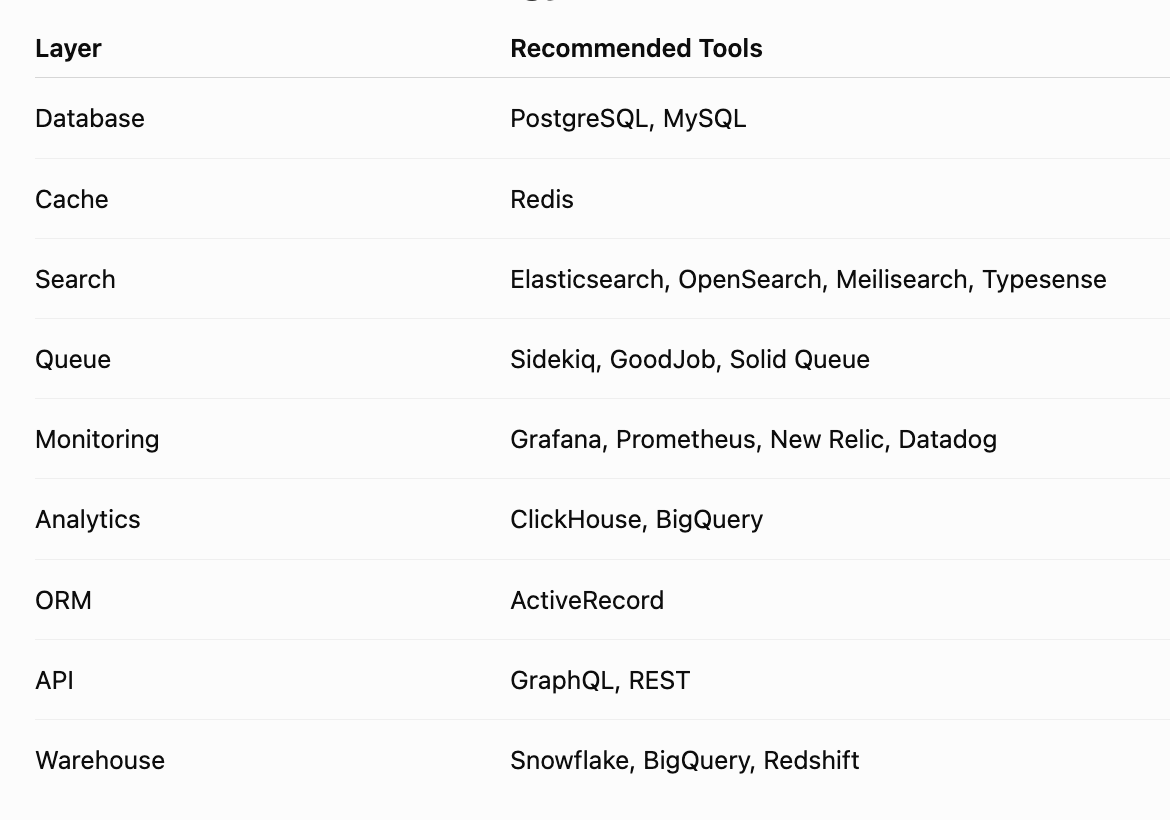
Recommended Technology Stack 🛠️
🎯 Final Thoughts
Handling large datasets is not about writing faster SQL alone — it’s about designing systems that remain fast as your application grows from thousands to billions of records.
A scalable data platform combines thoughtful schema design, efficient indexing, optimized queries, caching, partitioning, asynchronous processing, and continuous monitoring. By separating query logic through patterns like Service + Repository + Query Object, using cursor-based pagination, leveraging read replicas, and integrating specialized tools such as Redis, Elasticsearch, and ClickHouse, you build systems that are easier to maintain and scale.
Remember these guiding principles:
- 📌 Design for future growth, not just today’s traffic.
- 📌 Measure performance before optimizing.
- 📌 Optimize the slowest 1% of queries first.
- 📌 Cache intelligently instead of querying repeatedly.
- 📌 Archive and partition data proactively.
- 📌 Continuously monitor, profile, and refine.
“The best-performing databases aren’t the ones with the fastest hardware — they’re the ones with the smartest architecture.” 🚀


Comments
Post a Comment