🚀 Mastering Servers & Infrastructure for Software and Web Applications: The Complete Developer’s Guide
🚀 Mastering Servers & Infrastructure for Software and Web Applications: The Complete Developer’s Guide
“Great applications are not built only with code; they are built on strong infrastructure.”
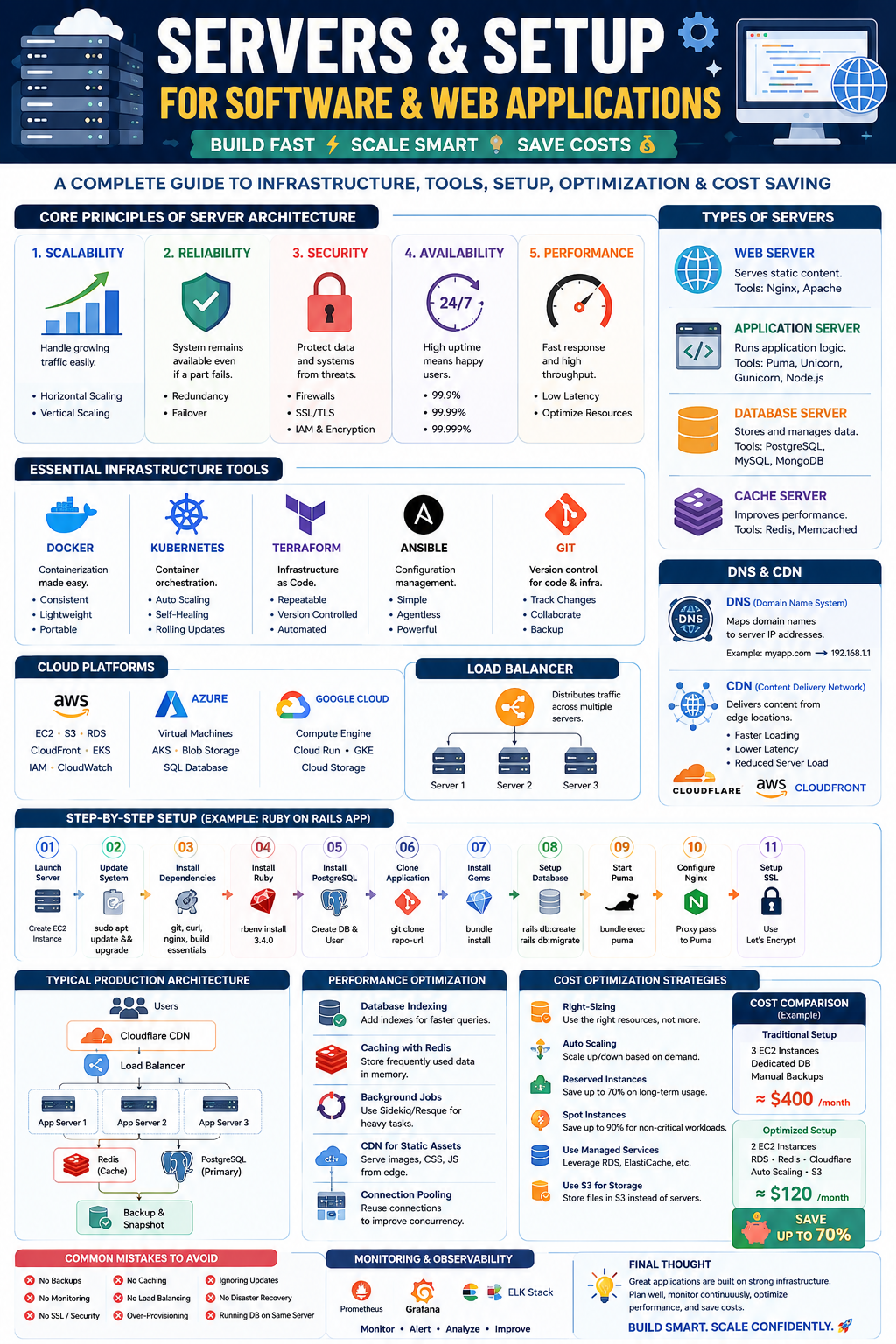
Modern software applications serve millions of users worldwide. Whether it’s Netflix streaming videos, Amazon handling purchases, or your Ruby on Rails application serving customers, everything depends on a well-designed server infrastructure.
In this guide, you’ll learn:
✅ Server fundamentals
✅ Infrastructure principles
✅ Web and software application architecture
✅ Deployment tools and technologies
✅ Step-by-step server setup
✅ Performance optimization techniques
✅ Cost-saving strategies
✅ Real-world examples
Let’s dive in! 🔥
🌍 What is a Server?
A server is a computer system designed to provide services, resources, or data to other computers called clients.
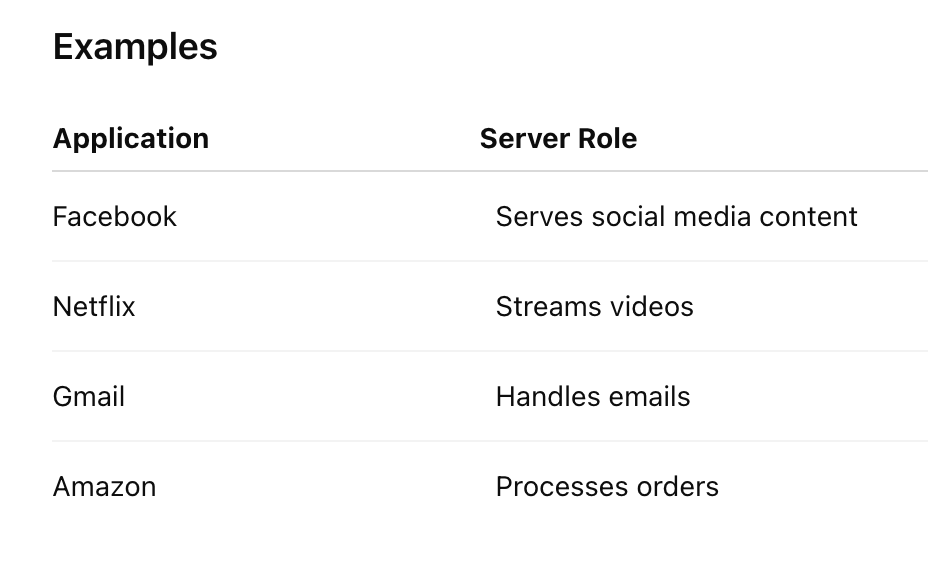
Without servers, applications cannot be accessed by users.
🏗️ Core Principles of Server Architecture
Before setting up infrastructure, understand these principles:
1️⃣ Scalability
Ability to handle increasing traffic.
Example
- 100 users today
- 100,000 users next year
Infrastructure should grow smoothly.
Methods
✅ Horizontal Scaling
Add more servers
1 Server → 2 Servers → 10 Servers✅ Vertical Scaling
Increase resources
4GB RAM → 16GB RAM
2 CPU → 16 CPU
2️⃣ Reliability
Applications should remain available even when failures occur.
Example
If one server crashes:
Server A ❌
Server B ✅
Server C ✅
Users continue accessing the application.
3️⃣ Security
Protect applications from attacks.
Security Layers
🔒 Firewalls
🔒 SSL/TLS
🔒 VPN
🔒 IAM
🔒 Encryption
4️⃣ Availability
Target:
99.9%
99.99%
99.999%
Higher availability means fewer outages.
5️⃣ Performance
Fast response times improve user experience.
Metrics
⚡ Response Time
⚡ Throughput
⚡ Latency
⚡ CPU Usage
⚡ Memory Usage
🖥️ Types of Servers
Web Server
Serves static content.
Popular Tools:
Nginx
Features:
✅ High performance
✅ Reverse proxy
✅ Load balancing
✅ SSL support
Apache
Features:
✅ Flexible
✅ Large ecosystem
✅ Easy configuration
Application Server
Runs application code.
Examples:
- Ruby on Rails
- Django
- Spring Boot
- Node.js
Popular Tools
✅ Puma
✅ Unicorn
✅ Passenger
✅ Gunicorn
Database Server
Stores application data.
Popular Databases
🐘 PostgreSQL
🐬 MySQL
🍃 MongoDB
🔴 Redis
Cache Server
Improves performance.
Redis
Features:
✅ In-memory storage
✅ Session management
✅ Background jobs
✅ Rate limiting
☁️ Cloud Platforms
Modern applications mostly run in the cloud.
Amazon Web Services (AWS)
Popular Services:
EC2
Virtual servers
S3
Object storage
RDS
Managed database
CloudFront
CDN
EKS
Kubernetes
Microsoft Azure
Features:
✅ Virtual Machines
✅ AKS
✅ Managed Databases
Google Cloud Platform
Features:
✅ Compute Engine
✅ Cloud Run
✅ Kubernetes Engine
🛠️ Essential Infrastructure Tools
Docker 🐳
Containerization platform.
Benefits
✅ Consistency
✅ Easy deployment
✅ Lightweight
Example:
docker build -t my-app .
docker run my-app
Kubernetes ☸️
Container orchestration.
Features:
✅ Auto Scaling
✅ Self-Healing
✅ Load Balancing
✅ Rolling Updates
Terraform 🏗️
Infrastructure as Code.
Example:
resource "aws_instance" "web" {
  ami           = "ami-123"
  instance_type = "t3.micro"
}
Benefits:
✅ Repeatable
✅ Automated
✅ Version Controlled
Ansible
Configuration management.
Example:
- hosts: servers
  tasks:
    - name: Install Nginx
      apt:
        name: nginx
🚦 Load Balancers
A load balancer distributes traffic.
Example
Users
   |
Load Balancer
 /    |    \
S1   S2   S3
Benefits:
✅ High Availability
✅ Scalability
✅ Reliability
Popular Options
- Nginx
- HAProxy
- AWS ELB
🌐 DNS & CDN
DNS
Maps:
myapp.com
      ↓
Server IP
Popular Providers:
✅ Cloudflare
✅ Route53
✅ Google DNS
CDN
Content Delivery Network.
Benefits:
⚡ Faster loading
⚡ Lower latency
⚡ Reduced server load
Examples:
- Cloudflare
- CloudFront
📦 Step-by-Step Setup of a Production Web Application
Let’s deploy a Ruby on Rails application.
Step 1: Launch Server
AWS EC2
Configuration:
Ubuntu 24.04
2 CPU
4GB RAM
Step 2: Update System
sudo apt update
sudo apt upgrade -y
Step 3: Install Dependencies
sudo apt install git curl nginxStep 4: Install Ruby
rbenv install 3.4.0Step 5: Install PostgreSQL
sudo apt install postgresqlCreate database:
CREATE DATABASE production_db;Step 6: Clone Application
git clone repo-urlStep 7: Install Gems
bundle installStep 8: Setup Database
rails db:create
rails db:migrate
Step 9: Start Puma
bundle exec pumaStep 10: Configure Nginx
server {
  listen 80;

  location / {
    proxy_pass http://localhost:3000;
  }
}
Step 11: SSL Setup
Using Let’s Encrypt:
sudo certbot --nginx🏢 Real Production Architecture
Users
  |
Cloudflare
  |
Load Balancer
  |
------------------
|       |        |
App1   App2    App3
  |
Redis Cluster
  |
PostgreSQL
  |
Backup Server
Enterprise-grade setup used by many SaaS companies.
⚡ Performance Optimization
1. Database Indexing
Without index:
1 Million Rows
Slow Query
With index:
Fast QueryExample:
CREATE INDEX idx_users_email
ON users(email);
2. Redis Caching
Store frequently used data.
Example:
Rails.cache.fetch("products") do
  Product.all
end
3. Background Jobs
Avoid slow user requests.
Tools:
✅ Sidekiq
✅ Resque
✅ Delayed Job
4. CDN Usage
Serve:
- Images
- Videos
- CSS
- JS
from edge servers.
5. Database Connection Pooling
Example:
pool: 20Improves concurrency.
💰 Cost Optimization Strategies
Infrastructure costs can become huge if unmanaged.
1️⃣ Right-Sizing Servers
Avoid:
❌ 32GB RAM for 100 users
Choose according to demand.
2️⃣ Auto Scaling
Scale automatically.
Low Traffic → 2 Servers
High Traffic → 10 Servers
3️⃣ Reserved Instances
AWS discounts:
💰 Up to 70%
for long-term usage.
4️⃣ Spot Instances
Perfect for:
✅ Batch Jobs
✅ AI Training
✅ Background Processing
Savings:
💰 Up to 90%
5️⃣ S3 Instead of Large Servers
Store:
- Images
- Videos
- Documents
in object storage.
Much cheaper.
6️⃣ Use Managed Databases
Instead of managing your own:
✅ AWS RDS
✅ Azure Database
✅ Cloud SQL
Benefits:
- Backups
- Monitoring
- Security
📊 Example Cost Comparison
Startup Application:
Traditional Setup
3 Servers
Dedicated Database
Manual Backups
≈ $400/month
Optimized Cloud Setup
2 EC2 Instances
RDS
Redis
Cloudflare
≈ $120/month
Savings:
💰 Nearly 70%
🎯 Recommended Tech Stack for 2026
Small Projects
- Nginx
- Rails/Django
- PostgreSQL
- Redis
- Docker
Medium SaaS
- AWS EC2
- Docker
- PostgreSQL
- Redis
- Sidekiq
- Cloudflare
Enterprise Scale
- Kubernetes
- Terraform
- AWS EKS
- Aurora PostgreSQL
- Redis Cluster
- Prometheus
- Grafana
🚨 Common Mistakes to Avoid
❌ No backups
❌ No monitoring
❌ Running database on same server forever
❌ Missing SSL
❌ No caching
❌ No load balancing
❌ Over-provisioning resources
❌ Ignoring security updates
❌ No disaster recovery plan
🏆 Final Thoughts
Building great software isn’t just about writing clean code. The real magic happens when your application is supported by a scalable, secure, reliable, and cost-efficient infrastructure.
A strong infrastructure strategy includes:
✅ Proper server architecture
✅ Cloud-native deployment
✅ Security-first mindset
✅ Monitoring and observability
✅ Performance optimization
✅ Cost control
Whether you’re building a startup MVP, a SaaS platform, or an enterprise application, mastering servers and infrastructure will make your applications faster, safer, and ready for millions of users.
🚀 Build smart. Scale confidently. Optimize continuously.


Comments
Post a Comment