🚀 ReactJS Design Patterns Mastery: Build Scalable, Maintainable & High-Performance Applications
🚀 ReactJS Design Patterns Mastery: Build Scalable, Maintainable & High-Performance Applications
ReactJS is not just a library — it’s a powerful ecosystem for building modern web applications. However, as applications grow, poorly structured code can become difficult to maintain, debug, and scale.
This is where React Design Patterns come into play. They provide proven solutions to common development challenges and help developers write cleaner, reusable, and efficient code.
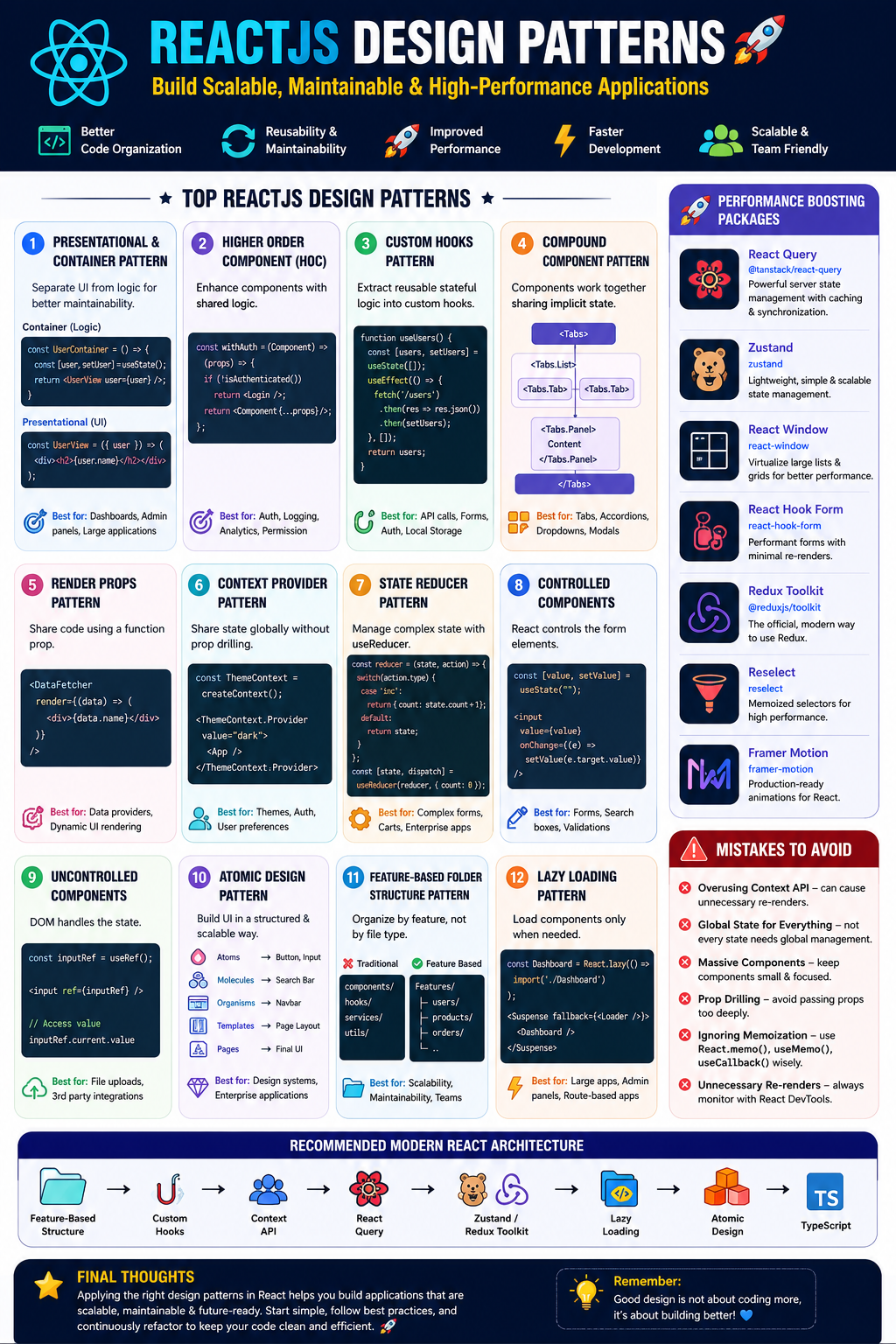
Let’s explore the most important ReactJS design patterns every developer should know! 🔥
🎯 Why Design Patterns Matter in React?
✅ Better Code Organization
✅ Reusable Components
✅ Easier Maintenance
✅ Improved Performance
✅ Faster Development
✅ Better Team Collaboration
1️⃣ Presentational & Container Pattern
One of the oldest yet most useful React patterns.
🎨 Presentational Component
Responsible only for UI rendering.
const UserView = ({ user }) => {
  return (
    <div>
      <h2>{user.name}</h2>
    </div>
  );
};
⚙️ Container Component
Handles business logic and data fetching.
const UserContainer = () => {
  const [user, setUser] = useState({ name: "Lakhveer" });

  return <UserView user={user} />;
};
🚀 Features
- Separation of concerns
- Easy testing
- Reusable UI components
✅ Best Use Cases
- Dashboard applications
- Admin panels
- Large enterprise projects
2️⃣ Higher Order Component (HOC)
A function that takes a component and returns an enhanced component.
const withLoader = (Component) => {
  return function WrappedComponent({ isLoading, ...props }) {
    if (isLoading) return <p>Loading...</p>;
    return <Component {...props} />;
  };
};
Usage:
const UserListWithLoader = withLoader(UserList);🚀 Features
- Code Reusability
- Logic Sharing
- Cross-cutting concerns
✅ Best Use Cases
- Authentication
- Logging
- Analytics
- Permission handling
❌ Mistakes to Avoid
- Deep nesting of HOCs
- Wrapping every component unnecessarily
3️⃣ Custom Hooks Pattern ⭐
Modern replacement for many HOCs.
function useUsers() {
  const [users, setUsers] = useState([]);

  useEffect(() => {
    fetch("/users")
      .then(res => res.json())
      .then(setUsers);
  }, []);
  return users;
}
Usage:
function UserList() {
  const users = useUsers();

  return (
    <>
      {users.map(user => (
        <p key={user.id}>{user.name}</p>
      ))}
    </>
  );
}
🚀 Features
- Reusable stateful logic
- Cleaner code
- Better readability
✅ Best Use Cases
- API calls
- Authentication
- Forms
- Local Storage
4️⃣ Compound Component Pattern
Components work together while sharing state.
Example:
<Tabs>
  <Tabs.List>
    <Tabs.Tab>Profile</Tabs.Tab>
    <Tabs.Tab>Settings</Tabs.Tab>
  </Tabs.List>

  <Tabs.Panel>
    Profile Content
  </Tabs.Panel>
</Tabs>
🚀 Features
- Flexible APIs
- Better user experience
- Shared state management
✅ Best Use Cases
- Tabs
- Accordions
- Dropdowns
- Modals
5️⃣ Render Props Pattern
Pass a function as a prop.
<DataFetcher
  render={(data) => (
    <div>{data.name}</div>
  )}
/>
🚀 Features
- Dynamic rendering
- Logic reuse
✅ Best Use Cases
- Data providers
- Dynamic UI rendering
❌ Mistakes to Avoid
- Excessive nesting
6️⃣ Context Provider Pattern
Avoids prop drilling.
const ThemeContext = createContext();

function App() {
  return (
    <ThemeContext.Provider value="dark">
      <Dashboard />
    </ThemeContext.Provider>
  );
}
Usage:
const theme = useContext(ThemeContext);🚀 Features
- Global state sharing
- Cleaner architecture
✅ Best Use Cases
- Themes
- Authentication
- User preferences
7️⃣ State Reducer Pattern
Allows consumers to customize internal state behavior.
const reducer = (state, action) => {
  switch(action.type) {
    case "increment":
      return { count: state.count + 1 };
    default:
      return state;
  }
};
Usage:
const [state, dispatch] = useReducer(reducer, { count: 0 });🚀 Features
- Predictable state updates
- Better debugging
✅ Best Use Cases
- Complex forms
- Shopping carts
- Enterprise applications
8️⃣ Controlled Components Pattern
React controls component state.
const [value, setValue] = useState("");

<input
  value={value}
  onChange={(e) => setValue(e.target.value)}
/>
🚀 Features
- Single source of truth
- Easier validation
✅ Best Use Cases
- Forms
- Search boxes
9️⃣ Uncontrolled Components Pattern
DOM manages state.
const inputRef = useRef();

<input ref={inputRef} />
Access value:
inputRef.current.value🚀 Features
- Simpler implementation
- Less React rendering
✅ Best Use Cases
- File uploads
- Third-party integrations
🔟 Atomic Design Pattern
Popular UI architecture methodology.
Atoms
 ↓
Molecules
 ↓
Organisms
 ↓
Templates
 ↓
Pages
Example
🔹 Atom → Button
<Button />🔹 Molecule → SearchBar
<SearchBar />🔹 Organism → Navbar
<Navbar />🚀 Features
- Highly scalable
- Reusable UI architecture
✅ Best Use Cases
- Design systems
- Enterprise applications
1️⃣1️⃣ Feature-Based Folder Structure Pattern
Instead of:
components/
hooks/
services/
Use:
src/
├── features/
│   ├── users/
│   ├── products/
│   ├── orders/
🚀 Benefits
✅ Better scalability
✅ Easier maintenance
✅ Team-friendly structure
1️⃣2️⃣ Lazy Loading Pattern
Load components only when needed.
const Dashboard = React.lazy(() =>
  import("./Dashboard")
);
Usage:
<Suspense fallback={<Loader />}>
  <Dashboard />
</Suspense>
🚀 Features
- Faster page load
- Reduced bundle size
✅ Best Use Cases
- Large applications
- Admin dashboards
⚡ React Performance Boosting Packages
🔥 React Query
Great for server-state management.
npm install @tanstack/react-queryBenefits:
✅ Caching
✅ Background Sync
✅ Optimistic Updates
🔥 Zustand
Lightweight state management.
npm install zustandBenefits:
✅ Small Bundle Size
✅ Simple API
🔥 React Window
Virtualized lists.
npm install react-windowBenefits:
✅ Huge performance boost
✅ Handles thousands of records
🔥 React Hook Form
Efficient form handling.
npm install react-hook-formBenefits:
✅ Fewer re-renders
✅ Better validation
🔥 Redux Toolkit
Modern Redux solution.
npm install @reduxjs/toolkitBenefits:
✅ Boilerplate reduction
✅ Predictable state management
🔥 Reselect
Memoized selectors.
npm install reselectBenefits:
✅ Prevents unnecessary calculations
🔥 Framer Motion
Advanced animations.
npm install framer-motionBenefits:
✅ Smooth animations
✅ Better UX
❌ Common React Design Pattern Mistakes
🚫 Overusing Context API
Too many updates can cause unnecessary re-renders.
🚫 Global State for Everything
Not every state belongs in Redux or Context.
🚫 Massive Components
Keep components focused on a single responsibility.
🚫 Prop Drilling
Use Context or state management when needed.
🚫 Ignoring Memoization
Use:
React.memo()
useMemo()
useCallback()
wisely.
🚫 Unnecessary Re-renders
Always monitor with React DevTools Profiler.
🏆 Recommended Architecture for Modern React Applications
React
 ├── Feature-Based Structure
 ├── Custom Hooks
 ├── Context API
 ├── React Query
 ├── Zustand/Redux Toolkit
 ├── Lazy Loading
 ├── Atomic Design
 └── TypeScript
This combination provides:
🚀 Scalability
🚀 Performance
🚀 Maintainability
🚀 Faster Development
🚀 Enterprise Readiness
🎯 Final Thoughts
Mastering ReactJS isn’t about learning more libraries — it’s about applying the right design patterns at the right time. Start with Custom Hooks, Context API, Compound Components, Feature-Based Architecture, and Lazy Loading, then gradually adopt advanced patterns like State Reducers and Atomic Design.
The best React developers don’t just write components — they design systems that remain clean, scalable, and maintainable for years. 💎
Remember: A well-designed React application can save hundreds of development hours and make scaling your product dramatically easier. 🚀🔥


Comments
Post a Comment