🚀 Ruby on Rails Gems Mastery: Build, Publish & Manage Your Own Gems Like a Pro 💎
🚀 Ruby on Rails Gems Mastery: Build, Publish & Manage Your Own Gems Like a Pro 💎
Ruby is famous for its elegant ecosystem of Gems. Every Rails developer uses gems daily — whether it’s Devise, Sidekiq, Pundit, or RSpec. But have you ever wondered how these gems are actually created?
Creating your own gem is one of the best ways to:
- ✅ Reuse code across multiple projects
- ✅ Share utilities with the community
- ✅ Build your developer portfolio
- ✅ Contribute to Open Source
- ✅ Create internal company libraries
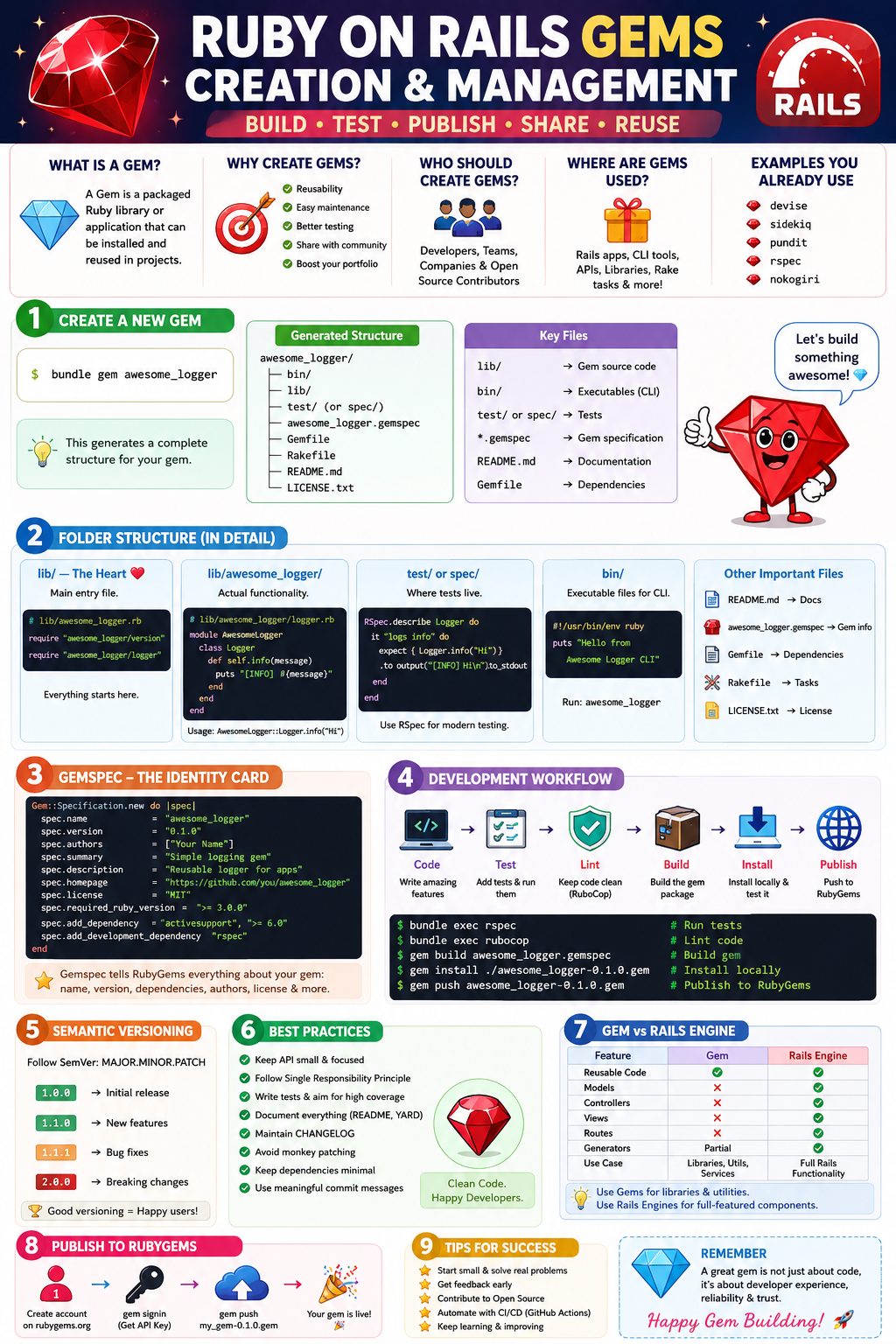
In this comprehensive guide, you’ll learn everything about Ruby Gem Creation and Management, from folder structure to publishing and best practices. 🎯
🤔 What is a Ruby Gem?
A Gem is a packaged Ruby application or library that can be installed and reused in multiple projects.
Think of it as:
Ruby Library + Metadata + Versioning + Distribution
= Ruby Gem
Example:
gem 'devise'
gem 'sidekiq'
gem 'nokogiri'
🏗 Why Create Your Own Gem?
Imagine you have authentication helper methods used in 10 projects.
Instead of:
# Copying code repeatedly
module AuthHelper
  ...
end
You can create:
gem 'my_auth_helper'and use it everywhere.
Benefits:
✨ Reusability
✨ Easy maintenance
✨ Better testing
✨ Cleaner architecture
✨ Version control
🛠 Prerequisites
Ensure you have:
ruby -v
gem -v
bundle -v
Install Bundler if needed:
gem install bundler🚀 Creating a New Gem
Ruby provides a built-in command.
bundle gem awesome_loggerOutput:
awesome_logger/
├── bin/
├── lib/
├── test/
├── Gemfile
├── Rakefile
├── README.md
├── awesome_logger.gemspec
└── LICENSE.txt
This generates a complete gem structure.
📂 Understanding Gem Folder Structure
Let’s explore each directory.
📁 lib/
The heart of the gem.
lib/
├── awesome_logger.rb
└── awesome_logger/
Main entry file:
# lib/awesome_logger.rb

require "awesome_logger/version"
require "awesome_logger/logger"
Everything starts here.
📁 lib/gem_name
Contains actual functionality.
Example:
# lib/awesome_logger/logger.rb

module AwesomeLogger
  class Logger
    def self.info(message)
      puts "[INFO] #{message}"
    end
  end
end
Usage:
AwesomeLogger::Logger.info("Server Started")Output:
[INFO] Server Started📁 test/ or spec/
Contains tests.
Example:
def test_logger
  assert_equal(
    "[INFO] Hello",
    AwesomeLogger::Logger.info("Hello")
  )
end
Most modern gems use RSpec.
bundle gem my_gem --test=rspec📁 bin/
Contains executable files.
Example:
bin/my_gemUsed when your gem provides command-line functionality.
Example:
my_gem generate report📄 README.md
Documentation.
Must include:
- Installation
- Usage
- Examples
- Configuration
- Contribution Guide
Good documentation = More users 📈
📄 Gemfile
Defines dependencies.
source "https://rubygems.org"

gemspec
Development gems:
group :development do
  gem 'rubocop'
  gem 'pry'
end
📄 gemspec File
The most important file.
Example:
Gem::Specification.new do |spec|
  spec.name          = "awesome_logger"
  spec.version       = "0.1.0"
  spec.authors       = ["Lakhveer Singh Rajput"]

  spec.summary       = "Simple logging gem"
  spec.description   = "Reusable logger"
  spec.homepage      = "https://github.com/rajputlakhveer"
  spec.license       = "MIT"
  spec.required_ruby_version = ">= 3.0.0"
end
This file tells RubyGems everything about your gem.
🧩 Designing Gem Architecture
Follow a modular structure.
❌ Bad
class Logger
end

class Formatter
end

class Parser
end
✅ Good
module AwesomeLogger
  class Logger
  end

  class Formatter
  end

  class Parser
  end
end
Namespacing prevents conflicts.
📦 Managing Dependencies
Add runtime dependencies:
spec.add_dependency "httparty", "~> 0.22"Development dependencies:
spec.add_development_dependency "rspec"Install:
bundle install🔖 Semantic Versioning
Always follow SemVer.
Format:
MAJOR.MINOR.PATCHExample:
1.2.3Meaning:
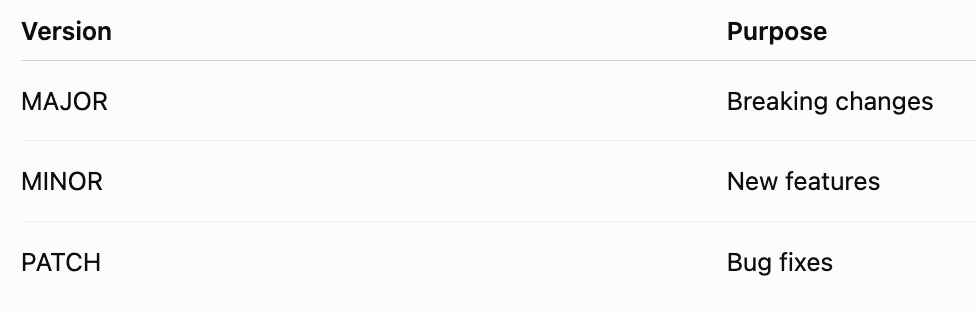
Examples:
1.0.0
1.1.0
1.1.1
2.0.0
🎯 Creating Gem Features
Example utility gem.
module TextTools
  class Formatter
    def self.titleize(text)
      text.split.map(&:capitalize).join(" ")
    end
  end
end
Usage:
TextTools::Formatter.titleize(
  "ruby on rails gems"
)
Output:
Ruby On Rails Gems🧪 Testing Your Gem
Install RSpec:
bundle add rspecExample:
RSpec.describe Formatter do
  it "titleizes text" do
    expect(
      Formatter.titleize("hello world")
    ).to eq("Hello World")
  end
end
Run:
bundle exec rspec🔍 Linting & Code Quality
Install RuboCop.
bundle add rubocopRun:
bundle exec rubocopBenefits:
✅ Consistent code
✅ Better readability
✅ Industry standards
🏗 Building the Gem
Build package:
gem build awesome_logger.gemspecOutput:
awesome_logger-0.1.0.gemThis creates a distributable package.
💻 Local Installation
Install locally:
gem install ./awesome_logger-0.1.0.gemVerify:
gem listUse:
require 'awesome_logger'🌍 Publishing to RubyGems
Create account on RubyGems.
Generate API key:
gem signinPush gem:
gem push awesome_logger-0.1.0.gemYour gem becomes available globally.
🎉 Congratulations!
People can now install:
gem install awesome_logger🔄 Updating a Gem
Update version:
VERSION = "0.2.0"Build again:
gem build awesome_logger.gemspecPublish:
gem push awesome_logger-0.2.0.gem🏢 Internal Company Gems
Many companies create private gems.
Examples:
company_auth
company_payments
company_logging
company_notifications
Benefits:
✅ Shared business logic
✅ Standardized architecture
✅ Faster development
🏛 Rails Engine vs Gem
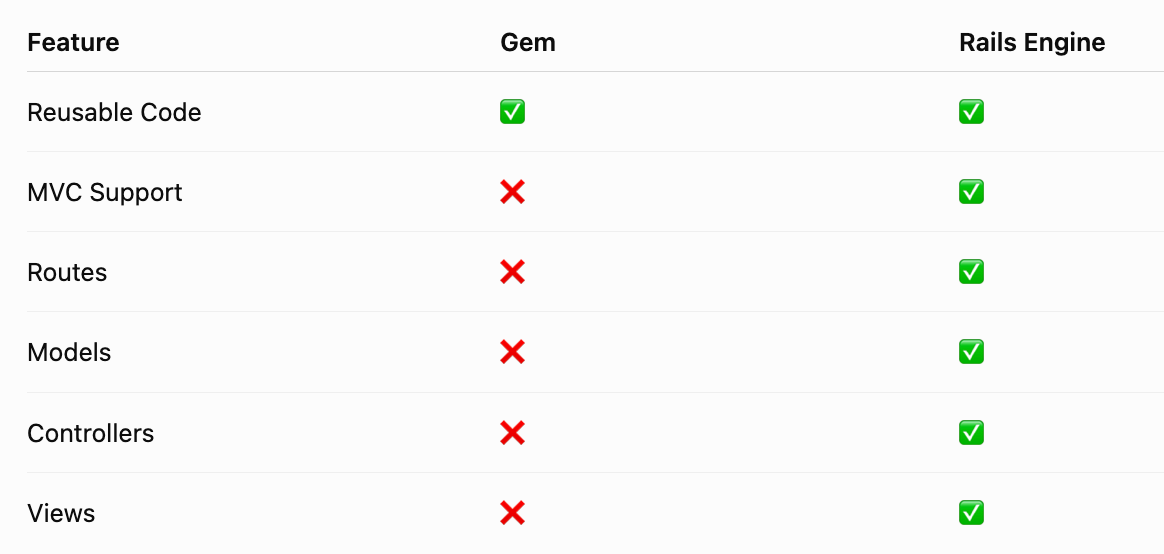
Use:
📦 Gem → Utility libraries
🚂 Rails Engine → Reusable Rails applications
⚡ Advanced Gem Techniques
Configuration Pattern
module AwesomeLogger
  class Configuration
    attr_accessor :level
  end
end
Usage:
AwesomeLogger.configure do |config|
  config.level = :debug
end
Singleton Pattern
require 'singleton'

class Logger
  include Singleton
end
Provides a single shared instance.
Service Object Pattern
module PaymentGateway
  class Charge
    def call
      # logic
    end
  end
end
Keeps code clean.
🎯 Best Practices for Gem Development
✅ Follow Single Responsibility Principle
One class = One responsibility.
✅ Keep Public API Small
Expose only necessary methods.
module MyGem
  def self.perform
  end
end
✅ Write Documentation
Include:
- Installation
- Examples
- Configuration
- Changelog
✅ Add CI/CD
GitHub Actions:
name: Tests

on: [push]
jobs:
  test:
    runs-on: ubuntu-latest
✅ Maintain Changelog
## 1.2.0
- Added formatter support

## 1.1.0
- Added JSON logger
✅ Avoid Global Monkey Patching
❌
class String
  def custom
  end
end
✅
module MyGem
  class Formatter
  end
end
🚨 Common Mistakes
❌ Large God Classes
class Everything
end
❌ No Tests
Unstable gems create maintenance nightmares.
❌ Poor Versioning
Avoid:
1.0
1.1
Use:
1.0.0
1.1.0
❌ Too Many Dependencies
Each dependency increases:
- Complexity
- Security risks
- Maintenance burden
🎓 Real-World Gem Development Workflow
Idea
 ↓
Create Gem
 ↓
Design Modules
 ↓
Write Features
 ↓
Add Tests
 ↓
Run RuboCop
 ↓
Build Gem
 ↓
Publish
 ↓
Gather Feedback
 ↓
Release New Versions
🏆 Final Thoughts
Ruby Gems are one of the biggest reasons behind Ruby on Rails’ productivity and popularity. Learning to create and manage your own gems transforms you from a framework user into a framework builder. 🚀
Whether you’re building:
- 🔐 Authentication utilities
- 📊 Reporting tools
- ☁️ AWS integrations
- 🤖 AI wrappers
- 🏢 Internal company libraries
A well-designed gem can save hundreds of development hours and be reused across countless applications.
“Write code once, package it as a gem, and use it everywhere.” 💎
Happy Gem Building! 🚀✨


Comments
Post a Comment