🚀 Ruby on Rails Views & UI Management: The Complete Guide to Building Beautiful, Fast & Scalable Applications
🚀 Ruby on Rails Views & UI Management: The Complete Guide to Building Beautiful, Fast & Scalable Applications
“Users don’t care how elegant your backend is if your UI frustrates them.”
Ruby on Rails is famous for rapid backend development, but many developers underestimate the importance of well-structured Views and UI architecture.
A poorly organized frontend becomes difficult to maintain, slow to render, and painful to scale.
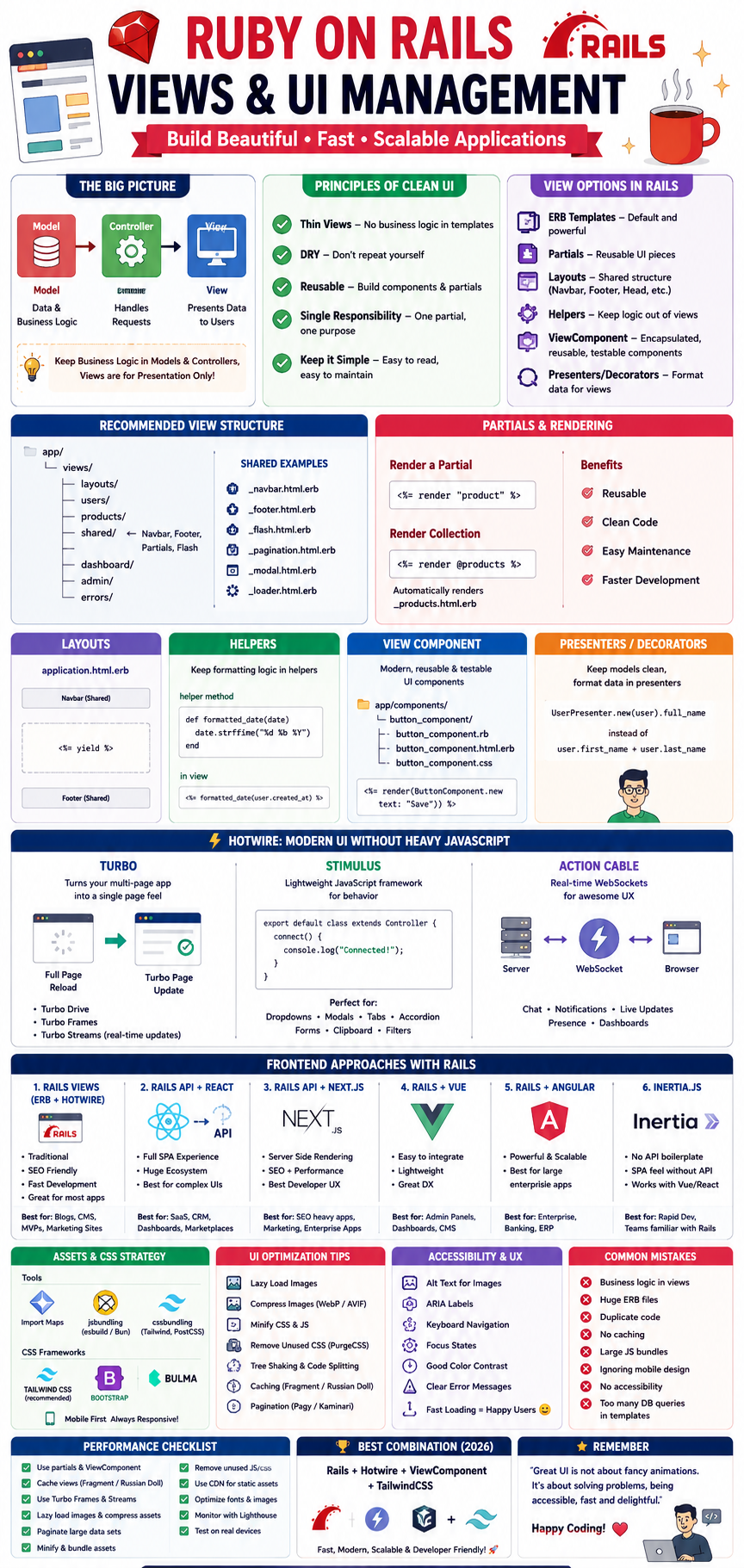
This guide explains everything you need to know about Rails Views, UI architecture, optimization techniques, frontend integration, React, Hotwire, ViewComponents, and modern frontend approaches.
Let’s build Rails applications like professionals! 🚀
📚 Table of Contents
- Understanding Rails Views
- MVC & View Responsibility
- Principles of Clean UI Development
- Rails View Folder Structure
- ERB Best Practices
- Layouts & Partials
- Helpers
- View Components
- Presenters & Decorators
- Hotwire
- Turbo
- Stimulus JS
- Asset Management
- CSS Architecture
- UI Optimization Techniques
- Caching Views
- Lazy Loading
- Responsive Design
- Accessibility
- React + Rails
- Vue + Rails
- Angular + Rails
- Next.js + Rails API
- Inertia.js
- Hybrid Architecture
- Complete UI Folder Structure
- Performance Checklist
- Common Mistakes
- Best Architecture Recommendation
🎯 What is Rails View?
The View is responsible for presenting data to users.
Controller
     ↓
Model
     ↓
View
Never place business logic inside views.
Bad:
<%= @orders.select(&:paid?).sum(&:total) %>Good:
# controller
@paid_total = Order.paid.sum(:total)

<%= @paid_total %>
🏗 MVC Principle
Keep responsibilities separated.
Model
✅ Business Logic
Controller
✅ Flow
View
✅ Presentation
Think of it like a restaurant.
Chef → Model
Waiter → Controller
Plate Decoration → View
⭐ Golden Principles of UI Development
1️⃣ Thin Views
Views should only display data.
❌ Bad
<% if current_user.orders.where(status:"paid").count > 5 %>✅ Good
@premium_customer = current_user.premium?2️⃣ Reusable Components
Instead of copying HTML:
Navbar
Footer
Cards
Buttons
Alerts
Create reusable components.
3️⃣ DRY Principle
Avoid repeating:
Bootstrap Cards
Buttons
Headers
Navigation
Forms
4️⃣ Single Responsibility
One partial = One purpose.
Example
_card.html.erb
_user.html.erb
_sidebar.html.erb
📁 Ideal View Folder Structure
app/
  views/
   layouts/
   users/
   products/
   shared/
   dashboard/
   admin/
   errors/
Shared folder:
Navbar
Footer
Pagination
Flash Messages
Loader
Modal
🧩 Layouts
Application Layout
application.html.erbContains
Navbar
Footer
Flash
Yield
Javascript
CSS
Example
<body>
  <%= render "shared/navbar" %>
  <%= yield %>
  <%= render "shared/footer" %>
</body>
🧱 Partials
Instead of
1000 lines HTMLBreak into
_header
_sidebar
_product
_footer
Render
<%= render "product" %>Collection rendering
<%= render @products %>Rails automatically renders
_product.html.erb🎨 Helpers
Never write formatting logic inside views.
Bad
<%= user.created_at.strftime(...) %>Helper
module UsersHelper
  def formatted_date(date)
    date.strftime("%d %b %Y")
  end
end
View
<%= formatted_date(user.created_at) %>⚡ ViewComponent
One of the biggest improvements for Rails UI.
Instead of:
Partial
Helper
Javascript
CSS
Everything lives together.
ButtonComponent
button_component.rb
button_component.html.erb
button_component.css
Example
<%= render(ButtonComponent.new(text:"Save")) %>Benefits
✅ Reusable
✅ Testable
✅ Maintainable
🎭 Decorators / Presenters
Avoid formatting inside models.
Example
UserPresenter.new(user).full_nameInstead of
user.first_name + user.last_name⚡ Hotwire
Hotwire allows modern SPA-like experience without React.
Components
Turbo
Stimulus
Advantages
✅ Less JavaScript
✅ Faster
✅ SEO Friendly
✅ Rails Native
🚀 Turbo
Instead of
Reload Entire PageTurbo only replaces changed content.
Before
Entire page reload
↓
After
Only one frame updates
Turbo Streams
Real-time notifications
Comments
Chat
Likes
Dashboard
⚙ Stimulus JS
Small JavaScript controllers.
Example
export default class extends Controller{
  connect(){
    console.log("Connected")
  }
}
Perfect for
Dropdown
Modal
Clipboard
Tabs
Accordion
Filters
🎨 CSS Strategy
Recommended
TailwindCSS ⭐⭐⭐⭐⭐
Bootstrap ⭐⭐⭐⭐
Bulma ⭐⭐⭐
Foundation ⭐⭐
My recommendation:
Rails + Tailwind + ViewComponent
Excellent combination.
📦 Asset Management
Rails 8 options
✅ Import Maps
✅ jsbundling
✅ cssbundling
✅ esbuild
✅ Bun
Choose based on project complexity.
⚡ UI Optimization
Lazy Images
<img loading="lazy">Image Compression
Use
WebP
AVIF
Minify CSS
Remove unused CSS.
Tree Shaking
Remove unused JavaScript.
Split Bundles
Don’t load
Admin JS

Dashboard JS

Checkout JS
Together.
🚀 View Caching
Russian Doll Caching
<% cache @product do %>
...
<% end %>
Huge speed improvement.
📈 Pagination
Instead of loading
50,000 recordsUse
Pagy ⭐⭐⭐⭐⭐
Kaminari ⭐⭐⭐⭐
📱 Responsive Design
Always design
Mobile FirstBreakpoints
Mobile

Tablet

Desktop
♿ Accessibility
Always include
Alt Tags

ARIA Labels

Keyboard Navigation

Focus States

Proper Colors
Accessibility improves SEO too.
⚛ React + Rails
There are several ways to combine React with Rails.
Option 1
Rails + React Components
Rails
↓
ERB
↓
React Widget
Good for
Dashboard

Charts

Comments

Filters
Option 2
Rails API + React SPA ⭐⭐⭐⭐⭐
Rails API
↓
JSON
↓
React
↓
Browser
Perfect for
Large SaaS

CRM

ERP

Enterprise Apps
Option 3
Rails + Next.js ⭐⭐⭐⭐⭐
Rails API
↓
Next.js
↓
SSR
↓
Browser
Benefits
✅ SEO
✅ Speed
✅ React ecosystem
✅ Excellent UX
🟢 Vue + Rails
Excellent developer experience.
Smaller than React.
Perfect for
Admin Panels

Dashboards

CMS
🔴 Angular + Rails
Best for
Large Enterprise

Government

Banking

ERP
Heavy but powerful.
⚡ Inertia.js
Very interesting architecture.
Rails
↓
Inertia
↓
Vue / React
No REST API required.
Feels like SPA.
🧠 Choosing the Right Frontend
📂 Ideal Enterprise Folder Structure
app/

components/

helpers/

views/

layouts/

shared/

javascript/

controllers/

stimulus/

stylesheets/

tailwind/

assets/
⚡ Performance Checklist
✅ Use partials
✅ Use ViewComponent
✅ Cache views
✅ Compress images
✅ Lazy load images
✅ Turbo Frames
✅ Turbo Streams
✅ Stimulus
✅ Paginate
✅ Minify CSS
✅ Remove unused JS
✅ Bundle splitting
✅ Responsive design
✅ Accessibility
✅ Lighthouse optimization
❌ Common Mistakes
🚫 Business logic in views
🚫 Giant ERB files
🚫 Duplicate HTML
🚫 No caching
🚫 Huge JavaScript bundles
🚫 No responsive design
🚫 Too many database queries in templates
🚫 Ignoring accessibility
🚫 Overusing React for simple interactions
🚫 Not optimizing images
🏆 My Recommended Stack (2026)
For most new Rails projects, a balanced stack looks like this:
Backend
- Ruby on Rails
- PostgreSQL
- Redis
UI
- Tailwind CSS
- ViewComponent
- Hotwire (Turbo + Stimulus)
JavaScript
- Bun or esbuild
- TypeScript (for medium/large projects)
Performance
- Fragment caching
- CDN for assets
- WebP/AVIF images
- Pagy
- Import only the JavaScript you need
For applications requiring highly interactive dashboards, offline support, or complex client-side state management, expose a Rails JSON API and build the frontend with React or Next.js. This provides the flexibility of the React ecosystem while keeping Rails focused on business logic and APIs.
🎯 Final Thoughts
A beautiful Rails application isn’t created by writing more HTML — it’s built by structuring your UI for maintainability, performance, and scalability.
Follow these guiding principles:
- 🎨 Keep views simple and presentation-focused.
- 🧩 Build reusable UI with components.
- ⚡ Use Hotwire for fast interactions without unnecessary JavaScript.
- 🚀 Reach for React, Vue, or Next.js when your application truly benefits from SPA capabilities.
- 📈 Optimize continuously with caching, lazy loading, responsive design, and accessibility.
Remember:
“The best UI is not the one with the most animations — it’s the one that helps users achieve their goals quickly, intuitively, and reliably.”
Happy Coding! 🚀❤️


Comments
Post a Comment