🤖 Build Your Own J.A.R.V.I.S. AI Assistant for FREE in 2026 🚀
🤖 Build Your Own J.A.R.V.I.S. AI Assistant for FREE in 2026 🚀
Create a ChatGPT-like AI Assistant with Voice, Memory, Vision, Automation, and Local LLMs — Without Spending a Penny!
“What if you had your own personal AI assistant like Tony Stark’s J.A.R.V.I.S. — one that runs on your computer, understands your voice, remembers conversations, browses the internet, writes code, automates tasks, and even sees your screen? The best part? You can build it completely FREE.”
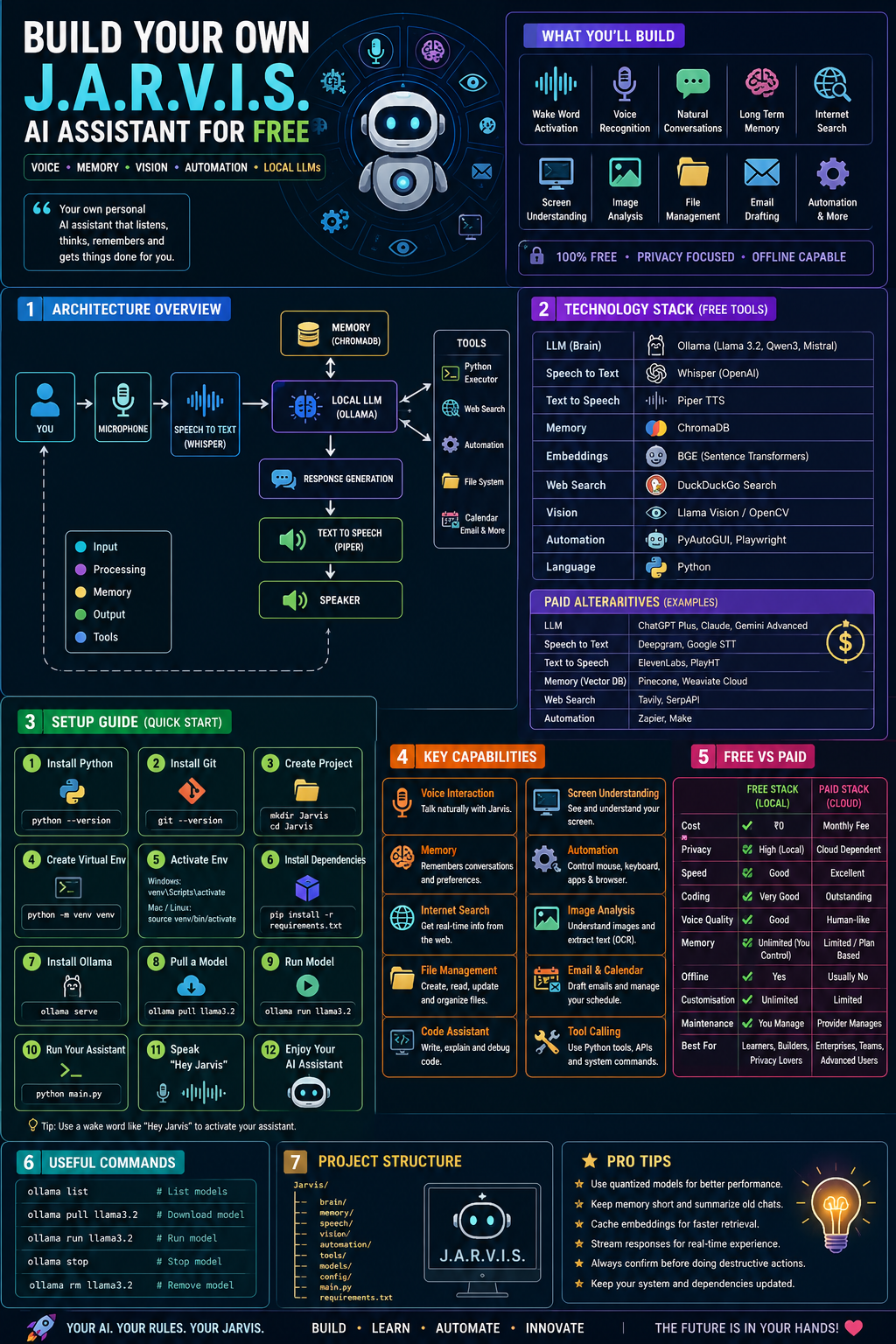
🌟 What You’ll Build
By the end of this guide, you’ll have an AI assistant capable of:
✅ Wake-word activation (“Hey Jarvis”)
✅ Natural conversations
✅ Voice recognition
✅ Human-like speech
✅ Long-term memory
✅ Internet search
✅ Screen understanding
✅ Image analysis
✅ File management
✅ Email drafting
✅ Coding assistance
✅ Running shell commands
✅ Browser automation
✅ Calendar & reminders
✅ Local execution (No API costs)
🏗 High-Level Architecture
Microphone
                     │
                     ▼
          Speech To Text (Whisper)
                     │
                     ▼
          Local LLM (Ollama)
                     │
      ┌──────────────┼──────────────┐
      ▼              ▼              ▼
  Memory         Tools          Internet
 (ChromaDB)    Python          Search
      │          │
      ▼          ▼
      Response Generation
             │
             ▼
      Text To Speech
             │
             ▼
           Speaker
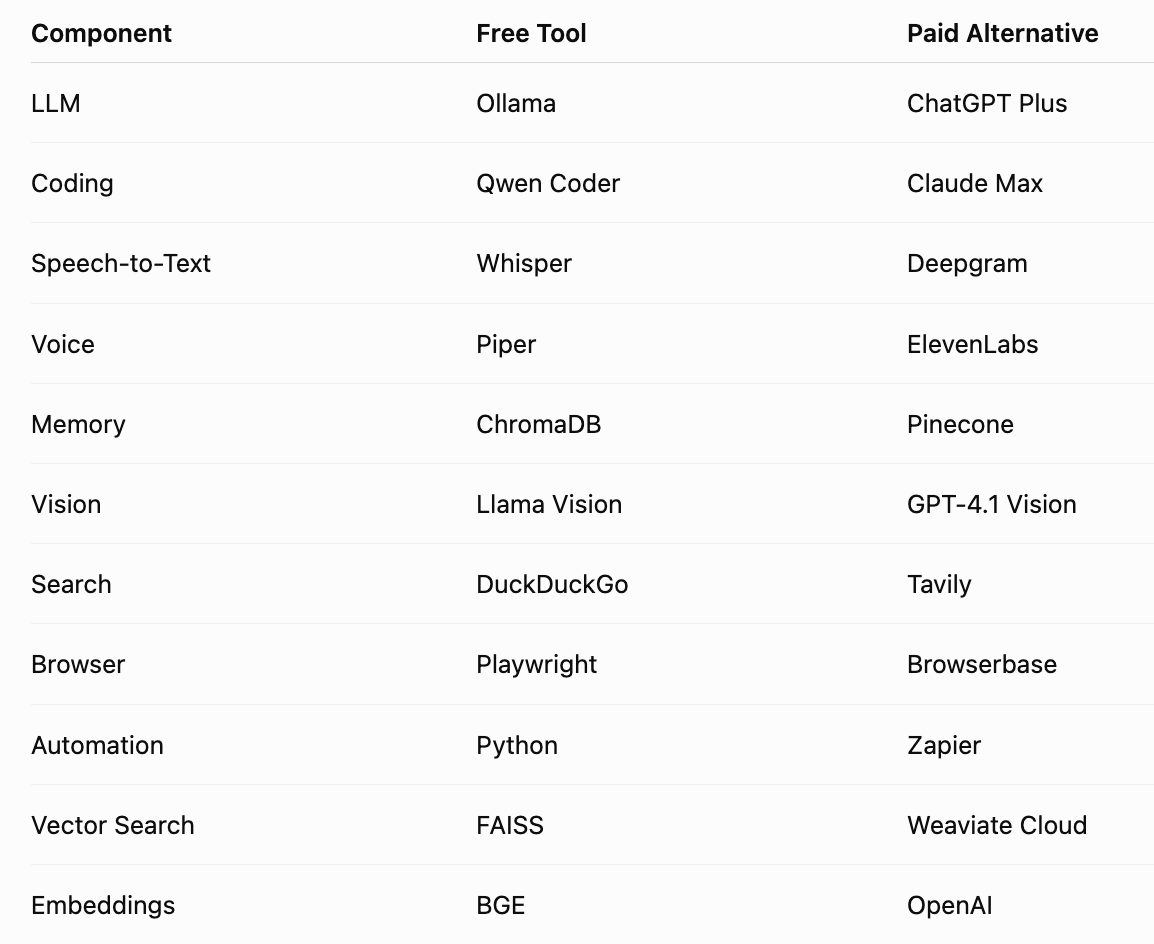
🧰 Technology Stack
💻 System Requirements
Minimum
- 8 GB RAM
- 15 GB Storage
- Python 3.11+
- Windows/Mac/Linux
Recommended
- 16 GB RAM
- RTX GPU
- SSD
- 50 GB Free Space
📥 Step 1 — Install Python
Download Python.
Verify:
python --versionor
python3 --version📥 Step 2 — Install Git
git --version📥 Step 3 — Install VS Code
Install extensions:
- Python
- Pylance
- Docker
- GitHub Copilot (optional)
📥 Step 4 — Create Project
mkdir Jarvis
cd Jarvis
Create virtual environment
python -m venv venvActivate
Windows
venv\Scripts\activateMac/Linux
source venv/bin/activate📥 Step 5 — Install Libraries
pip install ollama
pip install openai-whisper
pip install chromadb
pip install sentence-transformers
pip install pyaudio
pip install pyttsx3
pip install playsound
pip install pillow
pip install opencv-python
pip install pyautogui
pip install beautifulsoup4
pip install requests
pip install duckduckgo-search
Or simply
pip install \
ollama \
chromadb \
whisper \
pyautogui \
opencv-python \
duckduckgo-search \
sentence-transformers \
pyttsx3 \
requests \
beautifulsoup4
📥 Step 6 — Install Ollama
After installation
ollama serveDownload a model
ollama pull llama3.2or
ollama pull qwen3or
ollama pull mistralList installed models
ollama listRun
ollama run llama3.2🧠 Understanding the Brain
Your LLM is responsible for
- Reasoning
- Writing
- Coding
- Planning
- Decision making
Everything else acts like senses.
🎙 Voice Input
Using Whisper
import whisper
model = whisper.load_model("base")
result = model.transcribe("voice.wav")
print(result["text"])
Whisper converts audio into text with impressive multilingual accuracy. Smaller models are faster; larger ones improve recognition quality.
🗣 Voice Output
import pyttsx3

engine = pyttsx3.init()
engine.say("Hello Sir.")
engine.runAndWait()
You can later replace this with higher-quality voices for a more natural experience.
🤖 Connecting Ollama
from ollama import chat

response = chat(
model='llama3.2',
messages=[
{"role":"user",
"content":"Hello Jarvis"}
]
)
print(response.message.content)
🧠 Memory
Without memory
You: My name is Tony

Later...
Jarvis:
Who are you?
With ChromaDB
User Name
Tony Stark
Now
Hello Tony.Store memory
collection.add(
ids=["1"],
documents=["User likes Python"]
)
Retrieve
collection.query(
query_texts=["What language?"]
)
Memory transforms your assistant from a chatbot into a personalised companion.
🌍 Internet Search
from duckduckgo_search import DDGS

results = DDGS().text(
"Latest AI news",
max_results=5
)
Use web search for current events, while relying on your local model for reasoning.
👀 Screen Vision
Screenshot
import pyautogui

image = pyautogui.screenshot()
image.save("screen.png")
Pass this image to a vision-capable model for UI understanding or OCR.
📂 File Reading
with open("notes.txt") as f:
    print(f.read())
Extend this to PDFs, Word files, spreadsheets, and code repositories.
🖥 Desktop Automation
Move mouse
pyautogui.moveTo(300,400)Click
pyautogui.click()Type
pyautogui.write(
"Hello World"
)
Automating repetitive tasks is where your assistant becomes genuinely useful.
🌐 Browser Automation
from playwright.sync_api import sync_playwrightExamples:
- Open websites
- Fill forms
- Download files
- Login
- Scrape information
import smtplibCapabilities
- Draft emails
- Send reports
- Read inbox (with appropriate APIs)
- Summarise messages
📸 Image Recognition
import cv2

image = cv2.imread(
"cat.jpg")
Pair OpenCV with a vision-language model to answer questions about images.
🧩 Tool Calling
Instead of only chatting,
Jarvis can execute Python.
User:
Open Chrome
↓
Jarvis
↓
Runs Python
↓
Chrome Opens
Typical tools include:
- Calculator
- Weather
- Terminal
- File system
- Browser
- Calendar
🧠 Prompt Engineering
Bad Prompt
Write codeBetter
Write a production-ready
FastAPI authentication system
using JWT with tests.
Clear prompts improve accuracy and reduce hallucinations.
🏎 Optimisation Tips
✔ Use quantised models
✔ Keep memory short
✔ Summarise old conversations
✔ Cache embeddings
✔ Stream responses
✔ Run GPU inference if available
✔ Limit unnecessary internet searches
🔐 Security Tips
Never allow unrestricted execution of:
os.remove("/")Instead:
✔ Ask for confirmation before destructive actions.
✔ Restrict accessible folders.
✔ Validate shell commands.
✔ Keep API keys in environment variables.
📁 Suggested Folder Structure
Jarvis/
brain/
memory/
speech/
vision/
automation/
tools/
models/
config/
main.py
requirements.txt
Organising by responsibility keeps the project maintainable as it grows.
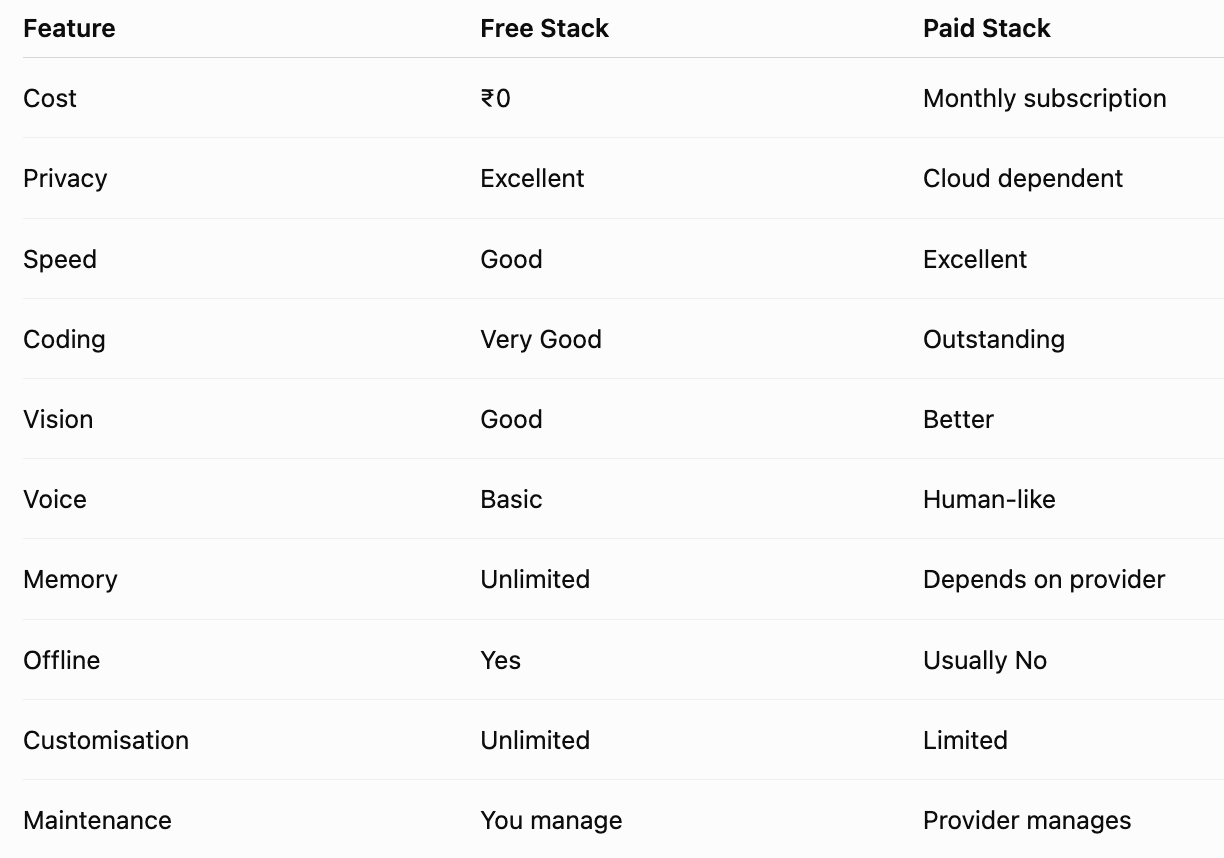
🆓 Free vs 💰 Paid
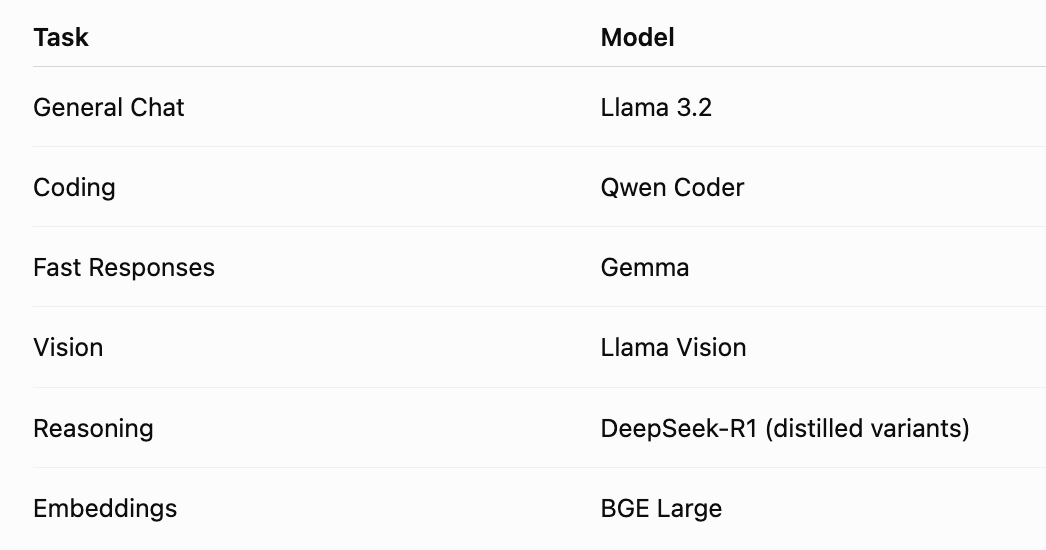
⭐ Recommended Free Models
💰 When Should You Pay?
Choose a paid service if you need:
- Enterprise reliability
- Large-context reasoning
- Premium voices
- Team collaboration
- Managed infrastructure
- Advanced multimodal capabilities
If you’re learning, experimenting, or building a personal assistant, the free stack is often more than enough.
🚀 Future Improvements
- 📱 Mobile companion app
- 🏠 Smart home integration
- 📷 Face recognition
- 😊 Emotion detection
- 🧾 OCR for documents
- 📊 Financial dashboards
- 🎥 Meeting summarisation
- 💻 IDE integration
- ☁️ Multi-device synchronisation
- 🤝 Multi-agent collaboration
⚠️ Common Mistakes
❌ Using the largest model on low-end hardware
❌ Giving the assistant unrestricted system access
❌ Forgetting to store conversation history
❌ Installing unnecessary dependencies
❌ Ignoring prompt design
❌ Not validating generated code before execution
🎯 Final Thoughts
Building your own J.A.R.V.I.S. is no longer science fiction. With today’s open-source ecosystem, you can assemble a capable AI assistant that listens, speaks, remembers, automates, and assists — all while running locally and protecting your privacy.
The true power doesn’t come from any single model; it comes from combining specialised components into a cohesive system. Start with a simple conversational assistant, then progressively add voice, memory, vision, and automation. By iterating one capability at a time, you’ll create an assistant tailored to your workflow and learn modern AI engineering skills along the way.
Whether you’re a student, developer, or AI enthusiast, this project is one of the best ways to understand how intelligent assistants work under the hood. Happy building! 🚀


Comments
Post a Comment