🚀 Coding Like a Perfectionist Developer in the AI Era 🤖💻
🚀 Coding Like a Perfectionist Developer in the AI Era 🤖💻
Master the Art of Writing Clean, Scalable, Maintainable & Intelligent Code
“A good developer writes code that works. A professional developer writes code that survives change. A perfectionist developer writes code that humans and machines can understand.”
The era of software development has changed dramatically. Earlier, developers were judged mainly by how quickly they could write code. Today, with AI assistants like coding copilots and intelligent agents, writing code is becoming easier — but writing great code is becoming more valuable.
A professional developer doesn’t compete with AI. They direct AI, review AI, improve AI-generated solutions, and combine human engineering judgment with machine speed.
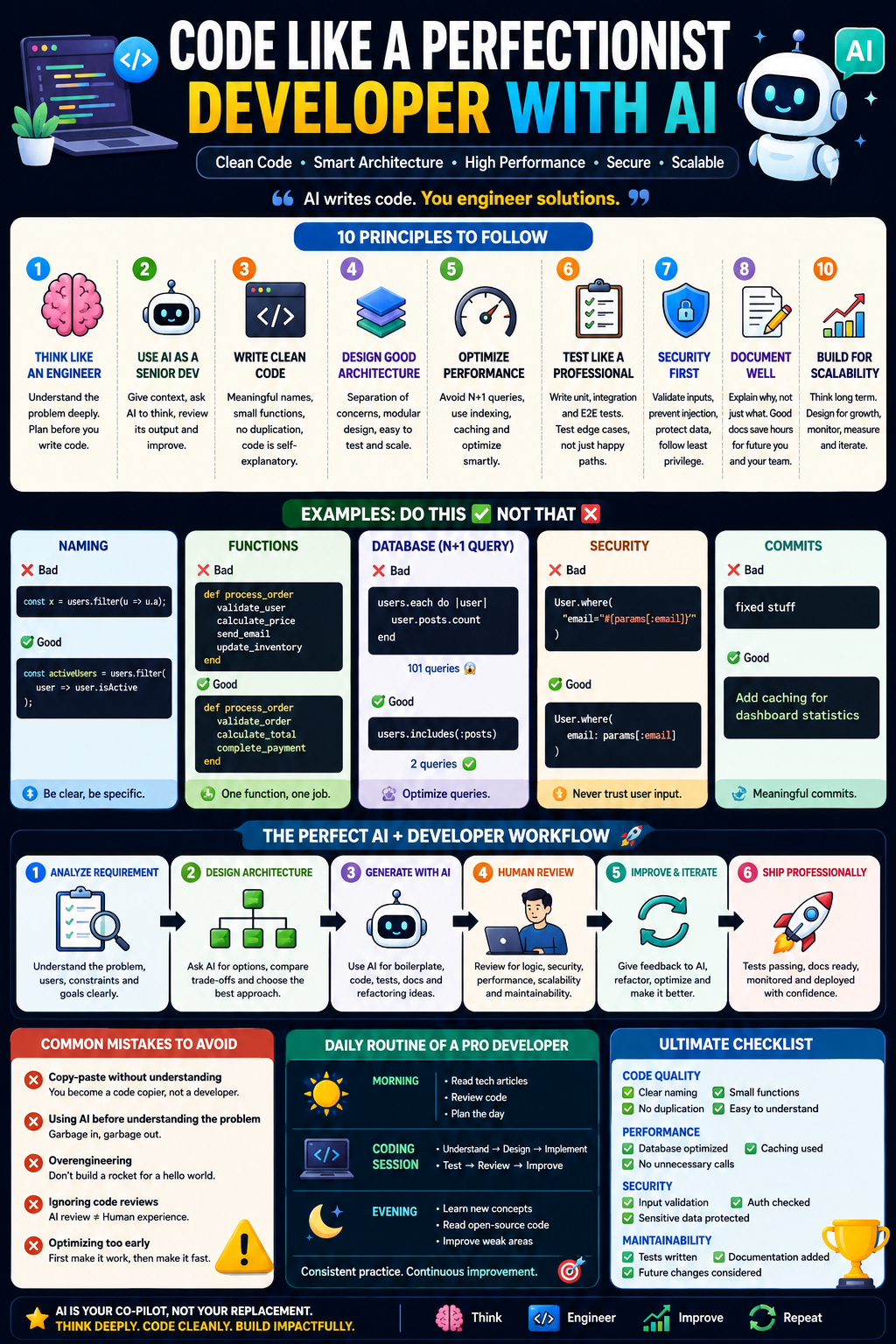
This guide explains how to code like a perfectionist developer using AI — from thinking patterns to architecture, testing, optimization, and professional workflows.
🧠 1. Think Like an Engineer, Not a Code Generator
Many developers start coding immediately after receiving a requirement.
A perfectionist developer starts with:
“What problem am I solving? What will change tomorrow?”
Before writing code:
✅ Understand the business problem
✅ Identify users and workflows
✅ Define expected behavior
✅ Think about scalability
✅ Identify edge cases
❌ Amateur Approach
Requirement:
“Create a user registration API.”
Developer immediately writes:
def create_user
  User.create(params)
end
Problems:
- No validation
- No security
- No error handling
- No duplicate prevention
- No scalability thinking
✅ Professional Approach
Ask:
- What information does a user need?
- What happens if email already exists?
- How should passwords be stored?
- What response format should APIs return?
- How will this handle 10 million users?
Then design.
🤖 2. Use AI as a Senior Developer, Not as a Typing Machine
AI is powerful, but blindly accepting AI-generated code creates average developers.
A pro developer treats AI like:
“A junior developer who can write code extremely fast but needs review.”
Best AI Workflow
Step 1: Explain the Context
Bad prompt:
Create authentication.Good prompt:
I am building a Ruby on Rails SaaS application.
Requirements:
- Users authenticate using email/password
- JWT API authentication
- PostgreSQL database
- Need scalable architecture
- Follow Rails best practices
Suggest architecture first.
Step 2: Ask AI to Think Before Coding
Instead of:
Write code.Ask:
Analyze the problem.
List possible approaches.
Compare trade-offs.
Recommend the best solution.
Then implement.
Step 3: Ask AI for Review
After writing code:
Review this code like a senior software engineer.
Check:
- Security issues
- Performance problems
- Maintainability
- Edge cases
- Better architecture
🏗️ 3. Follow Clean Code Principles
Clean code is not about fewer lines.
Clean code means:
“Another developer should understand your code without asking you questions.”
Principle 1: Meaningful Naming
❌ Bad
const x = users.filter(u => u.a);Nobody knows:
- What is x?
- What is a?
✅ Good
const activeUsers = users.filter(
  user => user.isActive
);
The code explains itself.
Principle 2: Functions Should Do One Thing
❌ Bad
def process_order
  validate_user
  calculate_price
  send_email
  update_inventory
end
Too many responsibilities.
✅ Better
def process_order
  validate_order
  calculate_total
  complete_payment
end
Each function has one purpose.
Principle 3: Avoid Clever Code
Developers sometimes write code to impress other developers.
Example:
arr.sort((a,b)=>b-a)Works, but unclear.
Better:
const sortedProductsByPrice =
products.sort(
(productA, productB) =>
productB.price - productA.price
);
Readable code beats clever code.
🧩 4. Master Software Architecture Thinking
A beginner thinks:
“How can I make this work?”
A professional thinks:
“How can I make this easy to change?”
Follow These Architecture Principles
1. Separation of Concerns
Don’t mix everything.
Example:
Bad:
Controller
 ├── Database logic
 ├── Email logic
 ├── Payment logic
 └── Business rules
Better:
Controller
Service Layer
Models
Repositories
Background Jobs
Example: Rails Application
Instead of:
class OrdersController

  def create
    order = Order.create(params)
    Payment.charge(order)
    UserMailer.send(order.user)
  end
end
Use:
OrdersController
OrderCreationService
PaymentService
NotificationService
Benefits:
✅ Easier testing
✅ Easier modification
✅ Cleaner codebase
⚡ 5. Optimize Performance Like a Senior Developer
Perfect code is not only clean.
It is fast.
Database Optimization
Avoid N+1 Queries
❌ Bad
users.each do |user|
 user.posts.count
end
Database:
1 query for users
100 queries for posts
✅ Better
users.includes(:posts)Database:
2 queriesUse Proper Indexing
Example:
Searching:
SELECT *
FROM users
WHERE email='abc@gmail.com';
Without index:
Database scans everything.
With index:
Database directly finds the record.
Cache Expensive Operations
Instead of:
Calculate dashboard statistics every requestUse:
Cache result for 10 minutesExample:
Rails.cache.fetch("dashboard") do
 calculate_statistics
end
🧪 6. Testing Like a Professional
A perfectionist developer does not trust code without tests.
Testing Pyramid
        E2E Tests

Unit Tests       Integration Tests
Write Tests For:
✅ Business logic
✅ Important workflows
✅ Edge cases
✅ Security scenarios
Example:
Instead of testing:
“User can login”
Test:
- Wrong password
- Locked account
- Expired token
- Missing email
🔐 7. Security Mindset
Professional developers assume:
“Every input is dangerous.”
Always Protect Against:
SQL Injection
❌
User.where(
"email='#{params[:email]}'"
)
✅
User.where(
email: params[:email]
)
Validate User Input
Never trust:
- Forms
- APIs
- Files
- External services
📚 8. Documentation Is Part of Code
Future you is another developer.
Document:
- Why something exists
- Complex business logic
- Architecture decisions
Avoid:
# Calculate price
calculate()
Meaningless.
Better:
# Applies loyalty discount only for customers
# who purchased more than 10 times
calculate_discount()
🔄 9. Perfect Git Workflow
A professional developer writes meaningful commits.
Bad:
fixed stuffGood:
Add caching for dashboard statisticsFollow:
Feature Branch
↓
Code Review
↓
Automated Tests
↓
Merge
↓
Deployment
🌎 10. Build With Scalability in Mind
Ask:
“What happens when users grow 100x?”
Example:
Small app:
User uploads image
↓
Store locally
Large app:
User uploads image
↓
Background Job
↓
Cloud Storage
↓
CDN
🤖 How Professional Developers Combine AI + Engineering
The Perfect AI Development Workflow
Step 1: Requirement Analysis 📝
Write:
Problem:
Users need faster search.

Constraints:
- Millions of records
- Real-time results
- Low latency
Step 2: Architecture Design 🏗️
Ask AI:
Design scalable architecture.
Explain trade-offs.
Step 3: Generate Initial Implementation ⚙️
Use AI for:
✅ Boilerplate
✅ Tests
✅ Documentation
✅ Refactoring ideas
Step 4: Human Review 👨💻
Check:
- Is this secure?
- Is this maintainable?
- Is this scalable?
- Is this the simplest solution?
Step 5: Improve With Feedback Loop 🔁
Ask AI:
Optimize this code for:
- performance
- readability
- scalability
Step 6: Ship Professionally 🚀
Before deployment:
✅ Tests passing
✅ Security checked
✅ Logs added
✅ Monitoring enabled
✅ Documentation updated
🚫 Common Mistakes Developers Make With AI
1. Copy-Paste Without Understanding
AI-generated code can contain:
- Security issues
- Wrong assumptions
- Poor architecture
2. Using AI Before Understanding the Problem
AI cannot replace engineering thinking.
3. Overengineering
Example:
Building:
Microservices
Kubernetes
Event-driven architecture
for:
Simple CRUD applicationStart simple.
Scale when needed.
4. Ignoring Code Reviews
AI review ≠ Human review.
Experienced developers catch:
- Business mistakes
- Architectural problems
- Hidden risks
5. Optimizing Too Early
Don’t optimize:
Before measuringFirst:
Make it correct.
Then:
Make it fast.
🏆 Daily Routine of a Professional Developer
Morning ☀️
30 minutes:
- Read engineering articles
- Review yesterday’s code
- Plan today’s work
Coding Session 💻
Follow:
Understand
↓
Design
↓
Implement
↓
Test
↓
Review
↓
Improve
Evening 🌙
Spend time on:
- Learning new concepts
- Reading open-source code
- Improving weak areas
🧠 The Ultimate Professional Developer Checklist
Before submitting code:
Code Quality
☑ Clear naming
☑ Small functions
☑ No duplication
☑ Easy to understand
Performance
☑ Database optimized
☑ No unnecessary API calls
☑ Proper caching
Security
☑ Input validation
☑ Authentication checked
☑ Sensitive data protected
Maintainability
☑ Tests written
☑ Documentation added
☑ Future changes considered
🚀 Final Philosophy
The best developers are not those who write the most code.
They are those who:
✨ Think deeply
✨ Use tools intelligently
✨ Understand trade-offs
✨ Write code that lasts years
AI will make average developers faster.
But developers who master engineering principles + AI collaboration will build the future.
“Don’t use AI to replace your thinking. Use AI to amplify your thinking.” 🤖
Share this with developers who want to move from “coding” to “engineering.” 🚀
#SoftwareEngineering #AI #Programming #CleanCode #DeveloperLife #CodingTips #ArtificialIntelligence #WebDevelopment #TechCareer #FullStackDeveloper


Comments
Post a Comment