🚀 GitHub Mastery: The Ultimate Guide to Git, GitHub, Hidden Features, Pro Tips & Power Tools 💻🔥
🚀 GitHub Mastery: The Ultimate Guide to Git, GitHub, Hidden Features, Pro Tips & Power Tools 💻🔥
“Code is just the beginning. Collaboration is where software comes alive.”
Whether you’re a beginner learning Git or a senior engineer managing enterprise applications, GitHub is one of the most important platforms you’ll ever use.
GitHub isn’t just a place to store code.
It is your:
- 📂 Version Control System
- 👨💻 Collaboration Platform
- 🚀 Deployment Center
- 🤖 AI Coding Assistant
- 🔄 CI/CD Pipeline
- 📦 Package Registry
- 📖 Documentation Hub
- 🛡 Security Scanner
- 🌍 Portfolio
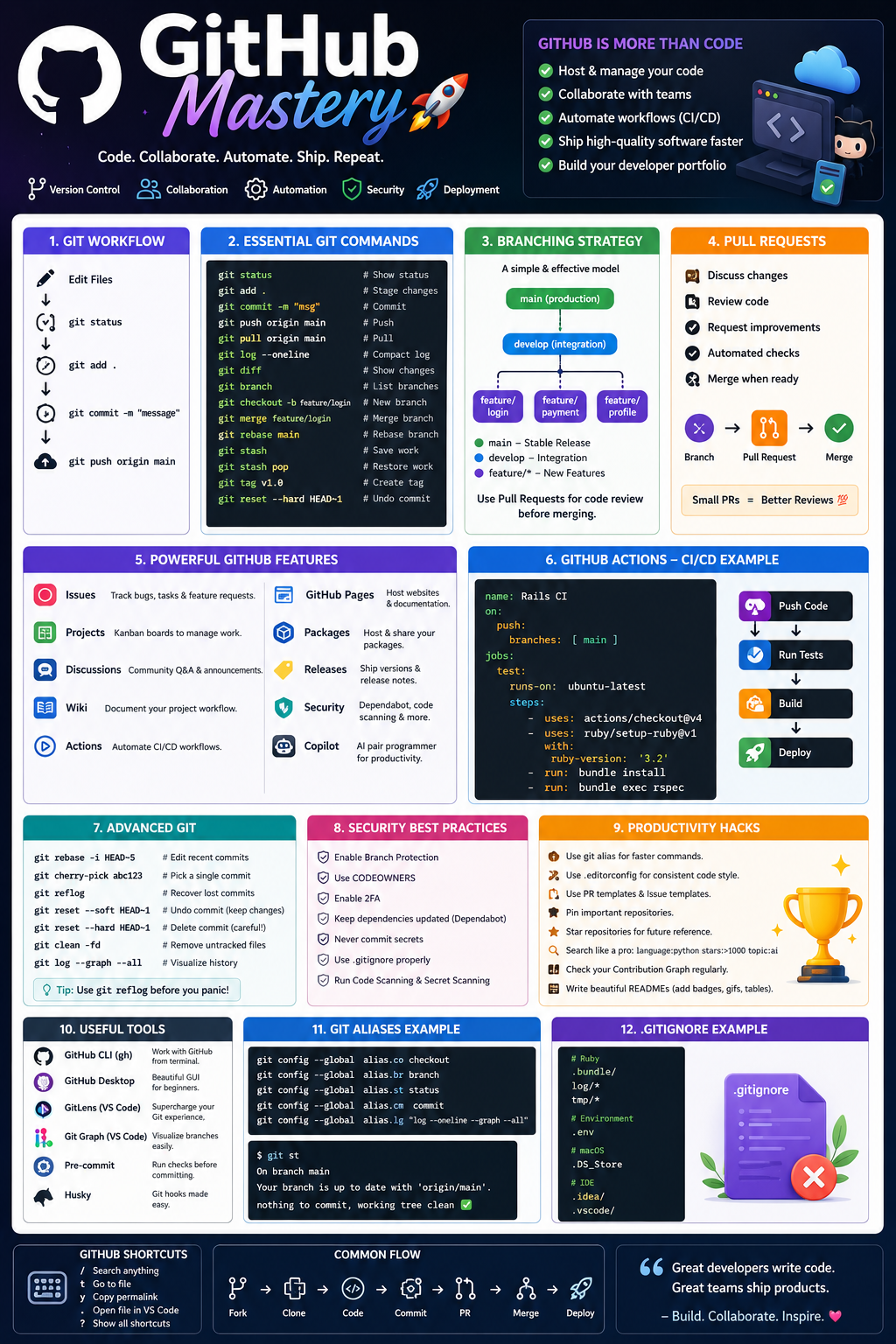
This guide covers everything about GitHub — from basic Git commands to advanced workflows, GitHub Actions, Copilot, security, automation, productivity hacks, and hidden features.
Let’s master GitHub!
📚 Table of Contents
- What is Git?
- What is GitHub?
- Git vs GitHub
- Installing Git
- Repository Structure
- Git Workflow
- Git Commands
- Branching Strategy
- Merge vs Rebase
- Pull Requests
- GitHub Issues
- Projects
- Discussions
- Wikis
- GitHub Actions
- GitHub Pages
- GitHub Packages
- GitHub Releases
- GitHub CLI
- GitHub Desktop
- GitHub Copilot
- Security Features
- Advanced Git
- Git Stash
- Git Tags
- Git Hooks
- Git Aliases
- Git LFS
- Submodules
- Best GitHub Extensions
- Productivity Hacks
- Mistakes to Avoid
- Best Practices
- Advanced Tips
- Learning Roadmap
🌳 What is Git?
Git is a distributed version control system created by Linus Torvalds.
It tracks every change in your project.
Imagine writing a book.
Every time you save:
Version 1
Version 2
Version 3
Git stores every version forever.
You can go back anytime.
☁️ What is GitHub?
GitHub is a cloud platform that hosts Git repositories.
Think of it like Google Drive for developers — but much smarter.
GitHub provides:
✅ Collaboration
✅ Pull Requests
✅ Code Review
✅ Issues
✅ CI/CD
✅ Security
✅ Automation
✅ AI
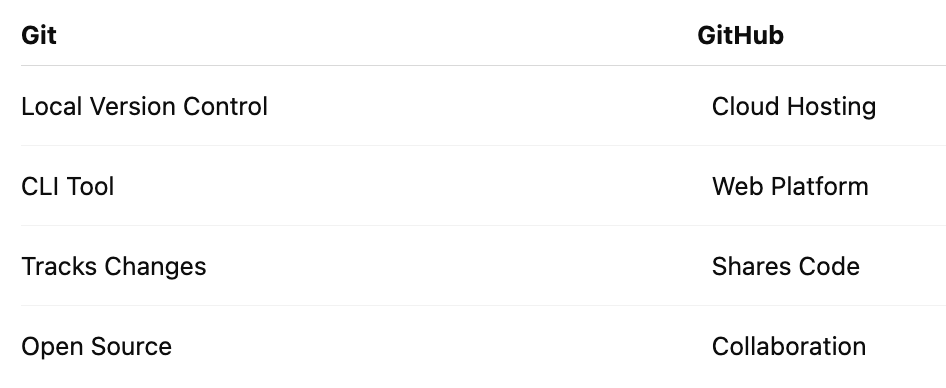
⚔ Git vs GitHub
⚙ Installing Git
Windows
Download Git
Install
git --versionMac
brew install gitUbuntu
sudo apt install git🛠 Initial Configuration
git config --global user.name "John Doe"
git config --global user.email "john@gmail.com"
Verify
git config --list📂 Creating Repository
mkdir myapp
cd myapp
git init
Result
.git/
README.md
📄 Clone Repository
git clone https://github.com/user/project.gitSSH
git clone git@github.com:user/project.git🔥 Daily Git Workflow
Edit Files
↓
git status
↓
git add .
↓
git commit
↓
git push
⭐ Essential Commands
Status
git statusShows modified files.
Add
git add .
git add file.rb
Commit
git commit -m "Add authentication"Push
git push origin mainPull
git pull origin mainFetch
git fetchDownloads changes without merging.
Log
git logCompact
git log --onelineGraph
git log --graph --allDiff
git diffCompare commits
git diff HEAD~1 HEADReset
Soft
git reset --soft HEAD~1Mixed
git reset HEAD~1Hard
git reset --hard HEAD~1🌿 Branching
Create
git branch feature/loginSwitch
git checkout feature/loginModern
git switch feature/loginCreate + Switch
git checkout -b feature/login🌲 Merge
git checkout main
git merge feature/login
🔀 Rebase
git rebase mainBenefits
✔ Cleaner History
✔ Linear Commits
✔ Easier Reviews
🎯 Cherry Pick
git cherry-pick abc123Copy a single commit.
🧰 Git Stash
Save work
git stashRestore
git stash popList
git stash list🏷 Git Tags
git tag v1.0
git push origin v1.0
Useful for releases.
🔥 Git Reflog (Life Saver)
git reflogRecover deleted commits.
📦 Git Clean
git clean -fdDeletes untracked files.
🧠 Interactive Rebase
git rebase -i HEAD~5You can:
✔ Squash commits
✔ Rename commits
✔ Delete commits
✔ Reorder history
🤝 Pull Requests
Best practices:
✅ Small PRs
✅ One feature
✅ Screenshots
✅ Linked Issues
✅ Clear Description
Example
Added authentication
Fixed login bug
Added tests
Issue #24
📝 GitHub Issues
Track
🐞 Bugs
✨ Features
📌 Tasks
Templates help standardize reporting.
📊 GitHub Projects
Kanban boards
Backlog
↓
In Progress
↓
Review
↓
Done
💬 GitHub Discussions
Great for
Questions
Ideas
Community support
Announcements
📖 Wiki
Perfect for:
Architecture
API Docs
Meeting Notes
Setup Guides
🤖 GitHub Actions
Automate everything.
Example
Push Code
↓
Run Tests
↓
Build
↓
Deploy
Example Workflow
name: Rails CI
on:
  push:
jobs:
  test:
    runs-on: ubuntu-latest
🚀 GitHub Pages
Host
Portfolio
Documentation
Blogs
Static Websites
Free.
📦 GitHub Packages
Host
Docker Images
Ruby Gems
npm Packages
NuGet
Maven
🏷 Releases
Create downloadable versions.
Attach
ZIP
Assets
Notes
Checksums
🤖 GitHub Copilot
AI pair programmer.
Features
✔ Code Completion
✔ Documentation
✔ Unit Tests
✔ Refactoring
✔ SQL Generation
✔ Regex
✔ Explanations
🔒 Security Features
Dependabot
Secret Scanning
Security Advisories
Code Scanning
Dependency Graph
Private Vulnerability Reporting
🔐 CODEOWNERS
* @backend-teamAutomatically requests reviewers.
🔑 SSH Authentication
Generate
ssh-keygenCopy
cat ~/.ssh/id_ed25519.pub📁 Git LFS
Large File Storage.
Great for
Videos
Designs
ML Models
Datasets
📂 Submodules
Include repositories inside repositories.
Useful for shared libraries.
⚡ Git Hooks
Run scripts automatically.
Examples
✔ Lint
✔ Tests
✔ Formatting
✔ Security Checks
🧩 Git Aliases
git config --global alias.co checkout
git config --global alias.br branch
git config --global alias.st status
Now
git co main
git st
💻 GitHub CLI
gh repo clone
gh pr create
gh issue list
gh release create
Amazing for automation.
🖥 GitHub Desktop
Perfect for beginners.
Features
✔ Visual commits
✔ Visual branches
✔ Merge
✔ History
✔ Drag-and-drop
🌟 Best GitHub Extensions & Add-ons
🔥 GitLens
- Rich Git history inside VS Code
- Inline blame annotations
- Commit visualization
🎨 Git Graph
- Interactive branch graph
- Easy branch switching
- Merge visualization
🤖 GitHub Copilot
- AI code suggestions
- Test generation
- Documentation assistance
🚀 GitHub Pull Requests & Issues
- Review PRs directly from VS Code
- Create and manage issues
- Inline comments
🛡 Better Commit Policy Tools
- Enforce commit message conventions
- Integrate with Conventional Commits
- Improve release automation
📦 Pre-commit Framework
- Run formatters, linters, and security checks before commits
- Prevent accidental commits of secrets or broken code
🎯 GitHub Productivity Hacks
⭐ Star repositories
Build your personal learning collection.
📌 Pin repositories
Showcase your best work.
👀 Watch repositories
Stay updated on important projects.
🔍 Advanced Search
Search by:
language:ruby
stars:>500
created:>2024
topic:rails
📊 Contribution Graph
Commit regularly.
Consistency builds credibility.
📄 Rich README
Include:
- Logo
- Badges
- GIFs
- Architecture
- Screenshots
- Demo
- Installation
- Roadmap
- FAQ
- License
🏷 Labels
Examples
🐞 Bug
✨ Feature
📖 Docs
🚀 Enhancement
📑 Issue Templates
Reduce incomplete bug reports.
🔥 PR Templates
Standardize reviews.
🤖 Dependabot
Automatic dependency updates.
📦 Release Notes
Generate automatically from merged PRs.
🔐 Enable Branch Protection
Require:
- Pull request reviews
- Status checks
- Signed commits (optional)
- Linear history (if desired)
🧪 Use Draft Pull Requests
Share work early without signaling it’s ready to merge.
🚫 Common Mistakes
❌ Committing secrets
❌ Huge Pull Requests
❌ Working directly on main
❌ Ignoring README
❌ No .gitignore
❌ Force pushing shared branches without coordination
❌ Meaningless commit messages like “fix” or “update”
🌟 Best Practices
✅ Commit frequently
✅ Keep commits focused
✅ Write descriptive commit messages
✅ Use feature branches
✅ Review code before merging
✅ Automate testing
✅ Protect production branches
✅ Tag stable releases
✅ Document setup steps
📈 GitHub Learning Roadmap
Beginner
- Git basics
- Commits
- Branches
- Merge
- Clone
- Push/Pull
Intermediate
- Pull Requests
- Issues
- Projects
- GitHub Actions
- Pages
- Releases
- Packages
Advanced
- Interactive Rebase
- Git Hooks
- Git LFS
- Submodules
- CI/CD
- Security
- CODEOWNERS
- Monorepo strategies
- Automation with GitHub CLI
🎉 Final Thoughts
GitHub is far more than a place to store code — it’s the backbone of modern software collaboration. Mastering Git workflows, code reviews, automation, security, and documentation will make you a more productive developer and a stronger teammate.
The best GitHub users don’t just write excellent code — they build maintainable histories, automate repetitive work, document their projects well, and collaborate effectively.
“Version control protects your code. Great collaboration multiplies its impact.” 🚀


Comments
Post a Comment