🚀 Mastering Software Deployment: The Complete Guide to Tools, Strategies & Deployment Management 🌍
🚀 Mastering Software Deployment: The Complete Guide to Tools, Strategies & Deployment Management 🌍
“A successful deployment is one that users never notice.” 💡
Building an application is only 50% of the journey. The remaining 50% is deploying it reliably, securely, and repeatedly.
Many projects fail not because of poor code, but because of poor deployment practices.
Whether you’re deploying a Ruby on Rails, Python, Node.js, Java, or React application, understanding deployment principles can save countless hours of downtime and frustration.
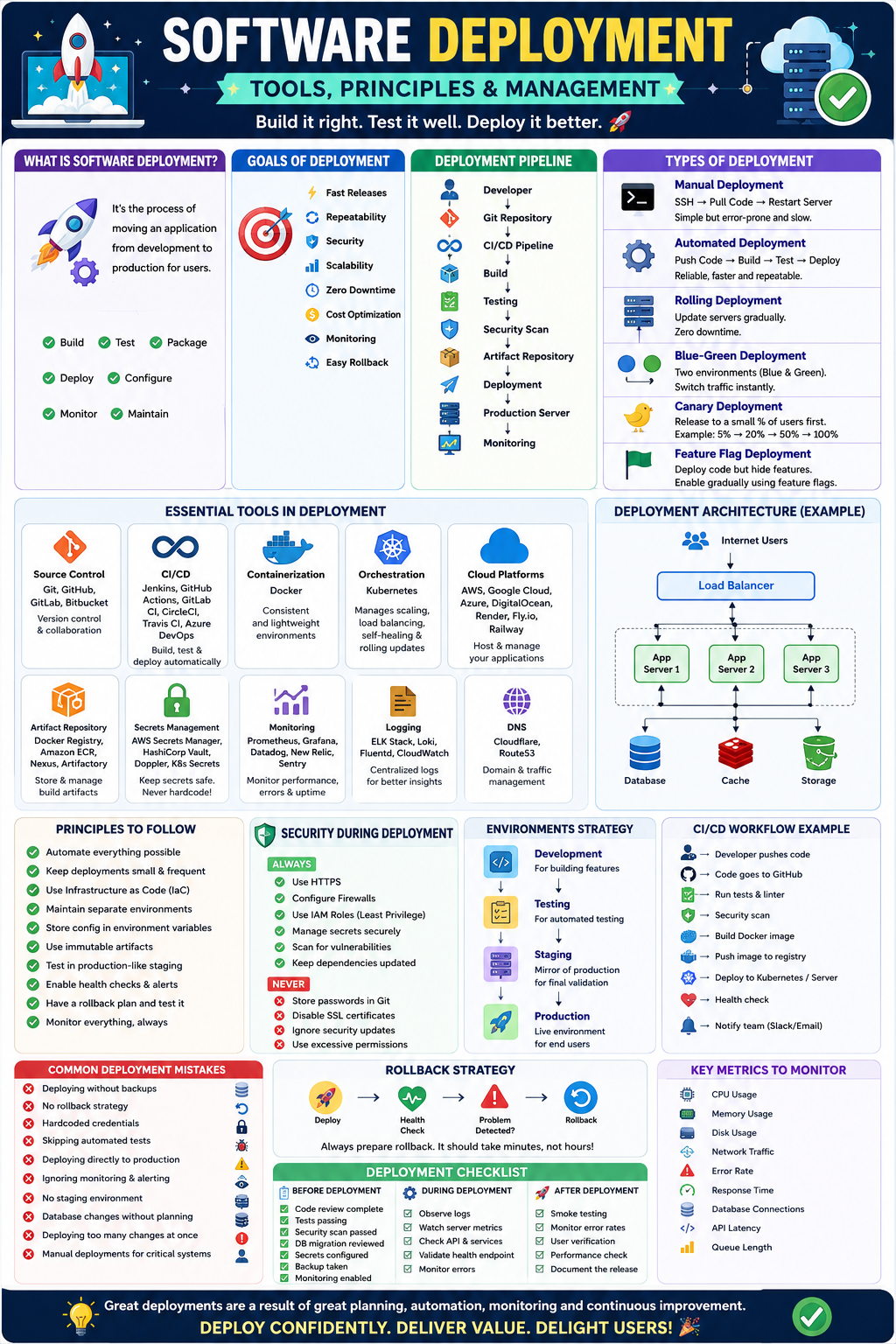
Let’s master everything about software deployment! 🚀
📖 What is Software Deployment?
Software deployment is the process of moving an application from the development environment to users.
It includes:
✅ Building the application
✅ Testing
✅ Packaging
✅ Deploying
✅ Configuring
✅ Monitoring
✅ Maintaining
🌎 Typical Software Deployment Pipeline
Developer
      │
      ▼
Git Repository
      │
      ▼
CI/CD Pipeline
      │
      ▼
Build
      │
      ▼
Testing
      │
      ▼
Security Scan
      │
      ▼
Artifact Repository
      │
      ▼
Deployment
      │
      ▼
Production Server
      │
      ▼
Monitoring
🎯 Goals of Deployment
A good deployment should provide
- ⚡ Fast releases
- 🔄 Repeatability
- 🔒 Security
- 📈 Scalability
- 💰 Cost optimization
- 🚀 Zero downtime
- 📊 Monitoring
- 🔙 Easy rollback
🏗 Types of Deployment
1️⃣ Manual Deployment
SSH
↓
Pull Code
↓
Restart Server
Pros
✅ Simple
Cons
❌ Error-prone
❌ Slow
❌ Difficult to scale
2️⃣ Automated Deployment
Pipeline performs everything automatically.
Push Code
↓
Build
↓
Test
↓
Deploy
Advantages
✅ Reliable
✅ Faster
✅ Repeatable
3️⃣ Rolling Deployment
Servers are updated gradually.
Server 1 ✔
Server 2 ✔
Server 3 ✔
Users never notice downtime.
4️⃣ Blue-Green Deployment 🔵🟢
Two identical environments exist.
Blue → Current
Green → New Version
Switch traffic instantly.
Benefits
✅ Zero downtime
✅ Instant rollback
5️⃣ Canary Deployment 🐤
Only a few users receive the new version.
5%
↓
20%
↓
50%
↓
100%
Perfect for detecting bugs early.
6️⃣ Feature Flag Deployment 🚩
Deploy code but hide features.
Example
if feature_enabled?
  show_new_dashboard
end
Excellent for testing.
🏗 Deployment Architecture
Load Balancer
│
├── App Server 1
├── App Server 2
├── App Server 3
│
Database
│
Cache
│
Storage
⚙️ Essential Deployment Tools
📦 Source Control
- Git
- GitHub
- GitLab
- Bitbucket
Purpose
Version control
⚡ CI/CD
Popular tools
- Jenkins
- GitHub Actions
- GitLab CI/CD
- CircleCI
- Travis CI
- Azure DevOps
Responsibilities
✅ Build
✅ Test
✅ Deploy
🐳 Containerization
Docker
Example
FROM ruby:3.3
COPY . /app
WORKDIR /app
RUN bundle install
CMD ["rails","server"]
Advantages
✅ Consistent environments
✅ Lightweight
☸️ Container Orchestration
Kubernetes
Manages
- Scaling
- Load balancing
- Self-healing
- Rolling updates
☁ Cloud Platforms
Popular options
- AWS
- Google Cloud
- Azure
- DigitalOcean
- Render
- Fly.io
- Railway
📦 Artifact Storage
Store deployment packages.
Examples
- Docker Registry
- Amazon ECR
- Nexus
- Artifactory
🔐 Secret Management
Never hardcode secrets.
Use
- AWS Secrets Manager
- HashiCorp Vault
- Doppler
- Kubernetes Secrets
📊 Monitoring
Tools
- Prometheus
- Grafana
- Datadog
- New Relic
- Sentry
Monitor
CPU
Memory
Errors
Traffic
Latency
📜 Logging
Tools
- ELK Stack
- Loki
- Fluentd
- CloudWatch
🌍 DNS
Examples
- Cloudflare
- Route53
🛠 Configuration Management
Configuration should never be inside code.
Bad
password="admin123"Good
password=ENV["DATABASE_PASSWORD"]📁 Environment Strategy
Development
↓
Testing
↓
Staging
↓
Production
Every environment should closely resemble production.
🚀 CI/CD Workflow Example
Developer Pushes Code
↓
GitHub
↓
GitHub Actions
↓
Run Tests
↓
Run Linter
↓
Security Scan
↓
Build Docker Image
↓
Push Image
↓
Deploy Kubernetes
↓
Health Check
↓
Notify Slack
🔐 Security During Deployment
Always
✅ HTTPS
✅ Firewall
✅ IAM Roles
✅ Least Privilege
✅ Secret Management
✅ Vulnerability Scanning
Never
❌ Store passwords in Git
❌ Disable SSL
❌ Ignore updates
📈 Scaling Strategy
Vertical Scaling
4GB RAM
↓
8GB RAM
Horizontal Scaling
Server 1
Server 2
Server 3
Horizontal scaling is generally preferred.
📊 Monitoring Metrics
Monitor
🔥 CPU
🔥 RAM
🔥 Disk
🔥 Network
🔥 Error Rate
🔥 Response Time
🔥 Database Connections
🔥 API Latency
🔥 Queue Length
🔙 Rollback Strategy
Always prepare rollback.
Deploy
↓
Health Check
↓
Problem?
↓
Rollback
Rollback should take only minutes.
🗂 Deployment Checklist
Before deployment
✅ Code review complete
✅ Tests passing
✅ Security scan passed
✅ Database migration reviewed
✅ Secrets configured
✅ Backup taken
✅ Monitoring enabled
During deployment
✅ Observe logs
✅ Watch CPU
✅ Check API
✅ Validate health endpoint
After deployment
✅ Smoke testing
✅ Error monitoring
✅ User verification
✅ Performance validation
📌 Example: Ruby on Rails Deployment
Developer Push
↓
GitHub
↓
GitHub Actions
↓
Bundle Install
↓
RSpec
↓
Docker Build
↓
Push to ECR
↓
Deploy ECS
↓
Restart Containers
↓
Health Check
↓
Success
🧪 Example: React Deployment
npm run build
↓
Upload Static Files
↓
CloudFront
↓
S3
↓
CDN
🐍 Example: Python Deployment
Git Push
↓
GitHub Actions
↓
pytest
↓
Docker
↓
Kubernetes
↓
Production
⚠️ Common Deployment Mistakes
❌ Deploying without backups
❌ No rollback strategy
❌ Hardcoded credentials
❌ Skipping automated tests
❌ Deploying directly to production
❌ Ignoring monitoring
❌ No staging environment
❌ Manual deployments for critical systems
❌ Database schema changes without compatibility planning
❌ Deploying multiple major changes at once
💡 Deployment Best Practices
✅ Automate everything possible.
✅ Keep deployments small and frequent.
✅ Use Infrastructure as Code (IaC).
✅ Maintain separate environments.
✅ Store configuration in environment variables.
✅ Use immutable artifacts (deploy the same build that was tested).
✅ Perform database migrations carefully and make them backward-compatible when possible.
✅ Enable health checks and readiness probes.
✅ Monitor every deployment.
✅ Practice rollback procedures regularly.
📦 Infrastructure as Code (IaC)
Manage infrastructure using code instead of manual setup.
Popular tools:
- Terraform
- OpenTofu
- AWS CloudFormation
- Pulumi
- Ansible (configuration management)
Benefits:
- 🔁 Repeatable infrastructure
- 📜 Version-controlled changes
- ⚡ Faster provisioning
- 🛡 Easier disaster recovery
🔄 Database Deployment Tips
Database changes often carry the highest risk.
Best practices:
- Add new columns before removing old ones.
- Avoid long-running migrations during peak hours.
- Back up the database before major changes.
- Test migrations in staging with production-like data.
- Make application code compatible with both old and new schemas during transitions.
Example migration strategy:
Step 1 → Add new column
Step 2 → Deploy application using both columns
Step 3 → Migrate data
Step 4 → Remove old column in a later release
📚 Complete Deployment Lifecycle
Planning
      ↓
Development
      ↓
Code Review
      ↓
Continuous Integration
      ↓
Automated Testing
      ↓
Security Scanning
      ↓
Artifact Creation
      ↓
Staging Deployment
      ↓
Acceptance Testing
      ↓
Production Deployment
      ↓
Monitoring
      ↓
Maintenance
      ↓
Continuous Improvement
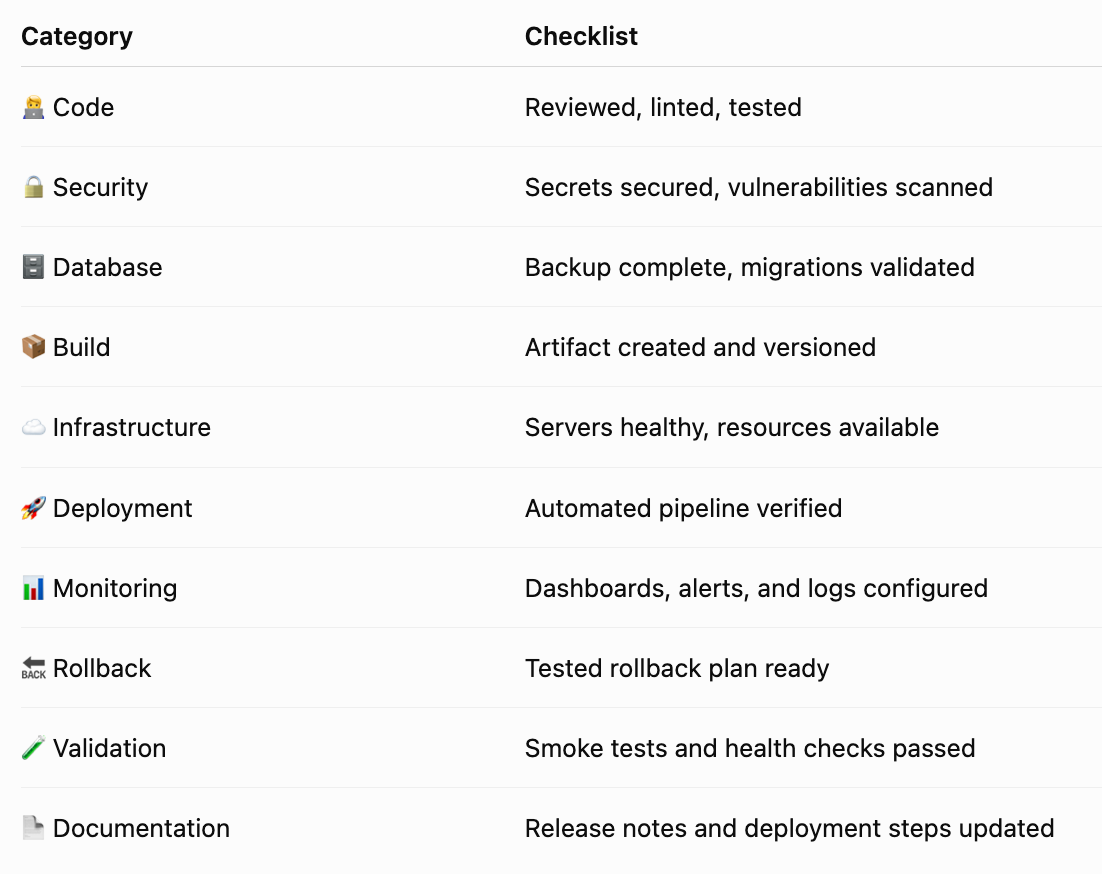
🎯 Final Deployment Success Checklist
🏆 Final Thoughts
Software deployment is far more than copying files to a server — it’s a disciplined engineering practice that combines automation, security, observability, reliability, and continuous improvement.
By adopting modern practices such as CI/CD, containerization, Infrastructure as Code, Blue-Green and Canary deployments, comprehensive monitoring, and well-tested rollback strategies, teams can release software with confidence, minimize downtime, and deliver a seamless experience to users.
“The best deployment is one that is predictable, repeatable, secure, and so smooth that users barely notice it happened.” 🚀
Happy Deploying! 💙


Comments
Post a Comment