🔐 Ruby on Rails Authentication Mastery: The Complete Guide to Building Bulletproof Login Systems 🚀
🔐 Ruby on Rails Authentication Mastery: The Complete Guide to Building Bulletproof Login Systems 🚀
“Authentication is not just about logging users in. It’s about protecting trust, data, and your application’s reputation.”
Authentication is one of the most critical parts of every web application. Whether you’re building a startup MVP, SaaS platform, banking system, healthcare application, or social media platform, authentication is your first line of defense.
Ruby on Rails provides multiple ways to authenticate users — from built-in authentication generators to powerful gems like Devise and Authlogic, or even building everything from scratch.

- 🔑 Authentication Fundamentals
- ⚙️ Rails Built-in Authentication
- 💎 Best Authentication Gems
- 🛠 Self-Made Authentication
- 🔒 Password Security
- 🛡 Session vs JWT Authentication
- 🌍 OAuth & Social Login
- 📱 API Authentication
- 🚨 Common Security Mistakes
- ✅ Production Security Checklist
- ⭐ Best Practices used by Large Companies
Let’s begin.
🤔 What is Authentication?
Authentication answers one simple question:
“Who are you?”
Examples:
- Username + Password
- Google Login
- Apple Login
- Face ID
- OTP
- Fingerprint
- Magic Link
After authentication comes Authorization, which answers:
“What are you allowed to do?”
Example:
Admin → Delete Users
Manager → View Reports
Customer → Buy Products
Authentication and Authorization are completely different concepts.
🏗 Authentication Architecture
User
↓
Login Form
↓
Validate Credentials
↓
Password Verification
↓
Generate Session / JWT
↓
Store Authentication
↓
Access Protected Routes
↓
Logout
↓
Destroy Session
🔑 Password Authentication Flow
Email
↓
Password
↓
Hash Password
↓
Compare Hash
↓
Valid
↓
Create Session
↓
Redirect Dashboard
Passwords should NEVER be stored as plain text.
Instead:
password
↓
bcrypt
↓
$2a$12$asduashduasd...
↓
Database
Even database administrators shouldn’t know user passwords.
🔒 Rails Built-in Authentication (Rails 8+)
Rails introduced an authentication generator, making it easier to bootstrap secure authentication without external gems.
rails generate authenticationIt automatically generates:
- User model
- Sessions Controller
- Password hashing
- Session management
- Authentication concern
- Login/Logout flow
- Secure cookies
Features
✅ Secure by default
✅ Uses BCrypt
✅ Session-based
✅ Minimal dependencies
✅ Easy to customize
Perfect for:
- MVPs
- Internal dashboards
- Small SaaS
- Learning Rails
💎 Devise — The Industry Standard
Devise is the most popular authentication gem in the Rails ecosystem.
Installation
gem "devise"bundle install
rails generate devise:install
rails generate devise User
rails db:migrateModules
Database Authentication
Email
Password
Login
Registerable
Allows users to register.
Recoverable
Forgot password.
Email
↓
Reset Token
↓
Email Link
↓
New Password
Rememberable
Keeps users logged in.
Remember Me
↓
Cookie
↓
30 Days Login
Confirmable
Email verification.
Signup
↓
Email
↓
Click Link
↓
Activate
Lockable
Stops brute-force attacks.
Example
Wrong Password ×5
↓
Account Locked
↓
Unlock Email
Timeoutable
Automatically logs out inactive users.
30 Minutes
↓
Logout
Trackable
Tracks
- Login Count
- Last Login
- Current Login
- IP Address
Omniauthable
Supports
- GitHub
- Apple
- Microsoft
Pros
✅ Production ready
✅ Battle tested
✅ Huge community
✅ Easy customization
Cons
❌ Large
❌ Complex internals
❌ Difficult debugging
💎 Sorcery
A lightweight alternative.
Features
- Email Login
- Reset Password
- Remember Me
- OAuth
- Session Timeout
Pros
- Simple
- Clean
- Flexible
💎 Authlogic
Old but stable.
Popular in legacy Rails applications.
Pros
- Flexible
- ActiveRecord style
Cons
- Smaller community
💎 Clearance
By thoughtbot.
Very lightweight.
Perfect for startups.
💎 Rodauth
One of the most secure authentication libraries.
Features
- MFA
- WebAuthn
- Recovery Codes
- Password Rotation
- OTP
Extremely configurable.
💎 OmniAuth
Used for social login.
Supports
Google
GitHub
Facebook
Twitter
Apple
LinkedIn
Flow
Login
↓
Google
↓
Consent
↓
Token
↓
Profile
↓
Create User
🔥 has_secure_password
Rails provides
has_secure_passwordRequires
gem "bcrypt"Model
class User < ApplicationRecord
  has_secure_password
end
Database
password_digestAutomatically provides
authenticate(password)Example
user.authenticate("secret")Returns
User
or
false
🛠 Build Authentication Yourself
Step 1
User Model
class User < ApplicationRecord
  has_secure_password
end
Step 2
Signup
User.create(
  email: params[:email],
  password: params[:password]
)
Step 3
Login
user = User.find_by(email: params[:email])
if user&.authenticate(params[:password])
  session[:user_id] = user.id
end
Step 4
Current User
def current_user
  @current_user ||= User.find(session[:user_id])
end
Step 5
Authentication Filter
before_action :authenticate_userStep 6
Logout
reset_session🔐 Session Authentication
Most Rails applications use sessions.
Browser
↓
Cookie
↓
Session ID
↓
Rails Server
↓
Database
Advantages
✅ Secure
✅ Easy
✅ CSRF Protection
Ideal for:
- Admin Panels
- SaaS
- CMS
- ERP
🌍 JWT Authentication
Popular for APIs.
Login
↓
JWT Token
↓
Client Stores Token
↓
Authorization Header
↓
Verify Token
Advantages
- Stateless
- Mobile Apps
- SPA
- React
- Flutter
Common gems
- devise-jwt
- jwt
- knock
📱 API Authentication
Popular methods
Bearer Token
Authorization:
Bearer TOKEN
API Keys
x-api-keyOAuth2
Access Token
Refresh Token
🔒 Password Security
Always use BCrypt.
Never use
❌ SHA1
❌ MD5
❌ Plain Text
Strong password rules:
- Minimum 12 characters
- Uppercase
- Lowercase
- Number
- Special Character
🛡 CSRF Protection
Rails automatically provides
protect_from_forgeryNever disable it unless absolutely necessary for API-only endpoints using token-based auth.
🔐 Secure Cookies
Use
secure
httponly
same_site
Cookies become resistant to:
- XSS theft
- Network sniffing
- Cross-site attacks
🔑 Multi-Factor Authentication (MFA)
Modern applications should support:
- 📲 Authenticator Apps (TOTP)
- 📩 Email OTP
- 📱 SMS OTP (less preferred)
- 🔑 Security Keys (WebAuthn/FIDO2)
- 👆 Biometrics via platform authenticators
For high-security systems, combine password + TOTP or WebAuthn.
🌍 Social Login
Popular providers:
- GitHub
- Apple
- Microsoft
Advantages:
- Faster onboarding
- Fewer forgotten passwords
- Reduced password management
Remember to verify email ownership where appropriate and securely handle OAuth callbacks.
🚨 Common Authentication Mistakes
❌ Plain-text passwords
Always hash passwords.
❌ Weak passwords
Enforce complexity and length.
❌ No email verification
Unverified users can abuse your platform.
❌ Unlimited login attempts
Implement rate limiting and account lockouts.
❌ Predictable reset tokens
Use cryptographically secure random tokens with expiration.
❌ Long-lived sessions
Expire inactive sessions and allow users to revoke active sessions.
❌ Storing JWT in Local Storage (without understanding risks)
Prefer secure, HttpOnly cookies for browser-based applications when practical.
❌ Missing HTTPS
Never send credentials over HTTP.
❌ Exposing sensitive errors
Avoid responses like:
Email exists
Password incorrect
Prefer:
Invalid email or password.❌ Missing audit logs
Record:
- Login
- Logout
- Password changes
- Email changes
- Failed login attempts
🏆 Authentication Comparison
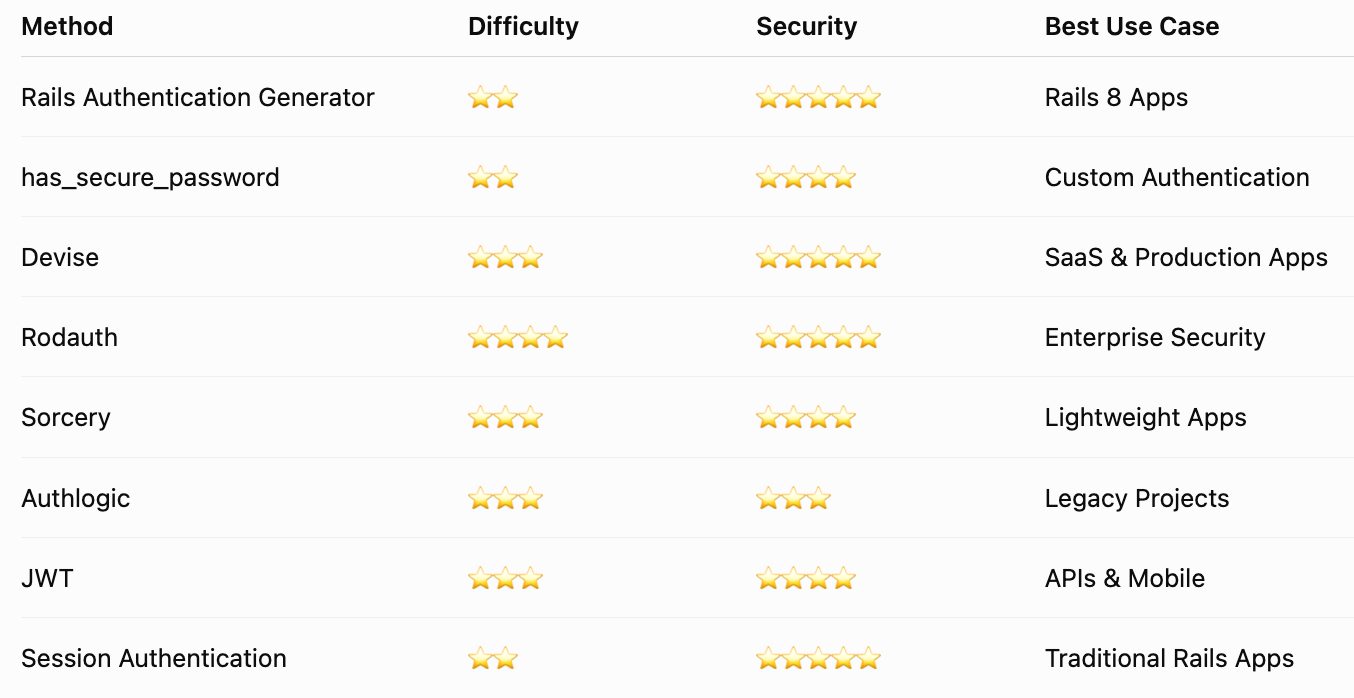
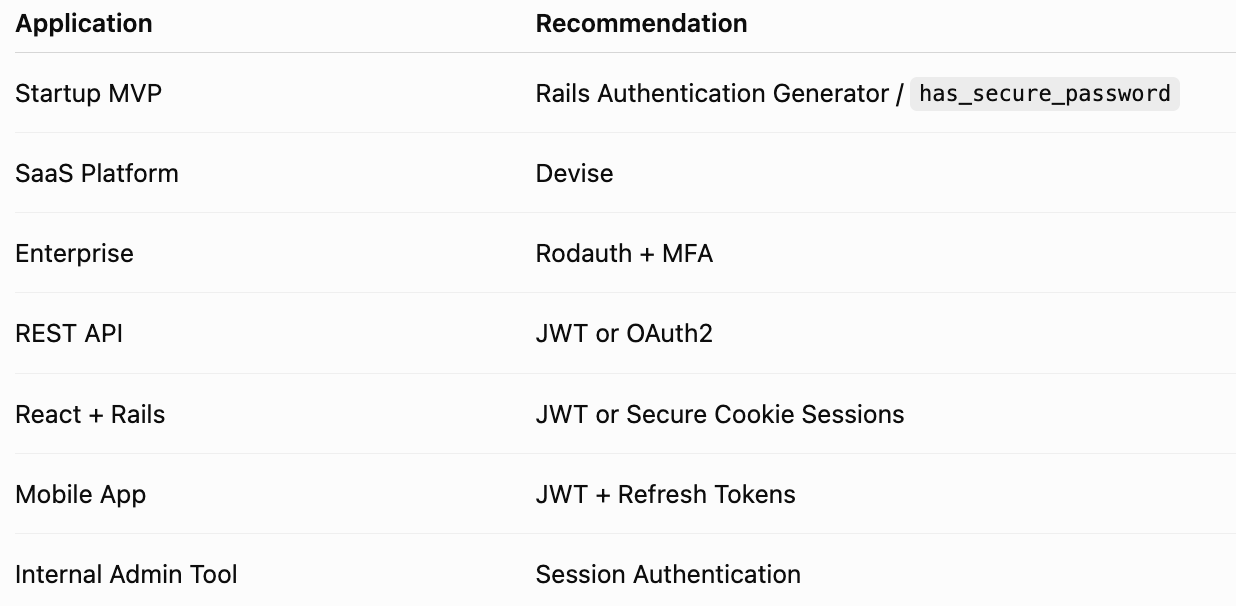
🏢 Which Authentication Should You Choose?
✅ Z+ Production Authentication Security Checklist
Infrastructure
- ✅ Enforce HTTPS everywhere
- ✅ Enable HSTS
- ✅ Use Secure, HttpOnly, SameSite cookies
- ✅ Store secrets in Rails Credentials or a secure secrets manager
- ✅ Rotate secrets regularly
Passwords
- ✅ Hash with BCrypt or Argon2 (if supported)
- ✅ Enforce strong password policies
- ✅ Prevent reuse of recent passwords
- ✅ Expire reset tokens quickly
Sessions & Tokens
- ✅ Regenerate session IDs after login
- ✅ Destroy sessions on logout
- ✅ Set idle session timeouts
- ✅ Rotate refresh tokens
- ✅ Validate JWT expiration and issuer
User Protection
- ✅ Email verification
- ✅ Multi-Factor Authentication (MFA)
- ✅ Login attempt throttling
- ✅ Account lockout after repeated failures
- ✅ Device/session management for users
Authorization
- ✅ Apply least-privilege access
- ✅ Verify permissions on every sensitive action
- ✅ Never trust client-side role checks
- ✅ Use policy libraries (e.g., Pundit) where appropriate
Monitoring
- ✅ Audit logs for authentication events
- ✅ Alerts for suspicious login activity
- ✅ Monitor unusual geographic or device changes
- ✅ Log token revocations and password changes
Testing
- ✅ Unit tests for authentication logic
- ✅ Integration tests for login flows
- ✅ Security testing for CSRF, XSS, and session fixation
- ✅ Regular dependency updates
- ✅ Penetration testing before major releases
🎯 Final Thoughts
Authentication is far more than a login form — it’s the foundation of application security. Ruby on Rails gives developers a rich ecosystem to choose from:
- 🚀 Use the Rails Authentication Generator or
has_secure_passwordfor lightweight, customizable applications. - 💎 Choose Devise for feature-rich production systems with a mature ecosystem.
- 🛡 Adopt Rodauth when enterprise-grade security and advanced authentication features are required.
- 🌐 Use JWT thoughtfully for APIs and mobile applications, while favoring secure session-based authentication for traditional Rails web apps.
- 🔒 Strengthen every implementation with HTTPS, MFA, secure cookies, rate limiting, audit logging, and rigorous testing.
A secure authentication system isn’t built by adding one gem — it’s built by combining sound architecture, secure coding practices, continuous monitoring, and a security-first mindset.
“Users may never notice a great authentication system — but they’ll immediately notice when it’s missing.” 🔐🚀


Comments
Post a Comment