🚀 Ruby on Rails Migrations Mastery: Build Databases the Right Way! 💎
🚀 Ruby on Rails Migrations Mastery: Build Databases the Right Way! 💎
“A great Rails application isn’t built by models alone — it’s built on clean, reliable, and maintainable database migrations.”
When learning Ruby on Rails, many developers spend hours mastering Models, Controllers, and Views but ignore one of the most important components — the Migration System.
Migrations are the backbone of every Rails application. They allow teams to change database structures safely, collaborate efficiently, deploy confidently, and maintain production databases without manually writing SQL every time.
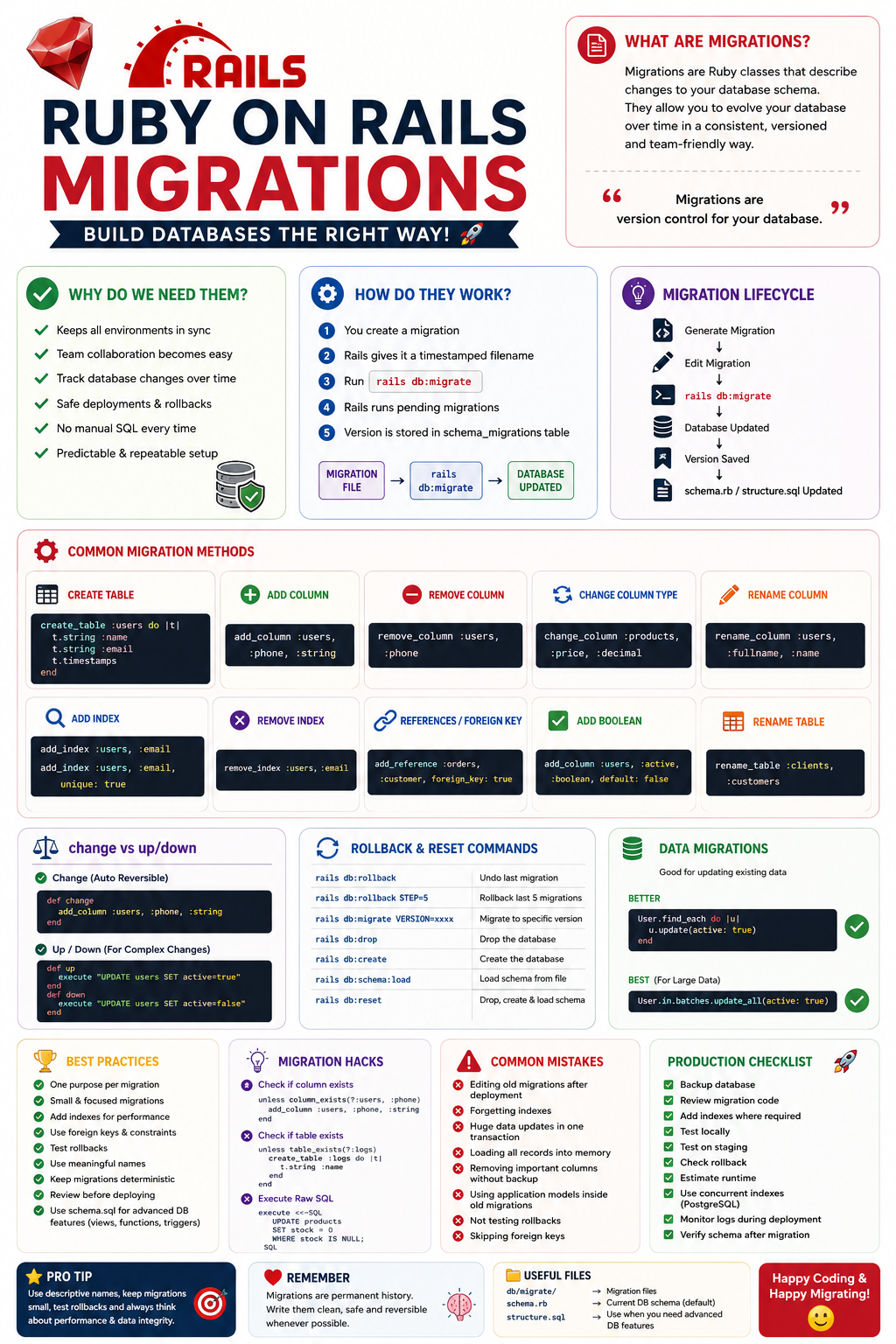
Let’s master Rails Migrations from beginner to advanced level.
📖 What are Rails Migrations?
A Migration is a Ruby class that describes changes to your database schema.
Instead of manually writing SQL like:
ALTER TABLE users ADD COLUMN age INTEGER;Rails allows you to write:
class AddAgeToUsers < ActiveRecord::Migration[8.0]
  def change
    add_column :users, :age, :integer
  end
end
Rails converts this into SQL automatically for PostgreSQL, MySQL, SQLite, MariaDB, etc.
Think of migrations as version control for your database, just like Git is version control for your code.
🤔 Why Do We Need Migrations?
Imagine working on a team.
Developer A adds:
users.nameDeveloper B adds:
users.phoneDeveloper C adds:
users.addressWithout migrations:
- ❌ Everyone edits SQL manually
- ❌ Production database becomes inconsistent
- ❌ Different environments have different schemas
- ❌ Impossible to track database history
With migrations:
001_create_users
002_add_phone_to_users
003_add_address_to_users
Everyone simply runs:
rails db:migrateEverything stays synchronised.
🏗 How Rails Migrations Work
Every migration has a version timestamp.
Example:
20260726101010_create_products.rbInside:
class CreateProducts < ActiveRecord::Migration[8.0]
  def change
    create_table :products do |t|
      t.string :name
      t.decimal :price
      t.timestamps
    end
  end
end
When running:
rails db:migrateRails checks:
schema_migrationstable.
It stores:
20260726101010If already present:
✅ Skip
Otherwise:
✅ Execute migration.
🧩 Anatomy of a Migration
class CreateUsers < ActiveRecord::Migration[8.0]
  def change
    create_table :users do |t|
      t.string :name
      t.string :email
      t.integer :age
      t.timestamps
    end
  end
end
Here,
create_tablecreates table.
t.stringcreates VARCHAR.
t.timestampscreates:
created_at
updated_at
automatically.
📂 Migration Lifecycle
Generate Migration
        │
        ▼
Edit Migration
        │
        ▼
rails db:migrate
        │
        ▼
Database Updated
        │
        ▼
schema.rb Updated
        │
        ▼
Version Saved
🛠 Creating Migrations
Generate model:
rails g model Product name:string price:decimal stock:integerOnly migration:
rails g migration AddGSTToProducts gst:decimalRemove column:
rails g migration RemoveGSTFromProducts gst:decimalRename:
rails g migration RenameStockToQuantity📋 Common Migration Methods
Create Table
create_table :books do |t|
  t.string :title
  t.integer :pages
end
Add Column
add_column :users, :phone, :stringRemove Column
remove_column :users, :phoneRename Column
rename_column :users, :fullname, :nameRename Table
rename_table :clients, :customersChange Column Type
change_column :products, :price, :decimalAdd Index
add_index :users, :emailUnique:
add_index :users, :email, unique: trueComposite:
add_index :orders,
          [:user_id, :status]
Remove Index
remove_index :users, :emailForeign Keys
add_reference :orders,
              :customer,
              foreign_key: true
Equivalent:
t.references :customer,
             foreign_key: true
Add Boolean
add_column :users,
           :verified,
           :boolean,
           default: false
🔄 change vs up/down
change
Automatically reversible.
def change
  add_column :users,
             :phone,
             :string
end
up/down
Use for complex operations.
def up
  execute "UPDATE users SET active=true"
end

def down
  execute "UPDATE users SET active=false"
end
📚 Data Migrations
Sometimes you need to update existing data.
Example:
User.update_all(active: true)Better:
User.find_each do |user|
  user.update(active: true)
end
Even better for very large datasets:
User.in_batches.update_all(active: true)🧠 Schema.rb
Rails automatically updates:
db/schema.rbNever edit it manually.
It represents your current database structure.
🗂 Structure.sql
Use when:
- PostgreSQL functions
- Triggers
- Views
- Advanced indexes
- Database extensions
Enable:
config.active_record.schema_format = :sql⚡ Rollback
Undo last migration:
rails db:rollbackRollback multiple:
rails db:rollback STEP=5Specific version:
rails db:migrate VERSION=20260726101010🔥 Reset Database
Drop database:
rails db:dropCreate:
rails db:createLoad schema:
rails db:schema:loadReset everything:
rails db:reset🧱 Transactions
Rails wraps migrations inside database transactions.
If something fails:
Everything rolls back.Safer deployments.
🚀 Reversible Migrations
reversible do |dir|
  dir.up do
    execute "..."
  end

  dir.down do
    execute "..."
  end
end
📈 Performance Tips
Add Indexes
add_index :orders, :user_idWithout index:
10 million rows
↓
Slow search
With index:
MillisecondsUse Concurrent Indexes (PostgreSQL)
disable_ddl_transaction!

add_index :users,
          :email,
          algorithm: :concurrently
Prevents long table locks during deployment.
Avoid Loading Models
Bad:
User.all.eachGood:
execute <<~SQL
UPDATE users
SET active=true
SQL
or
User.in_batches.update_all(active: true)💡 Advanced Migration Hacks
Conditional Column
unless column_exists?(:users, :phone)
  add_column :users,
             :phone,
             :string
end
Conditional Table
unless table_exists?(:logs)
  create_table :logs do |t|
    t.string :name
  end
end
Reversible SQL
reversible do |dir|
  dir.up do
    execute "CREATE VIEW ..."
  end

  dir.down do
    execute "DROP VIEW ..."
  end
end
Execute Raw SQL
execute <<~SQL
UPDATE products
SET stock = 0
WHERE stock IS NULL;
SQL
Bulk Changes
change_table :users,
             bulk: true do |t|
  t.string :city
  t.string :country
end
🌟 Best Practices
✅ One Purpose Per Migration
Good:
AddPhoneToUsersBad:
UpdateEverythingMigration✅ Small Migrations
One change
One commit
One migration
✅ Always Add Indexes
Especially:
Foreign Keys
Search Fields
Unique Columns
✅ Name Clearly
Good:
AddGSTToProductsBad:
Migration1✅ Test Rollback
Always verify:
rails db:migrate
rails db:rollback
✅ Keep Migrations Deterministic
Avoid depending on external APIs, current time (unless intentional), or application logic that may change.
✅ Use Database Constraints
Prefer:
add_index :users, :email, unique: true
change_column_null :users, :email, false
over relying only on model validations.
❌ Common Mistakes
🚫 Editing old migrations after production deployment.
🚫 Forgetting indexes.
🚫 Huge data updates in one transaction.
🚫 Loading every record into memory.
🚫 Removing important columns without backup.
🚫 Using changing application models inside old migrations.
🚫 Not testing rollbacks.
🚫 Skipping foreign keys.
🚫 Making multiple unrelated schema changes in one migration.
🚫 Running long blocking operations during peak traffic.
🏆 Production Migration Checklist
✅ Backup database
✅ Review migration code
✅ Add indexes where required
✅ Test locally
✅ Test on staging
✅ Check rollback
✅ Estimate runtime
✅ Use concurrent indexes when supported
✅ Monitor logs during deployment
✅ Verify schema after migration
🎯 Real-World Example
Suppose you’re building an e-commerce platform.
Step 1
rails g model Product \
name:string \
price:decimal \
stock:integer
Step 2
Run:
rails db:migrateStep 3
Later, add SKU and barcode:
rails g migration AddSkuAndBarcodeToProducts \
sku:string \
barcode:string
Step 4
Optimise lookups:
add_index :products, :sku, unique: true
add_index :products, :barcode
Step 5
Enforce data integrity:
change_column_null :products, :sku, falseThe database evolves incrementally without disrupting existing data or requiring manual SQL.
🎓 Final Thoughts
Rails Migrations are much more than a convenience — they are the foundation of safe, collaborative, and scalable database evolution. Treat each migration as a permanent piece of your application’s history. Keep them focused, reversible where possible, backed by constraints and indexes, and tested before deployment.
When your migrations are clean, your deployments become smoother, your teammates stay in sync, and your production database remains reliable as your application grows.
💬 “Code changes your application. Migrations change its history. Write both with care.”
Happy Rails coding! 🚂✨


Comments
Post a Comment