🤖 AI Token System Explained: The Hidden Currency Behind Every AI Conversation
🤖 AI Token System Explained: The Hidden Currency Behind Every AI Conversation
AI looks simple from the outside: you type a prompt → AI thinks → AI responds.
But underneath that conversation is a fascinating system of tiny computational units called tokens.
Understanding tokens is one of the most important skills for anyone building with LLMs — especially developers working with APIs, AI agents, RAG systems, chatbots, and production applications.
The big question is:
What exactly is a token, how much does it cost, and how can we get better AI results while using fewer tokens?
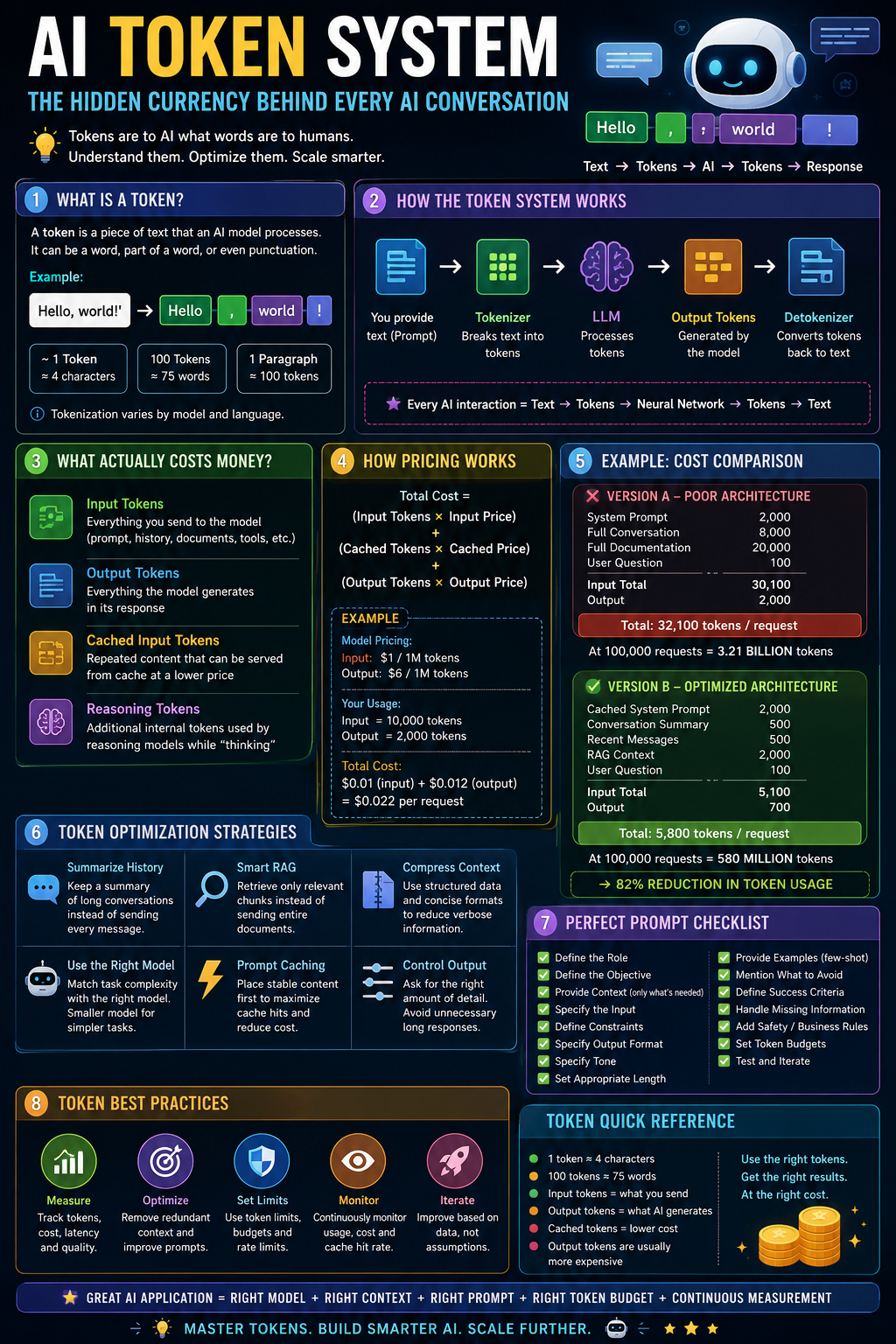
Let’s break it down. 🚀
🧩 1. What Exactly Is an AI Token?
A token is a piece of text that an AI model processes.
A token isn’t necessarily a complete word.
For example:
"Hello, world!"might be broken into pieces roughly resembling:
"Hello"
","
" world"
"!"
The exact tokenization depends on the model and tokenizer.
For English, OpenAI gives a useful approximation:
- 1 token ≈ 4 characters
- 1 token ≈ ¾ of a word
- 100 tokens ≈ 75 words
- 1 paragraph ≈ 100 tokens
But these are only rules of thumb. Different languages, punctuation, code, numbers, and unusual words can tokenize very differently. (OpenAI Help Center)
That’s why:
"authentication"and
"auth123_xyz"may not consume the same number of tokens.
⚙️ 2. How the AI Token System Works
A simplified AI request looks like this:
YOUR APPLICATION
                        │
                        ▼
                  📝 PROMPT
                        │
                        ▼
                 🔢 TOKENIZER
                        │
                        ▼
              [T1][T2][T3][T4]...
                        │
                        ▼
                   🧠 LLM
                        │
                        ▼
             [T1][T2][T3]...[Tn]
                        │
                        ▼
                 🔤 DETOKENIZER
                        │
                        ▼
                   AI RESPONSE
The process is approximately:
Step 1 — You provide text
Explain JWT authentication in Rails.Step 2 — Tokenizer breaks it apart
Conceptually:
Explain | JWT | authentication | in | Rails | .The actual token boundaries may be different.
Step 3 — The model processes those tokens
The model uses the token sequence as context and predicts what should come next.
Step 4 — The model generates output tokens
For example:
JWT | authentication | is | a | token-based | ...Step 5 — Tokens become human-readable text
The generated tokens are decoded back into text.
So an AI interaction is fundamentally:
Text → Tokens → Neural Network → Tokens → Text
💰 3. What Actually Costs Money?
For API-based AI applications, pricing is generally based on token usage, not simply the number of messages.
There are usually several categories:
🟢 Input Tokens
Everything you send to the model.
This can include:
- System instructions
- User prompt
- Conversation history
- Documents
- RAG context
- Tool results
- Structured data
🔵 Output Tokens
Everything the model generates.
For example:
Explain Redis caching in 500 words.The generated explanation consumes output tokens.
🟡 Cached Input Tokens
If a model supports prompt caching, repeatedly reused portions of your prompt can be billed at a substantially lower rate.
🟣 Reasoning Tokens
Some reasoning models may consume additional internal tokens while solving a problem. These can contribute to usage even though you don’t necessarily see them as visible text. (OpenAI Help Center)
🧮 4. The Basic Token Cost Formula
A simplified API billing equation is:
Total Cost =
(Input Tokens × Input Price)
+
(Cached Tokens × Cached Price)
+
(Output Tokens × Output Price)
OpenAI documents this same basic calculation for token-based pricing. (OpenAI Help Center)
For example, suppose a model costs:
Input:  $1 / 1M tokens
Output: $6 / 1M tokens
And your request uses:
Input  = 10,000 tokens
Output = 2,000 tokens
Then:
Input cost
= 10,000 / 1,000,000 × $1
= $0.01

Output cost
= 2,000 / 1,000,000 × $6
= $0.012
Total:
$0.022One request costs only about 2.2 cents.
But here’s where things become interesting.
At:
100,000 requests/monththat becomes:
$0.022 × 100,000
= $2,200/month
🔥 Small inefficiencies become expensive at scale.
📊 5. Current Example: OpenAI Token Pricing
AI pricing changes frequently, so always check the provider’s current pricing before making production cost assumptions.
For example, OpenAI’s current API pricing lists GPT-5.6 Luna at $0.50 per 1M input tokens, $0.05 per 1M cached input tokens, and $3.00 per 1M output tokens for the standard short-context tier. GPT-5.5 is listed at $5 input / $0.50 cached input / $30 output per 1M tokens. (OpenAI Platform)
The important lesson isn’t memorizing a price.
It’s understanding this:
⚡ Output tokens can be dramatically more expensive than input tokens.
Therefore, blindly asking an AI to produce enormous responses can become surprisingly expensive.
🧠 6. Why Output Tokens Are More Expensive
Imagine you send:
Summarize this article in 100 words.Your input might contain:
5,000 tokenswhile the response might contain:
150 tokensThat’s relatively cheap.
Now imagine:
Write a 10,000-word technical book about Kubernetes.The model may generate thousands of output tokens.
Your output bill can quickly dominate your input bill.
This leads to one of the most useful optimization principles:
🎯 Don’t optimize only the prompt. Optimize the entire input-output lifecycle.
🔥 7. The Biggest Token Killer: Conversation History
Consider a chatbot.
User asks:
What is Rails?Then:
What is ActiveRecord?Then:
How does it query PostgreSQL?Then:
How can I optimize it?A naive implementation might send the entire conversation history with every request.
So request #1:
1,000 tokensRequest #2:
2,000 tokensRequest #3:
3,000 tokensRequest #4:
4,000 tokensYour application is repeatedly paying to process old information.
✂️ 8. Token Optimization Strategy #1 — Summarize History
Instead of sending:
Entire 30-message conversationmaintain:
Conversation Summary
+
Recent Messages
+
Current User Request
For example:
USER CONTEXT:
Building a Rails API using PostgreSQL.
Authentication uses JWT.
Current problem: slow product search.

RECENT CONVERSATION:
...
CURRENT REQUEST:
Optimize the search query.
This can dramatically reduce token consumption.
📚 9. Token Optimization Strategy #2 — Don’t Send Entire Documents
This is one of the biggest mistakes in RAG systems.
Suppose you have:
Company documentation = 500,000 tokensUser asks:
How do I reset my password?❌ Bad architecture:
500,000 tokens → LLMBetter:
Question
   ↓
Embedding/Search
   ↓
Relevant chunks
   ↓
10,000 tokens
   ↓
LLM
Even better:
Question
   ↓
Retriever
   ↓
Top 3 relevant chunks
   ↓
2,500 tokens
   ↓
LLM
🎯 Retrieve relevant information instead of dumping everything into the prompt.
🗜️ 10. Token Optimization Strategy #3 — Compress Context
Instead of:
Customer name: Rahul Sharma
Customer age: 31
Customer lives in Indore
Customer's preferred language is English
Customer has purchased product X
Customer purchased product X on...
you might maintain a compact structured representation:
{
  "customer": "Rahul Sharma",
  "age": 31,
  "city": "Indore",
  "language": "en",
  "last_product": "X"
}
Structured data can be significantly easier for an AI system to consume than verbose prose.
But don’t compress information so aggressively that you destroy important meaning.
🧠 11. Token Optimization Strategy #4 — Use the Right Model
Not every task needs your most expensive model.
For example:
Simple task
Classify this email as:
spam / promotion / important
Use a smaller, cheaper model.
Complex task
Analyze this distributed-system architecture
and identify race conditions.
Use a stronger reasoning/coding model.
Think:
Simple task → Small model
Medium task → Mid-tier model
Complex task → Frontier model
This is one of the most effective ways to control AI infrastructure costs.
🏎️ 12. Token Optimization Strategy #5 — Prompt Caching
Suppose your system prompt is:
You are an enterprise banking assistant...
[5,000 tokens of instructions]
Every request repeats it.
If the provider supports prompt caching, that repeated prefix can potentially be served as cached input instead of being processed as fresh input every time.
OpenAI documents automatic prompt caching for supported models when prompts exceed the required threshold and reuse common prefixes. (OpenAI)
So design your prompt like:
STATIC CONTENT
──────────────
System instructions
Rules
Examples
Company policies
Documentation


DYNAMIC CONTENT
──────────────
User question
Current data
Session information
Put reusable content first.
🔥 Stable prefix + dynamic suffix = excellent caching architecture.
🧪 13. A Real Token Optimization Example
Imagine you’re building an AI support chatbot.
❌ Version A — Poor Architecture
Every request sends:
System Prompt          2,000 tokens
Full conversation      8,000 tokens
Full documentation    20,000 tokens
User question            100 tokens
──────────────────────────────
Input                 30,100 tokens
AI response:
2,000 tokensTotal:
32,100 tokens/requestAt 100,000 requests:
3.21 billion tokens😱
✅ Version B — Optimized Architecture
Use:
Cached system prompt       2,000
Conversation summary         500
Recent messages              500
RAG context                2,000
User question               100
──────────────────────────────
Input                     5,100
Output:
700 tokensTotal:
5,800 tokens/requestAt 100,000 requests:
580 million tokensThat’s roughly an 82% reduction in total token volume.
And that’s before considering cached-input pricing.
💡 14. Token Optimization Doesn’t Mean “Make Everything Short”
This is an important distinction.
Bad optimization:
Remove important context.Good optimization:
Remove redundant context.Bad:
Summarize everything aggressively.Good:
Preserve information that affects the answer.Bad:
Make every response 20 words.Good:
Generate only the amount of output required.The objective isn’t:
❌ Minimum tokens
The objective is:
✅ Minimum tokens required to achieve the desired quality.
🧮 15. Think in “Cost Per Successful Task”
Suppose:
Model A
Cost/request = $0.01
Success rate = 70%
Model B
Cost/request = $0.02
Success rate = 95%
You shouldn’t automatically choose Model A because it’s cheaper.
If users need multiple retries, the actual cost can become higher.
A better metric is:
Cost per successful taskThis is much more meaningful for production AI systems.
🧱 16. What Counts as Input Tokens?
Developers often think:
Input tokens = user message❌ Not necessarily.
Your model input can contain:
System instructions
+
Developer instructions
+
Conversation history
+
User message
+
RAG documents
+
Tool results
+
Function schemas
+
Structured data
+
Previous outputs
Therefore, a user typing:
"What's the status?"could trigger thousands of input tokens if your application attaches a huge context.
That’s why observability matters.
📈 17. Track Token Usage Like Infrastructure Metrics
For production AI applications, monitor:
input_tokens
output_tokens
cached_tokens
reasoning_tokens
latency
cost
success_rate
And calculate:
Average tokens/request
Cost/request
Cost/user
Cost/successful task
Cache hit rate
Then create dashboards.
For example:
AI COST DASHBOARD

Requests                 1,250,000
Input Tokens             4.2B
Output Tokens            820M
Cache Hit Rate           73%
Average Cost/Request     $0.004
Success Rate             94.7%
Now AI becomes an engineering system rather than a black box.
🛡️ 18. Beware of Token Bombs
A malicious or poorly designed request can intentionally cause huge token consumption.
Examples:
"Analyze this enormous document..."or:
"Generate an exhaustive 100,000-word explanation..."or an agent repeatedly calling tools.
Implement:
Token limits
max_input_tokens
max_output_tokens
Request limits
requests/user/minuteBudget limits
daily_cost/user
monthly_cost/application
Agent safeguards
max_iterations
max_tool_calls
max_execution_time
💰 Cost control is part of AI security.
🤖 19. AI Agents Make Token Economics Even More Important
A traditional chatbot might make:
1 request → 1 responseAn agent might do:
User
 ↓
LLM
 ↓
Search
 ↓
LLM
 ↓
Database
 ↓
LLM
 ↓
API
 ↓
LLM
 ↓
Final answer
One user request can therefore produce many model calls.
If each call carries previous context, token usage can explode.
A production agent should therefore use:
Context management
+
Tool-result compression
+
Conversation summarization
+
Caching
+
Iteration limits
+
Token budgets
✨ 20. The Perfect Prompt Checklist
A powerful prompt doesn’t need to be huge.
It needs to be clear, contextual, constrained, and testable.
Use this checklist:
- 🎯 Define the Role — Tell the AI what expertise or perspective it should use.
- 🎯 Define the Objective — Clearly state exactly what you want.
- 🧠 Provide Context — Give only information relevant to the task.
- 📋 Specify the Input — Clearly identify what the model should analyze.
- 📐 Define Constraints — Mention limitations, rules, technologies, dates, etc.
- 📝 Specify Output Format — Markdown, JSON, table, bullets, code, etc.
- 🎨 Specify Tone — Professional, technical, friendly, concise, persuasive, etc.
- 🔢 Set Appropriate Length — Ask for the amount of detail actually required.
- 🧪 Provide Examples — Use few-shot examples when the desired behavior is difficult to describe.
- 🚫 Mention What to Avoid — Prevent common failure modes.
- 🔍 Define Success Criteria — Explain what a good answer must contain.
- ❓ Handle Missing Information — Tell the model what to do when information is unavailable.
- 🔐 Add Safety/Business Rules — Especially for production applications.
- 💰 Set Token Budgets — Don’t allow unlimited generation when it isn’t necessary.
- 🔄 Test and Iterate — Measure results rather than assuming the prompt is perfect.
🏆 21. A Perfect Prompt Formula
A useful template is:
ROLE
You are a [specific expert].

OBJECTIVE
Your task is to [specific outcome].

CONTEXT
Here is the relevant background:
[context]

INPUT
Analyze the following:
[input]

CONSTRAINTS
- Constraint 1
- Constraint 2
- Constraint 3

PROCESS
Follow these requirements:
1. ...
2. ...
3. ...

OUTPUT
Return the result in this format:
[format]

QUALITY CRITERIA
A successful answer must:
- ...
- ...
- ...
IF INFORMATION IS MISSING
Clearly state what is unknown instead of inventing information.
Notice something important:
This isn’t necessarily a huge prompt.
It’s a structured prompt.
Structure often beats verbosity. 🧠
🚀 22. Example: Bad Prompt vs Better Prompt
❌ Bad
Tell me about Redis.It’s ambiguous.
Should the model explain:
- Redis architecture?
- Commands?
- Caching?
- Pub/Sub?
- Production deployment?
- Performance?
- Security?
✅ Better
You are a senior backend engineer.

Explain Redis caching for a Ruby on Rails production application.
Cover:
1. Redis architecture
2. Rails integration
3. Cache invalidation
4. TTL strategies
5. Serialization
6. Common production mistakes
7. Performance optimization
Use Ruby examples.
Target audience:
Developers with 2–4 years of backend experience.

Output:
- Start with a short mental model.
- Then explain each concept.
- Include practical code examples.
- Finish with a production checklist.
Avoid explaining basic programming concepts.
The second prompt gives the model:
Role
+
Objective
+
Context
+
Scope
+
Audience
+
Output format
+
Constraints
That’s what makes it powerful.
🧠 23. The Golden Rule of Prompt Engineering
Don’t ask:
“How can I make my prompt longer?”
Ask:
“What information does the model actually need to produce the correct result?”
That shift changes everything.
A 500-token prompt containing the right information can outperform a 5,000-token prompt full of repetition.
🔥 24. The AI Token Optimization Playbook
For production systems, follow this sequence:
1️⃣ Measure
   ↓
2️⃣ Identify token-heavy requests
   ↓
3️⃣ Remove redundant context
   ↓
4️⃣ Summarize conversations
   ↓
5️⃣ Optimize RAG retrieval
   ↓
6️⃣ Cache stable prompts
   ↓
7️⃣ Reduce unnecessary output
   ↓
8️⃣ Select the appropriate model
   ↓
9️⃣ Add token budgets
   ↓
🔟 Monitor cost + quality
Don’t optimize blindly.
Measure → Optimize → Benchmark → Repeat.
🌎 25. The Bigger Picture
Tokens are more than a billing unit.
They influence:
⚡ Latency
💰 Cost
🧠 Context quality
📚 How much information the model can process
🤖 Agent scalability
🔐 Security and abuse prevention
📈 Infrastructure economics
As AI applications move from simple chatbots to autonomous agents, token management will become as important as:
CPU
Memory
Database Queries
Network Bandwidth
API Calls
For AI engineers, token economics is becoming a core engineering discipline.
🏁 Final Takeaway
The best AI systems aren’t necessarily the ones that use the most tokens.
They’re the ones that use the right tokens.
Remember:
🧠 Better context beats more context.
✂️ Less redundancy beats shorter prompts.
🎯 Clear instructions beat verbose instructions.
💰 Token efficiency improves scalability.
⚡ Caching can dramatically reduce repeated-input costs.
🤖 Agentic workflows require strict token budgets.
And the ultimate formula is:
Great AI Application
=
Right Model
+
Right Context
+
Right Prompt
+
Right Token Budget
+
Continuous Measurement
Master tokens, and you don’t just build smarter AI applications — you build AI applications that can actually scale. 🚀
Pricing is model/provider-specific and changes over time. Always verify the current provider pricing before estimating production costs. OpenAI’s current pricing and token documentation are useful references for exact rates and token accounting. (OpenAI Help Center)


Comments
Post a Comment