☁️ AWS in Depth: From Cloud Fundamentals to Production-Grade Architecture
☁️ AWS in Depth: From Cloud Fundamentals to Production-Grade Architecture
Amazon Web Services (AWS) is much more than a collection of cloud servers. It is an ecosystem of compute, storage, databases, networking, security, observability, analytics, AI/ML, DevOps, and serverless services that can be combined to build systems ranging from a simple website to globally distributed enterprise platforms.
The real AWS skill is not memorizing hundreds of services.
It is understanding which service to use, why to use it, how services communicate, how to secure them, and how to control cost without sacrificing reliability.
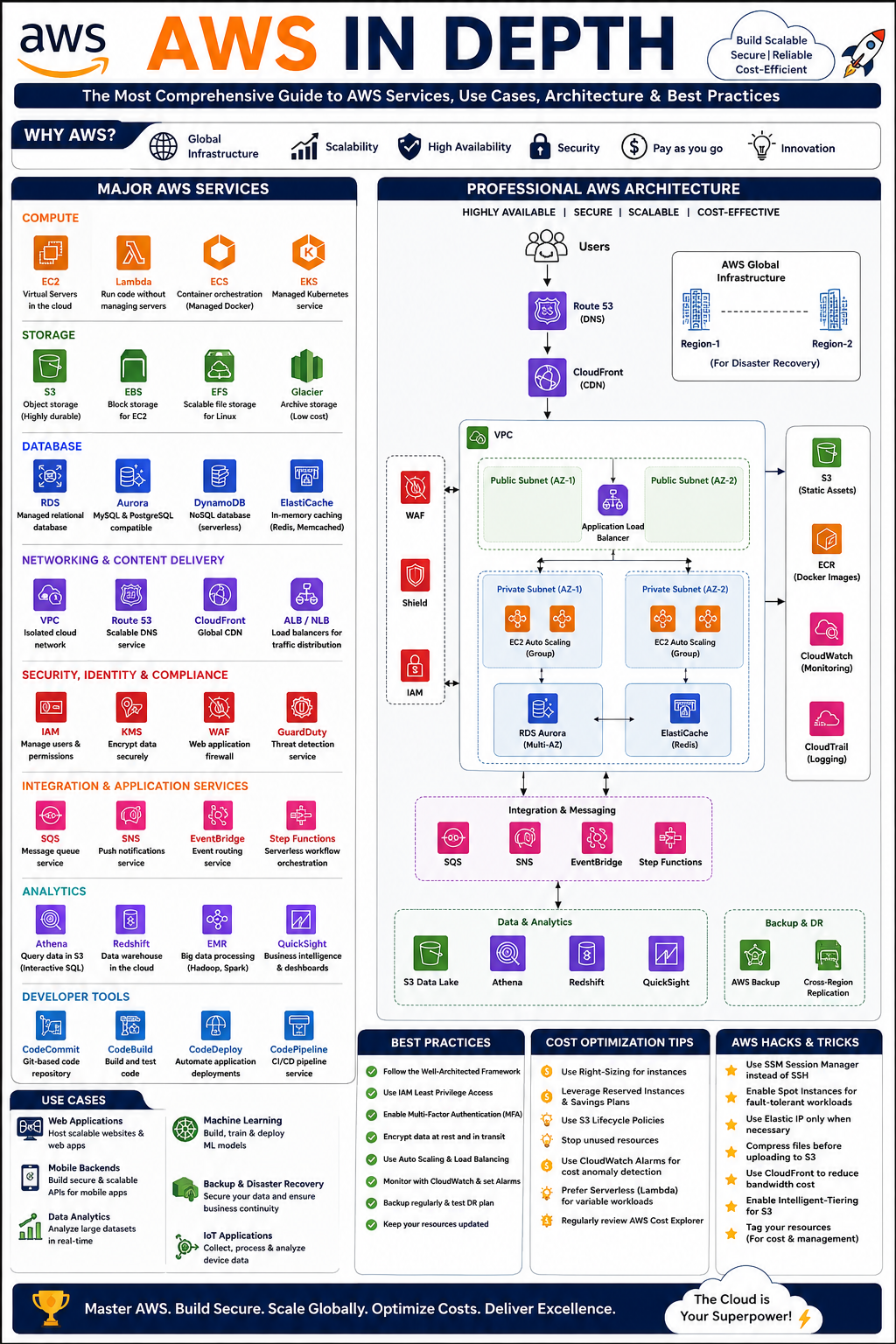
🌎 1. What Is AWS?
AWS is a cloud computing platform that provides infrastructure and managed services on a pay-as-you-go model.
Instead of purchasing:
- Physical servers 🖥️
- Storage systems 💾
- Networking equipment 🌐
- Load balancers
- Databases
- Backup infrastructure
- Data centers
- Security appliances
you can provision these capabilities through AWS.
A traditional architecture might look like:
Users
  │
  ▼
Internet
  │
  ▼
Physical Server
  │
  ├── Application
  ├── Database
  └── Files
A modern AWS architecture can become:
Users
   │
   ▼
Route 53
   │
   ▼
CloudFront
   │
   ▼
Application Load Balancer
   │
   ├───────────────┐
   ▼               ▼
EC2 / ECS       Lambda
   │               │
   └───────┬───────┘
           ▼
       RDS / DynamoDB
           │
           ▼
           S3
The biggest advantage is that individual infrastructure components can scale independently.
🧩 2. AWS’s Major Service Categories
AWS services can broadly be organized into:
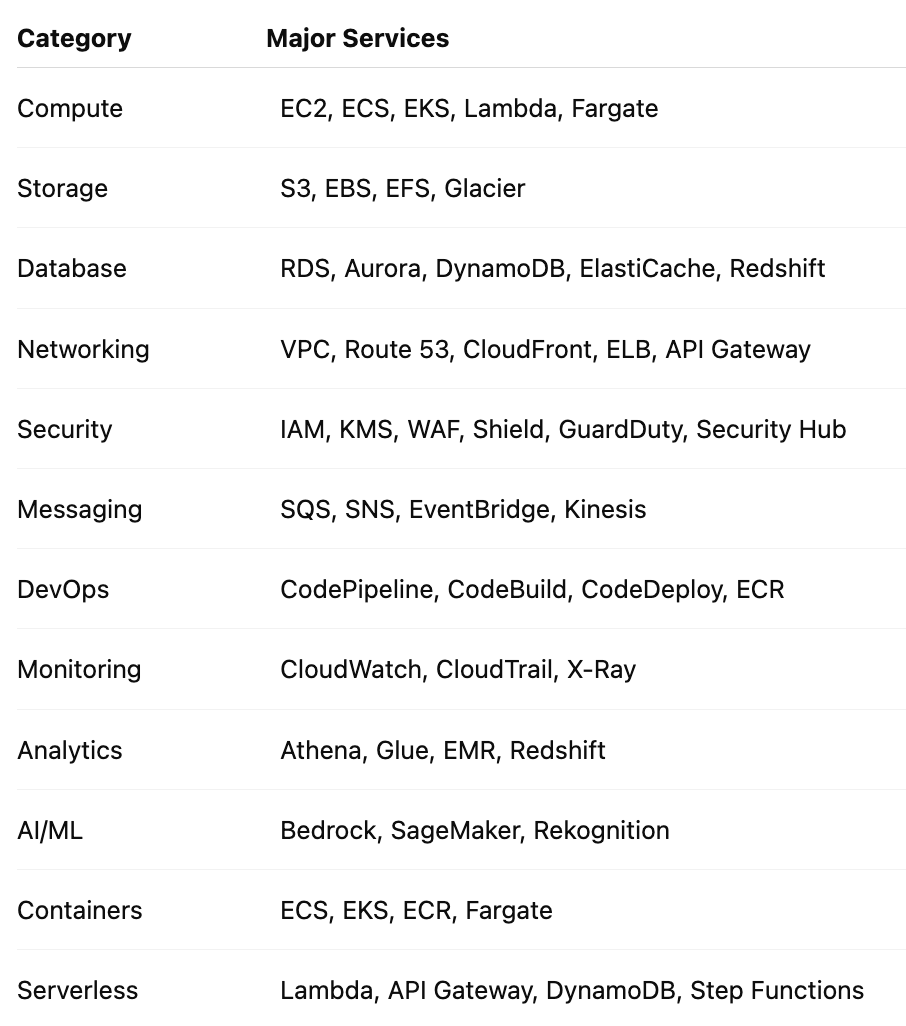
Let’s explore the most important ones.
🖥️ 3. Amazon EC2 — Virtual Servers in the Cloud
Amazon EC2 (Elastic Compute Cloud) provides virtual machines.
Think of EC2 as:
“Give me a server with the CPU, memory, operating system, and networking configuration I need.”
Example
Suppose you’re deploying a Ruby on Rails application.
You could have:
EC2
 ├── Ubuntu
 ├── Ruby
 ├── Rails
 ├── Puma
 ├── Nginx
 └── Application
A typical production deployment might use:
Internet
   │
   ▼
ALB
   │
   ├── EC2 #1
   ├── EC2 #2
   └── EC2 #3
If traffic increases, Auto Scaling can launch additional instances.
Important EC2 concepts
AMI
Amazon Machine Image containing the operating system and software configuration.
Instance Type
Defines compute resources.
Examples:
t3.micro
t3.small
t3.medium
m7g.large
c7g.large
r7g.large
Choose based on workload rather than simply selecting the largest machine.
EBS
Persistent block storage attached to EC2.
Security Groups
Virtual firewalls controlling inbound and outbound traffic.
Best use cases
EC2 is useful when you need:
- Full OS control
- Custom software
- Long-running applications
- Legacy applications
- Custom networking
- Specialized workloads
⚡ 4. AWS Lambda — Run Code Without Managing Servers
Lambda follows the serverless model.
Instead of:
Server → Application → Always Runningyou get:
Event → Lambda → Execute → StopFor example:
S3 Upload
    │
    ▼
Lambda
    │
    ▼
Resize Image
    │
    ▼
Save Thumbnail
Example
A user uploads:
profile.jpgto S3.
S3 triggers Lambda.
Lambda:
def handler(event, context):
    # Process uploaded image
    # Generate thumbnail
    # Store result
    return {"status": "success"}
You pay primarily based on execution rather than maintaining a permanently running server.
Excellent Lambda use cases
- Image processing
- Scheduled jobs
- API endpoints
- Event processing
- Automation
- Notifications
- ETL jobs
- Lightweight backend operations
Avoid Lambda when workloads require long-running processes or highly specialized runtime behavior.
🐳 5. ECS — Managed Containers
Amazon ECS manages Docker containers.
Architecture:
Docker Image
     │
     ▼
ECR
     │
     ▼
ECS
     │
     ├── Container 1
     ├── Container 2
     └── Container 3
For example, a Rails application can be packaged:
Rails Application
       ↓
Docker Image
       ↓
Amazon ECR
       ↓
ECS
       ↓
Fargate
ECS + Fargate
Fargate removes much of the server management.
You specify:
CPU
Memory
Container Image
Port
Environment Variables
Networking
AWS manages the underlying infrastructure.
☸️ 6. EKS — Kubernetes on AWS
Amazon EKS provides managed Kubernetes.
Use it when your organization genuinely needs Kubernetes capabilities.
Example:
EKS Cluster
                         │
          ┌──────────────┼──────────────┐
          ▼              ▼              ▼
     Rails API       Worker Pods     Node.js API
          │              │              │
          └──────────────┼──────────────┘
                         ▼
                      RDS
EKS makes sense when you need:
- Kubernetes ecosystem
- Complex microservices
- Portability
- Advanced orchestration
- Existing Kubernetes expertise
For a simple application, however, ECS/Fargate can often be considerably simpler.
📦 7. Amazon S3 — The Foundation of Cloud Storage
Amazon S3 is object storage.
A bucket can contain:
bucket/
 ├── images/
 ├── documents/
 ├── invoices/
 ├── backups/
 └── logs/
Example:
A Rails application shouldn’t necessarily store uploaded images on its EC2 filesystem.
Instead:
User
 │
 ▼
Rails
 │
 ▼
S3
 │
 └── image.jpg
S3 is useful for
- Images
- Videos
- Documents
- Backups
- Static websites
- Logs
- Data lakes
- Application assets
S3 Storage Classes
Different workloads require different storage classes.
For example:
Frequently accessed
       ↓
S3 Standard

Occasionally accessed
       ↓
S3 Standard-IA

Rarely accessed
       ↓
Glacier

Long-term archive
       ↓
Glacier Deep Archive
💡 Important S3 practice
Use Lifecycle Policies.
Example:
30 days  → Standard
90 days  → Infrequent Access
365 days → Glacier
This can dramatically reduce storage costs.
🗄️ 8. Amazon RDS — Managed Relational Databases
RDS provides managed relational databases.
Supported engines include:
- PostgreSQL
- MySQL
- MariaDB
- Oracle
- SQL Server
Instead of managing:
PostgreSQL
Backups
Replication
Patching
Monitoring
Storage
yourself, AWS manages much of the infrastructure.
Production architecture
Application
     │
     ▼
RDS PostgreSQL
     │
     ├── Primary
     │
     └── Read Replica
For high availability:
Availability Zone A
      │
      ▼
   Primary

Availability Zone B
      │
      ▼
   Standby
When to use RDS
Use it for:
- Business applications
- ERP
- CRM
- E-commerce
- Rails applications
- Financial applications
- Transaction-heavy systems
🚀 9. Amazon Aurora
Aurora is AWS’s cloud-optimized relational database engine compatible with PostgreSQL and MySQL.
It is particularly useful when you need:
- High availability
- High throughput
- Managed scaling capabilities
- Production-grade relational databases
For many large production workloads:
Application
     │
     ▼
Aurora PostgreSQL
     │
 ┌───┴────┐
 ▼        ▼
Writer   Readers
⚡ 10. DynamoDB — NoSQL at Scale
DynamoDB is a managed NoSQL database.
Instead of tables designed around joins, you typically model around access patterns.
Example:
Users
 ├── user_id
 ├── name
 ├── email
 └── created_at
DynamoDB is excellent for:
- High-scale APIs
- Gaming
- IoT
- Session storage
- Event metadata
- Serverless applications
Example:
API Gateway
     │
     ▼
 Lambda
     │
     ▼
DynamoDB
This is a powerful serverless architecture.
🧠 11. ElastiCache — Redis/Memcached
Database queries can become expensive when millions of users access the same data.
Instead:
Application
    │
    ├──── Cache Hit ────► Redis
    │
    └──── Cache Miss ───► PostgreSQL
For example:
GET /productsInstead of querying PostgreSQL every time:
Request
 ↓
Redis
 ↓
Return
This dramatically reduces database load and improves latency.
Common uses:
- Sessions
- Frequently accessed data
- API responses
- Rate limiting
- Leaderboards
- Temporary state
🌐 12. Amazon VPC — Your Private AWS Network
VPC is one of the most important AWS concepts.
Think of it as:
Your own isolated network inside AWS.
A production VPC could look like:
VPC: 10.0.0.0/16

┌───────────────────────────────────────────┐
│                                           │
│  Public Subnets                           │
│  ┌──────────────┐    ┌──────────────┐     │
│  │ ALB           │    │ NAT Gateway  │    │
│  └──────────────┘    └──────────────┘     │
│                                           │
│  Private App Subnets                      │
│  ┌──────────────┐    ┌──────────────┐     │
│  │ EC2/ECS      │    │ EC2/ECS      │     │
│  └──────────────┘    └──────────────┘     │
│                                           │
│  Private DB Subnets                       │
│  ┌──────────────┐    ┌──────────────┐     │
│  │ RDS Primary  │    │ RDS Standby  │     │
│  └──────────────┘    └──────────────┘     │
│                                           │
└───────────────────────────────────────────┘
Key networking concepts
You should understand:
- VPC
- Subnets
- Route Tables
- Internet Gateway
- NAT Gateway
- Security Groups
- Network ACLs
- VPC Endpoints
- Elastic IP
- Peering
- Transit Gateway
🌍 13. Route 53 — DNS
Route 53 translates domain names into destinations.
Example:
api.example.com
       ↓
Route 53
       ↓
Application Load Balancer
It also supports:
- Health checks
- Routing policies
- Failover
- Weighted routing
- Latency-based routing
- Geolocation routing
For global applications:
User India
   ↓
India Region

User Europe
   ↓
Europe Region
🚦 14. Elastic Load Balancing
A Load Balancer distributes traffic.
Without load balancing:
Users
  │
  ▼
EC2
With load balancing:
Users
               │
               ▼
              ALB
          ┌────┼────┐
          ▼    ▼    ▼
        EC2   EC2   EC2
Application Load Balancer
Useful for HTTP/HTTPS applications.
It can route based on:
Host
Path
Headers
Query
Example:
api.example.com/users
       ↓
User Service
api.example.com/orders
↓
Order Service
🚀 15. CloudFront — Global Content Delivery
CloudFront is AWS’s CDN.
Without CDN:
India User
    │
    └──────────────► US Server
With CloudFront:
India User
    │
    ▼
CloudFront Edge
    │
    ▼
Origin
Static assets such as:
CSS
JS
Images
Videos
Downloads
can be served from edge locations.
Benefits:
- Lower latency
- Reduced origin traffic
- Better global performance
- DDoS protection integration
- HTTPS support
🔐 16. IAM — The Security Foundation
IAM controls:
Who can do what on which AWS resource.
Avoid:
AdministratorAccessfor every user and application.
Instead follow:
Principle of Least Privilege
For example:
Image Processor Lambda
       │
       └── S3:GetObject
       └── S3:PutObject
It doesn’t need:
EC2:*
RDS:*
IAM:*
IAM components
- Users
- Groups
- Roles
- Policies
- Permissions
- Identity federation
For applications, IAM Roles are generally preferable to embedding long-lived AWS access keys.
🔑 17. AWS KMS — Encryption Key Management
KMS manages encryption keys.
Use it for:
S3
RDS
EBS
Secrets
Backups
Example:
Application
    │
    ▼
Encrypted S3 Object
    │
    ▼
AWS KMS
Encryption should be considered at both:
At rest 🔒
and
In transit 🔒
🛡️ 18. AWS WAF
WAF protects web applications against common attacks.
Example:
Internet
   │
   ▼
CloudFront
   │
   ▼
AWS WAF
   │
   ▼
ALB
You can create rules for:
- SQL injection
- XSS
- IP blocking
- Rate limiting
- Bot control
- Suspicious requests
🚨 19. AWS Shield
Shield provides DDoS protection.
A simplified architecture:
Internet
   │
   ▼
CloudFront
   │
   ▼
Shield
   │
   ▼
WAF
   │
   ▼
ALB
For public-facing production systems, layered protection is much stronger than relying on a single security service.
📊 20. CloudWatch — Observability
CloudWatch monitors AWS resources and applications.
Monitor:
CPU
Memory
Network
Latency
Errors
Requests
Logs
Alarms
Example:
EC2 CPU > 80%
      ↓
CloudWatch Alarm
      ↓
Auto Scaling
      ↓
Launch EC2
Application logs can also be centralized.
Application
     ↓
CloudWatch Logs
     ↓
Metric Filter
     ↓
Alarm
     ↓
SNS
     ↓
Notification
🔍 21. CloudTrail — Who Did What?
CloudTrail records AWS API activity.
For example:
Developer
   │
   ▼
Delete S3 Bucket
   │
   ▼
CloudTrail
   │
   └── Records identity, action, time and resource
This is extremely useful for:
- Auditing
- Security investigations
- Compliance
- Troubleshooting
- Change tracking
📨 22. SQS — Message Queues
Suppose your application needs to process thousands of jobs.
Don’t make the user wait:
User
 ↓
API
 ↓
Process 10,000 records
 ↓
Response
Instead:
User
 ↓
API
 ↓
SQS
 ↓
Immediate Response

SQS
 ↓
Workers
 ↓
Process Jobs
This creates asynchronous processing.
For example, a Rails application could send background work to a queue.
📣 23. SNS — Notifications
SNS is designed for publishing messages to subscribers.
Example:
Application
     │
     ▼
SNS Topic
 ┌───┼────┐
 ▼   ▼    ▼
Email SQS Lambda
Useful for:
- Notifications
- Alerts
- Event fan-out
- Application events
🎯 24. EventBridge — Event-Driven Architecture
EventBridge lets services react to events.
Example:
Order Created
     │
     ▼
EventBridge
 ┌───┼────────┐
 ▼   ▼        ▼
Email Lambda Analytics
This creates loosely coupled architectures.
Instead of:
Order Service → Email Service
Order Service → Analytics
Order Service → Notification
you can use:
Order Service
      ↓
 Event Bus
   ↙ ↓ ↘
Email Analytics Notification
🔄 25. Step Functions
Step Functions orchestrates workflows.
Example:
Create Order
     ↓
Validate Payment
     ↓
Reserve Inventory
     ↓
Generate Invoice
     ↓
Send Notification
     ↓
Complete
If a step fails:
Retry
 ↓
Fallback
 ↓
Compensation
This is much cleaner than putting an entire business workflow inside one enormous Lambda function.
🛠️ 26. ECR — Container Registry
Amazon ECR stores Docker images.
Typical CI/CD flow:
Developer
   ↓
GitHub
   ↓
CI Pipeline
   ↓
Docker Build
   ↓
ECR
   ↓
ECS
   ↓
Production
🚀 27. AWS CI/CD
A production deployment pipeline could be:
Git Push
   │
   ▼
GitHub
   │
   ▼
CI
   │
   ├── Tests
   ├── Security Scan
   ├── Build
   └── Docker Image
          │
          ▼
         ECR
          │
          ▼
       Staging
          │
          ▼
    Integration Tests
          │
          ▼
      Production
You can implement this with AWS-native services or integrate AWS with GitHub Actions, Jenkins, CircleCI and other CI/CD platforms.
🧠 28. AWS AI/ML Services
AWS has an extensive AI/ML ecosystem.
Amazon Bedrock
Useful for building generative AI applications using foundation models through managed APIs.
Example:
User
 ↓
Application
 ↓
Bedrock
 ↓
Foundation Model
 ↓
Response
Use cases:
- Chatbots
- RAG
- Document analysis
- Summarization
- Content generation
- AI assistants
SageMaker
Used for more extensive ML workflows:
Data
 ↓
Training
 ↓
Model
 ↓
Evaluation
 ↓
Deployment
 ↓
Monitoring
Useful when you’re building and managing your own machine-learning lifecycle.
🏗️ 29. Professional Production Architecture
Let’s design a production-grade architecture for a modern SaaS application.
🌍 INTERNET
                              │
                              ▼
                         Route 53
                              │
                              ▼
                         CloudFront
                              │
                              ▼
                            WAF
                              │
                              ▼
                    Application Load Balancer
                              │
               ┌──────────────┴──────────────┐
               │                             │
               ▼                             ▼
          Private App Subnet            Private App Subnet
               │                             │
          ┌────┴────┐                   ┌────┴────┐
          ▼         ▼                   ▼         ▼
        ECS       ECS                 ECS       ECS
      Service   Service             Service   Service
          │         │                   │         │
          └─────────┼───────────────────┘
                    │
          ┌─────────┼─────────┐
          ▼         ▼         ▼
        Redis      SQS       S3
          │         │         │
          │         ▼         │
          │      Workers      │
          │                   │
          └────────┬──────────┘
                   ▼
              RDS/Aurora
                   │
             ┌─────┴─────┐
             ▼           ▼
          Primary      Replica

Monitoring:
CloudWatch + CloudTrail + X-Ray

Security:
IAM + KMS + WAF + GuardDuty + Security Hub
Why this architecture is strong
🌐 CloudFront
Reduces latency globally.
🛡️ WAF
Adds application-layer protection.
⚖️ ALB
Distributes requests.
🐳 ECS
Runs containerized applications.
⚡ Redis
Reduces database pressure.
📨 SQS
Provides asynchronous processing.
🗄️ RDS/Aurora
Provides relational persistence.
📦 S3
Handles object storage.
📊 CloudWatch
Provides monitoring.
🔍 CloudTrail
Provides auditability.
🔐 IAM/KMS
Provides access control and encryption.
🔥 30. Highly Scalable Event-Driven Architecture
For a large e-commerce platform:
Users
                           │
                           ▼
                      CloudFront
                           │
                           ▼
                          WAF
                           │
                           ▼
                     API Gateway
                           │
                           ▼
                         Lambda
                           │
                           ▼
                     EventBridge
                 ┌─────────┼─────────┐
                 ▼         ▼         ▼
              Orders   Payments   Inventory
                 │         │         │
                 ▼         ▼         ▼
                SQS       SQS       SQS
                 │         │         │
                 ▼         ▼         ▼
             Workers    Workers    Workers
                 │         │         │
                 └─────────┼─────────┘
                           ▼
                      DynamoDB/RDS
                           │
                           ▼
                         S3
This architecture provides:
- Loose coupling
- Independent scaling
- Fault isolation
- Asynchronous processing
- Better resilience
💰 31. AWS Cost Optimization
AWS can be extremely cost-efficient — or surprisingly expensive.
The difference is architecture and discipline.
💡 Trick #1: Delete What You Don’t Use
Regularly inspect:
EC2
EBS
Snapshots
Elastic IPs
Load Balancers
NAT Gateways
RDS
S3
CloudWatch Logs
Unused resources are one of the easiest sources of unnecessary spending.
💡 Trick #2: Use Auto Scaling
Don’t run:
10 EC2 instances
24/7
if your application only needs 2 during normal traffic.
Use:
Low Traffic → 2 instances
High Traffic → 10 instances
Traffic falls → 2 instances
💡 Trick #3: Right-Size Resources
Don’t choose:
32 GB RAM
16 CPU
because “production needs a big server.”
Measure first.
If actual utilization is:
CPU = 18%
RAM = 25%
you’re probably overprovisioned.
💡 Trick #4: Use Graviton Where Compatible
AWS Graviton-based instances can provide strong price/performance for compatible workloads.
Evaluate compatibility for:
- Ruby
- Java
- Python
- Node.js
- Go
- Containers
- Databases
before migrating.
💡 Trick #5: Use S3 Lifecycle Policies
Move older objects automatically.
Active
 ↓
Standard
 ↓
IA
 ↓
Glacier
 ↓
Deep Archive
This is particularly useful for:
- Logs
- Backups
- Historical documents
- Reports
- Media
💡 Trick #6: Be Careful With NAT Gateways
NAT Gateway costs can surprise teams.
A common architecture is:
Private EC2
     ↓
NAT Gateway
     ↓
Internet
For workloads accessing AWS services, evaluate VPC endpoints where appropriate.
For example:
Private Application
       ↓
VPC Endpoint
       ↓
S3
This can reduce unnecessary NAT traffic and improve network architecture.
💡 Trick #7: Control CloudWatch Logs
Logs can grow continuously.
Use:
Retention Policies
Filtering
Archiving
Sampling
Don’t retain every debug log forever.
💡 Trick #8: Use Budgets and Alerts
Create cost alerts.
For example:
Monthly budget
      ↓
80% → Alert
90% → Alert
100% → Alert
Cost monitoring should be part of engineering — not something checked only when the invoice arrives.
💡 Trick #9: Use Reserved/Savings Options Carefully
For predictable long-running workloads, AWS offers commitment-based pricing mechanisms such as:
- Savings Plans
- Reserved Instances
These can reduce costs significantly when usage is stable.
But don’t commit before understanding your workload.
💡 Trick #10: Tag Everything
Use tags such as:
Environment = Production
Application = Payments
Team = Backend
Owner = Platform
CostCenter = Engineering
Then you can understand:
Which application costs the most?
Which team owns it?
Which environment is expensive?
🔐 32. AWS Security Best Practices
A professional AWS environment should follow layered security.
Identity
Least Privilege
MFA
IAM Roles
Short-lived credentials
Network
Private subnets
Security Groups
Network segmentation
VPC endpoints
Data
Encryption
KMS
Secrets Manager
Backups
Application
WAF
Input validation
Rate limiting
Secure headers
Dependency scanning
Monitoring
CloudTrail
CloudWatch
GuardDuty
Security Hub
🚫 33. AWS Mistakes Developers Commonly Make
❌ Putting the database on a public subnet
Prefer private database subnets.
❌ Using root account credentials
Use IAM identities and roles.
❌ Hardcoding AWS access keys
Avoid:
AWS_ACCESS_KEY_ID=...
AWS_SECRET_ACCESS_KEY=...
inside source code.
❌ Opening port 22 to the entire Internet
Avoid:
0.0.0.0/0 → SSHwherever possible.
❌ Storing uploaded files on EC2
Use S3 for object storage.
❌ Running everything on one EC2
You create a single point of failure.
❌ No backups
Production systems require tested recovery procedures.
❌ No monitoring
If you don’t measure your infrastructure, you’re operating blind.
📈 34. Designing AWS for Reliability
A professional system should assume that components can fail.
Instead of:
EC2
 ↓
Database
build:
           ALB
         /     \
       EC2     EC2
         \     /
          RDS
For higher resilience:
Availability Zone A
       │
       ├── Application
       └── Database

Availability Zone B
       │
       ├── Application
       └── Database
The goal is not:
“Nothing will fail.”
The goal is:
“Failure should not bring down the entire system.”
🧪 35. AWS Architecture by Application Size
🟢 Small Application
Route 53
   ↓
EC2
   ↓
RDS
   ↓
S3
Good for:
- Small SaaS
- Internal applications
- MVPs
- Low traffic
🟡 Growing Application
Route 53
   ↓
CloudFront
   ↓
ALB
   ↓
Auto Scaling EC2
   ↓
RDS
   ↓
Redis
   ↓
S3
Good for:
- Growing SaaS
- E-commerce
- Medium traffic
🔴 Enterprise Application
Route 53
      ↓
CloudFront
      ↓
WAF
      ↓
ALB/API Gateway
      ↓
ECS/EKS/Lambda
      ↓
EventBridge/SQS/SNS
      ↓
Redis
      ↓
Aurora/DynamoDB
      ↓
S3/Data Lake
      ↓
Analytics/ML
With:
IAM
KMS
CloudTrail
CloudWatch
GuardDuty
Security Hub
CI/CD
Multi-AZ
Backup
Disaster Recovery
🧭 36. The AWS Decision-Making Framework
Don’t start with:
“Which AWS service should I use?”
Start with:
1️⃣ What problem am I solving?
2️⃣ What are the workload characteristics?
Traffic
Latency
Data volume
Availability
Security
3️⃣ Do I need server control?
If yes:
EC2If no:
ECS/Fargate
Lambda
4️⃣ Is the data relational?
If yes:
RDS/AuroraIf no:
DynamoDB/S35️⃣ Is processing synchronous?
If yes:
API → ServiceIf no:
API → Queue → Worker6️⃣ Is the workload predictable?
If yes:
Reserved/Savings optionsIf unpredictable:
Auto Scaling / serverless🧠 37. The Most Important AWS Skill
Learning AWS is not about memorizing:
“S3 does this, EC2 does that.”
The real skill is architectural thinking.
For example, imagine you’re building an online bookstore.
You could design:
Users
  ↓
CloudFront
  ↓
WAF
  ↓
ALB
  ↓
ECS
  ↓
Aurora
But then ask:
What happens when 100,000 users search simultaneously?
Add:
RedisWhat happens when invoice generation takes 10 seconds?
Add:
SQS + WorkerWhat happens when the application crashes?
Add:
Multi-AZ + Auto ScalingWhat happens when a database query becomes slow?
Add:
Indexes + Query optimization + Read replicas + CacheWhat happens when the region fails?
Design:
Multi-region DRThis is what transforms someone from an AWS user into an AWS architect.
🏆 38. AWS Production Checklist
Before calling an application production-ready, verify:
- Multi-AZ architecture where required
- Auto Scaling configured
- Load balancing configured
- Database backups enabled
- Disaster recovery strategy defined
- IAM least privilege implemented
- MFA enabled for privileged identities
- Secrets stored securely
- Encryption enabled
- S3 public access blocked unless explicitly required
- WAF configured where appropriate
- CloudTrail enabled
- CloudWatch monitoring configured
- Alerts configured
- Log retention configured
- Cost budgets configured
- Resources tagged
- Vulnerability scanning implemented
- CI/CD automated
- Rollback strategy tested
- Infrastructure documented
- Disaster recovery tested
🚀 39. Final Thoughts
AWS provides virtually every building block required to build modern software.
But more AWS services do not automatically mean better architecture.
A good architecture balances:
Performance
     +
Reliability
     +
Security
     +
Scalability
     +
Maintainability
     +
Cost
The best AWS architecture is not the one containing the most services.
It is the one that uses the simplest set of services capable of meeting the business requirements reliably and securely.
Start small.
Measure.
Automate.
Secure.
Scale only when necessary.
And most importantly:
☁️ Don’t architect for today’s traffic alone. Architect for tomorrow’s failures, growth, security requirements, and costs.
That mindset is what turns AWS from a collection of cloud services into a professional engineering platform.
🌟 The AWS Mindset
Build → Measure → Secure → Automate → Optimize → Scale
AWS gives you the infrastructure.
Your architecture determines what you build with it. 🚀☁️


Comments
Post a Comment