🚀 Developing World-Class DevOps Pipelines: The Complete Guide to CI/CD, Secure SDLC & Production Automation 🔥
🚀 Developing World-Class DevOps Pipelines: The Complete Guide to CI/CD, Secure SDLC & Production Automation 🔥
“The goal of DevOps isn’t simply deploying faster — it’s deploying safely, consistently, and confidently.”
Modern software isn’t shipped once every few months anymore. Companies like Netflix, Google, Amazon, and Spotify deploy hundreds or even thousands of times every day because they rely on highly automated DevOps pipelines.
A well-designed pipeline transforms source code into a secure, tested, deployable application with minimal human intervention.
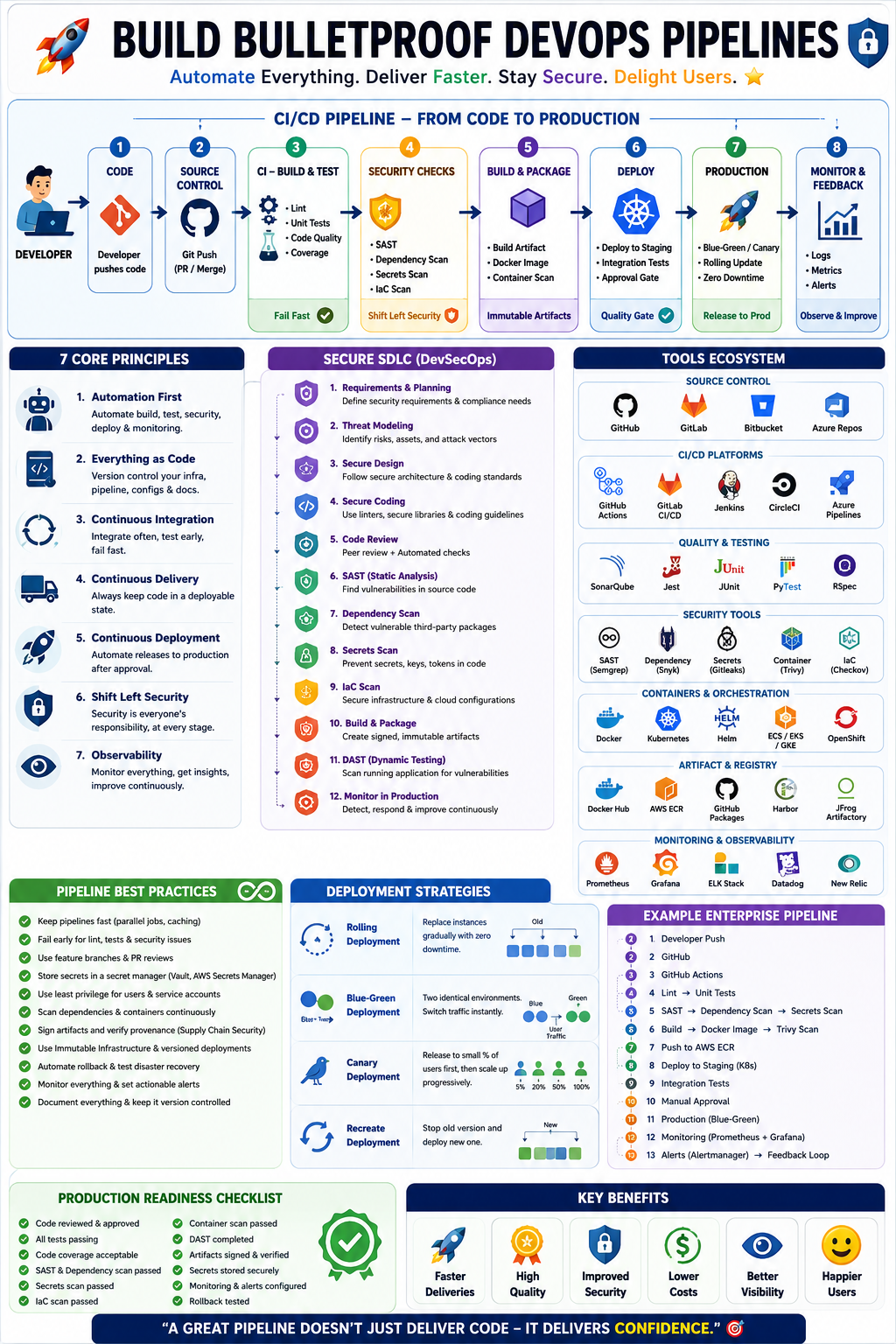
In this guide, you’ll learn everything required to build enterprise-grade DevOps pipelines, including:
✅ CI/CD Fundamentals
✅ Pipeline Architecture
✅ DevSecOps Principles
✅ Secure SDLC
✅ Pipeline Stages
✅ Best Practices
✅ Popular Tools
✅ Cloud Integration
✅ Monitoring & Rollback
✅ Real-world Examples
🌍 What is a DevOps Pipeline?
A DevOps pipeline is an automated workflow that takes code from a developer’s machine to production while ensuring:
- Code Quality
- Security
- Testing
- Packaging
- Deployment
- Monitoring
- Recovery
Instead of manually performing every step, automation guarantees consistency and repeatability.
Traditional Workflow
Developer → Manual Testing → Manual Deployment → Production
❌ Slow
❌ Error-prone
❌ Difficult to scale
Modern DevOps Workflow
Developer
↓
Git Push
↓
CI Pipeline
↓
Tests
↓
Security Scan
↓
Artifact Build
↓
Container Build
↓
CD Pipeline
↓
Deploy
↓
Monitoring
↓
Feedback
Everything happens automatically.
🎯 Core Principles of DevOps Pipelines
1. Automation First 🤖
Never repeat manual work.
Automate:
- Testing
- Building
- Packaging
- Security
- Deployment
- Monitoring
Example:
Every Git Push automatically:
- Builds application
- Runs tests
- Creates Docker image
- Pushes image
- Deploys to Kubernetes
2. Everything as Code 📜
Infrastructure should be version-controlled.
Examples:
- Dockerfiles
- Kubernetes YAML
- Terraform
- Ansible
- Helm Charts
- GitHub Actions YAML
Benefits:
- Repeatability
- Easy rollback
- Peer review
- Audit history
3. Continuous Integration 🔄
Developers merge frequently.
Every commit should:
✔ Compile
✔ Pass tests
✔ Pass security scan
✔ Generate artifact
4. Continuous Delivery 🚚
Every successful build is deployment-ready.
Production deployment becomes a business decision rather than a technical challenge.
5. Continuous Deployment 🚀
Every approved change automatically reaches production.
Example:
Developer Push
↓
Pipeline Success
↓
Deploy Automatically
↓
Users Receive Update
6. Shift Left Security 🔐
Security starts during development — not after release.
Instead of:
Develop → Deploy → Security
Do:
Develop → Secure → Test → Deploy
7. Observability 📈
Collect:
- Logs
- Metrics
- Traces
- Alerts
If you can’t observe your application, you can’t reliably operate it.
🏗 Complete CI/CD Pipeline Architecture
Developer
↓
Git Repository
↓
CI Server
↓
Code Quality
↓
Unit Tests
↓
SAST
↓
Dependency Scan
↓
Build
↓
Docker Build
↓
Container Scan
↓
Artifact Registry
↓
Deploy Staging
↓
Integration Tests
↓
Approval
↓
Production
↓
Monitoring
↓
Rollback
🧩 Pipeline Stages Explained
Stage 1️⃣ Source Control
Popular Tools:
- Git
- GitHub
- GitLab
- Bitbucket
- Azure Repos
Responsibilities:
- Branching
- Pull Requests
- Code Reviews
- Version Control
Example Branch Strategy:
main
develop
feature/login
hotfix/payment
Stage 2️⃣ Code Quality
Automatically detect:
- Bugs
- Code smells
- Duplicates
- Complexity
Tools:
- SonarQube
- CodeClimate
- Codacy
Metrics:
- Coverage
- Maintainability
- Technical Debt
- Reliability
Stage 3️⃣ Unit Testing
Frameworks:
Ruby → RSpec
Python → PyTest
Java → JUnit
JavaScript → Jest
The pipeline should fail immediately if tests fail.
Stage 4️⃣ Security Scanning 🔐
Static Application Security Testing (SAST)
Scans source code.
Tools:
- Semgrep
- SonarQube
- Checkmarx
- CodeQL
Finds:
- SQL Injection
- XSS
- Hardcoded secrets
- Weak encryption
Dependency Scanning
Checks third-party libraries.
Tools:
- Dependabot
- Snyk
- OWASP Dependency-Check
- Trivy
Detects:
- Known CVEs
- Outdated packages
- Vulnerable dependencies
Secret Scanning
Never allow:
AWS_SECRET=xxxxxxxxTools:
- Gitleaks
- GitGuardian
- TruffleHog
Stage 5️⃣ Build
Compile application.
Example:
Rails
bundle install
rails assets:precompile
Node
npm install
npm run build
Stage 6️⃣ Containerization 🐳
Package the application.
Dockerfile:
FROM ruby:3.4
COPY .
RUN bundle install
CMD ["rails","server"]
Benefits:
- Consistency
- Isolation
- Portability
Stage 7️⃣ Container Security
Tools:
- Trivy
- Grype
- Docker Scout
Checks:
- Vulnerable OS packages
- Exposed secrets
- Weak configurations
Stage 8️⃣ Artifact Repository
Store build outputs.
Popular Options:
- Docker Hub
- Harbor
- GitHub Container Registry
- AWS ECR
- Google Artifact Registry
- JFrog Artifactory
Stage 9️⃣ Deployment
Deploy using:
- Kubernetes
- Docker Swarm
- ECS
- Azure AKS
- Google GKE
Strategies:
✅ Rolling Update
✅ Blue-Green
✅ Canary
✅ Recreate
Stage 🔟 Monitoring
Monitor:
CPU
Memory
Latency
Errors
Availability
Tools:
- Prometheus
- Grafana
- Datadog
- New Relic
- Elastic Stack
🔐 Building a Secure SDLC Pipeline (DevSecOps)
A secure pipeline integrates security at every stage rather than treating it as a final checkpoint.
Requirements
     ↓
Threat Modeling
     ↓
Secure Design
     ↓
Coding Standards
     ↓
Code Review
     ↓
SAST
     ↓
Dependency Scan
     ↓
Secrets Scan
     ↓
Container Scan
     ↓
IaC Scan
     ↓
DAST
     ↓
Production Monitoring
Threat Modeling
Before writing code:
Ask:
- What can attackers exploit?
- What data is sensitive?
- What assets need protection?
- Where are trust boundaries?
Frameworks:
- STRIDE
- PASTA
- LINDDUN
Infrastructure as Code (IaC) Security
Scan Terraform, Kubernetes manifests, and CloudFormation templates.
Tools:
- Checkov
- Terrascan
- tfsec
Example findings:
❌ Public S3 bucket
❌ Open security groups
❌ Overly permissive IAM policies
Dynamic Application Security Testing (DAST)
Run security tests against a running application.
Tools:
- OWASP ZAP
- Burp Suite Enterprise
Detects:
- XSS
- CSRF
- Authentication flaws
- Session issues
Policy as Code
Use policy engines to enforce organizational standards automatically.
Tools:
- Open Policy Agent (OPA)
- Kyverno
Examples:
- Prevent privileged containers
- Require resource limit
- Enforce image signatures
Supply Chain Security
Strengthen trust in your software supply chain by:
- Signing artifacts
- Generating SBOMs (Software Bill of Materials)
- Verifying provenance
- Using trusted registries
Tools:
- Cosign
- Syft
- Sigstore
- in-toto
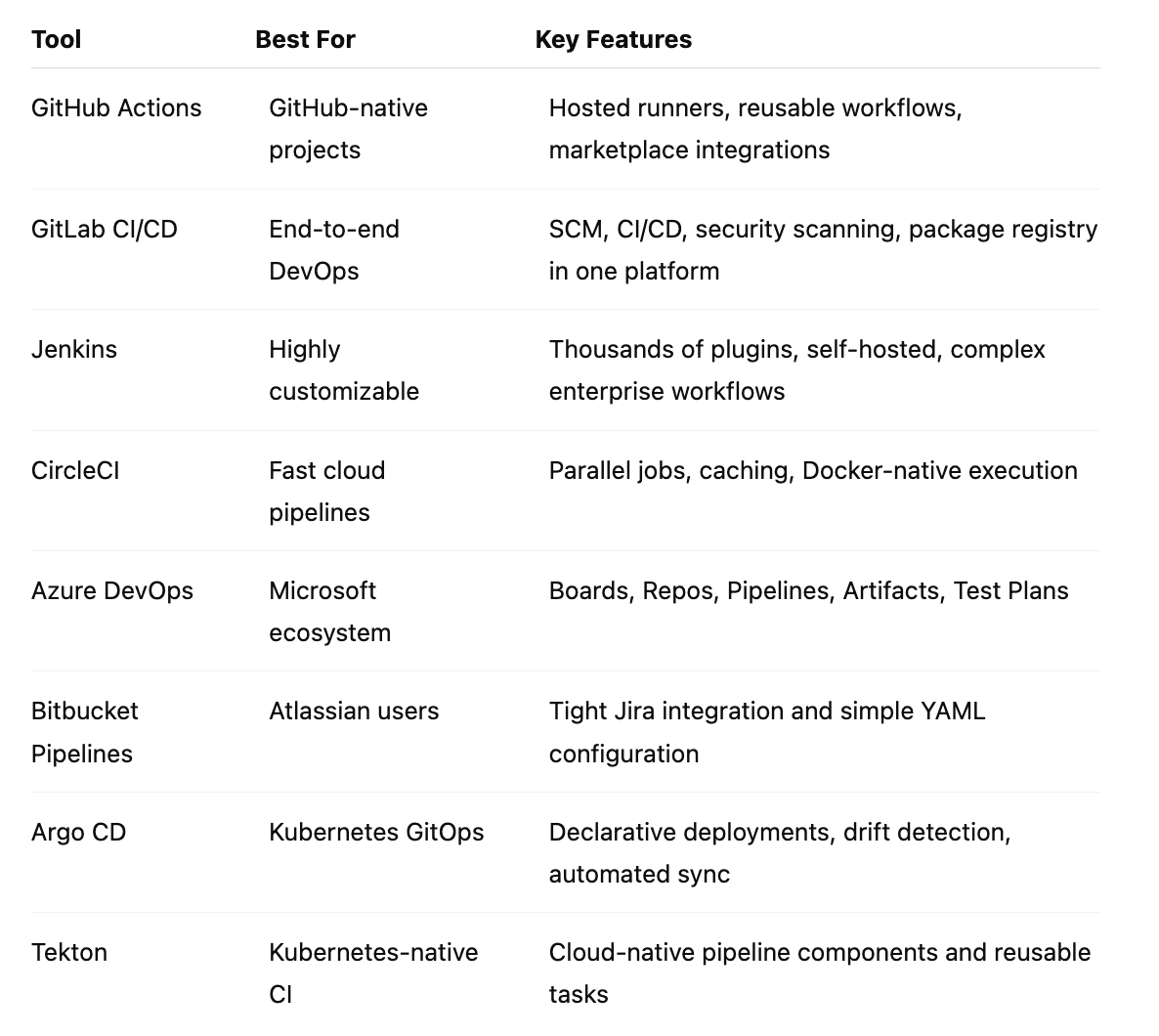
☁️ Popular CI/CD Platforms
📊 Deployment Strategies
Rolling Deployment
✔ Zero downtime
Best for:
Most production applications.
Blue-Green Deployment
Two identical environments.
Switch traffic instantly.
Advantages:
- Instant rollback
- Minimal downtime
Canary Deployment
Deploy to a small percentage of users first.
Example:
5%
↓
20%
↓
50%
↓
100%
Safely validates production changes.
🚨 Pipeline Best Practices
- Keep pipelines fast with caching and parallel execution.
- Fail early when linting, tests, or security checks fail.
- Protect the main branch with required reviews.
- Use immutable versioned artifacts.
- Store secrets in dedicated secret managers.
- Scan dependencies continuously.
- Sign container images and release artifacts.
- Automate rollback procedures.
- Enforce least-privilege access for users and service accounts.
- Monitor deployments with metrics, logs, and alerts.
- Review and update pipeline dependencies regularly.
🛠 Example Enterprise Pipeline
Developer Push
↓
GitHub
↓
GitHub Actions
↓
Lint
↓
Unit Tests
↓
SAST
↓
Dependency Scan
↓
Build
↓
Docker Image
↓
Trivy Scan
↓
Push to AWS ECR
↓
Deploy to Staging
↓
Integration Tests
↓
Manual Approval
↓
Production (Blue-Green)
↓
Prometheus
↓
Grafana
↓
Alertmanager
🎯 Final Checklist Before Production
✅ Branch protection enabled
✅ Code reviews completed
✅ Automated tests passing
✅ Code coverage acceptable
✅ SAST completed
✅ Dependency scan clean
✅ Secrets scan passed
✅ Container scan passed
✅ IaC scan passed
✅ DAST completed
✅ Signed artifacts generated
✅ Secrets managed securely
✅ Monitoring dashboards ready
✅ Alerts configured
✅ Rollback tested
✅ Backups verified
✅ Deployment strategy validated
💡 Final Thoughts
Great DevOps pipelines are more than automation scripts — they are the backbone of reliable software delivery. By embracing Infrastructure as Code, automated quality gates, integrated security, and continuous monitoring, teams can release software faster without compromising stability or security.
The strongest organizations treat CI/CD as a strategic capability. Every commit is validated, every artifact is traceable, every deployment is observable, and every release is reversible. When your pipeline is secure, repeatable, and automated, innovation accelerates while operational risk declines.
Remember: A mature pipeline doesn’t just deliver code — it delivers confidence. 🚀


Comments
Post a Comment