🍃 MongoDB in Depth: The Complete Guide to Building Fast, Scalable & Production-Ready Applications
🍃 MongoDB in Depth: The Complete Guide to Building Fast, Scalable & Production-Ready Applications
Modern applications generate enormous amounts of data — and that data rarely fits neatly into rows and columns.
User profiles, product catalogs, event streams, social feeds, analytics, IoT data, logs, AI-generated content, and real-time applications often have different structures and constantly changing requirements.
This is where MongoDB shines. 🚀
MongoDB is a document-oriented NoSQL database designed around flexible JSON-like documents, horizontal scalability, powerful indexing, aggregation, replication, and high availability.
But using MongoDB effectively is much more than writing:
db.users.find({})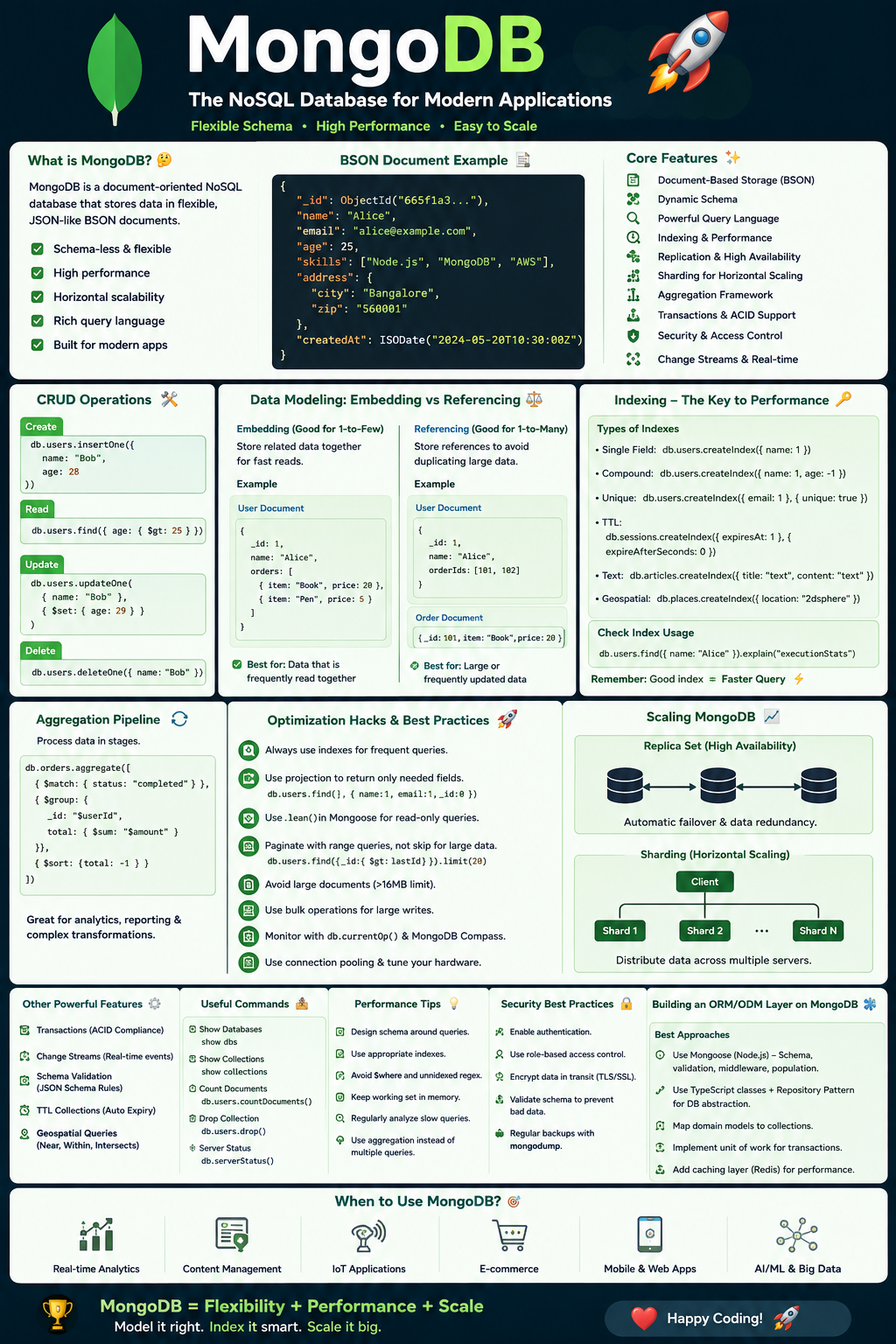
The real skill is knowing:
- 🧠 How to model data
- ⚡ How to design indexes
- 🔎 How to query efficiently
- 📊 How to use aggregation pipelines
- 🔄 When to embed vs reference
- 🛡️ How to secure MongoDB
- 📈 How to scale it
- 💾 How to handle transactions
- 🚀 How to optimize production workloads
- 🧩 How to build an ORM-like abstraction on top of MongoDB
Let’s go deep.
🧭 1. What Exactly Is MongoDB?
MongoDB is a NoSQL document database.
Instead of storing information in rows:
Users
--------------------------------
id | name | email | age
MongoDB stores documents:
{
  "_id": ObjectId("..."),
  "name": "Lakhveer",
  "email": "lakhveer@example.com",
  "age": 28
}
The structure resembles JSON, although MongoDB internally uses BSON (Binary JSON).
This makes MongoDB particularly useful when application objects map naturally to documents.
🏗️ 2. MongoDB Architecture
A simplified architecture looks like:
Application
                         │
                         ▼
                MongoDB Driver / ODM
                         │
                         ▼
                  MongoDB Server
                         │
              ┌──────────┴──────────┐
              ▼                     ▼
          Primary Node          Secondary Nodes
              │                     │
              └──── Replication ────┘
                         │
                         ▼
                       Disk
MongoDB’s major building blocks include:
Database
A logical container.
company_dbCollection
Similar conceptually to a SQL table.
users
orders
products
Document
Similar conceptually to a SQL row.
{
  name: "Lakhveer",
  role: "Developer"
}
Field
Equivalent roughly to a column, but fields can contain nested objects and arrays.
📦 3. Documents
A document can contain:
- Strings
- Numbers
- Boolean values
- Arrays
- Objects
- Dates
- ObjectIds
- Binary data
- Null
- Regular expressions
- Decimal values
Example:
{
  name: "Lakhveer",
  age: 28,
  skills: [
    "Ruby on Rails",
    "React",
    "Python",
    "AWS"
  ],
  address: {
    city: "Shujalpur",
    state: "Madhya Pradesh"
  },
  active: true
}
This flexibility is one of MongoDB’s biggest advantages.
🧩 4. Embedding vs Referencing
One of the most important MongoDB design decisions is deciding whether data should be embedded or referenced.
Embedded document
{
  name: "Lakhveer",
  address: {
    city: "Shujalpur",
    country: "India"
  }
}
Advantages:
⚡ One query
⚡ Atomic updates within the document
⚡ Simple application logic
Best when the child data:
- Belongs strongly to the parent
- Is frequently accessed with the parent
- Doesn’t grow indefinitely
Referencing
Instead:
{
  name: "Lakhveer",
  addressId: ObjectId("...")
}
Useful when:
- Data is shared
- Child collections are large
- Data grows independently
- You frequently access child data separately
Golden rule 🏆
Model your MongoDB schema around how your application reads and writes data — not around how your data looks conceptually.
This is one of the biggest mindset shifts from SQL databases.
🔍 5. CRUD Operations
Create
db.users.insertOne({
  name: "Lakhveer",
  role: "Software Engineer"
})
Multiple documents:
db.users.insertMany([
  { name: "Amit", age: 27 },
  { name: "Rahul", age: 30 }
])
🔎 6. Read Operations
Find everything:
db.users.find()Filter:
db.users.find({
  age: { $gt: 25 }
})
Multiple conditions:
db.users.find({
  age: { $gte: 25 },
  active: true
})
OR:
db.users.find({
  $or: [
    { role: "Developer" },
    { role: "Manager" }
  ]
})
✏️ 7. Updating Documents
Update one:
db.users.updateOne(
  { email: "lakhveer@example.com" },
  {
    $set: {
      role: "Senior Software Engineer"
    }
  }
)
Increment:
db.users.updateOne(
  { _id: userId },
  {
    $inc: {
      loginCount: 1
    }
  }
)
Add to array:
db.users.updateOne(
  { _id: userId },
  {
    $push: {
      skills: "MongoDB"
    }
  }
)
Avoid duplicates:
db.users.updateOne(
  { _id: userId },
  {
    $addToSet: {
      skills: "MongoDB"
    }
  }
)
Remove array item:
db.users.updateOne(
  { _id: userId },
  {
    $pull: {
      skills: "MongoDB"
    }
  }
)
🗑️ 8. Delete Operations
Delete one:
db.users.deleteOne({
  _id: userId
})
Delete multiple:
db.users.deleteMany({
  active: false
})
⚠️ Be extremely careful with deleteMany() in production.
Always test the filter first:
db.users.find({
  active: false
})
🚀 9. MongoDB Indexes — The Performance Superpower
Without an appropriate index:
Query
 ↓
Scan every document
 ↓
Find matching records
With an index:
Query
 ↓
Index
 ↓
Matching documents
Create an index:
db.users.createIndex({
  email: 1
})
Unique index:
db.users.createIndex(
  { email: 1 },
  { unique: true }
)
Compound index:
db.orders.createIndex({
  customerId: 1,
  createdAt: -1
})
🧠 10. The Compound Index Rule
Suppose you frequently execute:
db.orders.find({
  customerId: userId
}).sort({
  createdAt: -1
})
Create:
db.orders.createIndex({
  customerId: 1,
  createdAt: -1
})
This can support both filtering and sorting efficiently.
Important concept
Index order matters.
For example:
{ customerId: 1, createdAt: -1 }is not equivalent to:
{ createdAt: -1, customerId: 1 }Design indexes around actual query patterns.
🔬 11. Always Use explain()Never guess why a query is slow.
Measure it.
db.users
  .find({ email: "lakhveer@example.com" })
  .explain("executionStats")
Look for:
executionTimeMillis
totalDocsExamined
totalKeysExamined
A useful optimization signal is:
Documents examined ≈ Documents returnedIf you’re returning 10 documents but scanning 1,000,000, your query/index design deserves investigation. 🔥
⚡ 12. Projection — Don’t Fetch What You Don’t Need
Instead of:
db.users.find({
  active: true
})
return only required fields:
db.users.find(
  { active: true },
  {
    name: 1,
    email: 1
  }
)
Benefits:
- Less network traffic
- Less memory usage
- Less serialization
- Faster application processing
📄 13. Pagination
Avoid:
.skip(100000)
.limit(20)
Large offsets can become increasingly expensive.
For high-scale applications, consider cursor/range-based pagination.
Example:
db.posts.find({
  _id: {
    $lt: lastSeenId
  }
})
.sort({
  _id: -1
})
.limit(20)
This is often much more scalable.
📊 14. Aggregation Framework
MongoDB’s aggregation pipeline is one of its most powerful features.
Think:
Documents
   ↓
$match
   ↓
$group
   ↓
$sort
   ↓
$project
   ↓
Result
Example:
db.orders.aggregate([
  {
    $match: {
      status: "completed"
    }
  },
  {
    $group: {
      _id: "$customerId",
      totalSpent: {
        $sum: "$amount"
      }
    }
  },
  {
    $sort: {
      totalSpent: -1
    }
  }
])
🧱 15. Important Aggregation Operators
$match
Filtering.
{
  $match: {
    status: "active"
  }
}
$project
Selecting/transforming fields.
{
  $project: {
    name: 1,
    email: 1
  }
}
$group
Aggregation.
{
  $group: {
    _id: "$category",
    total: { $sum: "$price" }
  }
}
$sort
{
  $sort: {
    createdAt: -1
  }
}
$limit
{
  $limit: 10
}
$unwind
Turns array elements into separate pipeline documents.
{
  $unwind: "$items"
}
$lookup
MongoDB’s join-like operation.
{
  $lookup: {
    from: "customers",
    localField: "customerId",
    foreignField: "_id",
    as: "customer"
  }
}
⚡ 16. Aggregation Optimization Trick
Push filtering as early as possible.
Prefer:
[
  { $match: { status: "completed" } },
  { $group: ... }
]
instead of:
[
  { $group: ... },
  { $match: ... }
]
Reducing the number of documents flowing through the pipeline can dramatically improve performance.
🔄 17. Transactions
MongoDB supports multi-document ACID transactions.
Example:
session.startTransaction();

try {
  await orders.insertOne(order, { session });
  await inventory.updateOne(
    { productId },
    {
      $inc: { quantity: -1 }
    },
    { session }
  );
  await session.commitTransaction();
} catch (error) {
  await session.abortTransaction();
}
Use transactions when multiple writes must succeed or fail together.
But don’t use transactions everywhere.
They introduce additional coordination overhead.
Better principle:
Design your document model so that common operations are atomic within a single document whenever possible.
🔁 18. Atomic Updates
MongoDB provides atomic operations such as:
$set
$inc
$push
$pull
$addToSet
$unset
Example:
db.products.updateOne(
  {
    _id: productId,
    stock: { $gt: 0 }
  },
  {
    $inc: {
      stock: -1
    }
  }
)
This is safer than:
Read stock
 ↓
Decrease in application
 ↓
Write stock
because concurrent requests can otherwise create race conditions.
🧵 19. Concurrency
Imagine two customers purchase the final product simultaneously.
Bad:
Customer A → read stock = 1
Customer B → read stock = 1
Customer A → stock = 0
Customer B → stock = 0
Potentially both orders succeed.
Better:
updateOne(
  {
    _id: productId,
    stock: { $gt: 0 }
  },
  {
    $inc: { stock: -1 }
  }
)
Then check whether the update matched a document.
This is a powerful MongoDB concurrency pattern. 🔥
🌐 20. Replication
MongoDB uses replica sets for high availability.
Conceptually:
Primary
             /       \
            /         \
      Secondary     Secondary
Writes normally go to the primary.
Secondaries replicate the data.
If the primary fails:
Primary ❌
   ↓
Election
   ↓
New Primary ✅
This provides automatic failover.
📈 21. Read Preference
Applications can configure where reads go.
Common modes include:
primary
primaryPreferred
secondary
secondaryPreferred
nearest
Use cases:
Stronger consistency
primaryRead scaling
secondaryPreferredBut don’t blindly send reads to secondaries.
Replication lag means secondary data can temporarily be behind the primary.
🧩 22. Write Concern
MongoDB allows control over write durability.
For example:
{
  w: "majority"
}
means the write should be acknowledged by a majority of voting members.
You can tune:
wjwtimeout
depending on the durability and latency requirements.
🗂️ 23. MongoDB Data Types
Important BSON types include:
String
Double
Decimal128
Int32
Int64
Boolean
Date
ObjectId
Array
Embedded Document
Binary
Null
Regular Expression
ObjectId
MongoDB’s default _id commonly uses ObjectId.
Example:
ObjectId("64f...")It contains timestamp-related information and provides useful uniqueness characteristics.
🔐 24. MongoDB Security
Never expose MongoDB directly to the public internet without proper security controls.
Use:
🔒 Authentication
🔒 Authorization
🔒 TLS
🔒 Network restrictions
🔒 Secrets management
🔒 Least privilege
🔒 Auditing where required
Example principle:
Application
     ↓
Private Network
     ↓
MongoDB
rather than:
Internet
   ↓
MongoDB 😱
🛡️ 25. Schema Validation
MongoDB is flexible — but flexible doesn’t mean “no rules.”
You can enforce document structure using validation.
For example:
{
  $jsonSchema: {
    bsonType: "object",
    required: ["name", "email"],
    properties: {
      name: {
        bsonType: "string"
      },
      email: {
        bsonType: "string"
      }
    }
  }
}
This provides a useful middle ground:
SQL strict schema
        ↕
MongoDB flexible schema
🧠 26. Schema Design Strategy
Before creating collections, ask:
1. What are my most common reads?
2. What are my most common writes?
3. What data is accessed together?
4. What data grows indefinitely?
5. What requires transactions?
6. What queries require sorting?
7. What queries require filtering?
Then design documents around those access patterns.
⏳ 27. TTL Indexes
MongoDB can automatically delete documents after a period.
Great for:
- Sessions
- Temporary tokens
- Caches
- OTP records
- Expiring logs
- Temporary events
Example:
db.sessions.createIndex(
  {
    createdAt: 1
  },
  {
    expireAfterSeconds: 3600
  }
)
MongoDB will automatically expire eligible documents.
🔥 Very useful for temporary data.
🔎 28. Text Search
MongoDB supports text indexes.
Example:
db.products.createIndex({
  name: "text",
  description: "text"
})
Query:
db.products.find({
  $text: {
    $search: "wireless keyboard"
  }
})
For sophisticated search requirements, dedicated search functionality may be more appropriate than relying solely on basic text indexes.
🧮 29. Geospatial Queries
MongoDB supports geospatial indexes.
Example:
db.places.createIndex({
  location: "2dsphere"
})
Then query nearby locations:
db.places.find({
  location: {
    $near: {
      $geometry: {
        type: "Point",
        coordinates: [75.8, 23.1]
      },
      $maxDistance: 5000
    }
  }
})
Perfect for:
📍 Delivery applications
📍 Ride sharing
📍 Store locators
📍 Nearby services
📍 Location-based recommendations
📡 30. Change Streams
Change Streams allow applications to react to database changes.
Conceptually:
MongoDB
   ↓
Document changed
   ↓
Change Stream
   ↓
Application
   ↓
WebSocket / Event Bus / Notification
Example:
const changeStream = db.collection("orders").watch();

changeStream.on("change", change => {
  console.log(change);
});
Useful for:
- Real-time dashboards
- Notifications
- Event-driven architectures
- Cache invalidation
- Data synchronization
🗄️ 31. Capped Collections
Capped collections have a fixed size and maintain insertion order.
Useful for certain workloads such as:
- Logs
- Streaming-like data
- Rolling datasets
They are specialized — not a default choice for normal application collections.
📦 32. Bulk Operations
If you need to process thousands of operations, don’t always execute them individually.
Instead:
db.products.bulkWrite([
  {
    updateOne: {
      filter: { sku: "A100" },
      update: { $inc: { stock: 10 } }
    }
  },
  {
    updateOne: {
      filter: { sku: "A101" },
      update: { $inc: { stock: 20 } }
    }
  }
])
This can reduce network round trips significantly.
🚀 33. MongoDB Performance Hacks
Here are some of the most valuable production optimization tricks.
Hack #1 — Index based on queries
Don’t create indexes just because a field exists.
Bad:
Index every fieldBetter:
Observe queries
 ↓
Measure
 ↓
Create useful indexes
 ↓
Measure again
Hack #2 — Avoid over-indexing
Every index consumes resources.
Indexes also need maintenance during writes.
So:
More indexes ≠ more performance.
Hack #3 — Use projections
Fetch only what you need.
find(
  { active: true },
  { name: 1, email: 1 }
)
Hack #4 — Prefer range pagination
Instead of huge offsets:
skip(100000)use a cursor/range condition.
Hack #5 — Keep documents reasonably sized
MongoDB has a maximum BSON document size of 16 MiB.
More importantly, giant documents can create performance and update problems even when they are below the hard limit.
Avoid unbounded arrays.
Bad:
{
  user: "Lakhveer",
  notifications: [
    // millions of items 😱
  ]
}
Better:
users
notifications
with appropriate indexes.
⚡ Hack #6 — Avoid unnecessary $lookup
If data is always accessed together, embedding may be better.
Instead of:
Order
 ↓
Customer lookup
 ↓
Address lookup
consider embedding small, stable pieces of data when appropriate.
⚡ Hack #7 — Filter early
Aggregation:
[
  { $match: {...} },
  { $project: {...} },
  { $group: {...} }
]
Reduce data as early as practical.
⚡ Hack #8 — Use hint() carefully
For troubleshooting/testing:
db.orders.find({
  customerId: userId
}).hint({
  customerId: 1
})
Don’t use hint() everywhere unless you have a strong operational reason.
Indexes evolve.
⚡ Hack #9 — Monitor query patterns
Look at:
Slow queries
CPU
Memory
Disk I/O
Cache behavior
Locking/concurrency
Replication lag
Index usage
Optimization should be measurement-driven.
⚡ Hack #10 — Use connection pooling
Don’t create a new MongoDB connection for every request.
Use a properly configured connection pool.
Conceptually:
Application
 ├── Connection 1
 ├── Connection 2
 ├── Connection 3
 ├── Connection 4
 └── Connection 5
Requests reuse connections.
🧩 34. MongoDB as an ORM
Now comes the interesting part.
MongoDB itself isn’t an ORM.
An ORM — Object-Relational Mapper — usually maps application objects to relational database tables.
For MongoDB, the more accurate term is often:
ODM — Object-Document Mapper
The architecture becomes:
Application Model
       ↓
ODM
       ↓
MongoDB Driver
       ↓
MongoDB
💎 35. ODM Example with Mongoose
In Node.js, one popular approach is Mongoose.
Example:
const userSchema = new Schema({
  name: {
    type: String,
    required: true
  },

  email: {
    type: String,
    required: true,
    unique: true
  },
  age: Number,
  skills: [String]
});

const User = mongoose.model("User", userSchema);
Now application code can look like:
const user = await User.create({
  name: "Lakhveer",
  email: "lakhveer@example.com",
  skills: ["MongoDB", "React"]
});
Query:
const users = await User
  .find({
    age: { $gt: 25 }
  })
  .select("name email");
This creates an ORM-like developer experience.
🧱 36. What Should a Good MongoDB ORM/ODM Provide?
A production-grade abstraction should provide:
Model definitions
User
Product
Order
Validation
required
type
format
custom rules
Relationships
belongsTo
hasMany
Query builder
User
  .where(...)
  .order(...)
  .limit(...)
Lifecycle hooks
beforeCreate
afterCreate
beforeUpdate
afterUpdate
Serialization
Document → JSONTransactions
begin
commit
rollback
Pagination
page()
limit()
cursor()
Soft deletes
deletedAtAuditing
createdBy
updatedBy
🧠 37. Building Your Own Lightweight ODM
If you’re building a custom abstraction, structure it like:
models/
    user.js
    product.js
    order.js
repositories/
    user_repository.js
    product_repository.js
    order_repository.js
services/
    order_service.js
database/
    connection.js
    indexes.js
Then:
Controller
    ↓
Service
    ↓
Repository
    ↓
MongoDB Driver
This gives you a clean architecture.
🏛️ 38. Repository Pattern
Instead of putting raw MongoDB queries everywhere:
db.users.find(...)create:
class UserRepository {
  async findActiveUsers() {
    return User.find({
      active: true
    });
  }
}
Application code:
const users =
  await userRepository.findActiveUsers();
Now your business logic isn’t tightly coupled to MongoDB query syntax.
🧩 39. Query Builder Pattern
You can create an API like:
User
  .where("age", ">", 25)
  .where("active", true)
  .orderBy("createdAt", "desc")
  .limit(20)
  .all();
Internally translate it into:
db.users.find({
  age: { $gt: 25 },
  active: true
})
.sort({
  createdAt: -1
})
.limit(20)
This gives developers an ORM-style experience while retaining MongoDB’s document capabilities.
🔥 40. Don’t Hide MongoDB Too Much
This is a critical ORM/ODM design principle.
A bad abstraction tries to make MongoDB look exactly like SQL.
For example:
MongoDB
  ↓
Pretend it's MySQL
  ↓
ORM
  ↓
Application
You lose MongoDB’s strengths.
A better abstraction is:
Application
     ↓
ODM
     ↓
MongoDB-native capabilities
Your abstraction should expose:
- Aggregation
- Embedded documents
- Array operators
- Transactions
- Change streams
- Geospatial queries
- MongoDB indexes
Don’t create an abstraction so “generic” that it destroys database-specific capabilities.
🧠 41. MongoDB + TypeScript
TypeScript can provide a strong developer experience.
Example:
interface User {
  name: string;
  email: string;
  age?: number;
  skills: string[];
}
Now your repository can enforce types:
class UserRepository {
  async findByEmail(
    email: string
  ): Promise<User | null> {
    // ...
  }
}
This provides:
✅ Better autocomplete
✅ Compile-time checking
✅ Safer refactoring
✅ Better API contracts
🧪 42. Testing MongoDB Applications
Don’t only test controllers.
Test:
Model
 ↓
Repository
 ↓
Service
 ↓
Database
Important tests include:
CRUD
Create
Read
Update
Delete
Validation
Invalid document rejectedIndex-sensitive queries
Expected query behaviorTransactions
Failure → rollbackConcurrency
Concurrent updates don't corrupt state📊 43. Production Architecture
A scalable architecture could look like:
Users
                      │
                      ▼
                Load Balancer
                      │
              ┌───────┴───────┐
              ▼               ▼
          API Server       API Server
              │               │
              └───────┬───────┘
                      │
                      ▼
               Connection Pool
                      │
                      ▼
             MongoDB Cluster
              ┌───────┼───────┐
              ▼       ▼       ▼
           Primary Secondary Secondary
Add:
Redis
CDN
Message Queue
Object Storage
Monitoring
Centralized Logging
when the application actually needs them.
🌐 44. Sharding
When a single MongoDB deployment isn’t enough, MongoDB can scale horizontally using sharding.
Conceptually:
Router
                    │
          ┌─────────┼─────────┐
          ▼         ▼         ▼
       Shard 1   Shard 2   Shard 3
Data is distributed across shards based on a shard key.
Shard key selection is critical.
A poor shard key can create:
Hot shard 🔥while other shards sit mostly idle.
Consider:
- Cardinality
- Distribution
- Query targeting
- Write patterns
- Monotonicity
- Workload growth
before choosing a shard key.
💰 45. Cost Optimization
MongoDB optimization isn’t only about milliseconds.
It’s also about money. 💰
Reduce unnecessary data
Less:
Storage
Network
Memory
CPU
Optimize indexes
Too many indexes increase storage and write costs.
Archive cold data
Don’t keep everything in your hottest database tier forever.
Use TTL for temporary data
Automatic expiration prevents unnecessary growth.
Monitor growth
Track:
Database size
Collection size
Index size
Document growth
Working set
🚨 46. Common MongoDB Mistakes
❌ Treating MongoDB like SQL
MongoDB has different design principles.
❌ Creating an index for every field
Indexes aren’t free.
❌ Using unbounded arrays
Arrays that grow forever can become a serious problem.
❌ Using $lookup everywhere
Sometimes the schema should be redesigned.
❌ Ignoring explain()
Performance assumptions are dangerous.
❌ Using huge skip() values
Use cursor-based pagination for large datasets.
❌ Using transactions for every operation
Transactions have a purpose; they shouldn’t compensate for poor schema design.
❌ Exposing MongoDB publicly
Use authentication, authorization, TLS, network controls, and least privilege.
❌ Storing secrets inside documents unnecessarily
Sensitive credentials belong in proper secret-management systems.
🏆 47. MongoDB Optimization Checklist
Before production, ask:
- Do my most important queries have appropriate indexes?
- Have I checked slow queries with
explain()? - Am I returning only necessary fields?
- Is pagination scalable?
- Are arrays bounded?
- Are documents reasonably sized?
- Are aggregation pipelines optimized?
- Are transactions actually necessary?
- Is the replica-set strategy appropriate?
- Is replication lag monitored?
- Are backups tested?
- Is authentication enabled?
- Is network access restricted?
- Is TLS configured where required?
- Are indexes monitored?
- Are database growth and storage monitored?
- Is connection pooling configured correctly?
- Have concurrency scenarios been tested?
- Is the shard key appropriate if sharding is required?
🧠 48. The MongoDB Mental Model
The biggest lesson isn’t a command.
It’s a mindset.
With SQL, developers often start with:
What are my entities?
 ↓
What are my tables?
 ↓
How do I normalize them?
With MongoDB, start with:
What are my most important queries?
 ↓
What data is accessed together?
 ↓
Should I embed or reference?
 ↓
What indexes support those queries?
 ↓
How will the data grow?
That’s the fundamental MongoDB mindset.
🚀 49. MongoDB + Modern Backend Stack
A powerful architecture can be:
React / Next.js
       │
       ▼
Node.js / Python / Ruby API
       │
       ├──────── Redis
       │
       ├──────── Queue
       │
       ▼
   MongoDB
       │
       ├── Replica Set
       ├── Indexes
       ├── Aggregation
       └── Change Streams
For AI applications:
Application
     │
     ├── MongoDB → application data
     │
     ├── Vector Search → semantic retrieval
     │
     ├── Object Storage → documents
     │
     └── LLM → reasoning/generation
This makes MongoDB especially interesting for modern applications where structured application data and AI-powered retrieval need to coexist.
🧪 50. A Practical Optimization Workflow
When a MongoDB query becomes slow, don’t immediately add an index.
Follow this process:
1️⃣ Identify slow query
        ↓
2️⃣ Reproduce it
        ↓
3️⃣ Run explain()
        ↓
4️⃣ Check documents examined
        ↓
5️⃣ Check indexes
        ↓
6️⃣ Check query shape
        ↓
7️⃣ Optimize schema/query
        ↓
8️⃣ Add/change index if needed
        ↓
9️⃣ Benchmark
        ↓
🔟 Monitor in production
This prevents “index-driven development.”
🏁 Final Takeaway
MongoDB is much more than a JSON database.
It’s a complete data platform built around:
🚀 Flexible documents
⚡ High-performance queries
🔎 Powerful indexes
📊 Aggregation pipelines
🔄 Replication
📈 Horizontal scaling
🔐 Security
🧩 Flexible schema design
🌎 Geospatial queries
⏳ TTL expiration
📡 Change streams
💳 Transactions
🧠 Modern search and AI workloads
But the most important principle is this:
MongoDB performance starts with data modeling, not indexing.
And when building an ORM/ODM layer, don’t try to hide MongoDB.
Expose its strengths while giving developers a clean abstraction.
The best MongoDB architecture isn’t the one with the most indexes, the most transactions, or the most abstraction.
It’s the one where:
Schema → Query → Index → Workload → Scale
are designed as one coherent system. 🚀
🔥 Remember These 10 MongoDB Rules
1. Design around access patterns.
2. Embed when data belongs together and remains bounded.
3. Reference when data grows independently or is shared.
4. Index based on real queries.
5. Use explain() instead of guessing.
6. Avoid unbounded arrays.
7. Prefer cursor pagination at scale.
8. Keep aggregation pipelines efficient.
9. Use transactions only when necessary.
10. Build an ODM that complements MongoDB instead of pretending MongoDB is SQL.
Master these principles and MongoDB stops being “just another NoSQL database” and becomes a powerful foundation for scalable modern systems. 🍃🚀


Comments
Post a Comment