⚛️ ReactJS Principles for Optimized Code
⚛️ ReactJS Principles for Optimized Code
🚀 Write Less. Render Smarter. Ship Faster.
React makes it incredibly easy to build interfaces — but writing React code that works is not the same as writing React code that scales.
As applications grow, small decisions around component structure, state, effects, rendering, data fetching, and JavaScript can turn into major performance problems.
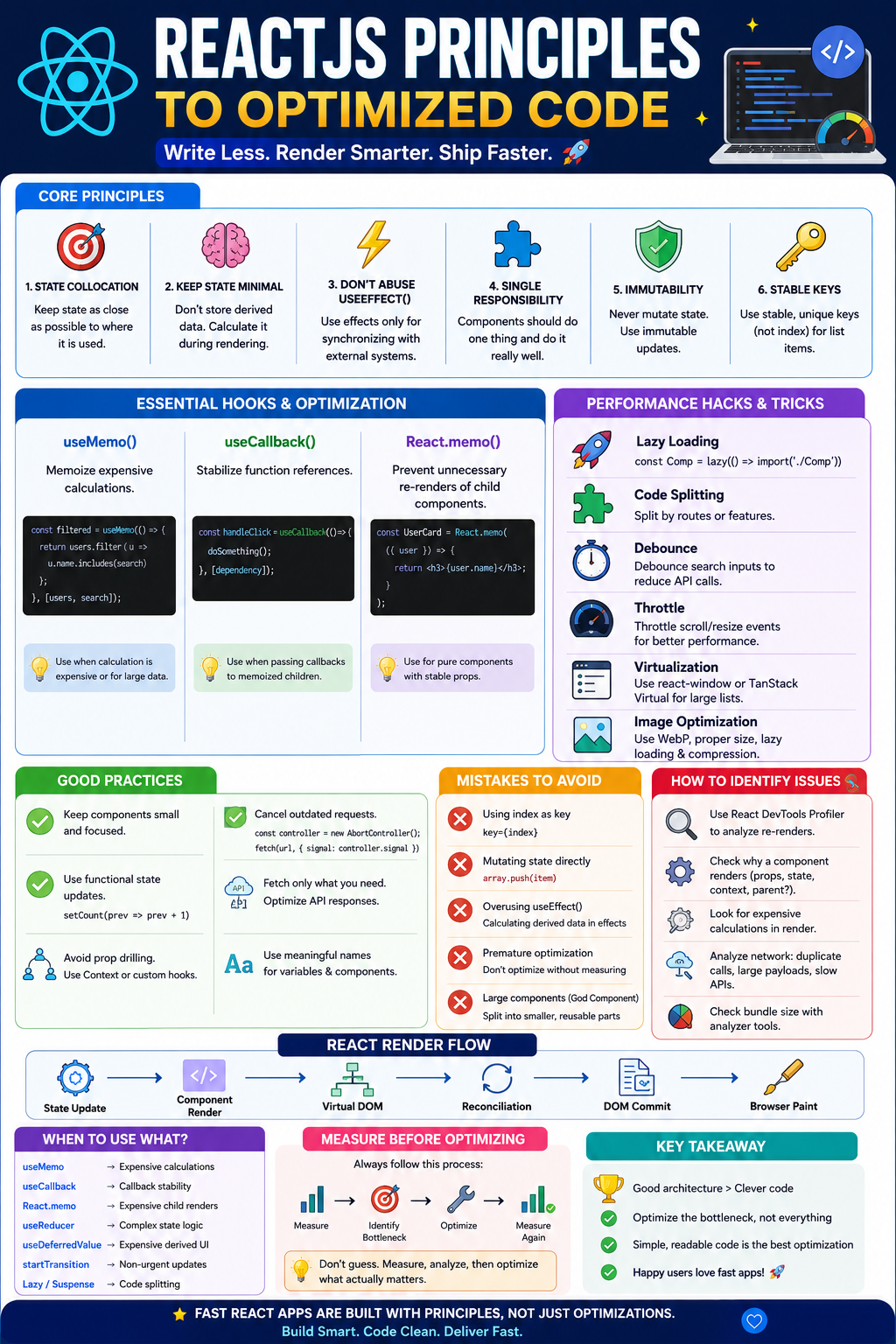
This guide covers the principles, patterns, functions, optimization techniques, hacks, and common mistakes that help you write clean, predictable, maintainable, and high-performance React applications.
🧠 1. The Golden Principle: Optimize the Architecture First
Before thinking about useMemo(), useCallback(), or lazy loading, ask:
“Why is this component rendering in the first place?”
A well-designed React application naturally requires fewer optimizations.
❌ Poor architecture
function App() {
  const [search, setSearch] = useState("");
  const [theme, setTheme] = useState("dark");
  const [user, setUser] = useState(null);
  const [cart, setCart] = useState([]);

  return (
    <Dashboard
      search={search}
      theme={theme}
      user={user}
      cart={cart}
    />
  );
}
One large component owns unrelated state.
✅ Better architecture
function App() {
  return (
    <>
      <Header />
      <Search />
      <Dashboard />
      <Cart />
    </>
  );
}
Each component owns the state it actually needs.
🎯 Principle
Keep state as close as possible to where it is consumed.
This is called state colocation.
⚡ 2. Understand React Rendering
A React component can render when:
- Its state changes
- Its parent renders
- A context value changes
- Its external store changes
- Its subscribed data changes
Rendering does not automatically mean DOM manipulation.
React roughly follows:
State Update
     ↓
Component Render
     ↓
Virtual DOM
     ↓
Reconciliation
     ↓
DOM Commit
     ↓
Browser Paint
Understanding this pipeline is essential for optimization.
🧩 3. Components Should Have One Responsibility
Avoid giant components.
❌ Bad
function Dashboard() {
  // API calls
  // authentication
  // filtering
  // charts
  // forms
  // tables
  // modal
  // notifications
  // business logic
}
✅ Better
Dashboard
├── Header
├── Statistics
├── SalesChart
├── OrdersTable
├── OrderModal
└── Notifications
Each component should have a clear responsibility.
Benefits
- Easier testing
- Easier debugging
- Smaller re-render boundaries
- Better reuse
- Easier maintenance
🧠 4. Keep State Minimal
One of the biggest React optimization principles:
Don’t store something in state if you can calculate it.
❌ Bad
const [firstName, setFirstName] = useState("Lakhveer");
const [lastName, setLastName] = useState("Rajput");
const [fullName, setFullName] = useState("Lakhveer Rajput");
Now you must synchronize three pieces of state.
✅ Better
const [firstName, setFirstName] = useState("Lakhveer");
const [lastName, setLastName] = useState("Rajput");

const fullName = `${firstName} ${lastName}`;
One source of truth.
🔥 5. Don’t Abuse useEffect()useEffect() is one of the most misunderstood React APIs.
Use effects for synchronizing React with external systems.
Examples:
- API subscriptions
- Browser APIs
- WebSocket connections
- Timers
- External libraries
- DOM integrations
❌ Don’t do this
const [total, setTotal] = useState(0);

useEffect(() => {
  setTotal(price * quantity);
}, [price, quantity]);
You’re creating an unnecessary render.
✅ Do this
const total = price * quantity;Rule
If something can be calculated during rendering, don’t use an effect to calculate it.
⚡ 6. useMemo() — Cache Expensive CalculationsuseMemo() remembers a calculated value.
const filteredUsers = useMemo(() => {
  return users.filter(user =>
    user.name.toLowerCase().includes(search.toLowerCase())
  );
}, [users, search]);
The calculation runs again only when:
users
   OR
search
changes.
⚠️ Important
Don’t use:
const value = useMemo(() => a + b, [a, b]);for trivial calculations.
Memoization itself has a cost.
Use useMemo() when:
- Calculation is expensive
- Large arrays are processed
- Sorting/filtering is expensive
- Referential equality matters
- Profiling shows a performance problem
🪝 7. useCallback() — Stabilize FunctionsConsider:
function Parent() {
  const handleClick = () => {
    console.log("clicked");
  };

  return <Child onClick={handleClick} />;
}
Every parent render creates a new function.
render #1 → function A
render #2 → function B
render #3 → function C
useCallback() can preserve the function reference:
const handleClick = useCallback(() => {
  console.log("clicked");
}, []);
Now React can reuse the same function reference.
But remember:
useCallback() isn't automatically an optimization.
Use it primarily when:
- Passing callbacks to memoized children
- Function identity matters
- Dependencies are expensive to recreate
- Profiling indicates unnecessary renders
🛡️ 8. React.memo() — Prevent Unnecessary Child Rendersconst UserCard = React.memo(function UserCard({ user }) {
return <h2>{user.name}</h2>;
});If the parent renders but user remains referentially equal, React can skip rendering UserCard.
Powerful combination
const handleDelete = useCallback((id) => {
  deleteUser(id);
}, []);

const UserCard = React.memo(({ user, onDelete }) => {
  return (
    <button onClick={() => onDelete(user.id)}>
      Delete
    </button>
  );
});
Here:
React.memo
     +
useCallback
     ↓
Stable child props
     ↓
Fewer renders
But don’t wrap every component with React.memo() blindly.
🧬 9. Referential Equality Matters
React frequently compares values by reference.
const user1 = { name: "John" };
const user2 = { name: "John" };

console.log(user1 === user2);
// false
Even though their content is identical.
This matters for:
React.memouseMemouseCallback- dependency arrays
- context
- state updates
Example
❌
<Child options={{ darkMode: true }} />A new object is created every render.
Better:
const options = useMemo(
  () => ({ darkMode: true }),
  []
);

<Child options={options} />
Again, only do this when the stable reference actually matters.
🧱 10. Don’t Mutate State
❌ Wrong
user.name = "Lakhveer";
setUser(user);
React may not detect the change correctly because the reference remains the same.
✅ Correct
setUser(prev => ({
  ...prev,
  name: "Lakhveer"
}));
For arrays:
❌
items.push(newItem);
setItems(items);
✅
setItems(prev => [...prev, newItem]);Golden rule
Treat React state as immutable.
🔑 11. Use Stable Keys
❌
users.map((user, index) => (
  <User key={index} user={user} />
))
Using indexes can cause problems when:
- Items are reordered
- Items are inserted
- Items are deleted
✅
users.map(user => (
  <User key={user.id} user={user} />
))
Keys help React understand:
Old UI
   ↓
New UI
   ↓
Which item changed?
Which item moved?
Which item disappeared?
📦 12. Lazy Load Heavy Components
Don’t send everything to the browser immediately.
const AdminDashboard = lazy(
  () => import("./AdminDashboard")
);
Then:
<Suspense fallback={<Loading />}>
  <AdminDashboard />
</Suspense>
Instead of:
Initial Bundle
████████████████████████████
you can create:
Initial Bundle
████████

Admin Dashboard
        ███████
Reports
              ███████
This reduces initial JavaScript.
🧭 13. Route-Based Code Splitting
Large applications should split code by route.
Example:
const Dashboard = lazy(
  () => import("./pages/Dashboard")
);

const Reports = lazy(
  () => import("./pages/Reports")
);
const Settings = lazy(
  () => import("./pages/Settings")
);
Users shouldn’t download the Reports page when they’re visiting Settings.
🖼️ 14. Optimize Images
Images are often bigger performance killers than React itself.
Use:
- WebP
- AVIF
- Responsive images
- Proper dimensions
- Compression
- Lazy loading
<img
  src="/product.webp"
  alt="Product"
  loading="lazy"
  width="400"
  height="300"
/>
Don’t send a 4000×3000 image when you display it at 400×300.
🧠 15. Avoid Prop Drilling
❌
App
 ↓
Dashboard
 ↓
Sidebar
 ↓
Menu
 ↓
Profile
Passing:
user={user}through every layer becomes difficult to maintain.
Possible solutions:
- Context
- State management library
- Composition
- Custom hooks
- External stores
But don’t introduce global state just to avoid passing one prop.
🌎 16. Use Context Carefully
Context is useful for:
- Theme
- Authentication
- Locale
- Global configuration
But context updates can cause all consumers to re-render.
❌
<AuthContext.Provider
  value={{ user, login, logout }}
>
The object can be recreated every render.
Better
const value = useMemo(
  () => ({ user, login, logout }),
  [user, login, logout]
);
For very large applications, split contexts:
AuthContext
ThemeContext
CartContext
NotificationContext
instead of one giant:
GlobalContext🪄 17. Custom Hooks = Reusable Logic
Instead of repeating logic:
function useDebounce(value, delay) {
  const [debouncedValue, setDebouncedValue] =
    useState(value);

    useEffect(() => {
    const timer = setTimeout(() => {
      setDebouncedValue(value);
    }, delay);
    return () => clearTimeout(timer);
  }, [value, delay]);
  return debouncedValue;
}
Usage:
const debouncedSearch = useDebounce(search, 500);This keeps components focused on UI.
🔍 18. Debounce Expensive User Actions
Search boxes are a classic example.
❌
L → API
La → API
Lak → API
Lakh → API
Lakhv → API
Lakhveer → API
Potentially 7 requests.
✅ Debounce
L
La
Lak
Lakh
Lakhveer
      ↓
Wait 500ms
      ↓
API request
This reduces:
- API calls
- CPU usage
- Server load
- UI noise
🚦 19. Throttle High-Frequency Events
Some events fire continuously:
scroll
mousemove
resize
touchmove
Use throttling when you need periodic updates.
function throttle(fn, delay) {
  let lastCall = 0;

  return (...args) => {
    const now = Date.now();
    if (now - lastCall >= delay) {
      lastCall = now;
      fn(...args);
    }
  };
}
Instead of processing 200 events per second:
200 events
   ↓
Throttle
   ↓
10 meaningful updates
⚡ 20. Use Functional State Updates
When new state depends on previous state:
❌
setCount(count + 1);Better
setCount(prev => prev + 1);Especially when multiple updates happen:
setCount(prev => prev + 1);
setCount(prev => prev + 1);
setCount(prev => prev + 1);
Result:
+3🧮 21. Avoid Expensive Work During Render
❌
function ProductList({ products }) {
  const sorted = products
    .sort(expensiveSortFunction);

  return <List products={sorted} />;
}
Problems include:
- Sorting every render
- Mutating the original array
Better
const sorted = useMemo(() => {
  return [...products].sort(expensiveSortFunction);
}, [products]);
📚 22. Virtualize Huge Lists
Rendering 10,000 elements is expensive.
❌
users.map(user => (
  <UserCard key={user.id} user={user} />
))
Instead, virtualization renders only what’s visible.
10,000 records
      ↓
Virtualized List
      ↓
~20 visible rows
Popular approaches include:
react-windowTanStack Virtual
This can dramatically improve large tables and feeds.
🧠 23. Use useReducer() for Complex StateIf state transitions become complicated:
const [state, dispatch] = useReducer(
  reducer,
  initialState
);
Example:
function reducer(state, action) {
  switch (action.type) {
    case "ADD":
      return {
        ...state,
        count: state.count + 1
      };

    case "RESET":
      return initialState;
    default:
      return state;
  }
}
Better than having:
setLoading(...)
setError(...)
setData(...)
setStatus(...)
setMessage(...)
scattered everywhere.
🧵 24. Keep Expensive Updates Non-Urgent
Modern React provides concurrency-oriented APIs such as:
startTransition(() => {
  setSearchResults(results);
});
This tells React that certain updates can be treated as less urgent.
A useful mental model:
User typing
   ↓
HIGH PRIORITY
   ↓
Keep UI responsive

Filtering 10,000 items
   ↓
LOWER PRIORITY
   ↓
Can be interrupted
🔄 25. useDeferredValue()Useful when displaying expensive derived UI.
const deferredSearch = useDeferredValue(search);You can keep the input responsive while expensive UI catches up.
search
  ↓
Immediate UI

deferredSearch
  ↓
Expensive results
🧪 26. Measure Before Optimizing
One of the biggest developer mistakes:
Optimizing code that isn’t slow.
Use profiling tools.
Look for:
Component
├── Render count
├── Render duration
├── Why did it render?
├── Expensive calculation
└── Large component tree
Useful tools include:
- React DevTools Profiler
- Browser Performance panel
- Lighthouse
- Chrome Memory tools
- Network panel
Golden rule:
Measure
 ↓
Identify bottleneck
 ↓
Optimize
 ↓
Measure again
Not:
useMemo everywhere
 ↓
useCallback everywhere
 ↓
hope it's faster
🐛 27. Identify Unnecessary Re-renders
A common symptom:
Parent renders
    ↓
Child renders
    ↓
Grandchild renders
    ↓
Huge table renders
Even though only a tiny part changed.
Ask:
🔎 Checklist
1. Did the parent render?
2. Did props change?
3. Did object references change?
4. Did function references change?
5. Did context change?
6. Did local state change?
7. Is the component actually expensive?
This gives you the root cause instead of blindly adding memoization.
🚨 28. Avoid the “God Component”
A component like:
App.jsxwith:
2000 lines
50 states
20 effects
30 callbacks
15 API calls
is a maintenance disaster.
Break it into:
components/
hooks/
services/
utils/
features/
pages/
A useful structure:
src/
├── components/
├── features/
│   ├── users/
│   ├── products/
│   └── orders/
├── hooks/
├── services/
├── utils/
├── pages/
└── app/
🔐 29. Don’t Put Secrets in React
Never do:
const API_KEY = "secret-key";Anything shipped to the browser can potentially be inspected.
Remember:
Frontend
   ↓
Public
Secrets belong on the server.
🌐 30. Optimize API Requests
Avoid:
Component A → API
Component B → API
Component C → API
when all three request the same data independently.
Use a server-state/data-fetching strategy where appropriate.
Modern applications commonly use tools such as:
- TanStack Query
- SWR
- Apollo Client
These can provide:
- Caching
- Deduplication
- Background refetching
- Retry
- Loading states
- Error handling
🧹 31. Cancel Outdated Requests
Imagine:
User types:
React
ReactJS
ReactJS Performance
Request 1 may finish after request 3.
That can produce stale UI.
Use AbortController:
useEffect(() => {
  const controller = new AbortController();

  fetch(`/api/search?q=${query}`, {
    signal: controller.signal
  });
  return () => controller.abort();
}, [query]);
Now outdated requests can be cancelled.
🎯 32. Don’t Fetch Data You Don’t Need
Bad:
GET /usersreturning:
{
  "id": 1,
  "name": "...",
  "email": "...",
  "address": "...",
  "orders": [],
  "payments": [],
  "permissions": [],
  "history": []
}
when your screen needs only:
{
  "id": 1,
  "name": "Lakhveer"
}
Optimize the data boundary.
📦 33. Tree Shaking & Bundle Size
Your application can become slow even if React rendering is perfect.
Check:
JavaScript bundle
CSS
Images
Fonts
Third-party libraries
Avoid importing huge libraries for tiny functionality.
Example
Instead of importing an entire utility library for one function, prefer a targeted import when the library supports it.
Analyze your production bundle using your build tooling.
🧠 34. Don’t Overuse Third-Party Libraries
Before installing:
npm install some-libraryask:
Can I solve this cleanly with the platform or React itself?
Adding a library introduces:
- Bundle size
- Dependency maintenance
- Security considerations
- Upgrade costs
- Complexity
The best dependency is often the dependency you don’t need.
🧱 35. Prefer Composition Over Giant Configuration
Instead of:
<Modal
  showHeader
  showFooter
  showClose
  showActions
  showIcon
  ...
/>
consider composition:
<Modal>
  <Modal.Header />
  <Modal.Body>
    Content
  </Modal.Body>
  <Modal.Footer>
    <Button>Save</Button>
  </Modal.Footer>
</Modal>
This often creates more flexible APIs.
🎨 36. Don’t Optimize JSX at the Cost of Readability
❌ Clever but difficult
{condition && data?.items?.length &&
  data.items.map(...)}
Better
const hasItems = data?.items?.length > 0;

if (!hasItems) {
  return <EmptyState />;
}

return <ItemList items={data.items} />;
Performance matters.
But maintainability is also performance — for your future self and your team.
🧠 37. Avoid Derived State
Instead of:
const [products, setProducts] = useState([]);
const [filteredProducts, setFilteredProducts] = useState([]);
do:
const [products, setProducts] = useState([]);
const [search, setSearch] = useState("");

const filteredProducts = useMemo(() => {
  return products.filter(product =>
    product.name.includes(search)
  );
}, [products, search]);
One source of truth.
🚀 38. Use the Right Optimization at the Right Problem
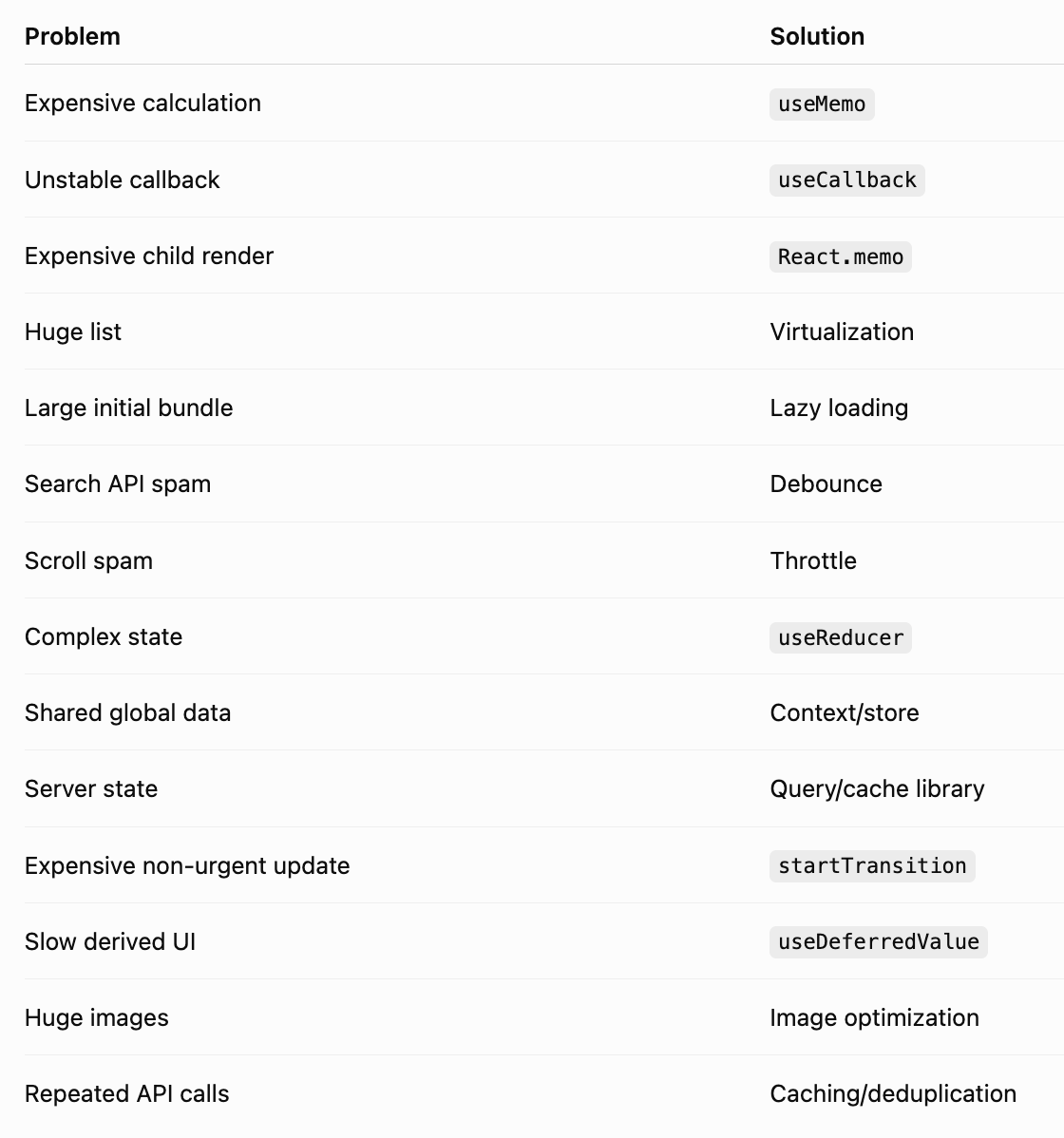
💀 39. Common React Mistakes to Avoid
❌ Mistake #1 — useEffect() everywhere
useEffect(() => {
  setFullName(first + last);
}, [first, last]);
Use derived values instead.
❌ Mistake #2 — Memoizing everything
useMemo(...)
useMemo(...)
useCallback(...)
useCallback(...)
React.memo(...)
React.memo(...)
More optimization ≠ more performance.
❌ Mistake #3 — Index as key
key={index}Use stable IDs.
❌ Mistake #4 — Mutating state
array.push(item);Use immutable updates.
❌ Mistake #5 — Giant components
Split responsibilities.
❌ Mistake #6 — Global state for everything
Not every piece of state needs Redux/Zustand/Context.
❌ Mistake #7 — Fetching inside every component
Design a proper server-state strategy.
❌ Mistake #8 — Ignoring bundle size
A fast component inside a 10 MB JavaScript bundle isn’t really fast.
❌ Mistake #9 — Unoptimized images
Large images can destroy page performance.
❌ Mistake #10 — Premature optimization
Don’t optimize based on assumptions.
Measure first.
🕵️ 40. How to Identify React Performance Problems
When an application becomes slow, investigate in this order:
🐌 Slow App
                      │
          ┌───────────┴───────────┐
          ↓                       ↓
       Network                 Rendering
          │                       │
   API latency              Re-renders
   Large payload             Large lists
   Duplicate calls           Expensive JSX
          │                       │
          └───────────┬───────────┘
                      ↓
                 JavaScript
                      │
                Large bundles
                Expensive work
                      ↓
                    DOM
                      │
                 Too many nodes
Then investigate:
🔎 Network
- Are requests duplicated?
- Are responses huge?
- Are APIs slow?
- Are requests sequential unnecessarily?
🔎 Rendering
- Which component renders?
- How frequently?
- Why?
🔎 JavaScript
- Expensive calculations?
- Large dependencies?
- Large bundle?
🔎 DOM
- Thousands of nodes?
- Complex layout?
- Expensive animations?
🧪 41. A Practical Optimization Workflow
Use this process:
Step 1 — Reproduce
Find the exact slow interaction.
Step 2 — Measure
Use:
React Profiler
Chrome Performance
Network panel
Lighthouse
Step 3 — Identify
Find the actual bottleneck.
Step 4 — Fix architecture
Before adding memoization, ask:
Can I prevent this component from rendering?
Step 5 — Optimize
Use the appropriate technique.
Step 6 — Measure again
Verify that the change actually helped.
Step 7 — Keep the simpler solution
If two approaches perform similarly:
Choose the easier one to maintain.
⚡ 42. React Performance Cheat Sheet
⚛️ React Optimization
                           │
        ┌──────────────────┼──────────────────┐
        ↓                  ↓                  ↓
      Render             State              Bundle
        │                  │                  │
   React.memo         Colocate state       Lazy load
   useMemo             Avoid mutation      Tree shake
   useCallback         Derived values      Compress
        │                  │                  │
        └──────────────────┼──────────────────┘
                           ↓
                       Data Layer
                           │
                   Cache / Deduplicate
                   Debounce / Throttle
                   Cancel requests
                           ↓
                         UI
                           │
                  Virtualize lists
                  Optimize images
                  Reduce DOM
🏆 43. The Ultimate React Optimization Principles
If you remember only 15 rules, remember these:
1️⃣ Keep state local
Don’t make everything global.
2️⃣ Keep state minimal
Don’t store derived data.
3️⃣ Avoid unnecessary effects
Effects are for synchronization.
4️⃣ Don’t mutate state
Use immutable updates.
5️⃣ Use stable keys
Prefer IDs over indexes.
6️⃣ Split large components
Create meaningful boundaries.
7️⃣ Measure before optimizing
Profiler > assumptions.
8️⃣ Memoize selectively
useMemo, useCallback, and memo are tools—not decorations.
9️⃣ Optimize network requests
Cache, deduplicate and cancel unnecessary requests.
🔟 Lazy-load expensive features
Don’t ship everything upfront.
1️⃣1️⃣ Virtualize huge lists
Render what users can see.
1️⃣2️⃣ Optimize images
Images can dominate page weight.
1️⃣3️⃣ Keep dependencies under control
Every package has a cost.
1️⃣4️⃣ Separate server state from UI state
They have different lifecycles.
1️⃣5️⃣ Optimize architecture before syntax
The biggest performance wins usually come from better design, not clever code.
🚀 Final Thought
The best React developer isn’t the one who knows the most hooks.
It’s the developer who understands when not to use them.
A high-performance React application isn’t created by sprinkling:
useMemo()
useCallback()
React.memo()
everywhere.
It’s created through:
Good Architecture
      ↓
Minimal State
      ↓
Predictable Rendering
      ↓
Efficient Data Flow
      ↓
Small Bundles
      ↓
Optimized Network
      ↓
Measured Performance
      ↓
🚀 Fast Application
⚛️ The ultimate rule:
First make it correct. Then make it simple. Then measure. Then optimize the bottleneck.
That’s how you move from React code that works → React code that scales. 🚀


Comments
Post a Comment